FushBot - Multi-Client Trove Fishing bot / Blitz and Glitz
FushBot
FushBot is a Trove Fishing Multi-Client Bot running on top of Cheat Engine's Lua Engine. It is the brainchild of Cellux, initially inspired by the AutoHotKey script created by @HaHaItsJake .
Once this is running at a relativly high level (all current planned features implemented) we will create a proper git project somewhere.
I've been personally chucking my lures into the bottom left item slot, and until we get to a more feature-rich bot (i.e. throwing boots away) you guys will have to do the same.
Regarding updates to this thread, I will create a new thread every patch-ish, all version updates (i.e. features added) will be edited into this thread. That should mean a new thread every week or so with patches, otherwise just come back here.
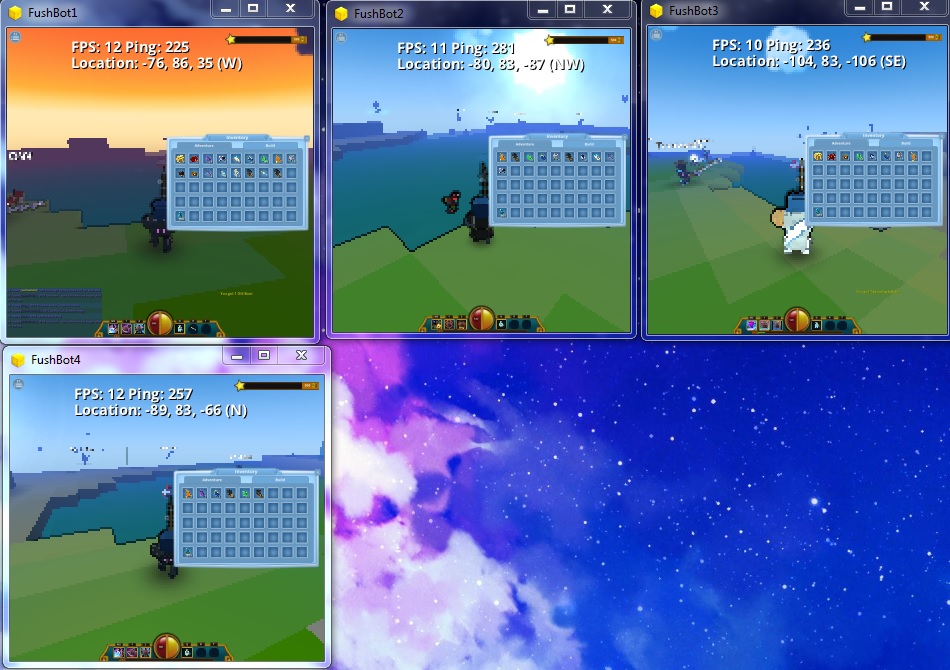
Current Features
Checks amount of lures available.
Presses Fish button to throw lure out
Presses fish button to bring lure in, once the lure is actually bobbing.
Multi-client (each Trove client still eats around 300-450MB of RAM each)
Run on CheatEngine's Lua adaption - so easily editable!
Planned/In Development Features
Throwing boots away!
Simpler setup
Lower game client footprint (RAM usage)
If you have any more features you might want, ask below. If you have any ideas on how we could do the above, I would love to hear it!
Addresses
Lure Amount
varLuresAvailable = '[[[[trove.exe+90D828]+9c]+78]+90]+58'
Bottom left inventory slot!
Lure is out
varLineCast = '[[trove.exe+909C84]+a818]+f2d0'
Bobbing
varBobbingWater = '[[trove.exe+909C84]+a818]+fd40'
Bot Prerequisites
Cheat Engine 6.4
Download:
[MPGH] [VirusTotal]
Script Download (.ct)
v008: [MPGH] [VirusTotal] [Jotti]
v007: [MPGH] [VirusTotal] [Jotti]
v006: [MPGH] [VirusTotal] [Jotti]
Please remember that the script needs to be executed before it can function.
To execute the script, ensure Trove is open and Cheat Engine is attached, then go to 'Table' -> 'Cheat Table Lua Script' -> Click "Execute script" button.
If you find something doesn't work, post your error messages or problems below, and we'll work them out.
Change Log
008:
Added the ability to fish in Lava and Chocolate.
This took some refactoring of the Bot itself, but it's all working now. So #yolo
v007:
Added a low-graphics mode.
Honestly not sure how much this affects it, but the options are there. Shader detail: 0, Super Sampling: 0.25, Draw Distance: 20
Disabled a large majority of the popup messages
Once the bot has successfully started, should now only show debug info. Specifically on start/stop and if there are any errors.
v006:
Bugfixes, something dun goof'd
Removed debug mode. Because of ^
v005:
Updated to new Blitz and Glitz update.
Added catcher in case script has not been executed.
Tells you to execute it first with a howto.
v004:
Enabled Debug Mode
Allows the script to only print information into the Lua Engine when the Enable Debug Mode script is enabled.
v003:
Uh, I can't remember :X
v002:
Added catcher in case of lag when casting line.
If the bot things it's cast the line, but it actually hasn't - then it will re-cast it with the Stepper function (runs every 3 seconds).
v001:
Initial release
How to multi-client bot in Trove with FushBot.
Remember to throw the requirements DLLs into the Cheat Engine root directory, default is C:\Program Files (x86)\Cheat Engine 6.4\
1.) Login to the Glyph client with your first account.
2.) Open Trove.
3.) Open 32-bit CheatEngine (this does work on 64-bit machines) [Available at C:\Program Files (x86)\Cheat Engine 6.4\cheatengine-i386.exe by default]
4.) Connect to the Trove client (It should be the only one there at this point)
5.) Wait for Trove to load (i.e. get in-game)
6.) Open the Cheat Table in CheatEngine (You can drag the CheatTable on top of Cheat Engine) for this to work.
7.) On the popup stating "This table contains a lua script. Do you want to run it?" click Yes (This is essentially executing the script, also available by going Table -> Show Cheat Table Lua Script -> Execute Script button, if you happen to press No)
8.) If this is the first time you've ever run the script, make sure to click the "Test WinAPI is available" script checkbox. This is just neccesarry for the first time ever, and if it doesn't show a lovely information box popup, then something's gone wrong. Likely you've not chucked the requirements in the CheatEngine folder.
9.) Get into a position to Fish, click Run Fushbot.
That's it for this client.
To add another one (you can minimize that trove/cheatengine pair if you want):
1.) On the Glyph client, click Log out
2.) click login again, log into another account
3.) Open another CheatEngine client
4.) Click the computer icon to connect to another window, then click the [Window List] button. The bot auto-renames it's selected client to FushBot1, FushBot2 etc so just select the new and fresh 'Trove' window.
5.) Wait for trove to load (get in game)
6.) Load the Cheat Table into Cheat Engine
7.) Click yes on the popup
8.) Get into position to fish, click Run Fushbot.
9.) Rinse and repeat. You can do this for as many as your computer can run.
Optionally, you can click the Enable Low-Graphics mode, which just turns down the graphics settings a bit. Rather than going Escape -> Settings -> video -> Advanced checkbox -> turning the scrollers down to minimum.
To handle which one is which, if you've opened each trove client, and cheatengine client in pair, then it will come up in order when you hover over the icon in your Window Task bar
It should be the first CheatEngine linked to the first Trove client etc.
You can start and stop Run FushBot as many times as you want, it should just pick up again from where it left off. In case you need to drop Fish off at where you're storing it etc.
For example, be fishing, stop the Run Fushbot script, press F to stop fishing, go to whereever you're dropping fish off, go back to where you were, re-click the Run FushBot script, minimize, open the next Trove client/CE pair.
FushBot is a Trove Fishing Multi-Client Bot running on top of Cheat Engine's Lua Engine. It is the brainchild of Cellux, initially inspired by the AutoHotKey script created by @HaHaItsJake .
Once this is running at a relativly high level (all current planned features implemented) we will create a proper git project somewhere.
I've been personally chucking my lures into the bottom left item slot, and until we get to a more feature-rich bot (i.e. throwing boots away) you guys will have to do the same.
Regarding updates to this thread, I will create a new thread every patch-ish, all version updates (i.e. features added) will be edited into this thread. That should mean a new thread every week or so with patches, otherwise just come back here.
Current Features
Checks amount of lures available.
Presses Fish button to throw lure out
Presses fish button to bring lure in, once the lure is actually bobbing.
Multi-client (each Trove client still eats around 300-450MB of RAM each)
Run on CheatEngine's Lua adaption - so easily editable!
Planned/In Development Features
Throwing boots away!
Simpler setup
Lower game client footprint (RAM usage)
If you have any more features you might want, ask below. If you have any ideas on how we could do the above, I would love to hear it!
Addresses
Lure Amount
varLuresAvailable = '[[[[trove.exe+90D828]+9c]+78]+90]+58'
Bottom left inventory slot!
Lure is out
varLineCast = '[[trove.exe+909C84]+a818]+f2d0'
Bobbing
varBobbingWater = '[[trove.exe+909C84]+a818]+fd40'
Bot Prerequisites
Cheat Engine 6.4
Downloadable from the CheatEngine website (Google it!)
WinAPI*The version we use has been custom compiled using CheatEngine's lua Engine libraries, source: https://github.com/stevedonovan/winapi
lua5.1-32.dll*build date: 15/06/2014 9.45pm
msvcrt.dll*File version: 7.0.7601.17744
libgcc_s_dw2-1.dll*part of GCC
*These files all need to be placed in either the Cheat Engine root directory (i.e. C:\Program Files (x86)\Cheat Engine 6.4) or your System32 folder (e.g. C:\Windows\System32)Download:
[MPGH] [VirusTotal]
Script Download (.ct)
v008: [MPGH] [VirusTotal] [Jotti]
v007: [MPGH] [VirusTotal] [Jotti]
v006: [MPGH] [VirusTotal] [Jotti]
Please remember that the script needs to be executed before it can function.
To execute the script, ensure Trove is open and Cheat Engine is attached, then go to 'Table' -> 'Cheat Table Lua Script' -> Click "Execute script" button.
If you find something doesn't work, post your error messages or problems below, and we'll work them out.
Change Log
008:
Added the ability to fish in Lava and Chocolate.
This took some refactoring of the Bot itself, but it's all working now. So #yolo
v007:
Added a low-graphics mode.
Honestly not sure how much this affects it, but the options are there. Shader detail: 0, Super Sampling: 0.25, Draw Distance: 20
Disabled a large majority of the popup messages
Once the bot has successfully started, should now only show debug info. Specifically on start/stop and if there are any errors.
v006:
Bugfixes, something dun goof'd
Removed debug mode. Because of ^
v005:
Updated to new Blitz and Glitz update.
Added catcher in case script has not been executed.
Tells you to execute it first with a howto.
v004:
Enabled Debug Mode
Allows the script to only print information into the Lua Engine when the Enable Debug Mode script is enabled.
v003:
Uh, I can't remember :X
v002:
Added catcher in case of lag when casting line.
If the bot things it's cast the line, but it actually hasn't - then it will re-cast it with the Stepper function (runs every 3 seconds).
v001:
Initial release
How to multi-client bot in Trove with FushBot.
Remember to throw the requirements DLLs into the Cheat Engine root directory, default is C:\Program Files (x86)\Cheat Engine 6.4\
1.) Login to the Glyph client with your first account.
2.) Open Trove.
3.) Open 32-bit CheatEngine (this does work on 64-bit machines) [Available at C:\Program Files (x86)\Cheat Engine 6.4\cheatengine-i386.exe by default]
4.) Connect to the Trove client (It should be the only one there at this point)
5.) Wait for Trove to load (i.e. get in-game)
6.) Open the Cheat Table in CheatEngine (You can drag the CheatTable on top of Cheat Engine) for this to work.
7.) On the popup stating "This table contains a lua script. Do you want to run it?" click Yes (This is essentially executing the script, also available by going Table -> Show Cheat Table Lua Script -> Execute Script button, if you happen to press No)
8.) If this is the first time you've ever run the script, make sure to click the "Test WinAPI is available" script checkbox. This is just neccesarry for the first time ever, and if it doesn't show a lovely information box popup, then something's gone wrong. Likely you've not chucked the requirements in the CheatEngine folder.
9.) Get into a position to Fish, click Run Fushbot.
That's it for this client.
To add another one (you can minimize that trove/cheatengine pair if you want):
1.) On the Glyph client, click Log out
2.) click login again, log into another account
3.) Open another CheatEngine client
4.) Click the computer icon to connect to another window, then click the [Window List] button. The bot auto-renames it's selected client to FushBot1, FushBot2 etc so just select the new and fresh 'Trove' window.
5.) Wait for trove to load (get in game)
6.) Load the Cheat Table into Cheat Engine
7.) Click yes on the popup
8.) Get into position to fish, click Run Fushbot.
9.) Rinse and repeat. You can do this for as many as your computer can run.
Optionally, you can click the Enable Low-Graphics mode, which just turns down the graphics settings a bit. Rather than going Escape -> Settings -> video -> Advanced checkbox -> turning the scrollers down to minimum.
To handle which one is which, if you've opened each trove client, and cheatengine client in pair, then it will come up in order when you hover over the icon in your Window Task bar
It should be the first CheatEngine linked to the first Trove client etc.
You can start and stop Run FushBot as many times as you want, it should just pick up again from where it left off. In case you need to drop Fish off at where you're storing it etc.
For example, be fishing, stop the Run Fushbot script, press F to stop fishing, go to whereever you're dropping fish off, go back to where you were, re-click the Run FushBot script, minimize, open the next Trove client/CE pair.
 Originally Posted by V-Val