

 General
Thread: [Tutorial]Convert Bits 2 Bytes
Results 1 to 8 of 8
-
01-19-2010 #1Wheres my GM? DAMN IT!



- Join Date
- Dec 2009
- Gender

- Location
- Posts
- 6,312
- Reputation
 382
382- Thanks
- 3,019
- My Mood
-


[Tutorial]Convert Bits 2 Bytes
Convert Bits to Bytes and Bytes to Bits
In this tutorial we will learn how to make a Program to convert bytes to bits and Vice versa,
- As always , create a new vb.net project
- Name it ConvertBits (or whatever you like)
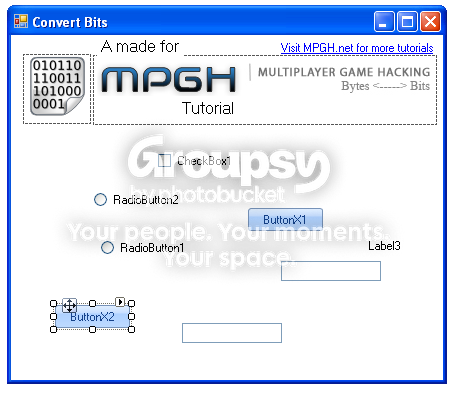
- On your form you are going to add
- 2 Texboxes
- 2 Radio Controls
- 1 CheckBox
- 1 Label
- 2 Buttons
- Arrange them however you like (you can use the below image for guidance)
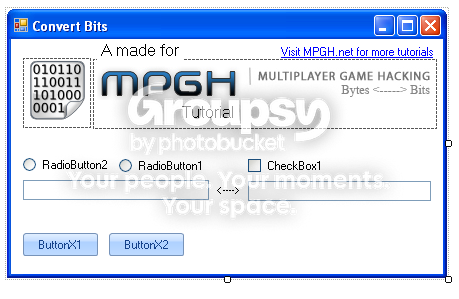
- Set the Text for the following controls to
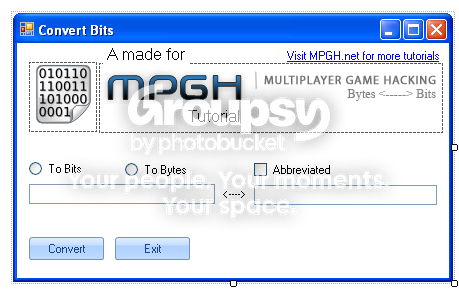
- Radio Control 1 - To Bits
- Radio Control 2 - To Bytes
- CheckBox - Abbreviated
- Button 1 - Convert
- Button 2 - Exit
- Change the name of your label to lblbit
It should look something like this
As always here is the code, I have noted everything you will need to know in order to learn from this example
End Function in Region may give errors, pay no mind to it.Code:Option Strict On Imports System.Convert Public Class Form1 'True = Bytes to bits 'False = bits to Bytes Dim objBitByte As New Converter() Private Sub ButtonX1_Click(ByVal sender As System.Object, ByVal e As System.EventArgs) Handles ButtonX1.Click If CheckBox1.Checked = False Then 'Unabbreviated output TextBox2.Text = objBitByte.Convert(CLng(TextBox1.Text), RadioButton1.Checked) Else 'Abbreviated output TextBox2.Text = objBitByte.Format(CLng(objBitByte.Convert(CLng(TextBox1.Text), RadioButton1.Checked)), RadioButton1.Checked) End If End Sub Private Sub ButtonX2_Click(ByVal sender As System.Object, ByVal e As System.EventArgs) Handles ButtonX2.Click Me.Close() End Sub Private Sub Form1_Load(ByVal sender As System.Object, ByVal e As System.EventArgs) Handles MyBase.Load End Sub Private Sub RadioButton2_CheckedChanged(ByVal sender As System.Object, ByVal e As System.EventArgs) Handles RadioButton2.CheckedChanged 'Change lblBit to display "Bytes" when converting to bits If RadioButton1.Checked = True Then lblbit.Text = "Bytes" End If End Sub Private Sub RadioButton1_CheckedChanged(ByVal sender As System.Object, ByVal e As System.EventArgs) Handles RadioButton1.CheckedChanged 'Change lblBit to display "bits" when converting to Bytes If RadioButton2.Checked = True Then lblbit.Text = "bits" End If End Sub Private Sub TextBox1_TextChanged(ByVal sender As System.Object, ByVal e As System.EventArgs) Handles TextBox1.TextChanged If Not IsNumeric(TextBox1.Text) Then TextBox1.Clear() End If End Sub End Class Public Class Converter #Region "Methods" Function Convert(ByVal intBitByte As Int64, ByVal blnType As Boolean) As String If blnType = True Then 'Convert from bits to Bytes Try Return CStr(intBitByte * 8) Catch err As ApplicationException MessageBox.Show(err.Message) End Try Else 'Convert from Bytes to bits Try Return CStr(intBitByte \ 8) Catch err As ApplicationException MessageBox.Show(err.Message) End Try End If End Function Function Format(ByVal intData As Int64, ByVal blnType As Boolean) As String Dim strData As String If intData < 1024 Then If blnType = False Then 'B strData = CStr((intData) & " B") Return strData Else ' b strData = CStr((intData) & " b") Return strData End If ElseIf intData >= 1024 And intData < 1048576 Then If blnType = False Then ' KB strData = CStr((intData * 10 ^ -3) & " KB") Return strData Else 'Kb strData = CStr((intData * 10 ^ -3) & " Kb") Return strData End If ElseIf intData >= 1048576 And intData < 1073741824 Then If blnType = False Then ' MB strData = CStr((intData * 10 ^ -6) & " MB") Return strData Else ' Mb strData = CStr((intData * 10 ^ -6) & " Mb") Return strData End If ElseIf intData >= 1073741824 And intData < 1099511627776 Then If blnType = False Then 'GB strData = CStr((intData * 10 ^ -9) & " GB") Return strData Else 'o Gb strData = CStr((intData * 10 ^ -9) & " Gb") Return strData End If ElseIf intData >= 1099511627776 And intData < 1125899906842624 Then If blnType = False Then 'TB strData = CStr((intData * 10 ^ -12) & " TB") Return strData Else ' Tb strData = CStr((intData * 10 ^ -12) & " Tb") Return strData End If Else MessageBox.Show("ERROR: overflow", "Program does not support EB/Eb or higher!", MessageBoxButtons.OK, MessageBoxIcon.Error, MessageBoxDefaultButton.Button1, MessageBoxOptions.DefaultDesktopOnly) End If End Function #End Region Public Class Form1 'True = Bytes to bits 'False = bits to Bytes Dim objBitByte As New Converter End Class End Class
Hope This helps Someone
' As always you may have to change the control names to make this work for your program
' Didn't include the source for this one yet, I will sometime soon
' Just in a rush this morningLast edited by NextGen1; 01-19-2010 at 10:53 AM.
-
The Following 2 Users Say Thank You to NextGen1 For This Useful Post:
-
01-19-2010 #2Choob


- Join Date
- Nov 2007
- Gender
- Location
- Posts
- 49
- Reputation
- 10
- Thanks
- 25
- My Mood
-


Is there any difference between a radiobutton and a checkbox? just wondering


-
01-19-2010 #3
ThreadstarterWheres my GM? DAMN IT!
- Join Date
- Dec 2009
- Gender
- Location
- Posts
- 6,312
- Reputation
- 382
- Thanks
- 3,019
- My Mood
-
In a sense, though the outcome can be achieved using either or.
*radiobuttons only allow one decision
checkboxs allow the selction of mulitiple options.
Example:
RadioButton
-----------
Gender = o Male o Female
Animal = o Cat o Dog
CheckBox
--------
Favorite programming languages
o Visual Basic o C++ o Assembly
here you can select all 3Last edited by NextGen1; 01-19-2010 at 05:53 PM.
-
01-19-2010 #4Upcoming MPGHiean


- Join Date
- Feb 2009
- Gender
- Location
- Posts
- 3,156
- Reputation
- 49
- Thanks
- 868
- My Mood
-


Helpful tutorial, GJ nextgen.
-
The Following User Says Thank You to Lolland For This Useful Post:
NextGen1 (01-19-2010)
-
01-19-2010 #5
ThreadstarterWheres my GM? DAMN IT!
- Join Date
- Dec 2009
- Gender
- Location
- Posts
- 6,312
- Reputation
- 382
- Thanks
- 3,019
- My Mood
-
Thanks , Hope this helps here Originally Posted by lolland

-
01-19-2010 #6Synthetic Hacker

- Join Date
- Mar 2009
- Gender
- Location
- Posts
- 1,344
- Reputation
- 12
- Thanks
- 276
nice tutorial!
-
01-19-2010 #7Dual-Keyboard Member

- Join Date
- Oct 2008
- Gender
- Posts
- 431
- Reputation
- 16
- Thanks
- 310
nice tutorial and btw do u use VB 10 cus ur buttons look different O.o

-
01-19-2010 #8
ThreadstarterWheres my GM? DAMN IT!
- Join Date
- Dec 2009
- Gender
- Location
- Posts
- 6,312
- Reputation
- 382
- Thanks
- 3,019
- My Mood
-
I use VB 10 (on occasions)but not in this case, the buttons are ButtonXControls.
The downloads for all of the UI Components are found in my
How To:UI Tutorial
and
Download:UI Components
Hope this helpsLast edited by NextGen1; 01-19-2010 at 08:56 PM.


Similar Threads
-
Ace of Spades 0.61 some bits & bytes
By learn_more in forum Other First Person Shooter HacksReplies: 15Last Post: 04-07-2012, 11:05 PM -
Convert Byte to Mb
By Zoom in forum Visual Basic ProgrammingReplies: 5Last Post: 01-11-2010, 09:08 AM -
Assembly basic's #1 - Bits Bytes and other Shyte :)
By GG2GG in forum AssemblyReplies: 4Last Post: 05-13-2009, 02:58 AM -
[Tutorials]Array of Bytes
By Str8Soulja00 in forum Visual Basic ProgrammingReplies: 3Last Post: 01-02-2008, 01:52 AM -
Converting Assembly Into Bytes
By radnomguywfq3 in forum Visual Basic ProgrammingReplies: 0Last Post: 09-24-2007, 04:42 PM
Powered by vBulletin
Copyright © 2022 vBulletin Solutions, Inc.
Like MPGH? Donate <3 BTC 15NBFUj8UiWs6t9YR3mvpsYDFPTMAQ5fGk
All trademarks, copyrights and content belongs to their respective owners.
By visiting this site you agree to its Terms of Service and Conditions which is subject to change at any time.