

 General


Blubb1337 (02-04-2010),FlashDrive (02-04-2010),martijno0o0 (02-04-2010),mnpeepno2 (02-04-2010),Zoom (02-04-2010)
Thread: [TuT]TaskBar Manipulation
Results 1 to 12 of 12
-
02-04-2010 #1Wheres my GM? DAMN IT!



- Join Date
- Dec 2009
- Gender

- Location
- Posts
- 6,312
- Reputation
 382
382- Thanks
- 3,019
- My Mood
-


[TuT]TaskBar Manipulation
Taskbar Manipulation
As always , Open VB.net and create a new project, follow along.
First, Add 7 Buttons and 1 Texbox to your form
Change button text to something like
* Hide Start
* Show Start
* Hide Clock
* Show Clock
* Disable Taskbar
* Disable Taskbar
* Change Start Menu Text
You should now have something that looks like this
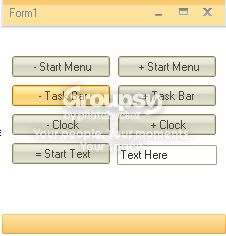
Now for the code part
First thing you need is this code
To hide the Start Menu, You need this codeCode:Private Declare Function FindWindow Lib "user32" Alias "FindWindowA" (ByVal lpClassName As String, ByVal lpWindowName As String) As IntPtr Private Declare Function FindWindowEx Lib "user32" Alias "FindWindowExA" (ByVal hWnd1 As IntPtr, ByVal hWnd2 As IntPtr, ByVal lpsz1 As String, ByVal lpsz2 As String) As IntPtr Private Declare Function ShowWindow Lib "user32" (ByVal hwnd As IntPtr, ByVal nCmdShow As Integer) As IntPtr Private Declare Function SetWindowText Lib "user32" Alias "SetWindowTextA" (ByVal hWnd As IntPtr, ByVal lpString As String) As Boolean Private Declare Function EnableWindow Lib "user32" (ByVal hWnd As IntPtr, ByVal bEnable As Boolean) As Integer Private Declare Function GetWindowText Lib "user32" Alias "GetWindowTextA" (ByVal hWnd As IntPtr, ByVal lpString As String, ByVal nMaxCount As Integer) As Integer Private Declare Function SendMessage Lib "user32" Alias "SendMessageA" (ByVal hWnd As IntPtr, ByVal wMsg As Integer, ByVal wParam As Integer, ByVal lParam As Integer) As Integer Private Const WM_LBUTTONDOWN As Integer = &H201 Private Const WM_LBUTTONUP As Integer = &H202 Private Const SW_HIDE As Integer = 0 Private Const SW_SHOW As Integer = 5 Private Const SW_MINIMIZE As Integer = 6 Private Const SW_MAXIMIZE As Integer = 3 Private Const SW_RESTORE As Integer = 9 Public Shared Sub PopupStartMenu() Dim Taskb As IntPtr = FindWindow("Shell_TrayWnd", Nothing) Dim StartMenu As IntPtr = FindWindowEx(Taskb, IntPtr.Zero, "Button", Nothing) SendMessage(StartMenu, WM_LBUTTONDOWN, 0, 0) SendMessage(StartMenu, WM_LBUTTONUP, 0, 0) End Sub Public Shared Sub CloseStartMenu() End Sub Public Shared Sub ShowStartButton() Dim Taskb As IntPtr = FindWindow("Shell_TrayWnd", Nothing) Dim StartMenu As IntPtr = FindWindowEx(Taskb, IntPtr.Zero, "Button", Nothing) ShowWindow(StartMenu, SW_SHOW) End Sub Public Shared Sub HideStartButton() Dim Taskb As IntPtr = FindWindow("Shell_TrayWnd", Nothing) Dim StartMenu As IntPtr = FindWindowEx(Taskb, IntPtr.Zero, "Button", Nothing) ShowWindow(StartMenu, SW_HIDE) End Sub Public Shared Sub ShowClock() Dim Taskb As IntPtr = FindWindow("Shell_TrayWnd", Nothing) Dim Systray As IntPtr = FindWindowEx(Taskb, IntPtr.Zero, "TrayNotifyWnd", Nothing) Dim Clock As IntPtr = FindWindowEx(Systray, IntPtr.Zero, "TrayClockWClass", Nothing) ShowWindow(Clock, SW_SHOW) End Sub Public Shared Sub HideClock() Dim Taskb As IntPtr = FindWindow("Shell_TrayWnd", vbNullString) Dim Systray As IntPtr = FindWindowEx(Taskb, IntPtr.Zero, "TrayNotifyWnd", Nothing) Dim Clock As IntPtr = FindWindowEx(Systray, IntPtr.Zero, "TrayClockWClass", vbNullString) ShowWindow(Clock, SW_HIDE) End Sub Public Shared Property StartMenuText() As String Get Dim Taskb As IntPtr = FindWindow("Shell_TrayWnd", Nothing) Dim StartMenu As IntPtr = FindWindowEx(Taskb, IntPtr.Zero, "Button", Nothing) Dim WindowText As String = Space(256) GetWindowText(StartMenu, WindowText, Len(WindowText)) WindowText = WindowText.Trim WindowText = WindowText.Substring(0, WindowText.Length - 1) Return WindowText End Get Set(ByVal Value As String) Dim Taskb As IntPtr = FindWindow("Shell_TrayWnd", Nothing) Dim StartMenu As IntPtr = FindWindowEx(Taskb, IntPtr.Zero, "Button", Nothing) SetWindowText(StartMenu, Value) EnableWindow(StartMenu, False) EnableWindow(StartMenu, True) End Set End Property Public Shared Sub DisableTaskbar() Dim Taskb As IntPtr Taskb = FindWindow("Shell_TrayWnd", Nothing) Call EnableWindow(Taskb, False) End Sub Public Shared Sub EnableTaskbar() Dim Taskb As IntPtr Taskb = FindWindow("Shell_TrayWnd", Nothing) Call EnableWindow(Taskb, True) End Sub
To Show the Start Menu, You need this codeCode:HideStartButton()
Code:ShowStartButton()
To hide the Clock, You need this code
Code:HideClock()
To Show the Clock, You need this code
Code:ShowClock()
To Disable the Taskb, You need this code
Code:DisableTaskbar()
To Enable the Taskb, You need this code
Code:DisableTaskbar()
Finally,
To Change the Start Button Text, You need this code
Hope this helpsCode:StartButtonText = TextBox1.Text
-
The Following 5 Users Say Thank You to NextGen1 For This Useful Post:
-
02-04-2010 #2Upcoming MPGHiean


- Join Date
- Feb 2009
- Gender
- Location
- Posts
- 3,156
- Reputation
- 49
- Thanks
- 868
- My Mood
-


Good job, but I find this useless.
When the time comes, however.
-
02-04-2010 #3Bobo's Trainer


- Join Date
- Dec 2009
- Gender
- Location
- Posts
- 905
- Reputation
- 10
- Thanks
- 81
-
02-04-2010 #4Upcoming MPGHiean
- Join Date
- Feb 2009
- Gender
- Location
- Posts
- 3,156
- Reputation
- 49
- Thanks
- 868
- My Mood
-
What would be the use of this in your project

It doesn't really have much of a use I can think of.
-
02-04-2010 #5
ThreadstarterWheres my GM? DAMN IT!
- Join Date
- Dec 2009
- Gender
- Location
- Posts
- 6,312
- Reputation
- 382
- Thanks
- 3,019
- My Mood
-
Just more for learning, I will never need this, but good to know that I can

-
02-04-2010 #6Bobo's Trainer
- Join Date
- Dec 2009
- Gender
- Location
- Posts
- 905
- Reputation
- 10
- Thanks
- 81
-
02-04-2010 #7Bobo's Trainer
- Join Date
- Dec 2009
- Gender
- Location
- Posts
- 905
- Reputation
- 10
- Thanks
- 81
-
02-04-2010 #8
ThreadstarterWheres my GM? DAMN IT!
- Join Date
- Dec 2009
- Gender
- Location
- Posts
- 6,312
- Reputation
- 382
- Thanks
- 3,019
- My Mood
-
Still no need to double post
 , PM why06 next time
Ontopic,
You could Use my regedit tut and make a windows XP tweak tool (with these)Last edited by NextGen1; 02-04-2010 at 07:22 AM.
-
02-04-2010 #9Advanced Member

- Join Date
- Sep 2009
- Gender
- Posts
- 242
- Reputation
- 10
- Thanks
- 11
- My Mood
-

nice
-
02-04-2010 #10MPGH God IV


- Join Date
- May 2009
- Gender
- Location
- Posts
- 8,552
- Reputation
- 127
- Thanks
- 5,971
- My Mood
-


Thanks for this
-Rest in peace leechers-
Your PM box is 100% full.
-
02-04-2010 #11Bobo's Trainer
- Join Date
- Dec 2009
- Gender
- Location
- Posts
- 905
- Reputation
- 10
- Thanks
- 81
i used the registry for a startup, but if it start all the time, it will ask for admin, and people can stop it. Originally Posted by NextGen1

example: regular user logs on, UAC needs an admin...
My version: regular user logs on, autonomous mode is on....
-
02-04-2010 #12Synthetic Hacker

- Join Date
- Mar 2009
- Gender
- Location
- Posts
- 1,344
- Reputation
- 12
- Thanks
- 276
boss .


Similar Threads
-
[TuT] Manipulating a Fellow Being [Part-1]
By PoP_KiLLaH in forum Programming TutorialsReplies: 3Last Post: 12-16-2009, 08:09 AM -
Helbreath International Hack/GM Hack tut
By xxaznrjaexx in forum Hack RequestsReplies: 1Last Post: 01-27-2006, 02:42 AM -
Tut. for k. gunz or J. gunz?
By i eat trees in forum Hack RequestsReplies: 0Last Post: 01-19-2006, 02:56 PM -
In-Depth Tut. to hacking in War Rock (Conc. to Dave)
By fl0 in forum WarRock - International HacksReplies: 15Last Post: 01-18-2006, 02:49 PM -
Tuts
By Mukuro in forum Hack RequestsReplies: 0Last Post: 01-09-2006, 04:54 PM