

 General

adamleslie0 (07-01-2008),CodeHPro (08-21-2009),darkangel88m (06-30-2008),esat23 (08-13-2009),jeffrey1 (09-17-2008),Noxit (07-02-2008),platinum92 (07-12-2008)
Thread: VB08 MEGA TUT
Results 1 to 15 of 38
-
06-30-2008 #1Newbie



- Join Date
- Sep 2007
- Gender

- Posts
- 57
- Reputation
 9
9- Thanks
- 29
- My Mood
-


VB08 MEGA TUT
Made By, SMgamer Please Do Not Leech
Now, First we need to download VB08, Or VB.net. Then you Need to Download PheNix's Module Maker.
Once you Have done all that... Its Time to Open Visual Basic.
Once VB Has Loaded, Go to the Top Left and click, File > New Project
A New Window Should Have appeared. Click on Windows Form Application.
Now After you Clicked Windows Form Application, Give your Hack A Name in the Box Below..
The Whole window Should Change. Your Tool Box Should be to the left and Properties should be on the right..
Your Form will be In the Middle ish Area... Go Ahead and Click the Form.
Then Under The Properties, Scroll Up and down until you See Text, Change that to your Hacks name.
Now, On the left Find and Double-click something that Says.. Button. Button 1 should appear on your Form.
Click the button once then Go to properties, and change the Text to Stamina.
Now, Make another Button. Instead of naming it Stamina Name it Off.
Now Make 12 More Buttons And Name them...
Ammo - Off
Anti-Kick - Off
No Spread - Off
No Recoil - Off
Super Jump - Off
NFD - Off
So your Hack should Look Like this..
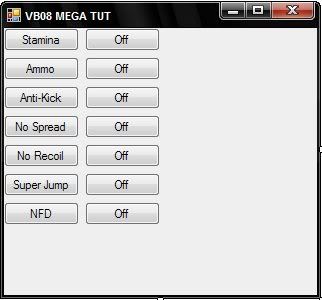
(You Can Move Buttons By Dragging them.)
Now Go to your tool List (on the left), and find Label.
Then double-click it, and Drag to where you Want it. then Put the Credits In.
Example:
It should Look something like this... Originally Posted by
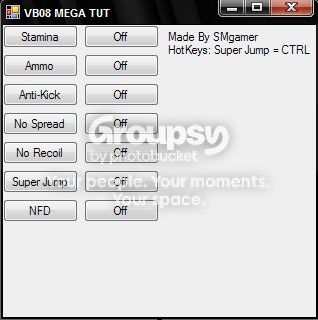
Now! We have our Form Done.. Time for Coding..
First Lets Add our Module.
Open your Module Maker, and Click Generate Fast Module.
Lots Of Coding Should appear to the right.. Highlight it all and Copy.
Go Back to VB and Go to the Top and Click.. Project > Add Module > Ok
Now you Have Made your Module. You should See..
Then you Add the Code.Code:Module Module1 End Module
Now Click the Form1.vb [Design]* Tab.Code:Module Module Add Code Here End Module
Now Find Timer In your tool List. Double Click it.
Now Below Your Form you should see a little Stop Watch. Double-Click It and Add in..
Do you see where it says WriteFloatPointer? Go Back to your Module Maker..Code:WriteFloatPointer(&H Player Pointer, & &H Stamina Offset, 100)
On the left look for WriteFloatPointer, Copy the Code, go Back to VB, and Replace WriteFloatPointer with The Code you copied.
Now Do you see where it Says Player Pointer? Go to Warrock-Hacks, and Get the Addy in the Warrock Discussion page.
And Replace it. Do the Same with the Stamina Offset, but use the Stamina Offset From Warrock-hacks.
Now go back to Form1.vb [Design]* and Double Click Stamina On.
Add in..
This Turns the Stamina Hack on.Code:Timer1.Enabled = True
Then Double Click the Stamina Off
and add in...
This Turns the Hack offCode:Timer1.Enabled = False
Now, Move on to Unlimited Ammo.
Make another timer, and Add in..
Replace the NOP, with the NOP code on your module maker.Code:NOP(&H Unl Ammo 1 adress, &H90) NOP(&H Unl Ammo 1 adress + 1, &H90) NOP(&H Unl Ammo 1 adress + 2, &H90) NOP(&H Unl Ammo 2 adress, &H90) NOP(&H Unl Ammo 2 adress + 1, &H90) NOP(&H Unl Ammo 2 adress + 2, &H90) NOP(&H Unl Ammo 3 adress, &H90) NOP(&H Unl Ammo 3 adress + 1, &H90) NOP(&H Unl Ammo 3 adress + 2, &H90)
Now go to Warrock-hacks and Get the U Ammo Addy #1 and Replace the First 3
Then get Addy #2 and Replace the 2nd 3
then Addy #3 and Replace the last 3.
Do the Same thing with the Buttons..
But this time Instead of..
Were gunna use Timer 2, then timer 3, then 4, Ect..Code:timer1
so you would use
Code:On Timer2.enabled = true Off timer2.enabled = false
Now For Anti-Kick.. Anti-Kick is Different Because instead of using a Timer, you Put the code Strait into the Buttons!
Your done with Anti-Kick!Code:On Button NOP(&H5058C5, &H90) NOP(&H5058C6, &H90) NOP(&H5058C7, &H90) NOP(&H5058C8, &H90) NOP(&H5058C9, &H90) NOP(&H5058CA, &H90) Off Button NOP(&H5058C5, 139) NOP(&H5058C6, 133) NOP(&H5058C7, 244) NOP(&H5058C8, 130) NOP(&H5058C9, 5) NOP(&H5058CA, 0)
No Spread
Code:Timer: Writememory(&HAddy, 0, 4)
Code:Button On: timer3.enabled = true Button Off: timer3.enabled = false
No Recoil
Code:timer: WriteFloatPointer(&H Player Pointer, &HOffset, 0) WriteFloatPointer(&H Player Pointer, &HOffset, 0) WriteFloatPointer(&H Player Pointer, &HOffset, 0)
Code:Button On: timer4.enabled = true Button Off: timer4.enabled = false
SuperJump
Hotkey = CTRL
Code:If GetAsyncKeyState(17) Then WriteFloatPointer(&H Player Pointer, &HOffset, 1500) End IfCode:Button On: timer5.enabled = true Button Off: timer5.enabled = false
No Fall Damage (NFD)
Code:Timer: WriteFloatPointer(&H Player Pointer, &HOffset, -2000)
Now You Are Done with your Hack.Code:Button On: timer6.enabled = true Button Off: timer6.enabled = false
To Create your Hack.. Go to the Top of the VB program.. and Click Build > Build (Your Project Name)
Thanks For Reading/Following my Tutorial I Hope this Helps you!
Please do not Post Hate Comments.. This took a long time to make.
If you Use this Tutorial Make sure to put me in the Credits! Or Thank me!
--SMgamer
-
The Following 7 Users Say Thank You to SMGamer For This Useful Post:
-
06-30-2008 #2MPGH Expert

- Join Date
- Apr 2007
- Gender
- Location
- Posts
- 1,093
- Reputation
- 40
- Thanks
- 57
- My Mood
-

 the problem is i saw this stuff on other websites ... Originally Posted by SMGamer

nice copy paste
-
-
06-30-2008 #3Advanced Member

- Join Date
- Jul 2007
- Gender
- Posts
- 212
- Reputation
- 11
- Thanks
- 14
- My Mood
-


 The man is trying to help... Originally Posted by cooly

-
06-30-2008 #4
ThreadstarterNewbie
- Join Date
- Sep 2007
- Gender
- Posts
- 57
- Reputation
- 9
- Thanks
- 29
- My Mood
-
Yeah Give Me a Break, So it Is a Copy-Paste TuT.. But at least i Explain what Everything Does..
-
07-01-2008 #5

- Join Date
- Jul 2007
- Gender
- Location
- Posts
- 2,017
- Reputation
- 24
- Thanks
- 640
- My Mood
-


Wow dude this really helpt, but only how do you mean: Build>Build(project name), i only see this: Build>Build WindowsAplication1 ? And now?
EDIT: After that i got 5 syntax errors ?--

-
07-01-2008 #6Leecher

- Join Date
- Aug 2007
- Posts
- 18
- Reputation
- 10
- Thanks
- 10
wow thx alot man, dun care that u copy n pasted, glad u did xD
saved me the time to go on other sites to find it (Y)
-
07-02-2008 #7Advanced Member

- Join Date
- Mar 2007
- Gender
- Location
- Posts
- 198
- Reputation
- 11
- Thanks
- 7

Thank Alot For This Man It Really Helped

-
07-02-2008 #8Leecher

- Join Date
- Jul 2008
- Posts
- 8
- Reputation
- 10
- Thanks
- 0
Thanks !
Just wanna say thanks ! i am gonna try my best and make a hack with vb 2008 XD
-
07-02-2008 #9Choob

- Join Date
- Jan 2008
- Gender
- Posts
- 46
- Reputation
- 10
- Thanks
- 4
Yea thanks for the tut. Its a lot easier than VB6.
-
07-04-2008 #10
ThreadstarterNewbie
- Join Date
- Sep 2007
- Gender
- Posts
- 57
- Reputation
- 9
- Thanks
- 29
- My Mood
-
When you Guys Say I Copy Pasted it, Do you mean that I Leeched it?
Cause i didnt! >=(
It took me Forever to write this Tut!
I originally Posted it on Warrock-hacks, then i posted on my site, then on k-o-w-n-a-g-e, then on wrhks, ect.
I Usually dont post my stuff on Mpgh
-
07-04-2008 #11Leecher
- Join Date
- Aug 2007
- Posts
- 18
- Reputation
- 10
- Thanks
- 10
hey man
um, with spread and recoil
the intervals of the timers r 100 to start of with, well in u only enable or disable em, then in game they wont work as well, they r only good if the interval is set to 1 o.o
but the problem wit settin it to 1 is thatthe game will become very laggy.
wat should i do so thy work properly with no lag?
-
07-04-2008 #12Banned

- Join Date
- May 2008
- Posts
- 45
- Reputation
- 10
- Thanks
- 11
noo i found this on warrock-hacks
-
07-04-2008 #13


- Join Date
- Mar 2008
- Gender
- Location
- Posts
- 4,568
- Reputation
 876
876- Thanks
- 866
- My Mood
-


 Originally Posted by SMGamer
Way to leech. You know that you did. You even confessed. And this tutorial was on another website and it wasn't your name. You should of said I take no credit and people would respect you more.... Originally Posted by SMGamer
Originally Posted by SMGamer
Way to leech. You know that you did. You even confessed. And this tutorial was on another website and it wasn't your name. You should of said I take no credit and people would respect you more.... Originally Posted by SMGamer
-
07-05-2008 #14n00b

- Join Date
- May 2007
- Gender
- Posts
- 5
- Reputation
- 10
- Thanks
- 0

Thank you for this tut but i've some problems...! When I finally click on build my project, i can't build it beacause they say there are few syntax errors! I see that these errors are like all the '&H' in the unlimitied ammo code...:s CAN SOMEONE HELP ME PLEASE?
-
07-05-2008 #15Choob

- Join Date
- Jul 2008
- Location
- Posts
- 30
- Reputation
- 10
- Thanks
- 4
.:Copy-Paste TuT:.


Similar Threads
-
Sword rocket request tut
By aoshi in forum Gunz GeneralReplies: 4Last Post: 02-09-2006, 03:43 PM -
Helbreath International Hack/GM Hack tut
By xxaznrjaexx in forum Hack RequestsReplies: 1Last Post: 01-27-2006, 02:42 AM -
Tut. for k. gunz or J. gunz?
By i eat trees in forum Hack RequestsReplies: 0Last Post: 01-19-2006, 02:56 PM -
In-Depth Tut. to hacking in War Rock (Conc. to Dave)
By fl0 in forum WarRock - International HacksReplies: 15Last Post: 01-18-2006, 02:49 PM -
Tuts
By Mukuro in forum Hack RequestsReplies: 0Last Post: 01-09-2006, 04:54 PM
