

 General

Blubb1337 (02-23-2010),CoderNever (09-22-2009),Dark_Goliath (11-05-2009),Deadhy (04-08-2011),frozenblade753 (10-22-2009),Hell_Demon (09-22-2009),Houston (10-05-2009),jabbathehutt (01-29-2011),kolobo (02-04-2010),mnpeepno2 (01-24-2010),Steve323 (05-26-2010),Zebra (10-08-2009)
Results 1 to 8 of 8
-
09-22-2009 #1Dual-Keyboard Member



- Join Date
- Aug 2009
- Gender

- Location
- Posts
- 276
- Reputation
 17
17- Thanks
- 224
- My Mood
-


[TUT] How to make an Updater [VB.net]
The following codes I put togethor myself and did not leech, I though this would be very useful so I created a tutorial.
Ok, so in most programs you might get that thing on the bottom or at top that says the version name, and if its out of date it will just simply say out of date. Well thats what im going to be teaching you. I will make this tutorial as simple to understand as possible, and once done you might want to check my visual tutorials at YouTube - VBBasics
What you need:
- Visual Basic 2008
- A Web Host
- FileZilla or any other FTP Client
THE DESIGN: STEP 1 - 3
Step 1
We are using Vb.Net, so it is only obvious that you will need to open Visual Basic 2008 if you haven't already. Afterword make a new project, name it anything, or just add this to a current project.
Step 2
Add a Label, change the color to Web Green and change the title to the version.

Step 3
Add a LinkLabel, Make Visible False, change the LinkColor and VisitedLinkColor to Red, and title to something like "Outdated version :: Update now". Make sure the LinkLabel covers the Label.

THE CODING: STEP 4 - 7
Step 4
Double Click the LinkLabel to get to the coding section, and add the following inside the sub.
Change the Orange Text to the website link where you will be providing your updated version, In this case I choice my Floodeh page.Code:System.Diagnostics.Process.Start("https://ugleh.com/Floodeh/")

Step 5
Considering you have a website host, you need to get your FTP Account details, this can be found in the Cpanel of the host.

Make a new FTP account, or get an existing one. Then open FileZilla or the FTP Client of your choice, and put in the info you got from the site

Now that you are logged in you are ready for the next steps.
Step 6
Go on your desktop and create a new .TXT file (NotePad File)
In the Notepad we are going to be running this updater by the Build, and not the Version, but making it Visually look like it runs by the version.
A Build is normally a version, but not being decimals, but being an integer. So Version 1 would be build 1, and Version 1.1 would be build 2 and so on.
So what we do is we make a new text file, and write the number of the build you believe it is, mine will be "2", if your just making you program it should be "1"

Save the file as "Version" type being .txt, and then upload that file to your host using the FTP Client.

Now find the URL for that file, normally it would be https://websitename.com/Version.txt.
Keep that URL in mind for the next few steps.
Step 7
Time for the real coding. Here I will break parts up.
In Visual Basic 2008 Click the Form itself so that you get the Form1 load sub.

In there, copy and paste the following code
Code:Dim Build As Integer Build = 2 Dim url As String url = "https://ugleh.com/Tutorials/VersionChecker/CurrentVersion/version.txt"- Build will be your current build. So while making this, your build should be the same number you put in your Version.txt file, in that case mine is 2.
- url is the URL i told you to hang on to earlier, put that URL in place of mine.

Step 7 :: Part B
Under the current code that we just did, put the following
Do not edit the following codes unless you had other LinkLabels in your project before you started step 1.
If you had more then 1 link label, I know I did, then change the red Text to what the LinkLabel the name was that was assigned with step 4.Code:Dim request As System.Net.HttpWebRequest = System.Net.HttpWebRequest.Create(url) Dim response As System.Net.HttpWebResponse = request.GetResponse() Dim sr As System.IO.StreamReader = New System.IO.StreamReader(response.GetResponseStream(), System.Text.Encoding.GetEncoding("windows-1252")) Dim Online As Integer Online = sr.ReadToEnd() If Build >= Online Then Else LinkLabel1.Visible = True End If

TESTING: STEP 8 - 9
Step 8
Now that we are all done, click the debug button, and look at your app. Should say the version name.

Step 9
Stop Debugging, and go to where we had this piece of code:
Change 2 or whatever number you put, to the number below it, so my case will be 1.Code:Build = 2

Now start Debugging, and if everything went well, it should say a version is available, then give us a link to the site.

Clicking the link will take you to the latest download. In this case for me,
Ugleh's Floodeh
If you liked this tutorial and had fun learning something new then please take the time to comment and press that Thanks button
Last edited by Ugleh; 09-22-2009 at 01:24 AM.
-
The Following 12 Users Say Thank You to Ugleh For This Useful Post:
-
09-22-2009 #2MPGH Addict


- Join Date
- Mar 2008
- Gender
- Location
- Posts
- 3,977
- Reputation
- 343
- Thanks
- 4,324
- My Mood
-


nice work
-
10-04-2009 #3Member

- Join Date
- Dec 2008
- Gender
- Posts
- 144
- Reputation
- 10
- Thanks
- 17
- My Mood
-


Thats some nice work.

-Advertisements(Permanent ban)
-Flaming(1+ day ban)
-Nazi or Racist content/comments ( 5+ day ban)
-Bumping old threads 1 week or older( 3 day ban)
-Using outside download sources "Links"( 3+ day ban)
-Spamming( 1+ day ban) -Begging for hacks ( 1 day ban)-
No virus scan( 1 day ban) -Fake VirusScan ( 7+ day ban) -Posting Viruses,keyloggers (permanent ban) -
Disrespect of Staff members (5+ day ban)


OMfG i hate hate noobs that ask for hacks they shuld just go in a hole and die
Thank me if i helped, or just thank me anyway
[Respect list]
Toymaker- for his crack hacking team.
[MPGH]-XpliCitt-
[MPGH]User1
[MPGH]Liz
[MPGH]Whitten
-
The Following User Says Thank You to geebes888 For This Useful Post:
Steve323 (05-26-2010)
-
10-05-2009 #4Blackhat Hacker

- Join Date
- Jul 2009
- Gender
- Location
- Posts
- 1,941
- Reputation
- 175
- Thanks
- 2,470
- My Mood
-
thanks very nice dude

-
02-23-2010 #5Banned

- Join Date
- Jan 2009
- Gender
- Posts
- 70
- Reputation
- 9
- Thanks
- 15
- My Mood
-

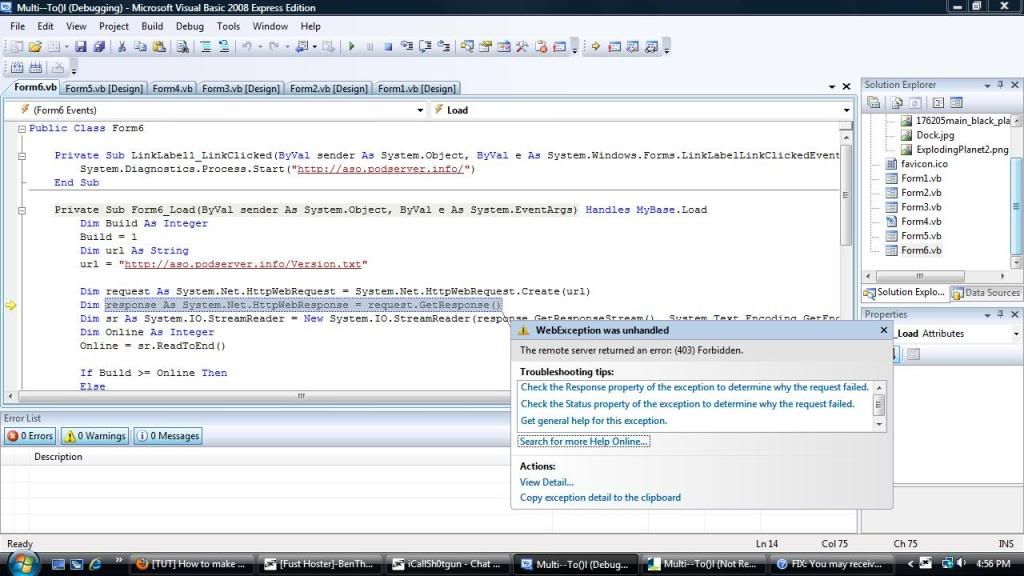
 Errorrr :(
it says an error let me post a screeniee
-
02-23-2010 #6Synthetic Hacker
- Join Date
- Mar 2009
- Gender
- Location
- Posts
- 1,344
- Reputation
- 12
- Thanks
- 276
For the record, dont bump threads this old.
- It looks like you don't have the right credentials, hence the error "forbidden."
-
02-23-2010 #7MPGH Champion


- Join Date
- Sep 2009
- Gender
- Location
- Posts
- 5,915
- Reputation
- 161
- Thanks
- 3,109

Try catching the error and display it in a messagebox, this might give you a better error.
The page doesn't seem to be available tho.
-
02-23-2010 #8Wheres my GM? DAMN IT!

- Join Date
- Dec 2009
- Gender
- Location
- Posts
- 6,312
- Reputation
- 382
- Thanks
- 3,019
- My Mood
-

Error 403 is a http request error, Permission Denied,
You don't have the right credentials to access his server, or it has since changed, this is an old topic, And you are trying to connect to Uglehs Site if following his example
/closed
Create a new thread if you have anymore questions, Please don't bump old threads
Thank YouLast edited by NextGen1; 02-23-2010 at 04:29 PM.


Similar Threads
-
[Tut]How to Make KoWarrock Account Easy
By EyalZamir in forum WarRock Korea HacksReplies: 181Last Post: 06-08-2008, 12:05 PM -
(TUT)how to make your own warrock menu
By aprill27 in forum WarRock - International HacksReplies: 0Last Post: 09-21-2007, 03:46 PM -
[TuT] How to make PW and value box for Guns/Superjump/SkyStormer(VB6)
By jokuvaan11 in forum WarRock - International HacksReplies: 14Last Post: 06-30-2007, 01:09 PM -
[Request]Tut how to make his own bypass
By BurakG in forum WarRock - International HacksReplies: 3Last Post: 05-08-2007, 02:46 PM -
Tut: how to make cheese
By ace76543 in forum GeneralReplies: 14Last Post: 01-14-2007, 09:39 AM
