In-Depth Guide to Botting Pokemon GO using Rocket API
In-Depth Guide to Botting Pokemon GO using Rocket API
Introduction
This will be a very in-depth and concise guide that goes over how to use the publicly available bot, Pokemon-GO-Rocket-API or PokeRocket, whichever name you have heard.
At the time of writing this there is no precompiled .exes available for you to run however I have seen them in development/around the internet. For this you don't have to have experience programming or even know how an IDE works as I will go through everything. Setup time for this is extremely quick.
Prerequisites
I will be aiming this tutorial towards Visual Studio 2013 users. In the future (or hopefully before 24 hours) I will be adding the Visual Studio 2015 option. I will do my best in this first tutorial to ensure both users are satisfied with what they need to do as instructions vary, but not by much, merely a dependency/support issue with 2013 issues as I explained above.
Let's Go!
1. Assuming Visual Studio is installed and you have downloaded the attachment, extract the contents of the ZIP to the directory of your choosing. Mine is simply on my Desktop however would usually be in my programming folder (C:/prog/cs, cs = c#).
2. Once extracted please open the folder. Below will be a picture of what the content of the extracted directory should contain. I will also highlight which file you will want to double click to automatically open Visual Studio.
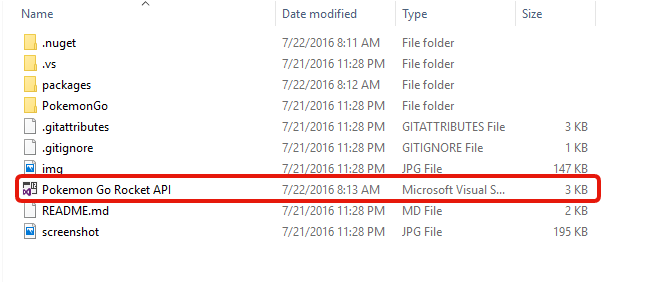
**YOU WILL NOT HAVE THE .nuget FOLDER YET. If you are running 2015 you will not be encountering that folder at all.
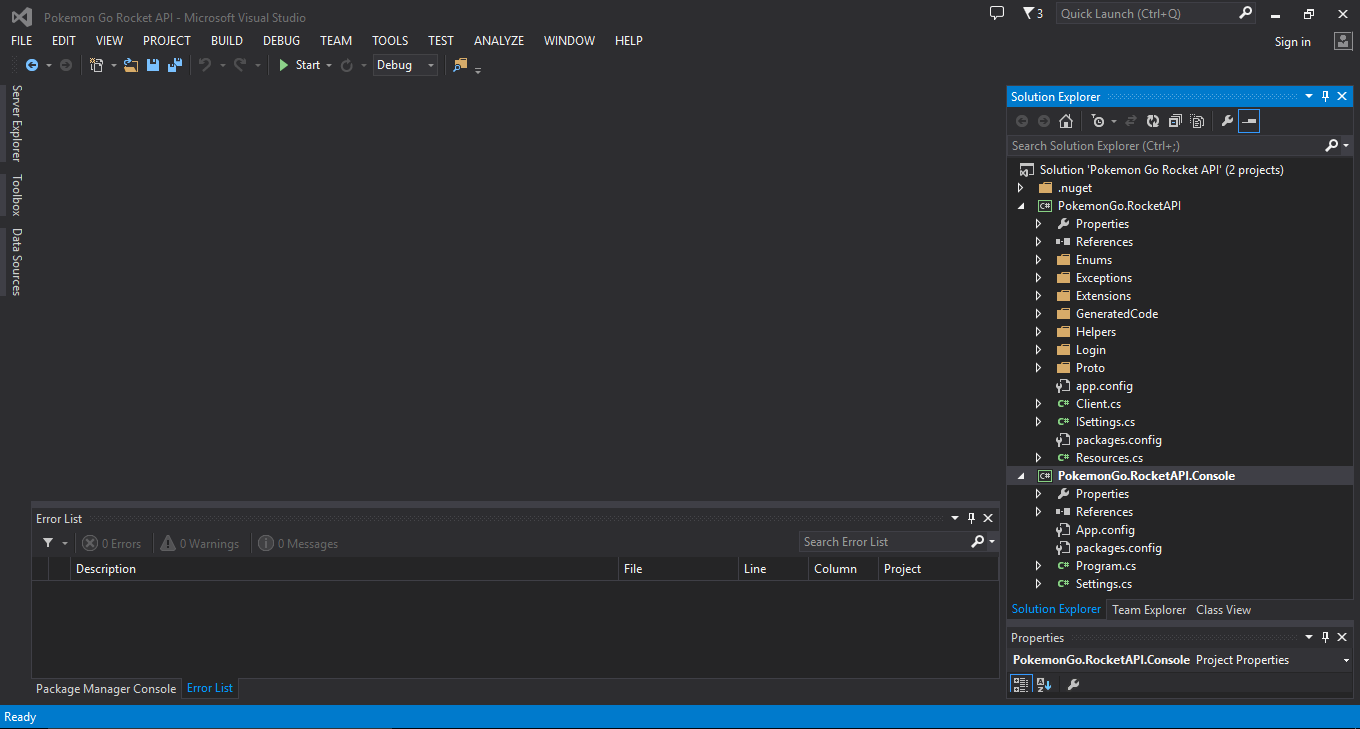
3. Visual Studio will have opened the project(s). Your screen will look similar to this depending on if you're running 2013/2015 and what theme you are using.
(if you are running 2015, you do not have to do this, please jump to STEP 7).
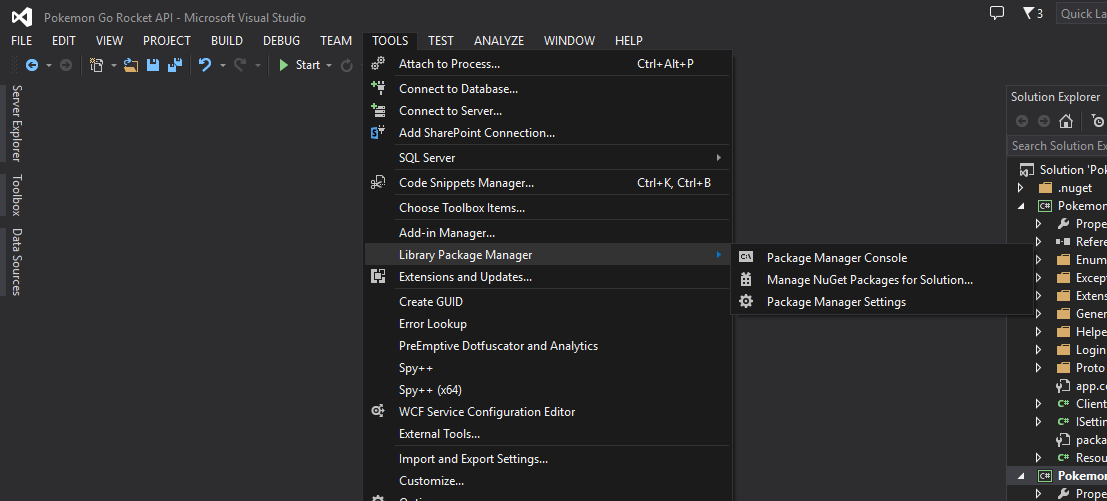
4. On the navigation menu please find 'Tools' -> 'Library Package Manager' -> 'Package Manager Console'.
5. A box will open up at the bottom of the IDE with the title, 'Package Manager Console'.
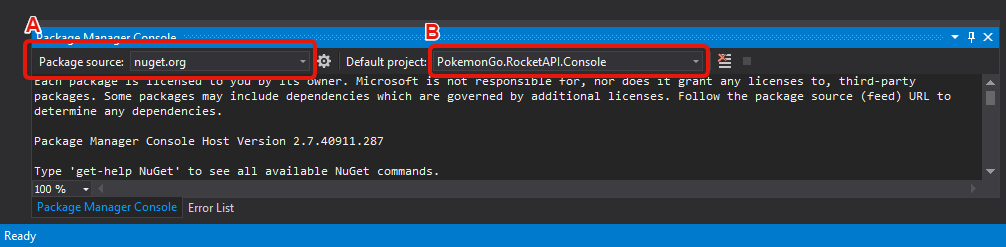
For 'A', please ensure it is nuget.org (it will be this by default).
For 'B', please ensure it is the following project: Pockemon.GO****cketAPI.Console (as shown in the image)
NOT Pokemon.GO****cketAPI
6. We're going to be installing a package that allows Visual Studio 2013 to interpret C#6 code which was packaged into 2015 which is why using that IDE doesn't require these steps.
In the Package Manager Console enter:
It will take anywhere from a few milliseconds to a second to respond.

Now, as long as everything was correct, you should get some type of success message similar to the one in the image. When I first put up VS2013 I accidentally added the Microsoft.Net.Compilers to the PokemonGO****cketAPI project instead of the PokemonGO****cketAPI.Console one which is why it says 'already installed', then 'adding it to'.
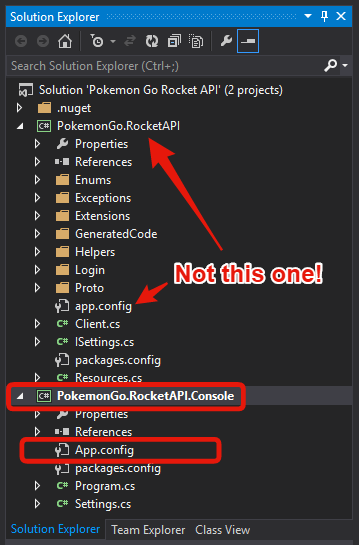
(if 2015, skip here) 7. Onward! We are now going to configure the client. Remember where the Solution Explorer is? Right side of the IDE. Under PokemonGO****cketAPI.Console project you'll find a file named, 'App.Config'. Double click it and it will open it in Visual Studio to edit.
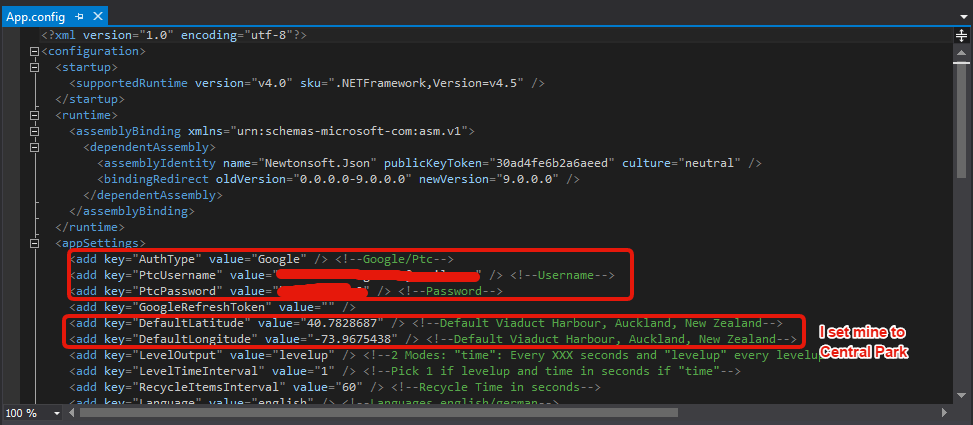
8. IN the above image I have squared the options you need to configure first but only two will need explanation.
The first one with the comment, <!-- Google/Ptc --> beside it is asking if your account is a GOOGLE ACCOUNT or is a PTC account. Whichever one you use to login/signed up with is what you're going to be putting in for value="".
Enter in your username and password.
Then the coordinates that you desire your character to start from. As I said in the image, the coordinates are to Central Park for me but will be different for you (the program's default, somewhere in Goat fucker land).
As for the other configurations that's up to you to decide. I can't necessarily guide you on those as of yet, I left most of them and the program is running great but you may prefer to evolve all your Pokemon or something such as that so look through it and see if you want to change anything.
9. Go to your Solution Explorer. Right click on PokemonGO****cketAPI.Console and click 'Set as StartUp Project'.
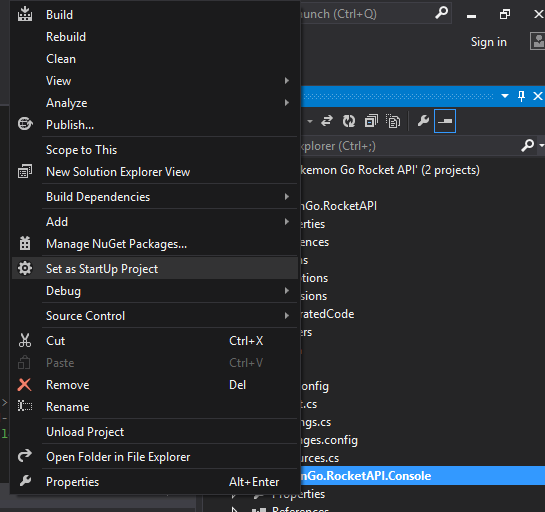
10. About there! We're going to run it. Press CTRL+F5 to Run & Build the project.
(IF USING GOOGLE)
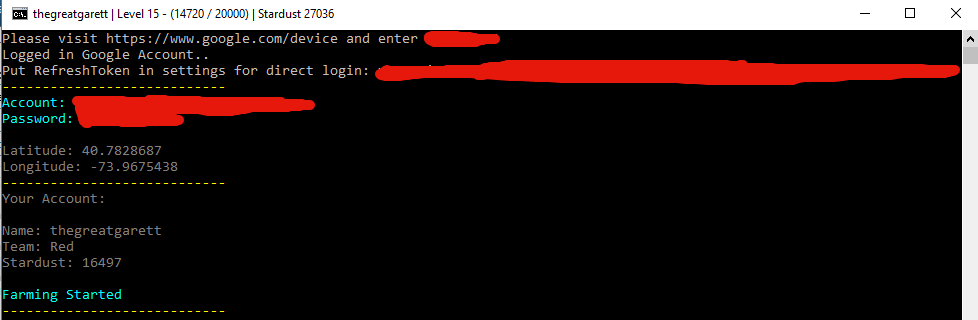
Assuming everything ran fine a command prompt will open. You need to:
- Go to http://google.com/device
- Login to your Google if not already
- Enter the code that the command prompt is asking you to enter. You have to authorize the 'device' to access your Google account.
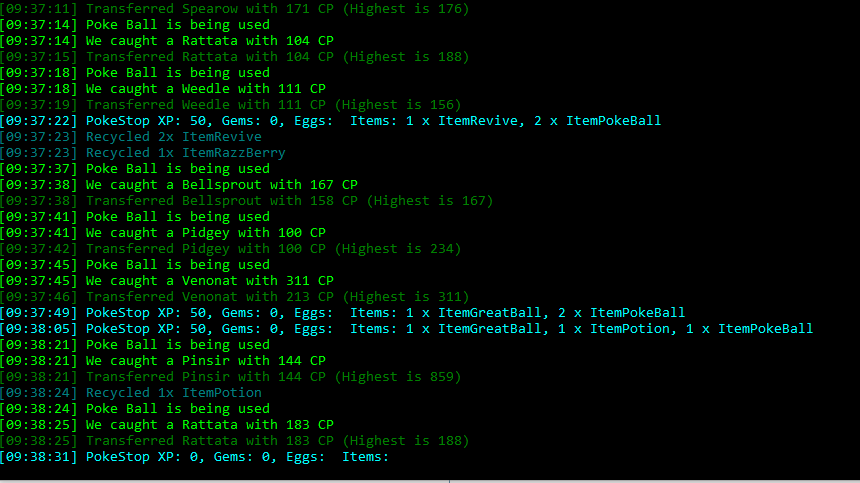
Once done the program will resume, enumerating over all the account details, the coordinates it was given and begin farming!
Virus Scans
https://virustotal.com/en/file/b7e1d...is/1469205499/
https://virusscan.jotti.org/fr-FR/fi...job/f0u6dz1yfo
DO NOT LOGIN TO YOUR ACCOUNT FROM YOUR PHONE 30 MINUTES PRIOR AND 30 MINUTES AFTER TO AVOID SOFTBAN.

This will be a very in-depth and concise guide that goes over how to use the publicly available bot, Pokemon-GO-Rocket-API or PokeRocket, whichever name you have heard.
At the time of writing this there is no precompiled .exes available for you to run however I have seen them in development/around the internet. For this you don't have to have experience programming or even know how an IDE works as I will go through everything. Setup time for this is extremely quick.
Prerequisites
- Visual Studio (2013/2015, recommended 2015, comes with Rosyln/C#6 supp)
- Download the attachment available at the bottom of this thread. I will refer to that as 'PokeRocket' from now on.
- Credits to Detective Squirrel (modifier) and FeroxRev (original developer on GitHub)
I will be aiming this tutorial towards Visual Studio 2013 users. In the future (or hopefully before 24 hours) I will be adding the Visual Studio 2015 option. I will do my best in this first tutorial to ensure both users are satisfied with what they need to do as instructions vary, but not by much, merely a dependency/support issue with 2013 issues as I explained above.
Let's Go!
1. Assuming Visual Studio is installed and you have downloaded the attachment, extract the contents of the ZIP to the directory of your choosing. Mine is simply on my Desktop however would usually be in my programming folder (C:/prog/cs, cs = c#).
2. Once extracted please open the folder. Below will be a picture of what the content of the extracted directory should contain. I will also highlight which file you will want to double click to automatically open Visual Studio.
**YOU WILL NOT HAVE THE .nuget FOLDER YET. If you are running 2015 you will not be encountering that folder at all.
3. Visual Studio will have opened the project(s). Your screen will look similar to this depending on if you're running 2013/2015 and what theme you are using.
(if you are running 2015, you do not have to do this, please jump to STEP 7).
4. On the navigation menu please find 'Tools' -> 'Library Package Manager' -> 'Package Manager Console'.
5. A box will open up at the bottom of the IDE with the title, 'Package Manager Console'.
For 'A', please ensure it is nuget.org (it will be this by default).
For 'B', please ensure it is the following project: Pockemon.GO****cketAPI.Console (as shown in the image)
NOT Pokemon.GO****cketAPI
6. We're going to be installing a package that allows Visual Studio 2013 to interpret C#6 code which was packaged into 2015 which is why using that IDE doesn't require these steps.
In the Package Manager Console enter:
Code:
Install-Package Microsoft.Net.Compilers
Now, as long as everything was correct, you should get some type of success message similar to the one in the image. When I first put up VS2013 I accidentally added the Microsoft.Net.Compilers to the PokemonGO****cketAPI project instead of the PokemonGO****cketAPI.Console one which is why it says 'already installed', then 'adding it to'.
(if 2015, skip here) 7. Onward! We are now going to configure the client. Remember where the Solution Explorer is? Right side of the IDE. Under PokemonGO****cketAPI.Console project you'll find a file named, 'App.Config'. Double click it and it will open it in Visual Studio to edit.
8. IN the above image I have squared the options you need to configure first but only two will need explanation.
The first one with the comment, <!-- Google/Ptc --> beside it is asking if your account is a GOOGLE ACCOUNT or is a PTC account. Whichever one you use to login/signed up with is what you're going to be putting in for value="".
Code:
<add key="AuthType" value="Google" /> <!--Google/Ptc-->

OR

<add key="AuthType" value="Ptc" /> <!--Google/Ptc-->
Then the coordinates that you desire your character to start from. As I said in the image, the coordinates are to Central Park for me but will be different for you (the program's default, somewhere in Goat fucker land).
As for the other configurations that's up to you to decide. I can't necessarily guide you on those as of yet, I left most of them and the program is running great but you may prefer to evolve all your Pokemon or something such as that so look through it and see if you want to change anything.
9. Go to your Solution Explorer. Right click on PokemonGO****cketAPI.Console and click 'Set as StartUp Project'.
10. About there! We're going to run it. Press CTRL+F5 to Run & Build the project.
(IF USING GOOGLE)
Assuming everything ran fine a command prompt will open. You need to:
- Go to http://google.com/device
- Login to your Google if not already
- Enter the code that the command prompt is asking you to enter. You have to authorize the 'device' to access your Google account.
Once done the program will resume, enumerating over all the account details, the coordinates it was given and begin farming!
Virus Scans
https://virustotal.com/en/file/b7e1d...is/1469205499/
https://virusscan.jotti.org/fr-FR/fi...job/f0u6dz1yfo
DO NOT LOGIN TO YOUR ACCOUNT FROM YOUR PHONE 30 MINUTES PRIOR AND 30 MINUTES AFTER TO AVOID SOFTBAN.
"Invalid Attachment specified. If you followed a valid link, please notify the administrator."
link doesn't work?
Attachment hasn't been approved yet.
Wonder how long it'll be till this is patched if it ever does
File appears safe.
/Approved
/Approved
Done every step as specified, I get an error:
Error 1 Metadata file 'Pokemon-Go-Rocket-API-master\PokemonGo\RocketAPI\bin\Debug\Pokemon Go Rocket API.dll' could not be found \Pokemon-Go-Rocket-API-master\PokemonGo\RocketAPI\Console\CSC PokemonGo****cketAPI.Console
Error 1 Metadata file 'Pokemon-Go-Rocket-API-master\PokemonGo\RocketAPI\bin\Debug\Pokemon Go Rocket API.dll' could not be found \Pokemon-Go-Rocket-API-master\PokemonGo\RocketAPI\Console\CSC PokemonGo****cketAPI.Console
 Originally Posted by Diurasel

It sucks that i can't download visual studios right now, there is an .exe in the list but i don't know whats the difference between those two
Originally Posted by sumaka10
Just throwing errors at my in console.
>Null Refference - Restarting
>Null Refference - Restarting
>ArgumentOutOfRangeException - Restarting
>Null Refference - Restarting
>Argument Null Refference - Restarting
>ArgumentOutOfRangeException - Restarting
>Null Refference - Restarting
>Null Refference - Restarting
>ArgumentOutOfRangeException - Restarting
>Null Refference - Restarting
>Argument Null Refference - Restarting
>ArgumentOutOfRangeException - Restarting
Originally Posted by Lxys
It's freaking crazy! But it keeps wanting to use the same pokestop over and over? Haha, its catching stuff like crazy! oh my god!
Any recommendations to where i should put the bot? by a bunch of pokestops?Should i put it in the field with the pokemon i want? If i use this on my main, i don't want it to recycle my incense, and lucky eggs.
Thoughts?
edit: It keeps recycling the pokeballs, is it using pokeballs that dont exsist?
edit2: It's weird? Its not getting rid of the itemrevive's, is it because i didn't have any on the new account? So it's not throwing em away because there was never anything there in the first place?
Any recommendations to where i should put the bot? by a bunch of pokestops?Should i put it in the field with the pokemon i want? If i use this on my main, i don't want it to recycle my incense, and lucky eggs.
Thoughts?
edit: It keeps recycling the pokeballs, is it using pokeballs that dont exsist?
edit2: It's weird? Its not getting rid of the itemrevive's, is it because i didn't have any on the new account? So it's not throwing em away because there was never anything there in the first place?
how can i get this google refresh token? nothing appears to me, just it wants to enter the code shown on device :/
go to google/.com/device and enter the code prompted in the command prompt. Once you do that, it will load up.

