[GUIDE] Got Banned? - FAQ
Get Banned? Follow all this Steps to know how to fix it!
Introduction:
- Terminated Ban (Hardware Ban)
- IP Ban
- Downloads
- Extra
Terminated Ban:
When you get Terminated Ban, you think you don't have other way, you need to play in other computer and this shits, but this isn't true, you can change this, you can fix it. Follow this Guide step by step.
Bypassing:
You will have to change all your hard drives Serial Number. Follow here the step by step of this Bypassing.
1- Download VolumeIDⓘ
2- Extract Volumeid.exe to your C:\
3- Start > Run > "cmd" > Press Enter
4- Type "C:", Press Enter.
5- Type "Volumeid.exe C: 1234-5678", Press Enter.
6- You have now changed your C: hard drive Serial Number. Please repeat step 5 to all of your LOCAL hard drives.
2- Extract Volumeid.exe to your C:\
3- Start > Run > "cmd" > Press Enter
4- Type "C:", Press Enter.
5- Type "Volumeid.exe C: 1234-5678", Press Enter.
6- You have now changed your C: hard drive Serial Number. Please repeat step 5 to all of your LOCAL hard drives.
7- And finally, Restart your PC , Bypassed!
Note 2: The Download of VolumeID are there, just click on VolumeID and download

IP Ban Guide:
If You Have been Ip Banned Follow this guide below and you should be fine.
Well seeing as Ijji decided to go on a banning spree I thought it called for a new guide, Before we get flooded with people saying they have been IP banned and need help etc..
The question is, is your IP dynamic or static? If you have a dynamic IP you are considered lucky by me because it is simple to change your ip. But if your IP is static you will have a problem changing your IP and will most likely just have to mask your IP rather than change it. Or if your static you could ring up your ISP and come up with some farfetched reason why your IP needs changing (I wouldn't reccomend this)
If you dont know whether you are static or dynamic there is an easy way to find out. Just follow my first solution to changing your IP and if that doesn't work then you have a static IP.
Solution 1 (DYNAMIC):
The first solution is very simple and will only work if you are dynamic.. Turn the modem/router off at the plug and then leave it off for 5 minutes. Before you turn the modem off open up a browser and go to this address "IP Chicken - Whats my IP address? ip address lookupⓘ". Once you have the browser open turn off your modem by the plug and leave off for the 5 minutes. Then after this turn it back on and open another browser (I say open another browser because sometimes when your IP changes it will still say the same IP in the other browser even if it did change) So once you have the other browser open go to this address "IP Chicken - Whats my IP address? ip address lookupⓘ" now compare it with the other browser and see if the IP has changed. If it didn't change then you are either static or you need to leave the modem off for a longer time. If you want to leave it off for a longer amount of time I suggest you turn the modem off by the plug before you go to sleep. Then in the morning turn it back on and see if your IP has changed. If it hasn't changed by now then you have a static IP and will have to get your ISP to change your IP or you will have to mask your IP. I will mention the programs you can mask your IP with later in this guide.
Solution 2 (DYNAMIC):
If you are dynamic you could try the age old method of changing your IP with a batch file now me myself this has never worked for, mainly because I connect to the internet wirelessly. Before you attempt this method please make sure your connected to the internet via a cable and not wirelessly seeing as it has a better success rate then if you do it whilst connected wirelessly. Ok once you are connected to the internet via the cable your going to want to open up notepad and copy this text into it:
Echo ipconfig/flushdns
ipconfig/flushdns
echo ipconfig/release
ipconfig/release
echo ipconfig/renew
ipconfig/renew
exit
ipconfig/flushdns
echo ipconfig/release
ipconfig/release
echo ipconfig/renew
ipconfig/renew
exit
Open the file you saved and a little dos window will come up if you look down in the toolbar your internet connect will go off but it will come back after about 5-10seconds. After you have done this check to see if your IP has changed, it most likely hasn't because this isn't a very good method at all to changing your IP. If it didn't work try one of my other solutions.
Your IP is dictated by your modem so anything you try and do whilst connected to a router most likely isn't going to change your IP. So its better following these solutions if you connect directly to the modem first. If you are connecting wirelessly you might just want to skip the solutions and mask your IP instead which means your temporarilily changing your IP and when you turn the masking off your IP will go back to how it was before.
Im just going to skip any other solutions because anything other than what I already said isn't going to change your IP. So now I will just move onto masking your IP which is easier and is guaranteed that you will get past the IP ban. There are many different software you can use to mask your IP the 2 I will be telling you how to use are the easiest in my opinion. They are Hotspot Shield and Proxy Switcher lite/pro. You can find the download links for these programs at the bottom of this thread.
Hotspot Shield

Now this really is simple and self explanatory really.
1- Go to the bottom of this thread and click the download link. Install the program. After you have installed it look at the bottom right of your screen and you will see an icon of the Hotspot Shield.
2- Right click on it and click "Connect/ON" after you have done this a browser will come up, like this:
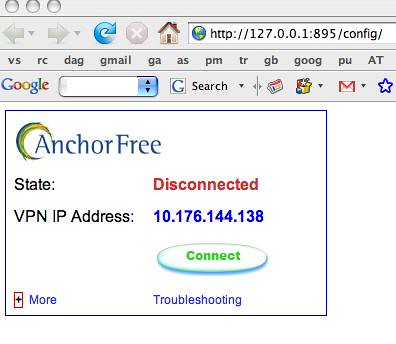
3- Click the connect button and it will assign you to another IP/Proxy, to double check that it worked you might want to go to ipchicken.com to check if your ip changed to the proxy. Remember this is only temporary and when you are finished playing on any ijji game with the Hotspot shield connected you just right click the shield in task bar and click Disconnect. After you click Disconnect your connection will revert back to your old IP. Changing/Masking your IP will not get any ijji account thts been banned back by the way you will have to make a new account.
If this software didn't work to mask your IP you can try the next software.
Proxy Switcher Lite/Standard/Pro
Now to get past the IP ban on AVA you need to use an SSL, Elite or High Anonymity because any proxy other than these will not get past the IP Ban. The problem with this program is that you need to purchase it for it to search for these type of proxies. So just download the program from the link at the bottom of this thread and we will put these proxies in manually.
1- Once you have the program installed you will have an icon like this in the taskbar:

2- Double click this icon and the program interface will come up. Dont bother using the search facility because it wont find you any SSL, Elite or High Anonymity proxies unless you have the paid version. You can find proxy lists by just going to google and typing "Fresh Proxy List", I will be using this site "Click Hereⓘ" Look for SSL, Elie or High Anonymity like I mentioned before.
3- Now you can follow this Flash Guide maded by the Proxy Switcher official website!
ProxySwitcher Flash Tutorial
ⓘ
4- After that you are ready to go play your ijji games. When you are finished playing on your games right click the icon of Proxy Switcher in the task bar and click "Direct Connection". You will then revert back to your old IP.
Note: The way to get no lag in game and to keep the ping you used to have by using either Hotspot Shield or Proxy switcher. You need a proxy active on whichever proxy program you picked before you log in to REACTOR. When you are logged into REACTOR and you have a proxy active, start the injector then start the game. When you see Gameguard checking files as soon as it disappears right click on Hotspot shield and click Disconnect. Or if your using Proxy Switcher right click the icon and click Direct Connection. You need to do this fast before AVA comes up, if you do it correct you will be on AVA using your IP (Even though its banned) And you will have the same ping as before the ban because you switch back to your IP after the IP Check.... Remember you will have to do this every time before AVA loads after Gameguard box disappears..
Downloads:
Hotspot Shield: http://www.hotspotshield.com/hotspot...d-download.phpⓘ
Proxy Switcher: http://www.proxyswitcher.com/pub/Pro...erStandard.exeⓘ
Proxy Lists:
Free Elite and Anonymous Proxy list! Fresh Proxy List Updated Every Few Seconds!ⓘ
Fresh PROXY listⓘ
Fresh Proxy List and New Proxy Listⓘ
PROXY LISTS - Free Anonymous Proxies and Proxy Toolsⓘ
Public Proxy Lists - anonymous proxy, anonymous proxies, elite proxy - My-Proxyⓘ
Edited:
Hey Bueeno, mind if you add this in...xD http://proxifier.com/ⓘ one hella good proxy switcher and i really like it.
Recomended by CerealKiller
Extra:

Thanks me and i'll give you HER ! lmfao
Thanks me and i'll give you HER ! lmfao
 Originally Posted by Greenytheboy


