[tut]My.Settings[Article]
[tut]My.Settings[Article]
My.Settings Tutorial
A few threads have been created about using settings, so here is a quick article/tutorial to help.In all honesty, the checkbox on and off setting is just more extensive and unneeded, this method will look more professional and clean (IMO)
What is it and what is it used for?
My.Settings is used as a way to distinguish between all the different user/application settings, So instead of hardcoding information and settings you can allow the user to set settings and change them.
To define or modify the users settings
Right Click the application name in the solution explorer , Click properties
Now Select the settings tab on the left side. It may (or should) say no settings have been defined.
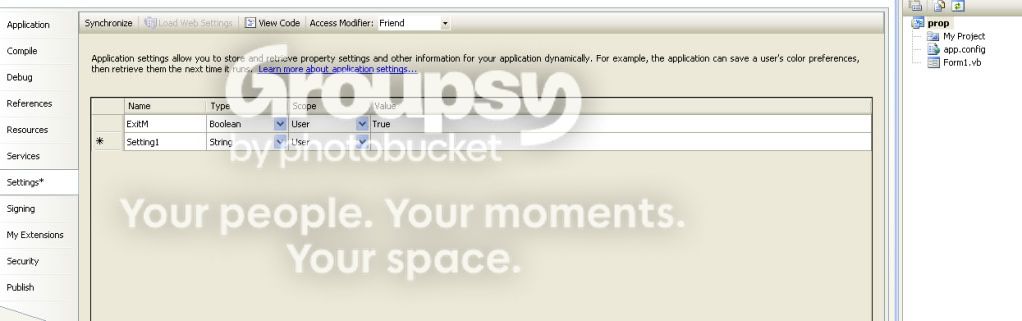
(Note: Default is set to string)
(Note: The difference between user and application settings is application scope are read only at run time, user scope are read/write at run time, so depending on your needs this should be modified)
at the top of the settings window you will notice ther are two commands
Synchronize: Returns all settings to the values that were determined in the settings window.
View Code: opens the MySettings class , you can use this to define setting releated events in this window.
How do you use your settings?
In your program, settings are automatically available to your code using the syntax My.Settings.GivenNameOfSetting
Lets look at a example:
[php]
Private Sub Button1_Click(ByVal sender As Object, ByVal e As EventArgs)
Dim CVal As String = My.Settings.ExitM
MessageBox.Show("The Value of ExitM is " & CVal & "'")
End Sub
[/php]
The above code will allow you to view the setting of ExitM as a string.
You can choose any type you like, in my case I prefer Boolean and set the value to true or false, as it has a similar effect to using a checkbox, just looks more professional.
Note: changes you make to a user setting (or set of) are automatically saved when the program shuts down, so there is no need to have a save button , however If you want to save them on a button click or similiar all you have to do is call
[php]
My.Settings.Save
[/php]
You can reload your saved settings using
[php]
My.Settings.Reload
[/php]
Accessing and allowing user to change settings with
extreme ease.
First thing you need to do is add a "PropertyGrid" to your form.
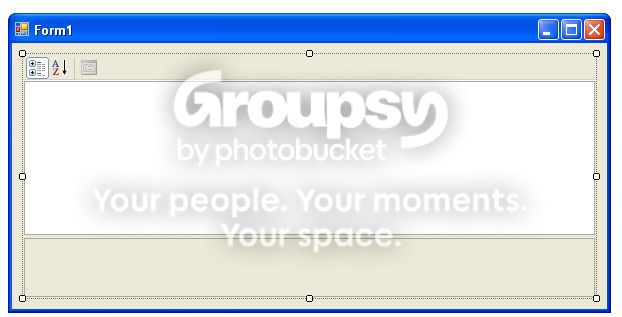
Add the following code to the form load event
[php]
PropertyGrid1.SelectedObject = My.Settings
[/php]
This grid will display both user and application settings in the form. (application settings will not be editable)
If you would like the grid to only display user settings, place this code right after the above code
[php]
Dim uat As New System.Configuration.UserScopedSettingAttribute
Dim atts As New System.ComponentModel.AttributeCollection(uat)
PropertyGrid1.BrowsableAttributes = atts
[/php]
This will allow the user to easily access the user settings and change the values.
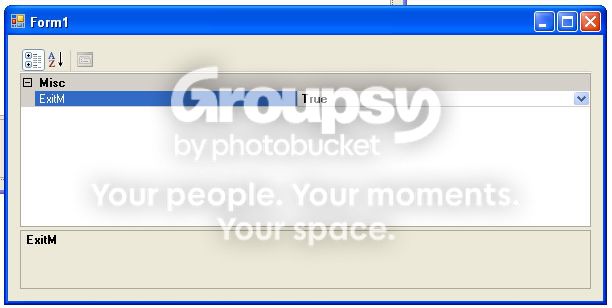
after a change you can use boolean (true or false) to handle an action
Then whenever you want you can check the value of a setting with
[php]
If my.settings.settingname = true then ' or a value 'if not boolean
'yada yada yada yada
else
end if
[/php]
Hope this helps with the settings questions that have been asked in this section over and over :p
Uploading a few images , one sec.
A few threads have been created about using settings, so here is a quick article/tutorial to help.In all honesty, the checkbox on and off setting is just more extensive and unneeded, this method will look more professional and clean (IMO)
What is it and what is it used for?
My.Settings is used as a way to distinguish between all the different user/application settings, So instead of hardcoding information and settings you can allow the user to set settings and change them.
To define or modify the users settings
Right Click the application name in the solution explorer , Click properties
Now Select the settings tab on the left side. It may (or should) say no settings have been defined.
- Click the setting element in the table.
- Create a Unigue Name for the setting
- Use the combobox to choose the data type of the setting.
(Note: Default is set to string)
- Under Scope, select whether the setting should have User or Application scope
(Note: The difference between user and application settings is application scope are read only at run time, user scope are read/write at run time, so depending on your needs this should be modified)
- you should always set a default value
at the top of the settings window you will notice ther are two commands
Synchronize: Returns all settings to the values that were determined in the settings window.
View Code: opens the MySettings class , you can use this to define setting releated events in this window.
How do you use your settings?
In your program, settings are automatically available to your code using the syntax My.Settings.GivenNameOfSetting
Lets look at a example:
[php]
Private Sub Button1_Click(ByVal sender As Object, ByVal e As EventArgs)
Dim CVal As String = My.Settings.ExitM
MessageBox.Show("The Value of ExitM is " & CVal & "'")
End Sub
[/php]
The above code will allow you to view the setting of ExitM as a string.
You can choose any type you like, in my case I prefer Boolean and set the value to true or false, as it has a similar effect to using a checkbox, just looks more professional.
Note: changes you make to a user setting (or set of) are automatically saved when the program shuts down, so there is no need to have a save button , however If you want to save them on a button click or similiar all you have to do is call
[php]
My.Settings.Save
[/php]
You can reload your saved settings using
[php]
My.Settings.Reload
[/php]
Accessing and allowing user to change settings with
extreme ease.
First thing you need to do is add a "PropertyGrid" to your form.
Add the following code to the form load event
[php]
PropertyGrid1.SelectedObject = My.Settings
[/php]
This grid will display both user and application settings in the form. (application settings will not be editable)
If you would like the grid to only display user settings, place this code right after the above code
[php]
Dim uat As New System.Configuration.UserScopedSettingAttribute
Dim atts As New System.ComponentModel.AttributeCollection(uat)
PropertyGrid1.BrowsableAttributes = atts
[/php]
This will allow the user to easily access the user settings and change the values.
after a change you can use boolean (true or false) to handle an action
Then whenever you want you can check the value of a setting with
[php]
If my.settings.settingname = true then ' or a value 'if not boolean
'yada yada yada yada
else
end if
[/php]
Hope this helps with the settings questions that have been asked in this section over and over :p
Uploading a few images , one sec.
nice tutorial. very helpful. but can you also help me with the gct file convertor. thanks.
Very nice tutorial. Well explained. I didn't knew it before. Thank you so much 
I assumed a-lot of people didn't know about the feature cause I always see questions and answers in regards to user settings and I myself answer the question even though the property grid and binding settings to it is so much cleaner (IMO)
Plus you can include descriptions and let the user sort settings etc etc, so much more professional looking ;p
Plus you can include descriptions and let the user sort settings etc etc, so much more professional looking ;p
Now I learned something new, thanks next.
thank you very much for this tutorial 
Added to tutorials list.
nice release
 Originally Posted by bbhing987

i always wondered how to use my.settgins and was going to get a book on it but now u saved me money
Watch the Bumps, I hate closing tuts. So don't bump topics older then 7 days
why he ins't banned?
nextgen gimmie your mod and i'll ban this bumper for ya XD i got nice message in my mind
nextgen gimmie your mod and i'll ban this bumper for ya XD i got nice message in my mind
nice release nextgen. good job!
Originally Posted by mizzer3

Not taking anything away from the tut itself, I really like it NG
I didn't ban him cause he is new, a warning is sufficient for now, if it happens again, then he is breaking a rule he was made aware of. Make Sense? @ Tut Yeah, just a way to allow users to modify settings easily.
This thread is closed for replies.