OutdatedA Noobs Guide to Minecraft
A Noobs Guide to Minecraft
So what is minecraft. Minecraft is a sandbox game created by Notch, and licenced by Mojang. In it, you can build, mine, craft, farm, hunt, and explore the Overworld, Nether, and End. It comes with both Singleplayer and Multiplayer. It is also available for Android, and/or iPhone/iTouch/iPad.
--Downloading--
Java:
First off, you are going to need Java, which your probably already have, but if you dont have Java, or the latest version, download it here:
Download Free Java Softwareⓘ
Accounts:
There are 2 ways to get minecraft. Legit and cracked.
Legit Accounts:
Legit accounts cost about $27, and can be bought here:
MPGH - MultiPlayer Game Hacking - Hacks, Cheats, Trainers, Downloads, Combat Arms Hacks, CrossFire Hacks, Medal of Honor Hacks, Black OPS Hacks, Project Blackout Hacks, WarRock Hacks, Soldier Front Hacks, Sudden Attack Hacks, Operation 7 Hacks, AVA Hⓘ
Cracked Accounts:
Cracked accounts are just as good as legit accounts, though access to premium servers is restricted and you are not allowed to use skins. The cracked client can be downloaded here:
http://www.mpgh.net/forum/335-minecr...o-updater.html
--Installing--
Technically, Minecraft requires no real installation, its just a .exe file, which is the game itself. The only thing you need is Java, which you probably already have.
Legit Installation:
1. Open up the .exe file.

2. Login with your Username & Password.
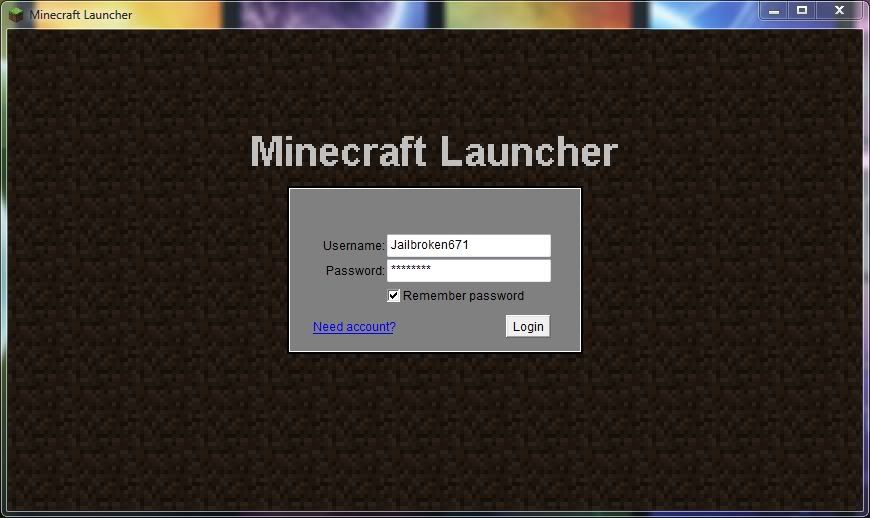
3. Wait for the download to finish, and get to this screen.

Cracked Installation:
1. Open the .exe file.

2. Type in a username

3. Click Force Update (first time only), and Enter Game

4. Wait for the download to finish and get to this screen.
--Getting Started--
The first thing your going to want to do is create a Single Player world. To do that, follow the following steps:
1. Click Single Player

2. Type in a name for your world

3. Select your gamemode (creative, survival, or hardcore)

4. Type in a seed (optional)

5. Click "Create New World"

6. Wait for the world to generate and play!
--How To Play--
To play minecraft, its just like any other game. Movement keys are as follow:
W-foward
A-Move left
S-Move back
D-move right
Space-Jump
Shift-sneak (the ability to "crouch" and not fall off edges)
Thats the easy part, the next part is to explore the world. You'll want to use the CTRL key (zoom) to look at the far away terrain. Now, its your duty to protect yourself. Nightfall is coming, and thats the only warning you get. You have to create a temporary shelter for the night. This is a good tutorial for doing so:
After surviving your first night, your going to want to gather more resources, hunt for food, explore caves, and craft more items. Refer here if you want a better tutorial for crafting, brewing, enchanting, hunting, farming, and mining:
Minecraft Wiki - The ultimate resource for all things Minecraftⓘ
--Enhancing the Experience--
I. Mods
Mods can enhance the overall game. To get mods, visit:
Minecraft Mods - MPGH - MultiPlayer Game Hacking
or
Minecraft Mods - Minecraft Forumⓘ
The next step would be to install them. Most mods come in .class files. All you have to do is extract, put it in your minecraft.jar (located in your %appdata%/.minecraft/bin), and delete the Meta-INF folder inside your minecraft.jar. Other mods come in installers, or if they require something special, it should be in the installation instructions with the mod thread. Most to all mods require modloader. Its this kind of mod that helps mod co-exist with each other. Another required mod for sound is Audiomod. It allows mods to put out sound.
II. Texture Packs
Download texture packs here:
Minecraft Textures & Skins - MPGH - MultiPlayer Game Hacking
or
Texture Packs - Minecraft Forumⓘ
This one is easy, to use texture packs, just download the texture pack, and put it in your %appdata/.minecraft/texturepacks folder. Your basically done. if your mod is a x64+ pack, you have to patch it with MC Patcher. Now your really done.
III. Multiplayer
Multiplayer is a complete different experience. It allows you to play on other peoples server, build, craft, and stuff you can do with Single Player, but you get to play with other players.
To join a premium server, just get the IP and your premium account.
To join a cracked server, just use a cracked account, get the IP, and join.
Unfortunately, you cannot join a premium server with a cracked account. Some servers, however, require a host file edit, like MPGHCraft. Some servers are also whitelisted, blacklisted, and stuff like that, so you might have to research your server to find out that info.
--Troubleshooting--
This thread should help you get through some errors:
http://www.mpgh.net/forum/417-minecr...-answered.html
If not, then post your question here and we will get to it ASAP.
I know double dutch already posted this guide, but mine is just a updated version.
@iMexi--Downloading--
Java:
First off, you are going to need Java, which your probably already have, but if you dont have Java, or the latest version, download it here:
Download Free Java Softwareⓘ
Accounts:
There are 2 ways to get minecraft. Legit and cracked.
Legit Accounts:
Legit accounts cost about $27, and can be bought here:
MPGH - MultiPlayer Game Hacking - Hacks, Cheats, Trainers, Downloads, Combat Arms Hacks, CrossFire Hacks, Medal of Honor Hacks, Black OPS Hacks, Project Blackout Hacks, WarRock Hacks, Soldier Front Hacks, Sudden Attack Hacks, Operation 7 Hacks, AVA Hⓘ
Cracked Accounts:
Cracked accounts are just as good as legit accounts, though access to premium servers is restricted and you are not allowed to use skins. The cracked client can be downloaded here:
http://www.mpgh.net/forum/335-minecr...o-updater.html
--Installing--
Technically, Minecraft requires no real installation, its just a .exe file, which is the game itself. The only thing you need is Java, which you probably already have.
Legit Installation:
1. Open up the .exe file.
2. Login with your Username & Password.
3. Wait for the download to finish, and get to this screen.
Cracked Installation:
1. Open the .exe file.
2. Type in a username
3. Click Force Update (first time only), and Enter Game
4. Wait for the download to finish and get to this screen.
--Getting Started--
The first thing your going to want to do is create a Single Player world. To do that, follow the following steps:
1. Click Single Player
2. Type in a name for your world
3. Select your gamemode (creative, survival, or hardcore)
4. Type in a seed (optional)
5. Click "Create New World"
6. Wait for the world to generate and play!
--How To Play--
To play minecraft, its just like any other game. Movement keys are as follow:
W-foward
A-Move left
S-Move back
D-move right
Space-Jump
Shift-sneak (the ability to "crouch" and not fall off edges)
Thats the easy part, the next part is to explore the world. You'll want to use the CTRL key (zoom) to look at the far away terrain. Now, its your duty to protect yourself. Nightfall is coming, and thats the only warning you get. You have to create a temporary shelter for the night. This is a good tutorial for doing so:
After surviving your first night, your going to want to gather more resources, hunt for food, explore caves, and craft more items. Refer here if you want a better tutorial for crafting, brewing, enchanting, hunting, farming, and mining:
Minecraft Wiki - The ultimate resource for all things Minecraftⓘ
--Enhancing the Experience--
I. Mods
Mods can enhance the overall game. To get mods, visit:
Minecraft Mods - MPGH - MultiPlayer Game Hacking
or
Minecraft Mods - Minecraft Forumⓘ
The next step would be to install them. Most mods come in .class files. All you have to do is extract, put it in your minecraft.jar (located in your %appdata%/.minecraft/bin), and delete the Meta-INF folder inside your minecraft.jar. Other mods come in installers, or if they require something special, it should be in the installation instructions with the mod thread. Most to all mods require modloader. Its this kind of mod that helps mod co-exist with each other. Another required mod for sound is Audiomod. It allows mods to put out sound.
II. Texture Packs
Download texture packs here:
Minecraft Textures & Skins - MPGH - MultiPlayer Game Hacking
or
Texture Packs - Minecraft Forumⓘ
This one is easy, to use texture packs, just download the texture pack, and put it in your %appdata/.minecraft/texturepacks folder. Your basically done. if your mod is a x64+ pack, you have to patch it with MC Patcher. Now your really done.
III. Multiplayer
Multiplayer is a complete different experience. It allows you to play on other peoples server, build, craft, and stuff you can do with Single Player, but you get to play with other players.
To join a premium server, just get the IP and your premium account.
To join a cracked server, just use a cracked account, get the IP, and join.
Unfortunately, you cannot join a premium server with a cracked account. Some servers, however, require a host file edit, like MPGHCraft. Some servers are also whitelisted, blacklisted, and stuff like that, so you might have to research your server to find out that info.
--Troubleshooting--
This thread should help you get through some errors:
http://www.mpgh.net/forum/417-minecr...-answered.html
If not, then post your question here and we will get to it ASAP.
I know double dutch already posted this guide, but mine is just a updated version.
@crex
@Paladin
If you want, you could replace Double's guide with this
/Stuck
Awesome tutorial
I've left doubledutch's thread aswell. If people want to use both.
OT : Are you planning on getting minion again once there's an open spot?
Awesome tutorial
I've left doubledutch's thread aswell. If people want to use both.
OT : Are you planning on getting minion again once there's an open spot?
 Originally Posted by iMexi
 Originally Posted by Paladin
Originally Posted by crex
Originally Posted by Paladin
Originally Posted by crex
L.O.L. @ minecraft4noobs. 
Originally Posted by Paladin
Originally Posted by Jailbroken671
Well Jailbroken has always been loyal.
jailbroken4reinstatement
oH sO COOl
Sick Guide! Lovin It 
But I paid already
But I paid already
Very Awesome tutorial for Newbs,..
I think this is really helpfull ! good job! 
I think this is pretty helpful for people who are in need of a tutorial before trying to free trial of early alpha/beta on the website...
This thread is closed for replies.


