[Tutorial] How To Make A Runescape Private Server (Hamachi)
In this Tutorial I am going to teach you how to make a runescape private server using hamachi (the easy way)
Things you will need:
Java Jre And Java JDK (Get From Java Site)
Hamachi -- Get it Here
A Runescape Source -- Get One From Here
A Brain -- Get One Here
Steps to creating a runescape private server (With Pictures):
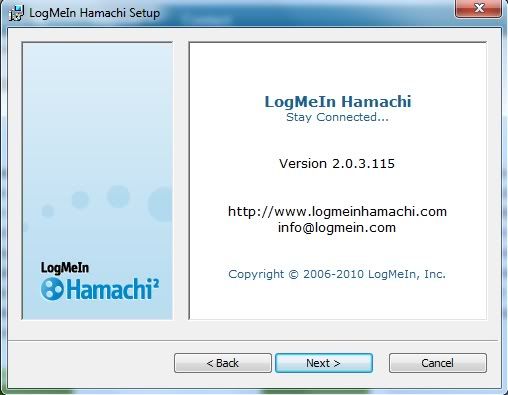
1. Install Hamachi. How? Look Below.
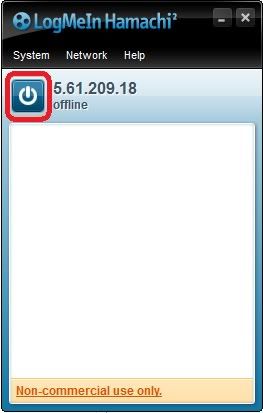
2. Once Installed run it and click the Power on button.
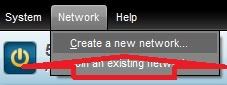
3. Next, navigate to the create Network Tab which is located here and click Create A New Network.
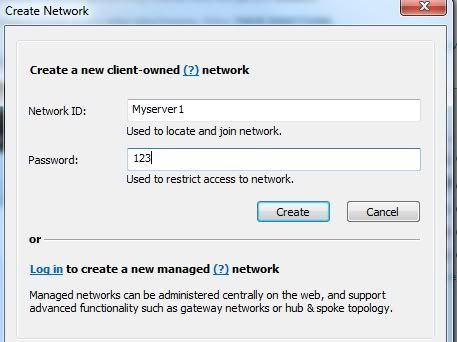
4. Choose a network name and a network password (you tell this to your friends so they can connect to your server.
5. Now that the previous steps are gone, you should now already have a downloaded source from moparscape, make sure you have extracted it to a folder.

6. Once extracted open the folder you extracted it to and search for a Run Or start File.

7. Once the start file is found, open it and you should get a cmd popup like so.

8. Your server is now running!
9. Now for people to connect to it they MUST be connected into your hamachi network and USUALLY should have the client the source came with e.g. PK-Forever Client. If they use another client instead of your, the ip they use will be on your hamachi screen, for example:

10. Once you have a friend connect you have successfully created a private server.
FAQ:
Question: When I open the run or compile cmd I get a stupid error like: Javaw Not found!
Answer: This is an easy fix, make sure you have jdk And jre installed and then right click the file that is giving you the errors and look at the code in side.
You might have Jdk v23 and the compiler isnt working,
Do this to fix it.
Question: My friends cant connect and neither can I!
Answer: Make sure you have the client downloaded that came with the source, and have edited the ip it connects to.
To do that open the client folder and open Client.Java
Scroll to the bottom (around the bottom) and look for server-ip=(Make this your hamachi IP)
And your done.
Credits:
Hamachi (Removed the portfowarding part)
Moparscape (For the sources)
Made a tutorial for mpgh. On how to portforward your RSPS. This is for you hamachi people '
'
Things you will need:
Java Jre And Java JDK (Get From Java Site)
Hamachi -- Get it Here
A Runescape Source -- Get One From Here
A Brain -- Get One Here
Steps to creating a runescape private server (With Pictures):
1. Install Hamachi. How? Look Below.
2. Once Installed run it and click the Power on button.
3. Next, navigate to the create Network Tab which is located here and click Create A New Network.
4. Choose a network name and a network password (you tell this to your friends so they can connect to your server.
5. Now that the previous steps are gone, you should now already have a downloaded source from moparscape, make sure you have extracted it to a folder.
6. Once extracted open the folder you extracted it to and search for a Run Or start File.
7. Once the start file is found, open it and you should get a cmd popup like so.
8. Your server is now running!
9. Now for people to connect to it they MUST be connected into your hamachi network and USUALLY should have the client the source came with e.g. PK-Forever Client. If they use another client instead of your, the ip they use will be on your hamachi screen, for example:
10. Once you have a friend connect you have successfully created a private server.
FAQ:
Question: When I open the run or compile cmd I get a stupid error like: Javaw Not found!
Answer: This is an easy fix, make sure you have jdk And jre installed and then right click the file that is giving you the errors and look at the code in side.
You might have Jdk v23 and the compiler isnt working,
Do this to fix it.
Question: My friends cant connect and neither can I!
Answer: Make sure you have the client downloaded that came with the source, and have edited the ip it connects to.
To do that open the client folder and open Client.Java
Scroll to the bottom (around the bottom) and look for server-ip=(Make this your hamachi IP)
And your done.
Credits:
TomAllMighty
(The Entire tutorial)Hamachi (Removed the portfowarding part)
Moparscape (For the sources)
Made a tutorial for mpgh. On how to portforward your RSPS. This is for you hamachi people
'
 Originally Posted by Shakugan no Shana



