
Spoof your rank (no bypass needed)
Was gonna keep this private but didn't see the point, barely play this trash game anyway 
Alright so as a lot of you are now aware, you are no longer able to change your rank with SAM. This is because the developers now store your rank data on their servers and read directly from this. So surely this means that there is no hope of editing your rank anymore, right?
Well, not exactly. This method is going to use a proxy man-in-the-middle attack to alter the data that the game thinks it's receiving directly from BHVR servers to instead use our own rank data. Let's get started.
First, you should download and install the latest version of the Fiddler Web Debugging Tool. I don't think I am allowed to link it here as it is licensed software, however google is your friend.
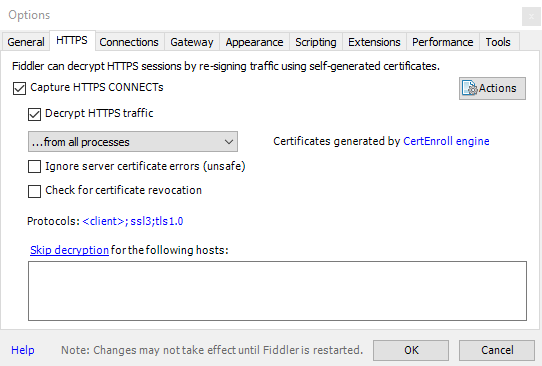
Once installed, you should go to Tools --> Options --> HTTPS, and make sure the 'Capture HTTPS CONNECTs' and 'Decrypt HTTPS traffic' boxes are selected. If you haven't used Fiddler before it is going to make you install a certificate, please understand the security risks behind this before continuing.
Next you need to open Notepad and paste the below code into it:
Replace the zeros with the pips you want the game to read (should be between 0 and 85).
Once you are done, go to File --> Save As, make sure the 'Save as type' is set to all files, and then you can save the file as rank.json. If it isn't set to all files then you will end up with a rank.json.txt.
We are almost done now, head back to Fiddler and navigate to the AutoResponder tab. Select the add rule button, and enter the following into the first box of the rule editor:
In the second box you should click the drop down arrow, then go to find a file and select the rank.json you created earlier. You should end up with something that looks like this:

Now you can save the rule. Last thing to do is to place a checkmark in the two boxes at the top (Enable rules and Unmatched requests passthrough) and that's all there is to it. You can now launch the game and it will use our rank data instead. You only need to set this up once, Fiddler should remember your rules next time you go to open it.
You need to open Fiddler before you start the game and leave it open until you close the game. Running the game without Fiddler will put you back on the rank you were on before (this doesn't stick). Currently this is undetected as of 16/04/2019 but that might change eventually now that this is public.
I AM NOT RESPONSIBLE FOR ANY BANS WHILE DOING THIS.
Alright so as a lot of you are now aware, you are no longer able to change your rank with SAM. This is because the developers now store your rank data on their servers and read directly from this. So surely this means that there is no hope of editing your rank anymore, right?
Well, not exactly. This method is going to use a proxy man-in-the-middle attack to alter the data that the game thinks it's receiving directly from BHVR servers to instead use our own rank data. Let's get started.
First, you should download and install the latest version of the Fiddler Web Debugging Tool. I don't think I am allowed to link it here as it is licensed software, however google is your friend.
Once installed, you should go to Tools --> Options --> HTTPS, and make sure the 'Capture HTTPS CONNECTs' and 'Decrypt HTTPS traffic' boxes are selected. If you haven't used Fiddler before it is going to make you install a certificate, please understand the security risks behind this before continuing.
Next you need to open Notepad and paste the below code into it:
Code:
{"survivorPips":0,"killerPips":0}
Once you are done, go to File --> Save As, make sure the 'Save as type' is set to all files, and then you can save the file as rank.json. If it isn't set to all files then you will end up with a rank.json.txt.
We are almost done now, head back to Fiddler and navigate to the AutoResponder tab. Select the add rule button, and enter the following into the first box of the rule editor:
Code:
EXACT:https://latest.live.dbd.bhvronline.com/api/v1/ranks/pips
Now you can save the rule. Last thing to do is to place a checkmark in the two boxes at the top (Enable rules and Unmatched requests passthrough) and that's all there is to it. You can now launch the game and it will use our rank data instead. You only need to set this up once, Fiddler should remember your rules next time you go to open it.
You need to open Fiddler before you start the game and leave it open until you close the game. Running the game without Fiddler will put you back on the rank you were on before (this doesn't stick). Currently this is undetected as of 16/04/2019 but that might change eventually now that this is public.
I AM NOT RESPONSIBLE FOR ANY BANS WHILE DOING THIS.
 Originally Posted by Sad Wolf


