Temporarily unlocking all purchasable skins, killers and survivors (no bypass needed)
Super short tutorial for advanced users
№1 Extract attached folder directly to C: drive>>Fiddler>>AutoResponder>>Import>>importme_v2 .farx>>Launch DBD
№2 Extract attached folder>>HTTP Debugger>>Add Rule>>Custom Rule>>
Respond with file>>Choose file "Market">>Click OK and Launch DBD
To make it work on PTB use this code for the second string
Final result: 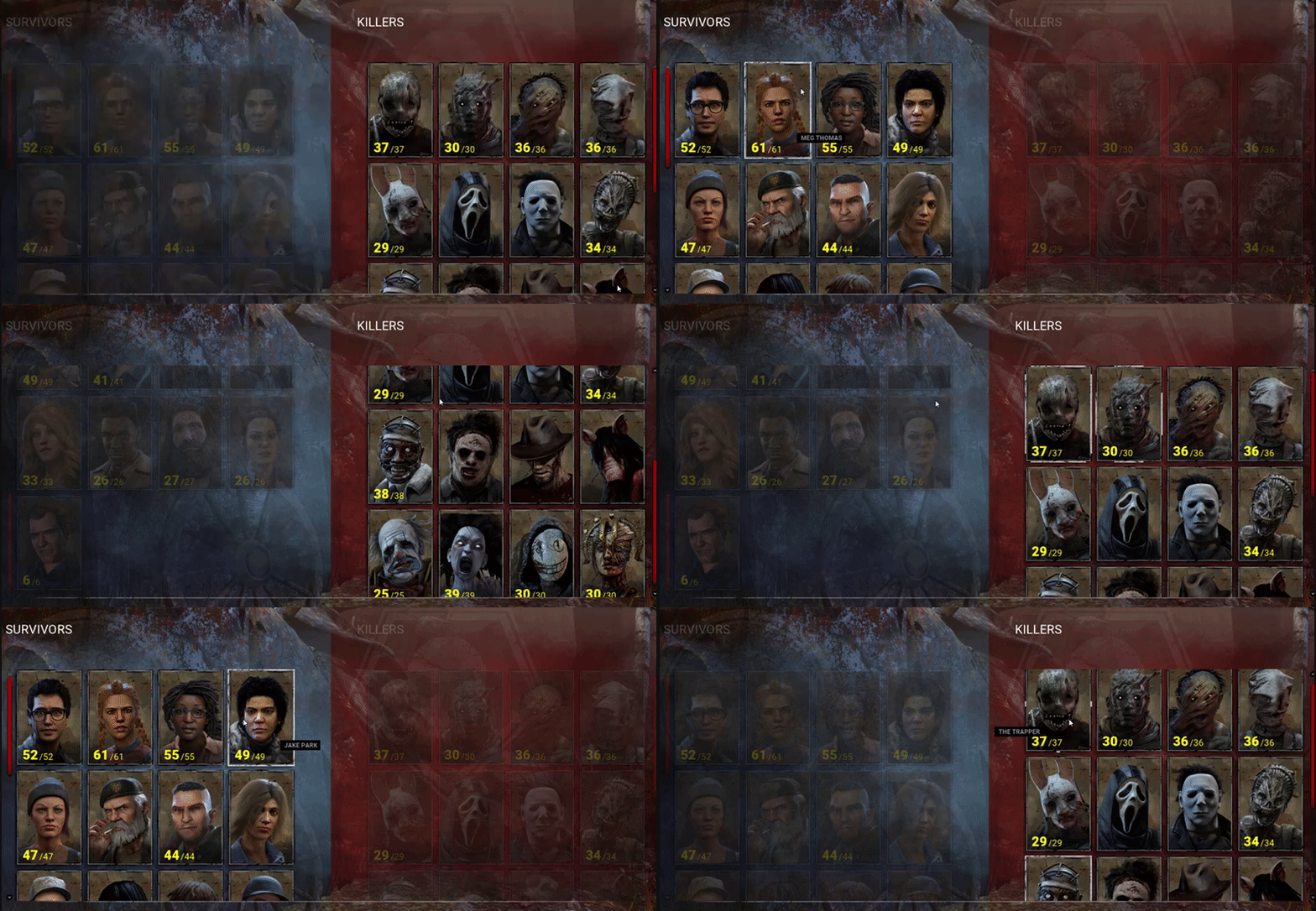
Method №1: Fiddler (easy)
1. Download and install latest version of Fiddler Web Debugging Proxy. Suggest using Telerik official website.
2. Launch Fiddler, at the top left corner click Tools - Options
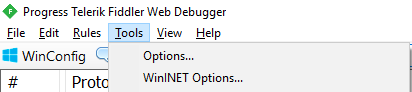
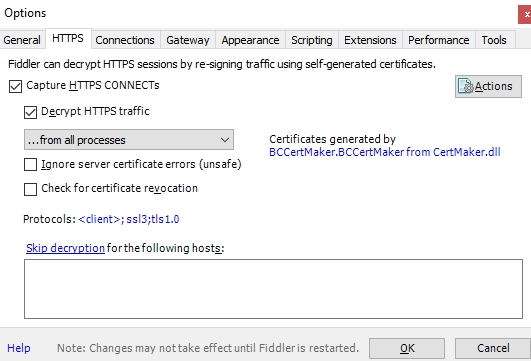
3. Go to HTTPS, Check "Capture HTTPS CONNECTs" and "Decrypt HTTPS traffic" boxes. If it's your first Fiddler usage it will ask you to install a certificate. As Fiddler accurately say, "This is generally safe" but i would recommend to do your own research before continuing.
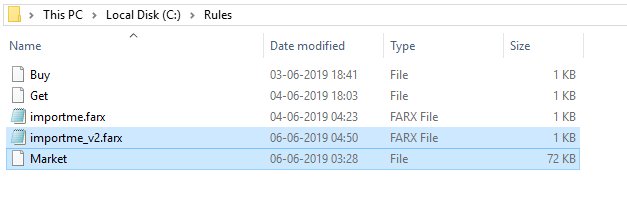
4. Download attachment, extract it directly to C: drive. As a final result you should get folder "Rules" with two files: Market and importme_v2. Correct path is important. If you used bloodpoints exploit you should have 5 files in total.
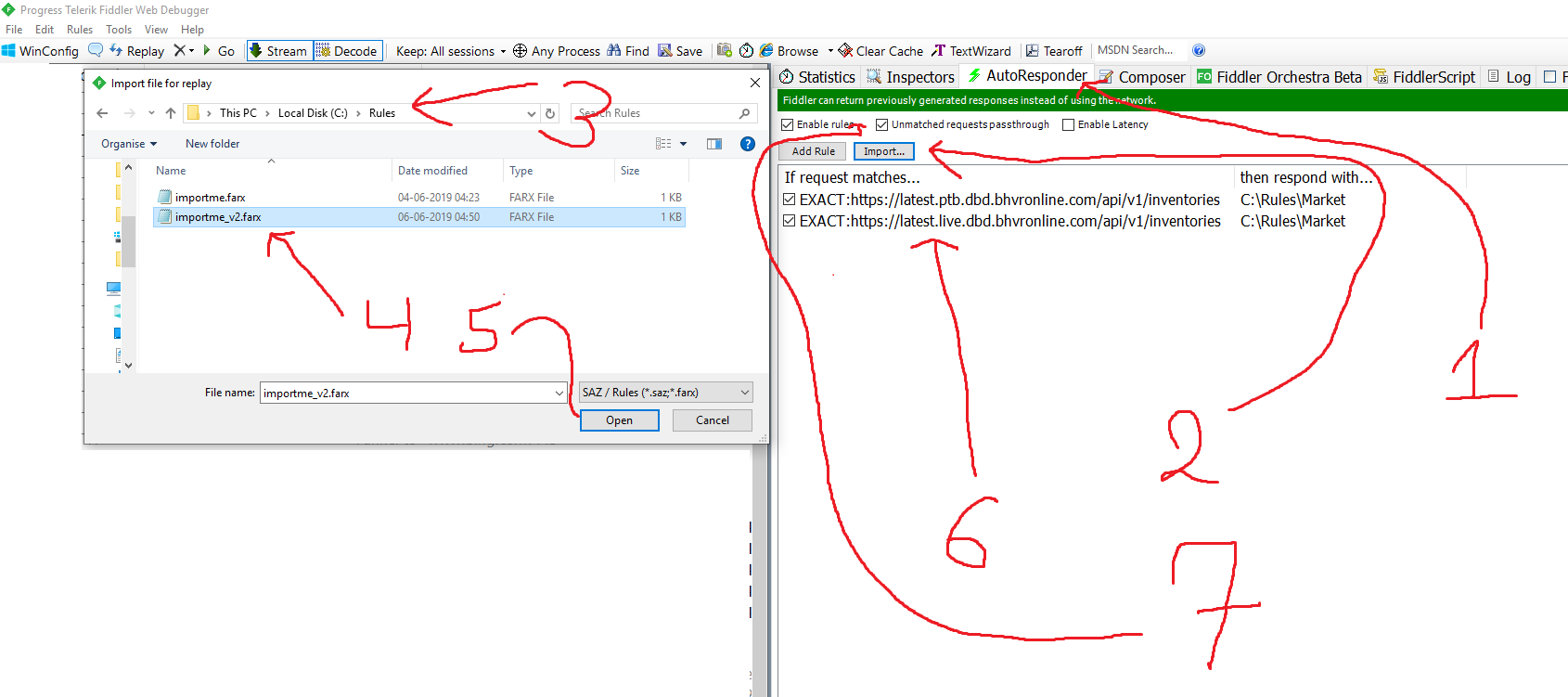
5. Back to the Fiddler, go to AutoResponder, click Import, go to This PC - Local Disk ( C: ) - Rules - importme_v2.farx and click Open. Two rules should appear in AutoResponder tab. Check "Enable rules" and "Unmatched requests passthrough" boxes. If you used bloodpoints exploit you should have 4 rules in total, feel free to disable two initial rules.
6. We have finished the setup. Launch Dead By Daylight, go to Store, Characters, enjoy the result:
Method №2: HTTP Debugger (medium)
1. Download attachment, extract it.
2. Download and install HTTP Debugger from their official website. Trial version is enough.
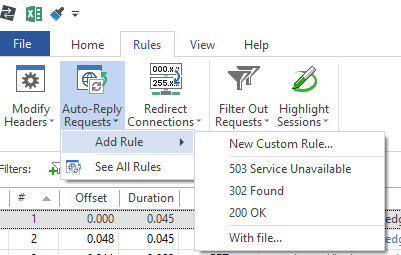
3. Go to Rules>>Auto-Reply Requests>>Add Rule>>With File...>>Choose "Market" file
4. "Auto-Reply Rule" window will appear. Paste this code to the string next to "Exactly Matches":
Moving to the bottom of the "Auto-Reply Rule" window, locate "Respond With File" option, grey square with three dots inside, click it and navigate to your Rules folder, choose "Market" file and click Open:
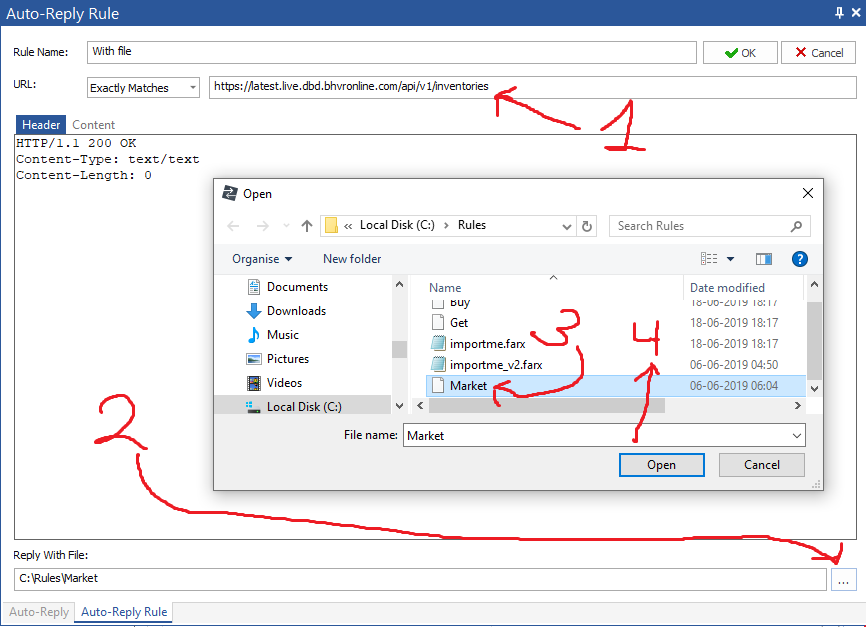
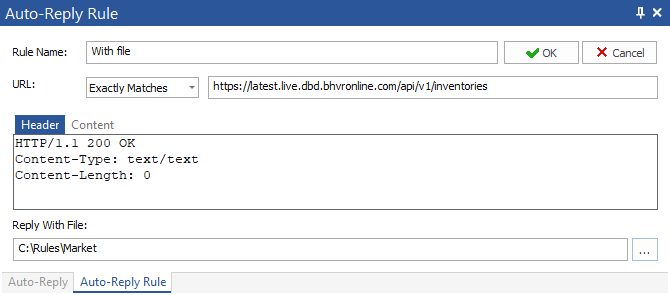
Final result should look exactly like this, click OK after:
5. We have finished the setup. Launch Dead By Daylight, go to Store, Characters, enjoy the result:
Troubleshoot and Notes
1. My Store is empty, all my items vanished - you should have exactly one rule in the Debugger, delete additional rules.
2. DBD says i'm offline - Reinstall Fiddler certificate, launch Fiddler/Debugger as admin, disable AV, launch Fiddler/Debugger before launching DBD.
3. Error code 8012 means you made a mistake during installation, repeat the process, delete unused rules in Debugger.
4(1). I used Method №1 but no changes in game - You should have extracted folder directly to C: drive.
4(2). I used Method №2 but no changes in game - Triple check you pasted correct code depending on live/ptb game version.
5. How to get back my normal inventory? - Restart your PC.
6. Are those changes permanent? - Cosmetics - no. Leveling characters - Yes. Teachable perks - Yes.
7. Can i level killer/survivor and get his/her teachable? - Yes, you can.
8. Why i can't wear certain items? - Hardcoded into the game client, no easy way to bypass it.
9. Is it safe? - Yes, currently and for the past year (Patch 2.0-2.7.1) it is/was safe. Don't want to get banned - don't cheat.
10. What happens if you keep the cosmetics active and log in without fiddler? - Cosmetics will reset.
11. What exclusives can you get with this? - Golden Feng, skull Dwight.
Credits
Credits go @bhvR_LOLteractive for implementing in-game market in a worst possible way.
Huge thanks to @xoreaxeax for useful advises and general idea. This guy is a gift to mpgh community.
Virus Total
https://www.virustotal.com/gui/file/...de37/detection
Enjoy!
№1 Extract attached folder directly to C: drive>>Fiddler>>AutoResponder>>Import>>importme_v2 .farx>>Launch DBD
№2 Extract attached folder>>HTTP Debugger>>Add Rule>>Custom Rule>>
Code:
^GET.+/api/v1/inventories.+HTTP/
Code:
Host:.*latest\.live\.dbd\.bhvronline\.com
To make it work on PTB use this code for the second string
Code:
Host:.*latest\.ptb\.dbd\.bhvronline\.com
Method №1: Fiddler (easy)
1. Download and install latest version of Fiddler Web Debugging Proxy. Suggest using Telerik official website.
2. Launch Fiddler, at the top left corner click Tools - Options
3. Go to HTTPS, Check "Capture HTTPS CONNECTs" and "Decrypt HTTPS traffic" boxes. If it's your first Fiddler usage it will ask you to install a certificate. As Fiddler accurately say, "This is generally safe" but i would recommend to do your own research before continuing.
4. Download attachment, extract it directly to C: drive. As a final result you should get folder "Rules" with two files: Market and importme_v2. Correct path is important. If you used bloodpoints exploit you should have 5 files in total.
5. Back to the Fiddler, go to AutoResponder, click Import, go to This PC - Local Disk ( C: ) - Rules - importme_v2.farx and click Open. Two rules should appear in AutoResponder tab. Check "Enable rules" and "Unmatched requests passthrough" boxes. If you used bloodpoints exploit you should have 4 rules in total, feel free to disable two initial rules.
6. We have finished the setup. Launch Dead By Daylight, go to Store, Characters, enjoy the result:
Method №2: HTTP Debugger (medium)
1. Download attachment, extract it.
2. Download and install HTTP Debugger from their official website. Trial version is enough.
3. Go to Rules>>Auto-Reply Requests>>Add Rule>>With File...>>Choose "Market" file
4. "Auto-Reply Rule" window will appear. Paste this code to the string next to "Exactly Matches":
Code:
https://latest.live.dbd.bhvronline.com/api/v1/inventories
Final result should look exactly like this, click OK after:
5. We have finished the setup. Launch Dead By Daylight, go to Store, Characters, enjoy the result:
Troubleshoot and Notes
1. My Store is empty, all my items vanished - you should have exactly one rule in the Debugger, delete additional rules.
2. DBD says i'm offline - Reinstall Fiddler certificate, launch Fiddler/Debugger as admin, disable AV, launch Fiddler/Debugger before launching DBD.
3. Error code 8012 means you made a mistake during installation, repeat the process, delete unused rules in Debugger.
4(1). I used Method №1 but no changes in game - You should have extracted folder directly to C: drive.
4(2). I used Method №2 but no changes in game - Triple check you pasted correct code depending on live/ptb game version.
5. How to get back my normal inventory? - Restart your PC.
6. Are those changes permanent? - Cosmetics - no. Leveling characters - Yes. Teachable perks - Yes.
7. Can i level killer/survivor and get his/her teachable? - Yes, you can.
8. Why i can't wear certain items? - Hardcoded into the game client, no easy way to bypass it.
9. Is it safe? - Yes, currently and for the past year (Patch 2.0-2.7.1) it is/was safe. Don't want to get banned - don't cheat.
10. What happens if you keep the cosmetics active and log in without fiddler? - Cosmetics will reset.
11. What exclusives can you get with this? - Golden Feng, skull Dwight.
Credits
Credits go @bhvR_LOLteractive for implementing in-game market in a worst possible way.
Huge thanks to @xoreaxeax for useful advises and general idea. This guy is a gift to mpgh community.
Virus Total
https://www.virustotal.com/gui/file/...de37/detection
Enjoy!

 Originally Posted by SancioFancio