Home › Forum › MultiPlayer Game Hacks & Cheats › Steam Games Hacks & Cheats › Dead by Daylight Hacks & Cheats › Dead by Daylight – WH/ESP (for Killers, reveal all Survivors' auras) | 5.4.2
 Dead by Daylight – WH/ESP (for Killers, reveal all Survivors' auras) | 5.4.2
Dead by Daylight – WH/ESP (for Killers, reveal all Survivors' auras) | 5.4.2
This method of wallhack is to replace one string line in the game file – pakchunk0-WindowsNoEditor.
For this you need a hex editor and the Killer perk calling Zanshin Tactics (The Oni).

I will use HxD – freeware hex editor, I recommend it to you too, but you can also use another hex editor if you like.
------------------------------------------------------------
All actions were performed on the Steam version of the game. On other versions, such as Microsoft Store or Epic Games, the method may be different.
Will Easy Anti-Cheat detect this? No, it won't! I played with this method all week and at one time I did not get a message like: "EAC has detected that game files have been modified".
I hope the developers will patch this method, because it is too easy to execute and it is also not detected by the game's anti-cheat. But for now, enjoy!
Let's start!
Ready!
Now you will always see the all Survivors' auras within 24/28/32 meters (depending on the level of the perk) from your position.
Result -->


For this you need a hex editor and the Killer perk calling Zanshin Tactics (The Oni).
I will use HxD – freeware hex editor, I recommend it to you too, but you can also use another hex editor if you like.
------------------------------------------------------------
All actions were performed on the Steam version of the game. On other versions, such as Microsoft Store or Epic Games, the method may be different.
Will Easy Anti-Cheat detect this? No, it won't! I played with this method all week and at one time I did not get a message like: "EAC has detected that game files have been modified".
I hope the developers will patch this method, because it is too easy to execute and it is also not detected by the game's anti-cheat. But for now, enjoy!
Let's start!
Steps
1. Launch the hex editor.
2. In the hex editor: File -> Open -> go to the following path ...steamapps\common\Dead by Daylight\DeadByDaylight\Content\Paks.
3. Choose the following file: pakchunk0-WindowsNoEditor.
4. In the hex editor press the keyboard shortcuts Ctrl + F, the search window will open.
5. In the "Text-string" tab in the "Search for" field, enter the word: BP_ZanshinTactics. Also, in the "Search direction" panel, select the "All" checkbox and press OK button.

6. After finding this string line, scroll down a bit and find the following string line: GameplayModifierType.RevealBreakableWallsInRange

7. Highlight the following string line: RevealBreakableWallsInRange
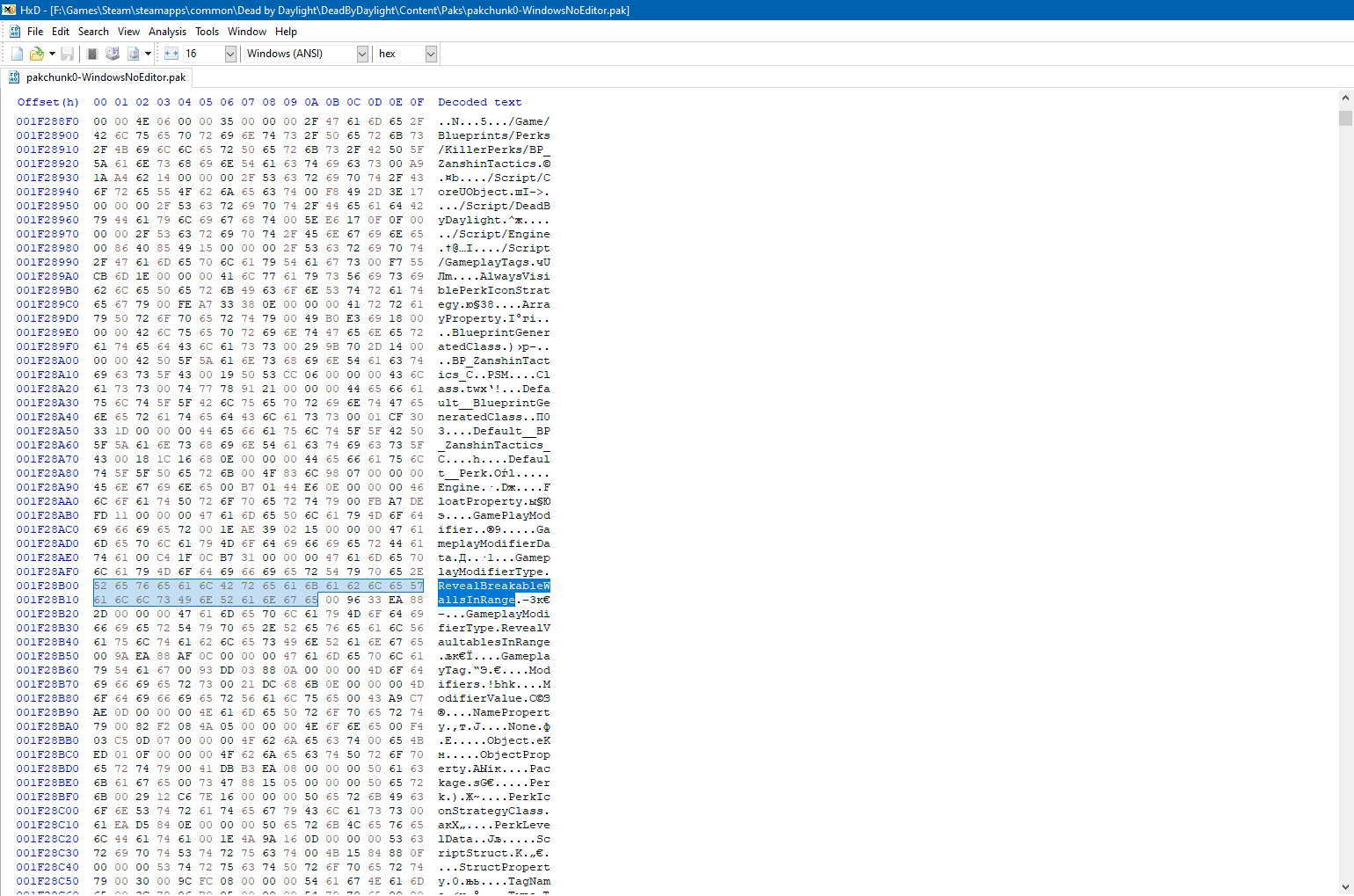
As you can see, in hexadecimal (the panel on the left), this string line starts at byte 52 and ends at byte 65.
8. Place the cursor on byte 52 and overwrite all values with zeros, up to 65 byte. It should look like the screenshot:
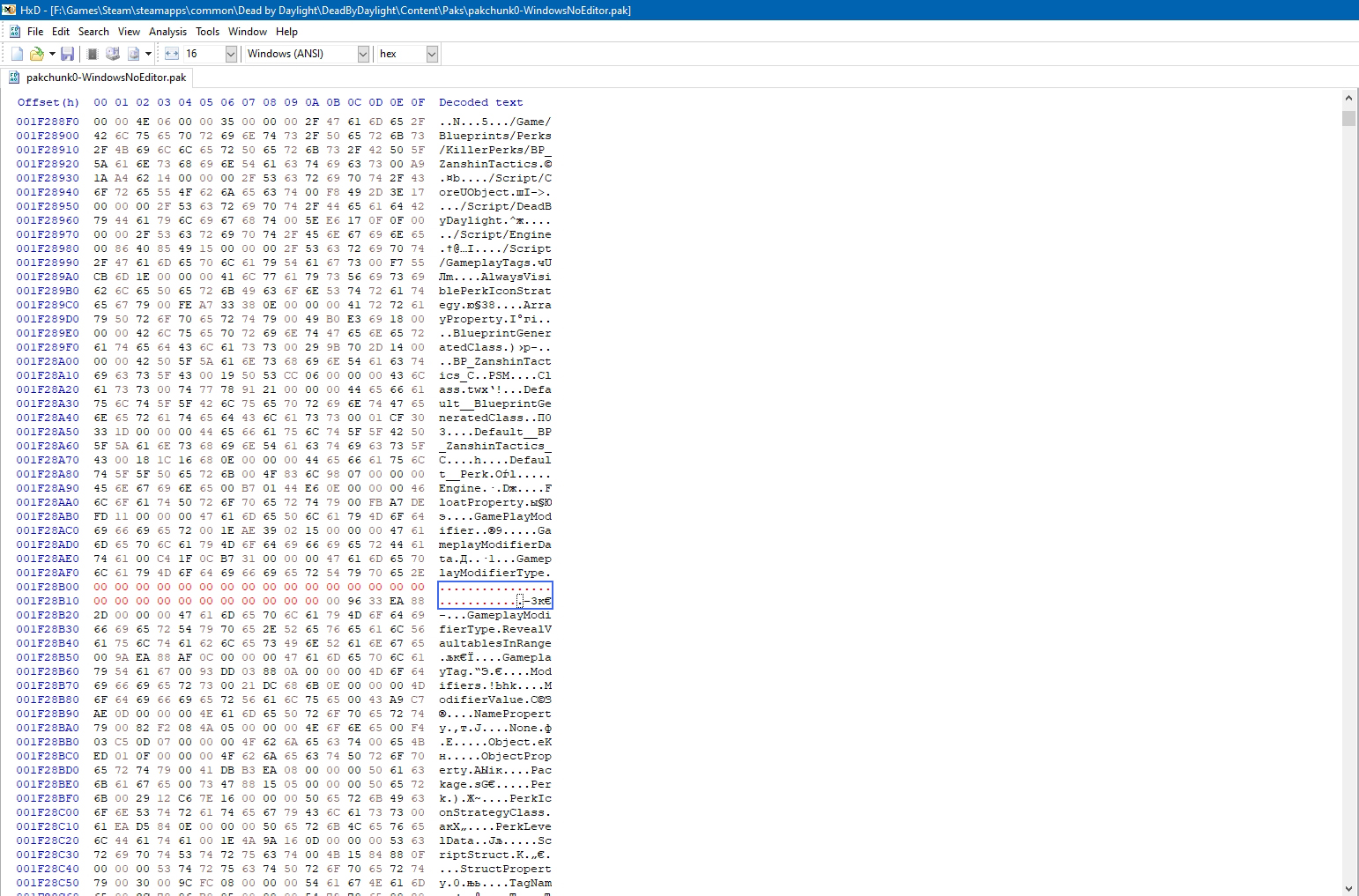
9. In the "Decoded text" panel (the panel on the right), place the cursor on the red dot, that is, after the following letters: "difierType."(so that byte 00 is highlighted on the left, after byte 2E) as in the screenshot:

10. Now copy this text – RevealAllSurvivorsInRange and mouse right click on the place where you had the cursor positioned in the hex editor and select "Paste write".

You should have something like this:

Now in the hex editor: File -> Save. When saving, a window will pop up about creating a backup copy of the file, you can undo this action.
2. In the hex editor: File -> Open -> go to the following path ...steamapps\common\Dead by Daylight\DeadByDaylight\Content\Paks.
3. Choose the following file: pakchunk0-WindowsNoEditor.
4. In the hex editor press the keyboard shortcuts Ctrl + F, the search window will open.
5. In the "Text-string" tab in the "Search for" field, enter the word: BP_ZanshinTactics. Also, in the "Search direction" panel, select the "All" checkbox and press OK button.
6. After finding this string line, scroll down a bit and find the following string line: GameplayModifierType.RevealBreakableWallsInRange
7. Highlight the following string line: RevealBreakableWallsInRange
As you can see, in hexadecimal (the panel on the left), this string line starts at byte 52 and ends at byte 65.
8. Place the cursor on byte 52 and overwrite all values with zeros, up to 65 byte. It should look like the screenshot:
9. In the "Decoded text" panel (the panel on the right), place the cursor on the red dot, that is, after the following letters: "difierType."(so that byte 00 is highlighted on the left, after byte 2E) as in the screenshot:
10. Now copy this text – RevealAllSurvivorsInRange and mouse right click on the place where you had the cursor positioned in the hex editor and select "Paste write".
You should have something like this:
Now in the hex editor: File -> Save. When saving, a window will pop up about creating a backup copy of the file, you can undo this action.
Ready!
Now you will always see the all Survivors' auras within 24/28/32 meters (depending on the level of the perk) from your position.
Result -->
 Originally Posted by johnmason

