 How to Change Your Grades so You Don't Get an Ass Whupping
How to Change Your Grades so You Don't Get an Ass Whupping
Alright kids, today I will be teaching you how to visually change your grades on the internet so you don't get your ass beat. This only works for slow parents who don't know much about internet stuff. Better yet, just print that shit out and profit.
What You Need
• A Brain
• Firefox or Google Chrome
• Fire Bug Addon for Firefox
Steps Using Google Chrome
1. Open your Online Grades. For me my school uses Schoolloop. However, this method works 99% of the time on any site
2. Press the F12 Button on your Keyboard. Should look a little something like this:

3. Look down on at the Console (This is what you call the F12 Menu Thingy) and find a little magnifying glass. It should be labeled: Inspect Element

4. Hover your mouse over your grade or percentage and click.
5. On the line of coding a certain part should be highlighted. On the Left of the code there should be an arrow pointing to it. You now want to "Expand the Code" by clicking on it.
6. Scroll down until you find the percentage or grade letter listed in the "Expanded Code". Double Click and change the value.
7. Hit Enter and voilà! The grade or value should be changed. To remove the Console hit F12 again and it should be gone. Show your grades to your parents or print it out!
Steps Using Firefox
1. Basically its almost the same thing as the Google Chrome method but Firefox doesn't come with the F12 feature. To get that feature search up this add on: Firebug
2. Just Right Click and Inspect Element like the video tutorial for the Google Chrome Version.
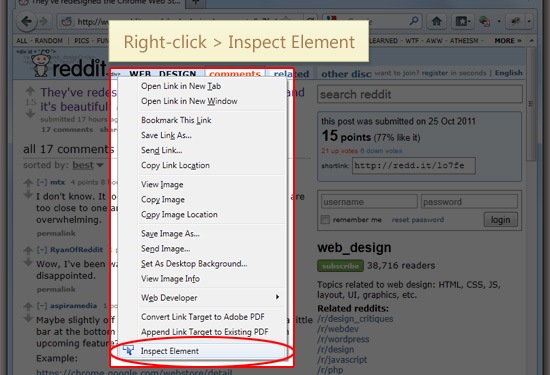
3. Follow the rest of the steps and your good to go!
Here are the steps for you lazy people who don't want to scroll up. You can thank me later.. (Or Below)
The Console is different from Google Chrome's but its still the same principles.
That basically concludes my tutorial. For those who of you who already knew this... Meh, this is for the people who didn't. If you tried this and it didn't work for you, sorry, at least you tried.
@Flengo and @BACKD00R Sticky this so my fellow hard working students can save their butts.
Good luck my friends!
Education is what remains after one has forgotten what one has learned in school.
- Albert Einstein
What You Need
• A Brain
• Firefox or Google Chrome
• Fire Bug Addon for Firefox
Steps Using Google Chrome
1. Open your Online Grades. For me my school uses Schoolloop. However, this method works 99% of the time on any site
2. Press the F12 Button on your Keyboard. Should look a little something like this:
3. Look down on at the Console (This is what you call the F12 Menu Thingy) and find a little magnifying glass. It should be labeled: Inspect Element
Example
4. Hover your mouse over your grade or percentage and click.
5. On the line of coding a certain part should be highlighted. On the Left of the code there should be an arrow pointing to it. You now want to "Expand the Code" by clicking on it.
6. Scroll down until you find the percentage or grade letter listed in the "Expanded Code". Double Click and change the value.
7. Hit Enter and voilà! The grade or value should be changed. To remove the Console hit F12 again and it should be gone. Show your grades to your parents or print it out!
Video Tutorial
Steps Using Firefox
1. Basically its almost the same thing as the Google Chrome method but Firefox doesn't come with the F12 feature. To get that feature search up this add on: Firebug
2. Just Right Click and Inspect Element like the video tutorial for the Google Chrome Version.
Example
3. Follow the rest of the steps and your good to go!
Here are the steps for you lazy people who don't want to scroll up. You can thank me later.. (Or Below)
Steps
3. Look down on at the Console (This is what you call the F12 Menu Thingy) and find a little magnifying glass. It should be labeled: Inspect Element
4. Hover your mouse over your grade or percentage and click.
5. On the line of coding a certain part should be highlighted. On the Left of the code there should be an arrow pointing to it. You now want to "Expand the Code" by clicking on it.
6. Scroll down until you find the percentage or grade letter listed in the "Expanded Code". Double Click and change the value.
7. Hit Enter and voilà! The grade or value should be changed. To remove the Console hit F12 again and it should be gone. Show your grades to your parents or print it out!
Example
4. Hover your mouse over your grade or percentage and click.
5. On the line of coding a certain part should be highlighted. On the Left of the code there should be an arrow pointing to it. You now want to "Expand the Code" by clicking on it.
6. Scroll down until you find the percentage or grade letter listed in the "Expanded Code". Double Click and change the value.
7. Hit Enter and voilà! The grade or value should be changed. To remove the Console hit F12 again and it should be gone. Show your grades to your parents or print it out!
The Console is different from Google Chrome's but its still the same principles.
That basically concludes my tutorial. For those who of you who already knew this... Meh, this is for the people who didn't. If you tried this and it didn't work for you, sorry, at least you tried.
@Flengo and @BACKD00R Sticky this so my fellow hard working students can save their butts.
Good luck my friends!
Education is what remains after one has forgotten what one has learned in school.
- Albert Einstein

 Originally Posted by Rance-Sama


