
Multi-Script ||Color Triggerbot||Strafe Assist||Auto Strafe||Bhop||+ More [NightWare]
NightWare public Rel 2.0

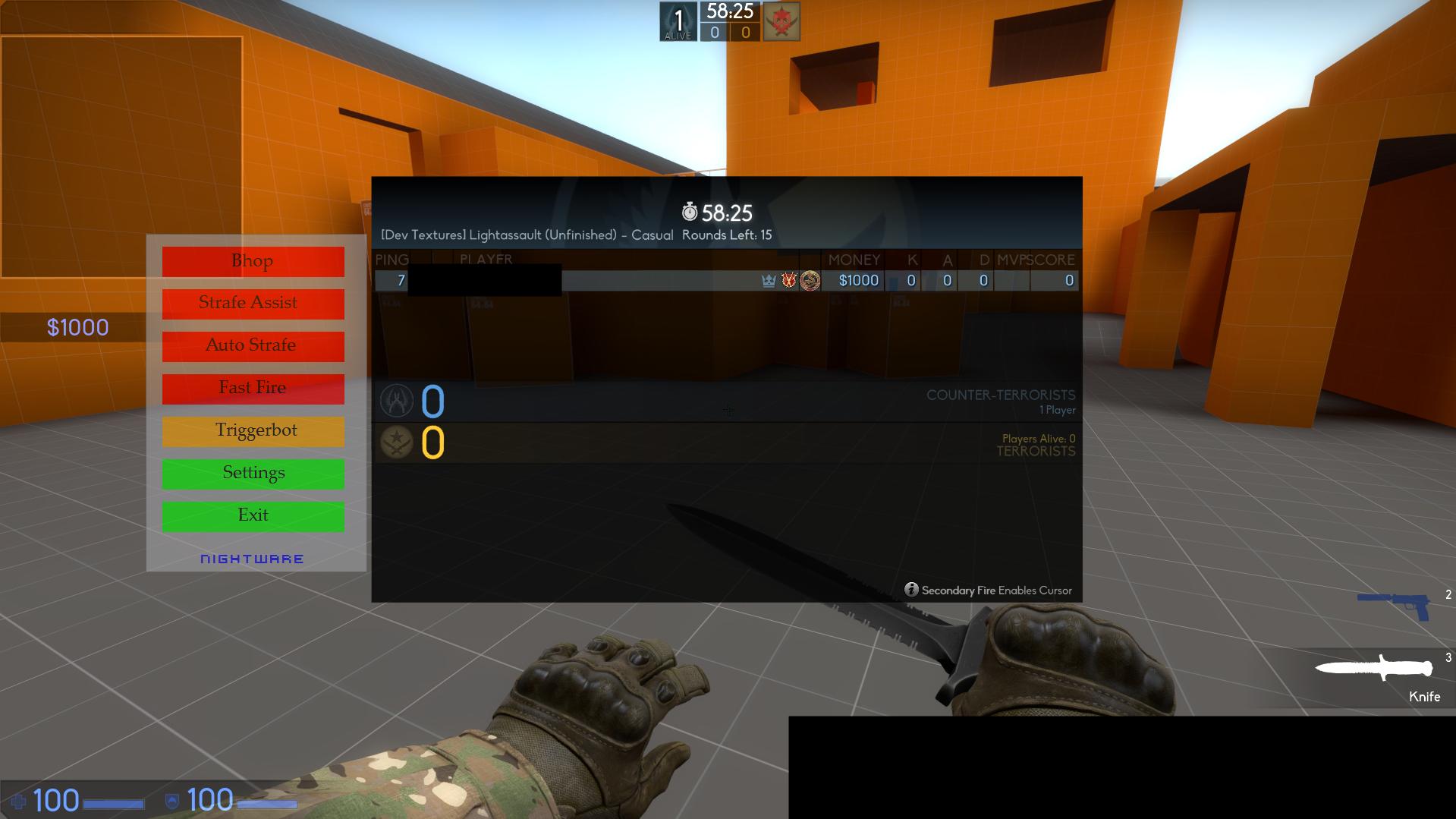
Features
- Color Triggerbot
- Strafe Assist
- Auto Strafe (LJ)
- Bhop
- Fast Fire
How to use:
1) Edit settings in the NightWareSettings.txt
2) run the NightWare Public Rel 2.0 exe
3) Open up CS:GO and hold down tab
Use arrow key up/down to select a script, and use enter to enable/disable it.
Be sure to type unbind downarrow;unbind uparrow;unbind enter in console.
FAQ
Virus scans:
virusscan.jotti.org/en-US/filescanjob/hhwlsw28wx
virustotal.com/nl/file/c2cc77006cc38f62ec60a8ea0a993b34311d063c6c647eba7c 702b5a8d6a220c/analysis/1455972958/
- - NOTE - -
Note: If you want to change the Bhop settings ingame you have to turn off and on bhop before it takes effect.
Features
- Color Triggerbot
- Strafe Assist
- Auto Strafe (LJ)
- Bhop
- Fast Fire
How to use:
1) Edit settings in the NightWareSettings.txt
2) run the NightWare Public Rel 2.0 exe
3) Open up CS:GO and hold down tab
Use arrow key up/down to select a script, and use enter to enable/disable it.
Be sure to type unbind downarrow;unbind uparrow;unbind enter in console.
FAQ
FAQ
- I get the error "An error occurred when reading the settings file. Default settings will be loaded."
Make sure the NightWareSettings.txt is in the same folder as the script is.
- Bhop is not working
Run as admin.
- The color triggerbot doesn't shoot
Make sure you are in windowed mode.
- I can move my mouse when I use the color triggerbot
Make sure m_rawinput is 0
- The color triggerbot shoots randomly
Set the tolerance a bit higher in the NightWareSettings.txt
- Fast Fire isn't fast
Set the delay lower in the NightWareSettings.txt
- The bhops are not consistant
Keep in mind this is a script. But you can set the delay higher or lower in the NightWareSettings.txt and find your "sweet spot"
- Auto Strafe looks wierd
Change the settings in NightWareSettings.txt as the default settings are not good. It's up to you to find the right values.
- The script doesn't work at all and says "Script Paused"
Right click the icon in hidden icons again, and uncheck "Script Paused".
If your question is not here, contact me on skype.
Make sure the NightWareSettings.txt is in the same folder as the script is.
- Bhop is not working
Run as admin.
- The color triggerbot doesn't shoot
Make sure you are in windowed mode.
- I can move my mouse when I use the color triggerbot
Make sure m_rawinput is 0
- The color triggerbot shoots randomly
Set the tolerance a bit higher in the NightWareSettings.txt
- Fast Fire isn't fast
Set the delay lower in the NightWareSettings.txt
- The bhops are not consistant
Keep in mind this is a script. But you can set the delay higher or lower in the NightWareSettings.txt and find your "sweet spot"
- Auto Strafe looks wierd
Change the settings in NightWareSettings.txt as the default settings are not good. It's up to you to find the right values.
- The script doesn't work at all and says "Script Paused"
Right click the icon in hidden icons again, and uncheck "Script Paused".
If your question is not here, contact me on skype.
Virus scans:
virusscan.jotti.org/en-US/filescanjob/hhwlsw28wx
virustotal.com/nl/file/c2cc77006cc38f62ec60a8ea0a993b34311d063c6c647eba7c 702b5a8d6a220c/analysis/1455972958/
- - NOTE - -
Note: If you want to change the Bhop settings ingame you have to turn off and on bhop before it takes effect.
 Originally Posted by AlvesFreitas


