HelpCant launch GTA V steam

Posts 1–13 of 13 · Page 1 of 1
Cant launch GTA V steam
So I bought this game legitemately from g2a and it's been giving me this message for months now and I don't know what the problem is. I've never been able to launch this game. I tried contacting rockstar but they failed to help me. I own the steam version. Thanks
c19dbf692a66b6ea53254aa6cf5f5659.png398 KB · 23 downloads
Have you tried launching in offline mode then once in single player turn back your internet connection and see what happens?
If not just buy a cheap alt on the market :/
Quote Originally Posted by OfficialSyntaxx View Post
Have you tried launching in offline mode then once in single player turn back your internet connection and see what happens?
If not just buy a cheap alt on the market :/
Well I couldn't even launch it in singleplayer mode with this, however I fixed it by lowering my internet speed to 10 mpbs download. However now my online doesn't work it basically tells me that they're servers are unavaliable and that my nat type is strict and udp blocked.
Must be a problem with your router or ISP if Online won't even load. What OS are you using?
Quote Originally Posted by Lupin View Post
Must be a problem with your router or ISP if Online won't even load. What OS are you using?
I'm at Windows 10.

- - - Updated - - -

Quote Originally Posted by Nyaro View Post
Pretty sure i know what the problem is.
Your Nat Type is strict Or closed.
What I Suggest is that you Change it to open (tuts on youtube)
And that you portforward your WiFi. So you can unblock the UDP Or if unblocking doesn't work you can Change it to TCP
tuts on youtube aswell. You shouldnt have any problems with it since its very easy
I've found out that my nat type is strict/closed however I haven't yet to figure out how to change it. I sat for about an hour and a half but still didn't manage to change it. Also what do you mean by portforwarding my wifi? And how can I change it to tcp? Thanks in advance
Quote Originally Posted by Anonymasnubben View Post
I'm at Windows 10.

- - - Updated - - -


I've found out that my nat type is strict/closed however I haven't yet to figure out how to change it. I sat for about an hour and a half but still didn't manage to change it. Also what do you mean by portforwarding my wifi? And how can I change it to tcp? Thanks in advance
open cmd.
type ''ipconfig''
search for your Gateway.
Type that number in your browser
now they ask for a user name and password which is most likely admin admin
if not ask the provider or ask if some1 from your family changed it.
after u logged in a page should open up where you can change everything.
But srsly
just type how to portforward on youtube and they explain everything
Quote Originally Posted by Anonymasnubben View Post
I'm at Windows 10.

- - - Updated - - -


I've found out that my nat type is strict/closed however I haven't yet to figure out how to change it. I sat for about an hour and a half but still didn't manage to change it. Also what do you mean by portforwarding my wifi? And how can I change it to tcp? Thanks in advance
Did you try messing with your router settings? Go to What is my ip, find your IP, log into your router by pasting your ip into the www bar at the top and when prompted, username and password should be "admin" for both of them. Then if you have the option, go to advanced LAN and enable UPNP (Universal Plug & Play). That's how I did it with Black Ops 3, hopefully the same will work for GTA. Also, if you want to port forward, either follow their guide by finding your router in the router list or download their application and it should let you do it quite easily. You should also try making your IP static by using their application.
Quote Originally Posted by Lupin View Post
Did you try messing with your router settings? Go to What is my ip, find your IP, log into your router by pasting your ip into the www bar at the top and when prompted, username and password should be "admin" for both of them. Then if you have the option, go to advanced LAN and enable UPNP (Universal Plug & Play). That's how I did it with Black Ops 3, hopefully the same will work for GTA. Also, if you want to port forward, either follow their guide by finding your router in the router list or download their application and it should let you do it quite easily. You should also try making your IP static by using their application.
In order to connect to your router you can't just type in your external ip, you have to type in your default gateway at least in my case. Also I do have experience with port forwarding and I forwarded the port 6672 at tcp/udp as well as 61455:61458 at tcp/udp. On top of that I also enabled UPNP and I still get the same issue. Also i've got pfsense.
Quote Originally Posted by Anonymasnubben View Post
In order to connect to your router you can't just type in your external ip, you have to type in your default gateway at least in my case. Also I do have experience with port forwarding and I forwarded the port 6672 at tcp/udp as well as 61455:61458 at tcp/udp. On top of that I also enabled UPNP and I still get the same issue. Also i've got pfsense.
Then you just need to change your nat type which you should be able to change it if you open the browser menu with your gateway
Atleast i am able to do that.
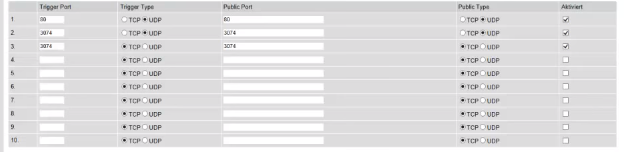
Here are my settings.
Quote Originally Posted by Nyaro View Post
Then you just need to change your nat type which you should be able to change it if you open the browser menu with your gateway
Atleast i am able to do that.
Here are my settings.
Do you know how to change your nat type with pfsense by any chance?
Quote Originally Posted by Anonymasnubben View Post
Do you know how to change your nat type with pfsense by any chance?
No clue... sorry
Quote Originally Posted by Anonymasnubben View Post
In order to connect to your router you can't just type in your external ip, you have to type in your default gateway at least in my case. Also I do have experience with port forwarding and I forwarded the port 6672 at tcp/udp as well as 61455:61458 at tcp/udp. On top of that I also enabled UPNP and I still get the same issue. Also i've got pfsense.
What worked for someone I know is: Disable UPNP, Apply, Enable, Apply, reset the router and test it out. It may not work for everyone, but give it a try
Quote Originally Posted by Anonymasnubben View Post
So I bought this game legitemately from g2a and it's been giving me this message for months now and I don't know what the problem is. I've never been able to launch this game. I tried contacting rockstar but they failed to help me. I own the steam version. Thanks
Pretty sure i know what the problem is.
Your Nat Type is strict Or closed.
What I Suggest is that you Change it to open (tuts on youtube)
And that you portforward your WiFi. So you can unblock the UDP Or if unblocking doesn't work you can Change it to TCP
tuts on youtube aswell. You shouldnt have any problems with it since its very easy
Posts 1–13 of 13 · Page 1 of 1

Post a Reply

Similar Threads

Talk with us