DIY Laggswitch V2 - With 2 new methods aswell.
People were asking for the laggswitch to block the Game individually, this one does that.
I had also uploaded the wrong file in the first one. (the code was right)
This is a continue on from:
http://www.mpgh.net/forum/showthread.php?t=1252230
Note: you will need to change the files path in the Prep.bat
Note: I have been using the firewall method since the original post, and am yet to be banned, make sure to keep changing your CHANGEME all the time.
Note: This method will not work unless u are using windows firewall to manage your network, if you have disabled it in the past, make sure to enable it so this method will work.
Note: If you want to avoid being banned, you will need to change CHANGEME in any of the files.
Virus Scans:
The Difference between the FirewallOld and Firewall is that the new makes a firewall rule that directly targets TSLGame.exe (make sure to change the path to that), this way it will not disable anything else when you run it, so you can continue to talk to your friends on voice communications, all whilst using it.
Pros and Cons of each method:
Pros:
- Is fastest to Disconnect and Re-connect.
Cons:
- Is currently the most used method, and has work to do to set it up.
Side note:
- Firewall old takes less work to set up.
Pros:
- Medium Speed Re-connect.
- Is used less than firewall method.
- Easy to setup, just change CHANGEME.
Cons:
- Is slower than Firewall method to Re-Connect.
Pros:
- Is used the least out of all available methods.
- Easy to setup, just change CHANGEME.
Cons:
- Takes the longest to Re-Connect.
I would recommend using the new Firewall method as it is the only one that disables JUST the TSLGame.exe and BEServices.exe connection and not your connection to voice coms.
Source Code:
Instructions:
Choose which method you are going to use.
Right Click the Prep.bat File
Click Edit
Change all CHANGEME to Whatever you choose (make sure ALL CHANGEME's are change to the same word)
If using Firewall: Change all CHANGEMEDIFFERENT to Whatever you choose, make sure its different to CHANGEME.
If using Firewall: Change Path/To/TSLGame.exe to your path where TSLGame.exe is installed.
Do the Same for the lagg.bat file
Run the Prep.bat
Use your keyboard tools to set a key for the bat to run or you can create a shortcut in windows and give the scripts a shortcut key:
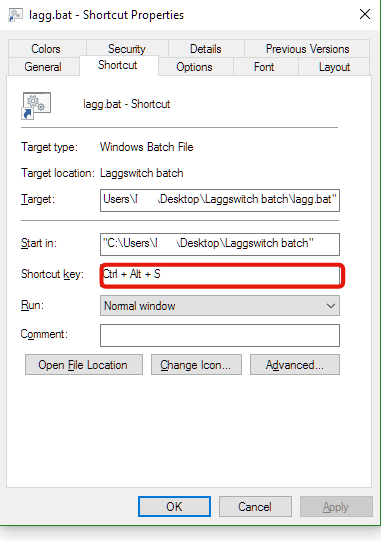
The First time you run the lagg.bat it will disable your connection,
The Second time it is run, it will re-enable your connection.
The same GIF is back to demonstrate it:

I had also uploaded the wrong file in the first one. (the code was right)
This is a continue on from:
http://www.mpgh.net/forum/showthread.php?t=1252230
Note: you will need to change the files path in the Prep.bat
Note: I have been using the firewall method since the original post, and am yet to be banned, make sure to keep changing your CHANGEME all the time.
Note: This method will not work unless u are using windows firewall to manage your network, if you have disabled it in the past, make sure to enable it so this method will work.
Note: If you want to avoid being banned, you will need to change CHANGEME in any of the files.
Virus Scans:
The Difference between the FirewallOld and Firewall is that the new makes a firewall rule that directly targets TSLGame.exe (make sure to change the path to that), this way it will not disable anything else when you run it, so you can continue to talk to your friends on voice communications, all whilst using it.
Pros and Cons of each method:
Firewall
Pros:
- Is fastest to Disconnect and Re-connect.
Cons:
- Is currently the most used method, and has work to do to set it up.
Side note:
- Firewall old takes less work to set up.
IPConfig
Pros:
- Medium Speed Re-connect.
- Is used less than firewall method.
- Easy to setup, just change CHANGEME.
Cons:
- Is slower than Firewall method to Re-Connect.
Disable Network
Pros:
- Is used the least out of all available methods.
- Easy to setup, just change CHANGEME.
Cons:
- Takes the longest to Re-Connect.
I would recommend using the new Firewall method as it is the only one that disables JUST the TSLGame.exe and BEServices.exe connection and not your connection to voice coms.
Source Code:
Prep.bat (for IPConfig and Disable Network)
Code:
   @EcHo off
SetX CHANGEME 1
IPConfig.bat
Code:
   @EcHo off
IF "%CHANGEME%"=="2" (
	IPConfig /release
	SetX CHANGEME 1
)
IF "%CHANGEME%"=="1" (
	IPConfig /renew
	SetX CHANGEME 2
)
DisableNetwork.bat
Code:
   @EcHo off
IF "%CHANGEME%"=="2" (
	netsh interface set interface name="Local Area Connection" admin=disabled
	netsh interface set interface name="Ethernet" admin=disabled
	netsh interface set interface name="Wireless Network Connection" admin=disabled
	netsh interface set interface name="Wi-Fi" admin=disabled
	SetX CHANGEME 1
)
IF "%CHANGEME%"=="1" (
	netsh interface set interface name="Local Area Connection" admin=enabled
	netsh interface set interface name="Ethernet" admin=enabled
	netsh interface set interface name="Wireless Network Connection" admin=enabled
	netsh interface set interface name="Wi-Fi" admin=enabled
	SetX CHANGEME 2
)
Prep.bat (Firewall)
Code:
   @EcHo off
netsh advfirewall firewall add rule name="CHANGEME" dir="out" action="block" program="Path/To/TSLGame.exe" enable="no"
netsh advfirewall firewall add rule name="CHANGEMEDIFFERENT" dir="out" action="block" program="C:\Program Files (x86)\Common Files\BattlEye\BEService.exe" enable="no"
SetX CHANGEME 1
Firewall.bat
Code:
   @EcHo off
IF "%CHANGEME%"=="2" (
	netsh advfirewall firewall set rule name="CHANGEME" new enable="yes"
	netsh advfirewall firewall set rule name="CHANGEMEDIFFERENT" new enable="yes"
	SetX CHANGEME 1
)
IF "%CHANGEME%"=="1" (
	netsh advfirewall firewall set rule name="CHANGEME" new enable="no"
	netsh advfirewall firewall set rule name="CHANGEMEDIFFERENT" new enable="no"
	SetX CHANGEME 2
)
Prep.bat (FirewallOld)
Code:
   @EcHo off
netsh advfirewall firewall add rule name="CHANGEME" dir="out" action="block" enable="no"
SetX CHANGEME 1
FirewallOld.bat
Code:
   @EcHo off
IF "%CHANGEME%"=="2" (
	netsh advfirewall firewall set rule name="CHANGEME" new enable="yes"
	SetX CHANGEME 1
)
IF "%CHANGEME%"=="1" (
	netsh advfirewall firewall set rule name="CHANGEME" new enable="no"
	SetX CHANGEME 2
)
Instructions:
Choose which method you are going to use.
Right Click the Prep.bat File
Click Edit
Change all CHANGEME to Whatever you choose (make sure ALL CHANGEME's are change to the same word)
If using Firewall: Change all CHANGEMEDIFFERENT to Whatever you choose, make sure its different to CHANGEME.
If using Firewall: Change Path/To/TSLGame.exe to your path where TSLGame.exe is installed.
Do the Same for the lagg.bat file
Run the Prep.bat
Use your keyboard tools to set a key for the bat to run or you can create a shortcut in windows and give the scripts a shortcut key:
Shortcut method
The First time you run the lagg.bat it will disable your connection,
The Second time it is run, it will re-enable your connection.
The same GIF is back to demonstrate it:
 Originally Posted by denemekullanici0007


