Post7DTD 17.4 (b4) Assembly

Posts 1–15 of 43 · Page 1 of 3
7DTD 17.4 (b4) Assembly
Since there is no thread for the this version, here is one.

Here is what i could find for the this version so far, Debug Mode (God Mode, Fly, Teleport, ect.), Creative Mode (Spawn Items), Spawn Entites (Probably doesn't work) and Command Console (Works partially).

Works for non EAC servers.

To install go to C:\SteamLibrary\steamapps\common\7 Days To Die\7DaysToDie_Data\Managed , paste and replace Assembly-CSharp.dll .

Enable Creative and Debug Mode Location:

Enable Creative and Debug Mode Edit:

Enable Command Console Location:

Enable Command Console Edit:


Gameplay Creative Mode:

Gameplay Debug Mode:

Gameplay Spawn Entities:


Virus Scans:
https://virusscan.jotti.org/en-US/fi...job/fymq4rda5f
https://www.virustotal.com/gui/file/...0a77/detection

If you know any other hacks and their locations in the assembly for this version feel free to post them.
Assembly_CSharp_mpgh.net.zip2.5 MB · 518 downloads Clean
Invalid Attachment specified. If you followed a valid link, please notify the administrator.
Quote Originally Posted by weiwoduba258 View Post
Invalid Attachment specified. If you followed a valid link, please notify the administrator.
"Attachments Pending Approval"
Thanks for stepping up and posting a modification. It's nice to see other people in the community sharing their work.

Best,
Sqeegie
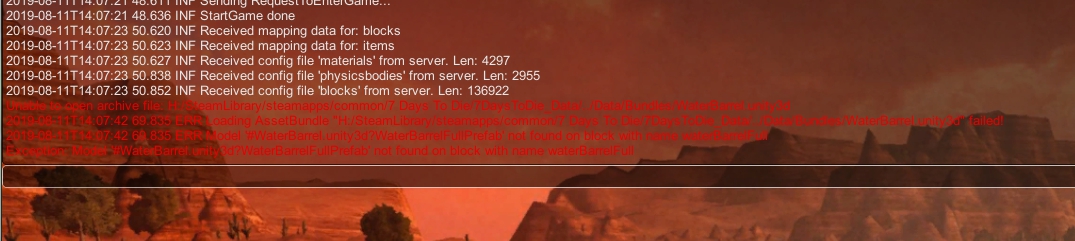
NillReferenceException:Object reference not set to an instance of an object
Quote Originally Posted by yy960865209 View Post
NillReferenceException:Object reference not set to an instance of an object
Happens when you try to do what?
I was trying to access a non-EAC server and was prompted not to enter the red name.

- - - Updated - - -

Quote Originally Posted by David94555 View Post
Happens when you try to do what?
Quote Originally Posted by yy960865209 View Post
I was trying to access a non-EAC server and was prompted not to enter the red name.

- - - Updated - - -


Server has a mod containing an item named water barrel, since you do not have the mod you get an error of a non existing item. If you try without the hacked dll you will get the same error on that server. I still think you can play even without the mod, but you will get errors from time to time, just close the console and continue. Try another server or download the mod if you don't want errors.
I've been using .NET Reflector for awhile so I thought I'd try out dnSpy, and I like it a lot!

Here's an edit for infinite tool/weapon durability (highlight is the only added code):


And also an edit for removing stamina usage with tools/weapons (highlight is the only added code, again):

[QUOTE=David94555;14502575]Since there is no thread for the this version, here is one.

Here is what i could find for the this version so far, Debug Mode (God Mode, Fly, Teleport, ect.), Creative Mode (Spawn Items), Spawn Entites (Probably doesn't work) and Command Console (Works partially).

Works for non EAC servers.

To install go to C:\SteamLibrary\steamapps\common\7 Days To Die\7DaysToDie_Data\Managed , paste and replace Assembly-CSharp.dll .

Enable Creative and Debug Mode Location:

Enable Creative and Debug Mode Edit:


I cant seem to find where the debug option is, if you could please direct me from the start that would be great
[QUOTE=Levante14;14512518]
Quote Originally Posted by David94555 View Post
Since there is no thread for the this version, here is one.

Here is what i could find for the this version so far, Debug Mode (God Mode, Fly, Teleport, ect.), Creative Mode (Spawn Items), Spawn Entites (Probably doesn't work) and Command Console (Works partially).

Works for non EAC servers.

To install go to C:\SteamLibrary\steamapps\common\7 Days To Die\7DaysToDie_Data\Managed , paste and replace Assembly-CSharp.dll .

Enable Creative and Debug Mode Location:

Enable Creative and Debug Mode Edit:


I cant seem to find where the debug option is, if you could please direct me from the start that would be great
Thanks Guy's
Anyone manage to find the see all players function?
[QUOTE=pixelmaniac;14512824]
Quote Originally Posted by Levante14 View Post

Thanks Guy's
Anyone manage to find the see all players function?
EntityPlayerLocal.IsDrawMapIcon()

Just make it return true.
[QUOTE=Levante14;14512518]
Quote Originally Posted by David94555 View Post
Since there is no thread for the this version, here is one.

Here is what i could find for the this version so far, Debug Mode (God Mode, Fly, Teleport, ect.), Creative Mode (Spawn Items), Spawn Entites (Probably doesn't work) and Command Console (Works partially).

Works for non EAC servers.

To install go to C:\SteamLibrary\steamapps\common\7 Days To Die\7DaysToDie_Data\Managed , paste and replace Assembly-CSharp.dll .

Enable Creative and Debug Mode Location:

Enable Creative and Debug Mode Edit:


I cant seem to find where the debug option is, if you could please direct me from the start that would be great
Debug is located in the esc menu as seen in the screenshot, depends what debug features are you interested in, look in the controls menu to find the shortcuts.

As for editing debug and creative modes are: Assembly-CSharp.dll/-/GameManager/startGameCo(): , and then follow the screenshot.

- - - Updated - - -

Quote Originally Posted by toxicsunmoon View Post
Any chance for a full on guide for peeps who don't know how to use dnSpy or where to find these directories in the program?
As for me i would consider myself a beginner, do what i did look around a few old tutorials to learn the directories, set syntax to C# since it is easier to read, play around for a bit with the here provided locations and variables, of course use the search and dont forget to backup.

But basically you open the assembly, locate the variable you want to change, highlight the part of code you want to edit and go right click edit IL instructions and the code will be highlighted there as well (ILspy instructions will do since it is IL syntax), once done click ok and review how the code has changed, if you are satisfied save the new assembly.
Any chance for a full on guide for peeps who don't know how to use dnSpy or where to find these directories in the program?
Posts 1–15 of 43 · Page 1 of 3
This thread is closed for replies.

Similar Threads

Tags for this Thread

None

Need help?