Lightbulb[Pre-Alpha] [2019 October] o!machine - Multiaccounting_Tool/Hardware_Spoofing

Posts 1–15 of 20 · Page 1 of 2
[RELEASE][Alpha] [2019 October] o!machine - Multiaccounting_Tool/Hardware_Ban_Bypass
Title says all. This requires .NET 4.8 to run, get it here: https://dotnet.microsoft.com/download/thank-you/net48
And PLEASE READ THE ENTIRE POST!
Tested on WINDOWS 10 x64.

o!machine


Features:
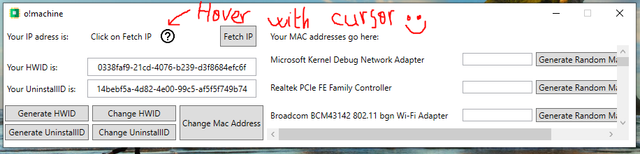
  1. Get your IP address, your IDs, and other identifiers straight from one app.
  2. Change the Mac Address of every network adapter in your system (check with getmac, and ipconfig /all)
  3. Change the UninstallID of your osu! install.
  4. Change your HWID.
  5. Easy way to check if your IP is static or dynamic.
  6. (Upcoming in next release!) Change our hard disk serial, and UniqueID signature (if MBR partition) from one app.

Screenshot:


How to use:
  1. Check your IP address, restart Wi-Fi router, close the app and reopen it, and check your IP address again. If you get a new IP address, you do not need a VPN.
  2. Find your network adapters. If you are using a wifi card, check "is Wi-Fi" before generating a MAC address. It is not necesarry to generate a MAC address for all the adapters, only those you use to connect (ethernet/wifi).
  3. Generate a uninstallID.
  4. Click on Change UninstallID, and on Change Mac Address. Reboot when asked to.


NOTES
  1. This is pre-release software. It might have bugs, so please report them to me and they will get fixed ASAP.
  2. You might need to manually change your HWID and uniqueID before being able to make an account (diskpart.exe). But you can always try with my app alone and see what results you get.
  3. Always attempt to make an account in a clean browser (meaning you need to wipe cookies, before going to osu.ppy.sh, or go incognito mode)
  4. HWID functionality has been activated. And when the app goes out of Alpha, you'll be able to change your HWID, uniqueID, and HD serial from my app without messing with the registry or command line. Stay tuned.
  5. This tool creates a machine.ini file in %appdata%/o!machine. For now, it is empty, but will soon be used for profile switching :).... EDIT:In alpha-ver1, the .ini file is used to check if your IP is dynamic or static. Do not overwrite, or will cause crashes.

  6. In case you missed it... THIS APP NEEDS .NET 4.8. get it here: https://dotnet.microsoft.com/download/thank-you/net48
  7. Please request features!! I'll gladly add anything if i is within my power.


VirusTotal(1/61, 100% safe, only accesses icanhazip.com for the IP address. Otherwise works without internet just fine.): https://www.virustotal.com/gui/file/...51fe/detection
o!machine_alpha-0.0.1_mpgh.net.zip17 KB · 1,141 downloads Clean
//approved
Wow nice release! definitely checking this out!
Quote Originally Posted by Raphiel_ View Post
Wow nice release! definitely checking this out!
Thanks. Please let me know if anything's wrong. I'm trying to tidy up as much as I can before I upload the next version of the thing.

Also, would it help if it provided a cookieless browser to quickly make an account within the app itself? It shouldn't be hard to implement
Quote Originally Posted by heterochromiairidis View Post
Also, would it help if it provided a cookieless browser to quickly make an account within the app itself? It shouldn't be hard to implement
It wouldnt be a bad idea and would look good, i dont actually know how hard it is to make that thing, anyway since its so easy to create an account just by going incognito mode i dont really see the point of it, also a lot of people will be distrustful of making account there bc maybe you can steal them. (Not saying that you will do it)

Knowing this go ahead or not, hope this helped
Updated the thread with a new attachement. Does it need to be approved?

Changelog: Fixed Hwid functionality - Dynamic IP detection - Pretty much bugless on Win 10.

Please, anybody with windows 7 or 8, can you confirm this runs at all with .net 4.8 installed?

Edit: Made 3 accounts using this tool on the same machine without a vpn (after router restarts ofc), all on the same day. It's working.
Next alpha release will have uniqueID capabilities.

Hopefully, once this goes out of Alpha, it will have AntiOS functionality built in too. I'm okay with translating their AntiOS script from python to c#, but does anybody here know if it's even possible to run py scripts in a c# context to avoid that in the first place?
//approved
TMW mpgh goes down the day you upload something on it, rip

I can't edit my post anymore, is that normal behaviour?
Quote Originally Posted by heterochromiairidis View Post
TMW mpgh goes down the day you upload something on it, rip

I can't edit my post anymore, is that normal behaviour?
just ping mods for attaching your updated file to main post.
nice one bro .
a cookieless browser is a good idea too .
looking forward to it .
change of plans. Registration has been moved to the in-game client, so the browser is not needed anymore

Quote Originally Posted by heterochromiairidis View Post
change of plans. Registration has been moved to the in-game client, so the browser is not needed anymore

Wow, client patching ?
Okay, thanks to process explorer, I figured it out.

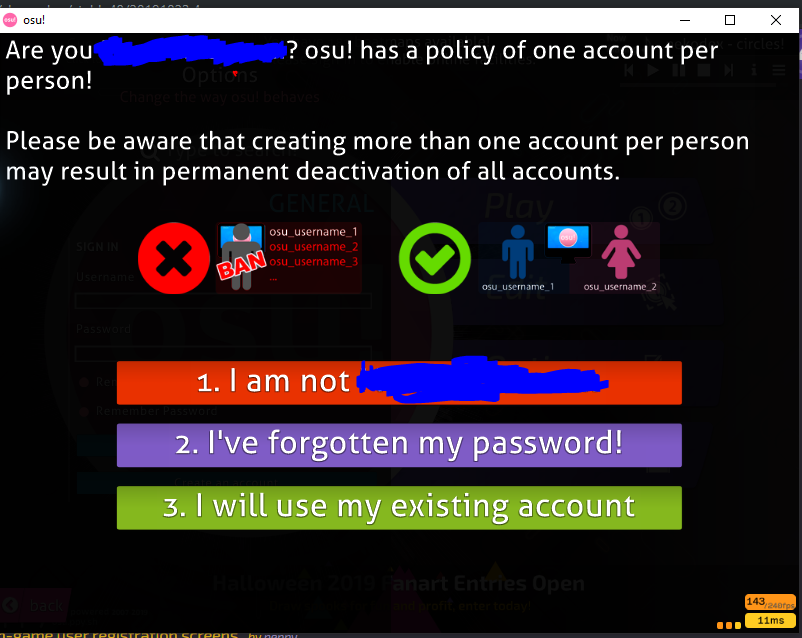
When you first register, this is how it will look from now on. This is through the in-game client.


However, even if registration is not done through the browser, it still leaves chrome cookies on your linked osu account.


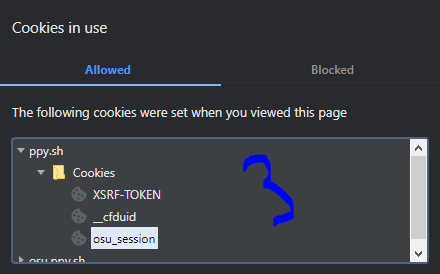
This is how it looks initially.


But once you finish the registration process, and make an account on the client, the cookies added are what identifies you and warns the client about the existence of another account in the machine. A cookie wipe will always be needed from now on, for multi accounters at least.

EDIT: Next release will be tomorrow. Make sure to UPDATE OSU!, or else it will not be compatible.

Changelog: uniqueID changer (for MBR partions).

Y'all can forget about the cookieless browser because registration is dealt with through the client in the newest update.

And yes, Cherry-... Client modification is necessary to avoid the behaviour described above. I'm looking into it.
damn son nice release keep this up!!!!!!!!
do u have a github page or something other then mpgh ?
Posts 1–15 of 20 · Page 1 of 2

Post a Reply

Similar Threads

Tags for this Thread

None

Talk with us