PostOutdatedAEUltimate [AQ, DF, MQ Trainer] 1.4.0

Posts 115 of 15 · Page 1 of 1
AEUltimate [AQ, DF, MQ Trainer] 1.4.0



AEUltimate 1.4.0

Completely rebuilt from scratch. Major performance increase. Sleaker design.

This is an all-in-one trainer for AdventureQuest, DragonFable and MechQuest.

AEUltimate Features:
  • No Flash EOL patches/bypasses needed
  • Game URLs for each game in a separate text file (don't have to change the URL every time, just save it in the file)
  • Seamless switching of games
  • Toggle Fullscreen (F11) *NEW*

AdventureQuest Features:
  • Admin Menu
  • Attack Element
  • Auto Battler
  • Change Name
  • Classes
  • Class Trainers
  • Custom SWF loader
  • Daily Caps for gold & exp (shown in player scroll and after every battle)
  • End Battle
  • Fodder (don't save gold & exp for faster battles)
  • Guardian
  • Heal
  • Infinite HP/MP/SP
  • Loaders for shops, monsters, quests and guests
  • Shop Lift
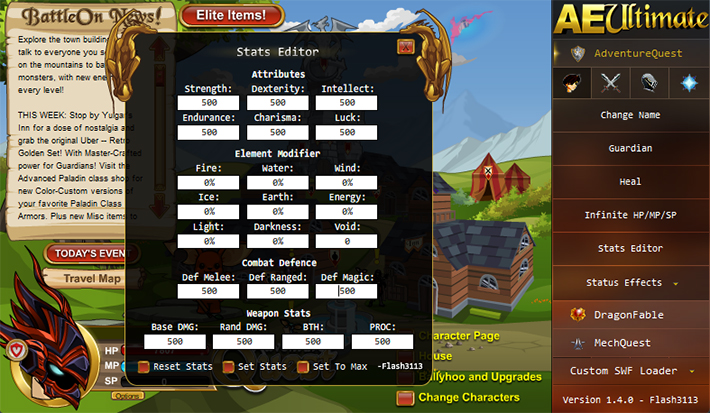
  • Stats Editor
  • Status Effects
  • Subraces
  • Win Initiative (you will always attack first in battles)

DragonFable Features:
  • Armour colour
  • Attack element
  • Class loader
  • Class trainers for DeathKnight, Necromancer and Ranger
  • Custom SWF loader
  • Dragon Amulet
  • Dragon stats editor
  • End Battle
  • Finish Quest
  • Heal
  • Loaders for quests, shops etc.
  • Max quest experience and gold
  • Quest reward cycler
  • Shop lifters (inside Loaders)
  • Skills Enabler
  • Stats Editor
  • Teleport Hack
  • Unloadable Class Loader v4.1 (thanks to 133spider)

MechQuest Features:
  • Admin Menu
  • Custom SWF loader
  • End Battle
  • Finish Quest
  • Heal
  • Infinite HP/EP
  • Mech Loader
  • Max quest experience and credits
  • Star Captain
  • Stats Editor
  • Teleport Hack
  • Uniform Loader
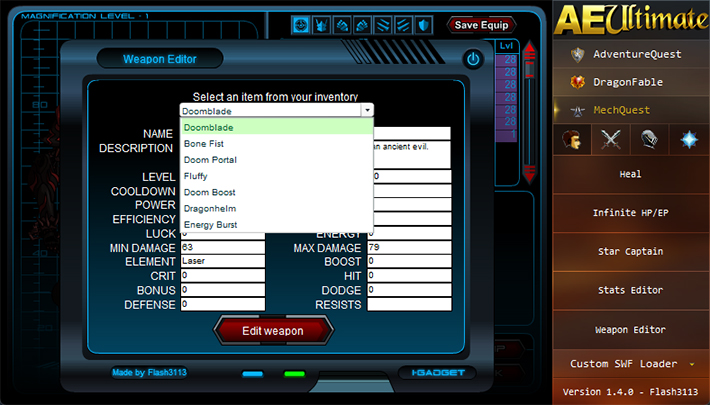
  • Weapon Editor


Please reply to this thread, if you have any questions/requests.

If you would like to support me you can check out my Patreon page: https://www.patreon.com/AEUltimate

Screenshots:
 
Screenshots


Virus Scans:


Changelog:
 
Changelog

# Changelog
All notable changes to this project will be documented in this file.

## [1.4.0]+ - 2022-06-28
### Changed
- Fixed WIS NaN for DF Stats Editor

## [1.4.0] - 2022-06-26
### Completely rebuilt from scratch. Major performance increase. Sleaker design.
### Added
- AEUltimate Toggle Fullscreen (F11 to toggle)
### Removed
- AEUltimate Hide UI
### Changed
- UI Redesign

## [1.3.1] - 2022-02-18
### Added
- AQ Class loaders and trainers
- AQ Subrace loaders and trainers
- AQ Auto Battler end report
- AQ Daily Caps to player scroll and post battle
- AEUltimate Toggle Custom SWF Loader (Press F2 to toggle)
### Changed
- AQ Status Effects now permanent and togglable

## [1.3] - 2022-02-08
### Added
- AQ Status Effects
- AEUltimate Hide UI (Press F1 to toggle)
### Changed
- AQ Stats Editing fixed again
- UI Redesign
- DF Combined Armor Color, Attack Element, Class Trainers into single list

## [1.22] - 2022-02-05
### Added
- AQ Weapon Proc Rate to Stats Editor
- AQ Reset stats to Stats Editor
- DF House Shop and House Item Shop Loaders to Loaders
### Changed
- Window now able to be made smaller (700x500)
- AQ Shop Lift can now steal everything
- AQ Heal won't increase potions past 35

## [1.21] - 2021-12-28
### Added
- AQ Auto Battler + ID
### Changed
- Window now able to be made smaller (700x700)
- AQ End Battle (don't have to wait for your turn)
- AQ Properly fixed damage boosting pets
- AQ Fixed health potions not healing

## [1.2] - 2021-12-23
### Added
- AQ Potions added to Heal
- AQ Change Name
- AQ Ability to steal faces using Shop Lift
- AQ Auto Battler
- AQ Fodder
### Changed
- UI Redesign
- AQ Fixed End Battle errors
- AQ End Battle now kills all monsters at once
- AQ Fixed Custom SWF
- AQ Steal Weapon is now Shop Lift
- AQ Fixed 0 damage with certain pets (now they have no effect)
- AQ Guardian, Infinite HP/MP/SP, Win Initiative are now toggles
- DF Remade Loaders, increased limit to 5 digits. Now moveable.

## [1.11] - 2021-10-08
### Added
- DF Unlimited SoulThreads for Chaosweaver (part of Skills Enabler
- AQ Admin Menu
- MQ Mech Loaders for Skullcrusher, Chrono Corruptor, Vladic Black Knight, Shadowtech E Series 3, Spectacular Lightshow, Prototype Accelerator Containment Vessel and Dark Lord Mechula
### Changed
- Fixed sound issue when switching between games
- New Custom SWF Loaders for all games

## [1.10] - 2021-10-01
### Added
- AQ Attack Element switcher
- DF End Battle
- DF Finish Quest
### Changed
- Complete UI redesign. Seamless game switching
- Fixed layer issue with AQ Win Initiative
- Fixed shop loading for quests
AEUltimate 1.4.0_mpgh.net.zip10.3 MB · 610 downloads 2/58 malicious
Looks awesome. Thanks for your updates.
//approved
//approved
Will there be any plans for this to have a version for MAC users?
Quote Originally Posted by jwong208 View Post
Will there be any plans for this to have a version for MAC users?
I am planning on looking into it. I think it will need a whole rewrite again though. In the mean time you could try to use WineBottler to get it to run.

- - - Updated - - -

Quote Originally Posted by zoby77 View Post
This is really cool i thought updates were done, thank you for the work you put into this
There will still be more to come!
Any Help Appreciated.
Quote Originally Posted by Flash3113 View Post
I am planning on looking into it. I think it will need a whole rewrite again though. In the mean time you could try to use WineBottler to get it to run.

- - - Updated - - -


There will still be more to come!
Any ideas on why I'm getting a black screen when using the program now? Could there be an issue with my flash or something? I was using 1.3.1 for a couple weeks without any issues, but then I took another couple weeks break and now neither 1.4 or 1.3.1 work for me. https://gyazo.com/9ccf4755d7d3ef3d97d7b95ddf417282 nowadays I just get a black screen on both versions.
Quote Originally Posted by Boyosolo View Post
Any ideas on why I'm getting a black screen when using the program now? Could there be an issue with my flash or something? I was using 1.3.1 for a couple weeks without any issues, but then I took another couple weeks break and now neither 1.4 or 1.3.1 work for me. https://gyazo.com/9ccf4755d7d3ef3d97d7b95ddf417282 nowadays I just get a black screen on both versions.
That's just a cache issue
Just close the game then open it again
This is really cool i thought updates were done, thank you for the work you put into this
Fantastic contribution, thank you so much.
Quote Originally Posted by Boyosolo View Post
Any ideas on why I'm getting a black screen when using the program now? Could there be an issue with my flash or something? I was using 1.3.1 for a couple weeks without any issues, but then I took another couple weeks break and now neither 1.4 or 1.3.1 work for me. https://gyazo.com/9ccf4755d7d3ef3d97d7b95ddf417282 nowadays I just get a black screen on both versions.
I'm not sure why it's happening. I've had other people come to me with the same thing but they never followed up with me. I suspect it's either anti virus or a locale thing. Can you disable your anti-virus (defender as well) and try again? If that doesn't work, try to use a VPN?

- - - Updated - - -

Just noticed you're in the United States, so unlikely it's locale. Strange.

If you have Flash installed, try to uninstall it because AEUltimate doesn't need it installed on your system to work. Might be conflicting.
Quote Originally Posted by asamortal View Post
That's just a cache issue
Just close the game then open it again
Makes sense. If closing and re-opening the game isn't working for you @Boyosolo use Disk Cleanup; select C:\, then have Temporary Internet Files ticked and click OK.
Quote Originally Posted by Flash3113 View Post
Makes sense. If closing and re-opening the game isn't working for you @Boyosolo use Disk Cleanup; select C:\, then have Temporary Internet Files ticked and click OK.
Reopening the game a couple times was the first thing I tried. I've also restarted my pc, as well as deleted any temporary files beforehand in an attempt to diagnose the issue. The issue persists both with VPN turned on and off, and I have also figured out since yesterday that I don't have adobe flash installed at all, so I'm back to stage one in not having any idea what could be causing the problem.
Quote Originally Posted by Boyosolo View Post
Reopening the game a couple times was the first thing I tried. I've also restarted my pc, as well as deleted any temporary files beforehand in an attempt to diagnose the issue. The issue persists both with VPN turned on and off, and I have also figured out since yesterday that I don't have adobe flash installed at all, so I'm back to stage one in not having any idea what could be causing the problem.
That’s annoying. Are you able to try it on another pc on the same network?
@Boyosolo I may have fixed it in the next update. I think it might be where I'm storing the app data, as it is read-only in some cases. I've changed the location to a more suitable one. Hopefully that fixes it. I'm currently testing another feature I've added, but 1.4.1 should be released within the next 24 hours.

- - - Updated - - -

Try running 1.4.0 as Administrator in the meantime. Might fix it.
Posts 115 of 15 · Page 1 of 1
This thread is closed for replies.

Similar Threads

Tags for this Thread

Need help?