Home › Forum › MultiPlayer Game Hacks & Cheats › Minecraft Hacks & Cheats › Minecraft Tutorials › How to make Minecraft Pocket Edition Texture Packs
How to make Minecraft Pocket Edition Texture Packs
How to make Minecraft Pocket Edition Texture Packs
IMPORTANT: This is done with the iPhone files. Android may be different.
1. First open up your favorite SSH client and find the app folder "com.mojang.mincraftpe". Once inside goto the folder "mincraftpe.app".
The first few files should look like this:
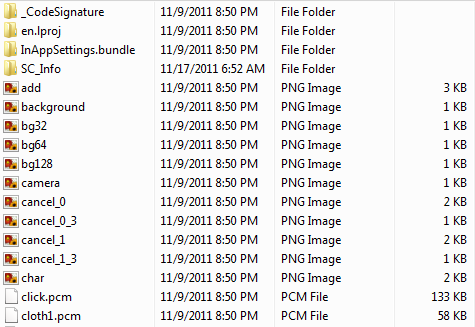
2. Now transfer all these files onto your computer. The files inside should be a lot of .pngs, .pcms, and .nibs
NOTE: We are only looking at the .pngs, so if you have a filter, filter everything else out.
NOTE 2: Windows Media Player doesn't seem to work with the files for me. The pictures are corrupted.
3. Ok so the pictures are corrupted as you may have found out, but it isn't important. Here is a quick list of what pictures are what:
icon.png, icon-72.png, icon@2x.png, etc. - These are th icons that show up on the springboard. You can edit them and they will work even if they are all the same size.
char.png - The character image.
icons.png - GUI icons

items.png - The items as seen in the inventory. I am not sure how they are placed though. Try experimenting with it.

itemframe.png - The frame around the items as seen in the inventory. I am not sure about the layout. Try experimenting with it.
trash.png - The delete button below the world selection.
touchgui.png - Sorry but Idk.
title.png - the "MINECRAFT POCKET EDITION" As seen on the first page.
terrain.png - The same image as seen in the computer version of Minecraft.

particles.png - The same image as seen in the computer version of Minecraft.

background.png - Just what it seems.
dpadbutton.png - The dpad buttons. Try to experimenting with this.

default_world.png - the default world image.
4 Repack onto iPhone via SSH.
1. First open up your favorite SSH client and find the app folder "com.mojang.mincraftpe". Once inside goto the folder "mincraftpe.app".
The first few files should look like this:
2. Now transfer all these files onto your computer. The files inside should be a lot of .pngs, .pcms, and .nibs
NOTE: We are only looking at the .pngs, so if you have a filter, filter everything else out.
NOTE 2: Windows Media Player doesn't seem to work with the files for me. The pictures are corrupted.
3. Ok so the pictures are corrupted as you may have found out, but it isn't important. Here is a quick list of what pictures are what:
icon.png, icon-72.png, icon@2x.png, etc. - These are th icons that show up on the springboard. You can edit them and they will work even if they are all the same size.

char.png - The character image.
icons.png - GUI icons
items.png - The items as seen in the inventory. I am not sure how they are placed though. Try experimenting with it.
itemframe.png - The frame around the items as seen in the inventory. I am not sure about the layout. Try experimenting with it.
trash.png - The delete button below the world selection.
touchgui.png - Sorry but Idk.
title.png - the "MINECRAFT POCKET EDITION" As seen on the first page.
terrain.png - The same image as seen in the computer version of Minecraft.
particles.png - The same image as seen in the computer version of Minecraft.
background.png - Just what it seems.
dpadbutton.png - The dpad buttons. Try to experimenting with this.
default_world.png - the default world image.
4 Repack onto iPhone via SSH.
have anyone tested this yet ?
 Originally Posted by terran88

Whooh man! your are good because you said that you know not sure and only pro say that and they don't lie about their skills but you are a guy like that really THANK YOU!
Similar Threads
- 11Last post
- 16Last post
- 3Last post
- How to make mods Tuto "sound": "textures": "scope" Photoshop plugin + full tools .By xBenitox in Combat Arms Mod Tutorials3Last post
- 12Last post