Skip to content
MPGHThe Dark Arts
/
RegisterLog in
Forum
Community
What's NewLatest posts across the boardTrendingHottest threads right nowSubscribedThreads you follow
Discussion
GeneralIntroductionsEntertainmentDebate FortFlaming & Rage
Board
News & AnnouncementsMPGH TimesSuggestions & HelpGiveaways
More Sections
Art & Graphic DesignProgrammingHackingCryptocurrency
Hacks & Cheats
Games
ValorantCS2 / CS:GOCall of Duty / WarzoneFortniteApex LegendsEscape From Tarkov
+14 moreLeague of LegendsGTA VMinecraftRustROTMGBattlefieldTroveBattleOnCombat ArmsCrossFireBlackshotRuneScapeDayZDead by Daylight
Resources
Game Hacking TutorialsReverse EngineeringGeneral Game HackingAnti-CheatConsole Game Hacking
Tools
Game Hacking ToolsTrainers & CheatsHack/Release NewsNew
Submit a release →Share your cheat, tool, or config with the community.
AINEW
AI Tools
General & DiscussionPrompt EngineeringLLM JailbreaksHotAI Agents & AutomationLocal / Open Models
AI × Gaming
AI Aimbots & VisionML Anti-CheatGame Bots & Automation
Create
AI Coding / Vibe CodingAI Art & MediaAI Voice & TTS
The AI frontier →Where game hacking meets modern machine learning. Jump in.
Marketplace
Buy & Sell
SellingBuyingTradingUser Services
Trust & Safety
Middleman LoungeMarketplace TalkVouch Copy Profiles
Money
Cryptocurrency TalkCurrency ExchangeWork & Job Offers
Start selling →List accounts, services, and goods. Use the middleman to trade safe.
MPGH The Dark Arts

A community for offensive security research, reverse engineering, and AI.

Community

ForumMarketplaceSearch

Account

RegisterLog in

Legal

Privacy PolicyForum RulesHelp & FAQ
© 2026 MPGH · All rights reserved.Built by the community, for the community. For educational purposes onlyContent is shared for security research and education — we don't condone illegal use. You're responsible for complying with applicable laws. Use at your own risk.
Home › Forum › MultiPlayer Game Hacks & Cheats › Call of Duty Hacks & Cheats › Call of Duty 8 - Modern Warfare 3 (MW3) Hacks & Cheats › Call of Duty Modern Warfare 3 Help › mw3 crashing problem

mw3 crashing problem

Posts 1–12 of 12 · Page 1 of 1
LE
leinuo2
mw3 crashing problem
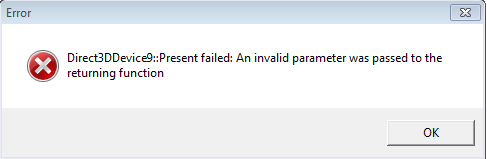
After the update, I've been getting an error every time I join a game. After about 5 minutes of playing, it gives me this error:
#1 · 14y ago
LA
Larity2056
Reinstall the game? Or download DirectX, please tell us what you've already tried
#2 · 14y ago
LE
leinuo2
Quote Originally Posted by MeatHunter View Post
Reinstall the game? Or download DirectX, please tell us what you've already tried
I already have DirectX and I've already re installed the game.
#3 · 14y ago
LA
Larity2056
Quote Originally Posted by leinuo2 View Post
I already have DirectX and I've already re installed the game.
Did you get this error after the map pack 2 patch? I've been googling and it seems an common problem, maybe Infinity Ward is working on a fix
#4 · 14y ago
LE
leinuo2
Quote Originally Posted by MeatHunter View Post
Did you get this error after the map pack 2 patch? I've been googling and it seems an common problem, maybe Infinity Ward is working on a fix
I got this error after the update. The 1.9.xxx thing.
#5 · 14y ago
LA
Larity2056
Quote Originally Posted by leinuo2 View Post
I got this error after the update. The 1.9.xxx thing.
Well, wait a week or longer. Maybe Infinity Ward will fix it, you can also check their site for a topic about this problem
#6 · 14y ago
LE
leinuo2
Quote Originally Posted by MeatHunter View Post
Well, wait a week or longer. Maybe Infinity Ward will fix it, you can also check their site for a topic about this problem
Alright. Thanks for the help
#7 · 14y ago
SlayerPFC
SlayerPFC
Might also try updating DirectX, google for a DirectX Update check, and re-validating your game files.
#8 · 14y ago
abaaaabbbb63
abaaaabbbb63
I always get this error when I play in windowed(no border) mode. Fullscreen has no problem. This is weird.
#9 · 14y ago
SlayerPFC
SlayerPFC
I dont know if this will fix your problem but it is worth a try

Step 1: Log out of steam and close the application comepletely (Task Manager after loggin out)
Step 2: Go to your steam folder in your program filee
Step 3: Search in the steam folder for a folder labeled "appcache"
Step 4: Delete the folder labeled as "appcache"
Step 5: Restart steam and log in the boot your game and see if the problem is solved

IDK if iut will fix this problem but I know it is working for the people wiht the new DLC getting the Invalid map file errors
#10 · 14y ago
abaaaabbbb63
abaaaabbbb63
Quote Originally Posted by SlayerPFC View Post
I dont know if this will fix your problem but it is worth a try

Step 1: Log out of steam and close the application comepletely (Task Manager after loggin out)
Step 2: Go to your steam folder in your program filee
Step 3: Search in the steam folder for a folder labeled "appcache"
Step 4: Delete the folder labeled as "appcache"
Step 5: Restart steam and log in the boot your game and see if the problem is solved

IDK if iut will fix this problem but I know it is working for the people wiht the new DLC getting the Invalid map file errors
Yea....that unfortunately didn't work.
#11 · 14y ago
LE
leinuo2
Quote Originally Posted by abaaaabbbb63 View Post
I always get this error when I play in windowed(no border) mode. Fullscreen has no problem. This is weird.
Ok. It is working now. Thanks for the help guys I just have to run Mw3 full screen and that will fix the problem.
#12 · edited 14y ago · 14y ago
Posts 1–12 of 12 · Page 1 of 1

Post a Reply

Similar Threads

  • Crashing problemBy Soul777 in Combat Arms Help
    4Last post 16y ago
  • [SOLVED]Crashing problemBy khalood1234 in Call of Duty Modern Warfare 2 Help
    2Last post 16y ago
  • Game crash problemBy WafflesLavigne420 in Combat Arms Hack Coding / Programming / Source Code
    1Last post 16y ago
  • Goggle Chrome Crash problem.?[SOLVED]By [PrO1Gamers] in CrossFire Help
    3Last post 15y ago
  • CRASHING problems:(By obinobi in WarRock Discussions
    5Last post 15y ago

Tags for this Thread

None