 How to make your own RPM/WPM hack for DayZ [C#]
How to make your own RPM/WPM hack for DayZ [C#]
In this tutorial I will cover how to make an item teleporter like the one I released yesterday.
Requirements
Before we do anything please read this:
If you actually want to learn how to make your own hacks, don't just copy and paste, even if you just write off my code you will still learn the syntax.
Now lets start of with just creating a project and designing it .
.
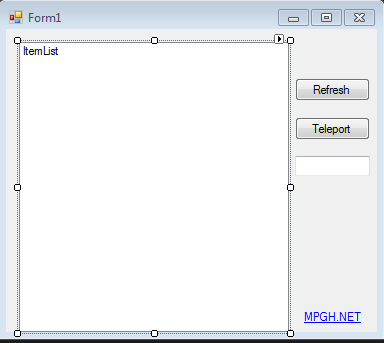
Your form will need the following:
2 Buttons
1 Listbox
1 Textbox
If you have bad patience or just want to copy me, here you go.
Now lets get to the programming. But first, you'll need a memory file. Personaly I always use Duppy's, which can be downloaded if you scroll down.
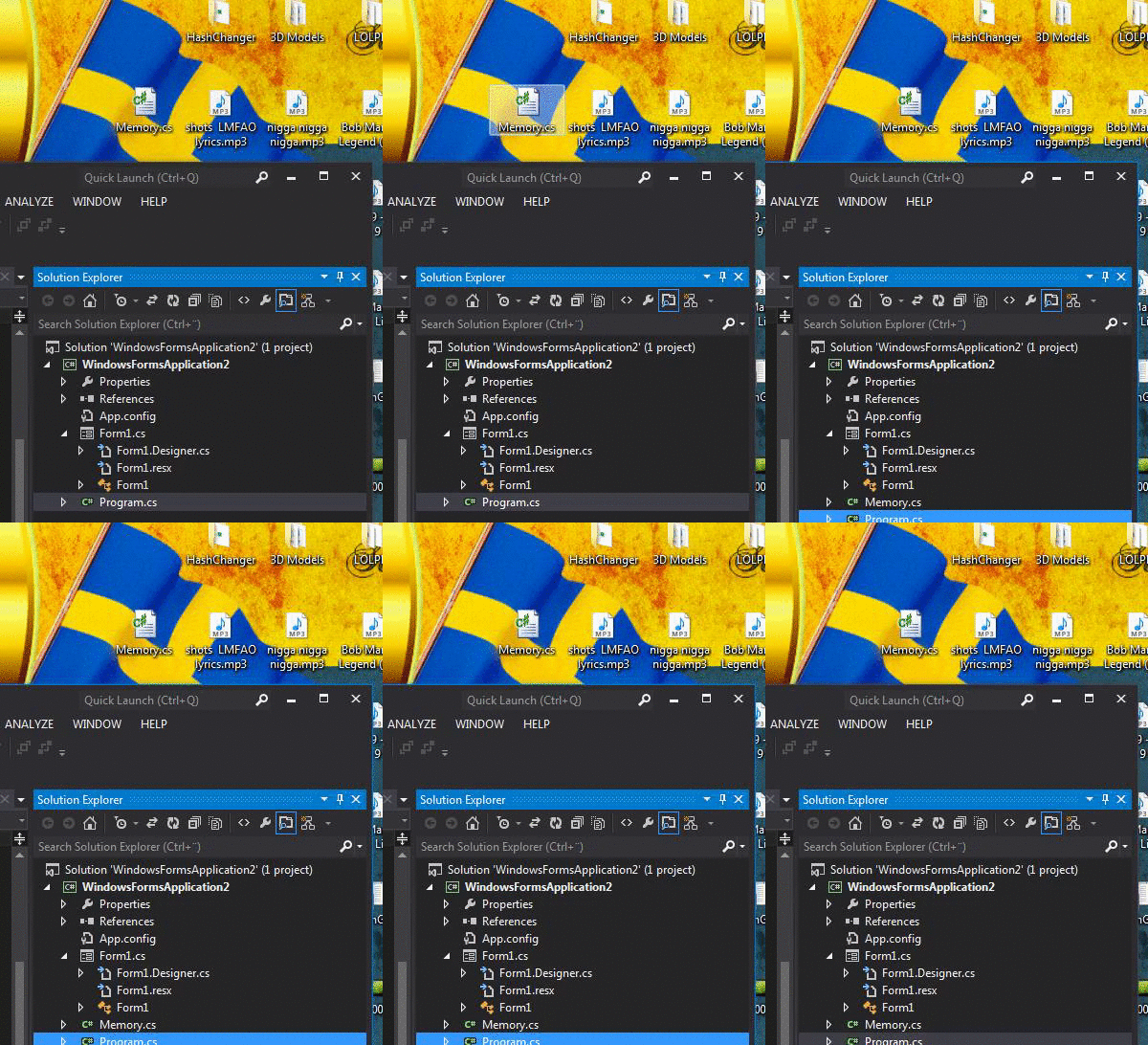
After you downloaded it just drag and drop it into your project.
After you got the memory file, you wanna add
at the top, all this does it to give us access to call its functions.
Now we need to intialize that we are using "ReadWriteMemory"s functions by writing
What this does is to tell our program to search for DayZ.exe.
Now it's time to create our function so we can just call this all the time.
Before we can do anything with the process we must do something important. We must Open it and get full access to read and write its memory.
Since we are going to teleport the items to us, we need to get our local position.
Just incase you don't know how to use Duppy's memory file yet
For our XYZ we have to read these floats.
For example:
As you might notice we are reading coordPtr which is an int. Well, this is because all hex codes are Intergers. It's kinda weird, huh?
Now when we got our player location we will need iterate through FarTable to get all spawned items.
For "FarTableSize" you could also do
Example:
Now it's time to actually go through the FarTable, but how do we do that? A for() loop maybe?
Yea, a for() loop seems right to me.
Now we have the item count, but we don't have every specific item.
Each item take 4 bytes, seems simple huh?
Example:
So what do we need next, XYZ? No, we need the names so we can add them to the listbox! 
Now we can add them to the listbox, right? Well, first we must exclude 2 items.
Now lets just add everything to the list box.
As you can see I included the search function which I will show you how it works shortly.
But first lets add the teleport function. First create a bool (it must be outside of our function)
Example:
Now lets change some code again.
Now we have finished our UpdateItems() function. Got any errors? Read my whole function here:
Finally it's time to fix the buttons.
Just double click the button to get the function for it.
And now...
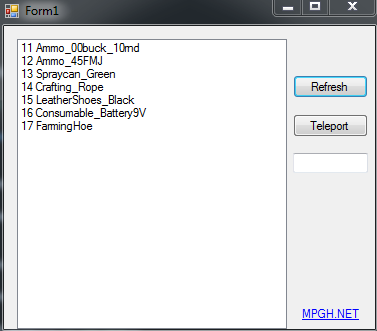
We are finished! Please press the thanks button if this was helpful for you, it means alot to me as I spent a long time writing this tutorial!
Virus Scans:
http://virusscan.jotti.org/en/scanre...813dd53437effbⓘ
https://www.virustotal.com/en/file/9...is/1405875940/ⓘ
Requirements
- Visual Studio
- Some knowledge with C#
- Offsets
- Patience
Before we do anything please read this:
If you actually want to learn how to make your own hacks, don't just copy and paste, even if you just write off my code you will still learn the syntax.
Now lets start of with just creating a project and designing it
.Your form will need the following:
2 Buttons
1 Listbox
1 Textbox
If you have bad patience or just want to copy me, here you go.
My form
Now lets get to the programming. But first, you'll need a memory file. Personaly I always use Duppy's, which can be downloaded if you scroll down.
After you downloaded it just drag and drop it into your project.
How to drag and drop
After you got the memory file, you wanna add
Code:
using ReadWriteMemory;
Now we need to intialize that we are using "ReadWriteMemory"s functions by writing
Code:
ProcessMemory Mem = new ProcessMemory("DayZ");
Now it's time to create our function so we can just call this all the time.
Code:
void UpdateItems()
{
    ItemList.Items.Clear();
}
Code:
if (Mem.CheckProcess())
{
    Mem.StartProcess();
    //If you want to you can place the RPM/WPM stuff in this if function.
}
Code:
Base = 0x10810D0]
LocalPlayer = Base] + 0x15C4] + 0x4]
Code:
int Base = Mem.ReadInt(0x10810D0);
int pLocal = Mem.ReadInt(Base + 0x15C4);
pLocal = Mem.ReadInt(pLocal + 0x4);
Code:
pLocal] + 0x20] + 0x28/0x30/0x2C]
Code:
int coordPtr = Mem.ReadInt(pLocal + 0x20);
float LocX = Mem.ReadFloat(coordPtr + 0x28);
float LocY = Mem.ReadFloat(coordPtr + 0x30);
float LocZ = Mem.ReadFloat(coordPtr + 0x2C);
Now when we got our player location we will need iterate through FarTable to get all spawned items.
Code:
FarTable = Base] + 0x11B4]
FarTableSize = Base] + 0x11B4]
Code:
FarTableSize = FarTable] + 0x4]
Code:
int FarTable = Mem.ReadInt(Base + 0x11B4);
int FarTableSize = Mem.ReadInt(Base + 0x11B8);
Yea, a for() loop seems right to me.
Code:
for (int i = 0; i < FarTableSize; i++)
{

}
Each item take 4 bytes, seems simple huh?
Code:
FarTable] + i * 0x4]
Code:
int FarTablePtr = Mem.ReadInt(FarTable + (i * 0x4));
int itemCoord = Mem.ReadInt(FarTablePtr + 0x20);//I also included the item coord pointer for you
Code:
ItemNamePtr = FarTablePtr] + 0x70] + 0x34]
ItemNameSize = ItemNamePtr] + 0x4]
ItemName = ItemNamePtr] + 0x8]
Code:
if (ItemName != "Land_A_FuelStation_Feed" && ItemName != "Land_Mash")
{

}
Code:
if (searchBox.Text.Length > 0)
{
if (ItemName.Contains(searchBox.Text))
{
    itemNameList.Items.Add(it.ToString() + " " + ItemName);
}
}
else
{
    itemNameList.Items.Add(it.ToString() + " " + ItemName);
}
But first lets add the teleport function. First create a bool (it must be outside of our function)
Example:
Code:
public bool TeleportItems = false;
void UpdateItems()etc.....
Code:
                 if (ItemName != "Land_A_FuelStation_Feed" && ItemName != "Land_Mash")
                    {
                        if (SearchBox.Text.Length > 0)
                        {
                            if (ItemName.Contains(SearchBox.Text))
                            {
                                ItemList.Items.Add(i.ToString() + " " + ItemName);
                                if (TeleportItems)//this is what we added
                                {
                                    Mem.WriteFloat(itemCoord + 0x28, LocX + (i * 0.1f));
                                    Mem.WriteFloat(itemCoord + 0x30, LocY + (i * 0.05f));
                                    Mem.WriteFloat(itemCoord + 0x2C, LocZ + 0.5f);
                                    TeleportItems = false;
                                }//
                            }
                        }
                        else
                        {
                            ItemList.Items.Add(i.ToString() + " " + ItemName);
                        }
                    }
UpdateItems()
Code:
        public bool TeleportItems;
        void UpdateItems()
        {
            ItemList.Items.Clear();
            if (Mem.CheckProcess())
            {
                Mem.StartProcess();

                int Base = Mem.ReadInt(0x10810D0);
                int pLocal = Mem.ReadInt(Base + 0x15C4);
                pLocal = Mem.ReadInt(pLocal + 0x4);

                int coordPtr = Mem.ReadInt(pLocal + 0x20);

                float LocX = Mem.ReadFloat(coordPtr + 0x28);
                float LocY = Mem.ReadFloat(coordPtr + 0x30);
                float LocZ = Mem.ReadFloat(coordPtr + 0x2C);

                int FarTable = Mem.ReadInt(Base + 0x11B4);
                int FarTableSize = Mem.ReadInt(Base + 0x11B8);
                for (int i = 0; i < FarTableSize; i++)
                {
                    int FarTablePtr = Mem.ReadInt(FarTable + (i * 0x4));
                    int itemCoord = Mem.ReadInt(FarTablePtr + 0x20);

                    int ItemNamePtr = Mem.ReadInt(FarTablePtr + 0x70);
                    ItemNamePtr = Mem.ReadInt(ItemNamePtr + 0x34);
                    int ItemNameSize = Mem.ReadInt(ItemNamePtr + 0x4);
                    string ItemName = Mem.ReadStringAscii(ItemNamePtr + 0x8, ItemNameSize);

                    if (ItemName != "Land_A_FuelStation_Feed" && ItemName != "Land_Mash")
                    {
                        if (SearchBox.Text.Length > 0)
                        {
                            if (ItemName.Contains(SearchBox.Text))
                            {
                                ItemList.Items.Add(i.ToString() + " " + ItemName);
                                if (TeleportItems)
                                {
                                    Mem.WriteFloat(itemCoord + 0x28, LocX + (i * 0.1f));
                                    Mem.WriteFloat(itemCoord + 0x30, LocY + (i * 0.05f));
                                    Mem.WriteFloat(itemCoord + 0x2C, LocZ + 0.5f);
                                    TeleportItems = false;
                                }
                            }
                        }
                        else
                        {
                            ItemList.Items.Add(i.ToString() + " " + ItemName);
                        }
                    }
                }
            }
        }
Finally it's time to fix the buttons.
Code:
        private void RefreshBox_Click(object sender, EventArgs e)
        {
            UpdateItems();
        }

        private void TeleportBox_Click(object sender, EventArgs e)
        {
            TeleportItems = true;
            UpdateItems();
        }

        private void SearchBox_TextChanged(object sender, EventArgs e)
        {
            UpdateItems();
        }
And now...
We are finished!
Please press the thanks button if this was helpful for you, it means alot to me as I spent a long time writing this tutorial! Virus Scans:
http://virusscan.jotti.org/en/scanre...813dd53437effbⓘ
https://www.virustotal.com/en/file/9...is/1405875940/ⓘ

 Originally Posted by Jim Morrison

