Sudden Attack Skinning Tutorials
Sudden Attack Skinning Tutorials
OFFICIAL SUDDEN ATTACK TUTORIAL THREAD
By: Arcruend, Mistasparkle, and silentfox
Note: This thread is allowed to be used for questions, answers to questions, discussion, ideas, etc.
Not spam.
Thanks.
- Ryan
CREDITS TO MISTASPARKLE FOR THIS SECTION OF THE TUTORIAL:
By: Arcruend, Mistasparkle, and silentfox
Note: This thread is allowed to be used for questions, answers to questions, discussion, ideas, etc.
Not spam.
Thanks.
- Ryan
CREDITS TO MISTASPARKLE FOR THIS SECTION OF THE TUTORIAL:
Sudden Attack Gloves and Sleeves Skins
* ONLY WORK FOR SANA FOR NOW *
Instruction listed below is the same for skinning any kind of weapons, maps, or interface.
Why use this skin?
With these skins, you are able to use character skins that requires a very high ranking. Also just for the heck of it

Can other players see it too?
only YOU can see your skins, since this is NOT a hack.
Will I get banned for skinning?
No. Even though skinning is against the rule, skinnings can't be detected nor patched.
How long does this skinning process take?
Around 10 minutes if you have done it before. Maybe 15 minutes for first timers.
Who made this thread and *revised* the skins below?
Me, Mistasparkle or in some forum you can find me as Kuldurath.

Why does this only work for SANA and not other servers?
With this process, it should work with ALL servers. However, giv for each server is a little different. there is a universal one but it takes forever, maybe up to an hour to load. The gvi I uploaded is superfast, only for all you busy gamers out there.

This package provides :
W-Scout

Squad-Ranger

Commander Red

Commander Blue

Mistasparkles' Custom Made Skins
-Red
-blue
=================================================
INSTRUCTIONS
1. Download all the files attached to this thread
2. Go to your Sudden Attack folder, which mine is "C:\Program Files\GameHi_USA\SuddenAttackNA"
A fast shortcut would be just right click on the Sudden Attack icon -> properties -> find target.
3. Replace the Gvi.dat files in the SA folder with the newly modified gvi.dat file you just downloaded. Make sure you *replaced* the old gvi file.
4. Close all your SA stuff, and start Sudden Attack
5. SA should be starting to patch itself. it'll go from downloading to updating. this is normal, so just wait.
6. When the laucher says "updating" and the loading bar is at 80%, click start->run and enter %temp%.
7. A folder should open with bunch of random files. You now have to find a folder with a name of 8 random letters. When you find it, make sure the folder was just created.
8. Once you are in the folder, go to game->sa_weapon->skins->pv
9. Now replace the glove and sleeve file attached to this thread. Make sure you *replaced*
10. Wait for the SA launcher to finish loading. And then click start game.
=================================================
Some Screenshots
My custom made skins

Me using a MAG skin, but i have only a noobie rank.


================================================
Virus Scan
File Mista_Skins.rar received on 2010.01.30 07:15:17 (UTC)
Current status: Loading ... queued waiting scanning finished NOT FOUND STOPPED
Result: 0/41 (0%)
Virustotal. MD5: ed49db9593527678615716ceaed9bbbb
File gvi.dat received on 2010.01.30 07:19:07 (UTC)
Current status: Loading ... queued waiting scanning finished NOT FOUND STOPPED
Result: 0/40 (0%)
Virustotal. MD5: 936627b601f7cda9aee2c7a7432900a6
================================================
IF YOU ARE GOING TO LEECH THIS, PLEASE LEAVE EVERYTHING AS IT IS. THANK YOU. FIRST POSTED ON MPGH.NET
If you have questions or comments. Please post it below, or pm me.
I will be adding new skins in the future.
CREDITS TO ARCRUEND FOR THIS SECTION OF THE TUTORIAL:
Most Important info:
1. use the photoshop portable in the rar folder. regular photoshop wont work.
2. When your about to save the file make sure to right click Background and click merge visable.
3. make sure you put DX Tformat in the file format in the photoshop folder. and put the 2 dlls in WINDOWS
4. after saving a pop up will come out do not mess with any of the options.
Video tutorial made by me :
credits to : ianRuiz2004 for helping me with some files

VirScan :
Sudden Attack skining.rar MD5:faec1eff1b0eb11f86ea81662d01bf61 - VirSCAN.org Scanners did not find malware!
Guns1.rar MD5:515670e70de81d66201b1186ecd1bf16 - VirSCAN.org Scanners did not find malware!
Guns2.rar MD5:9c405d50385ef9d8af0a05b386d95077 - VirSCAN.org Scanners did not find malware!
Guns3.rar MD5:49da6112c9b6365ab4ed3fdfa5bc2d84 - VirSCAN.org Scanners did not find malware!
VirusTotal :
Virustotal. MD5: faec1eff1b0eb11f86ea81662d01bf61
Virustotal. MD5: 515670e70de81d66201b1186ecd1bf16
Virustotal. MD5: 9c405d50385ef9d8af0a05b386d95077
Virustotal. MD5: faec1eff1b0eb11f86ea81662d01bf61
CREDITS TO SILENTFOX FOR THIS SECTION OF THE TUTORIAL:
Weapon Skin Samples:
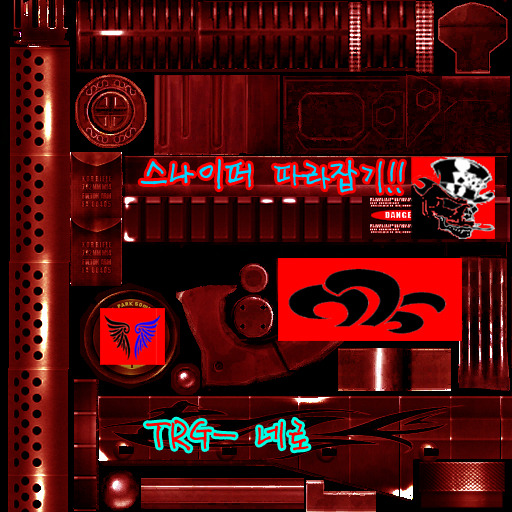
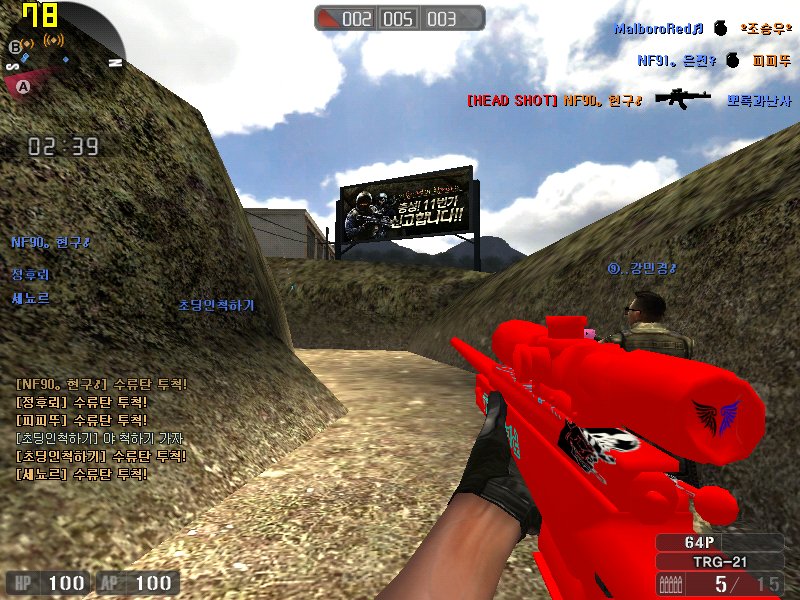
Map Skin Samples:


 [/QUOTE]

.Rez Files are LithTech Game Archives used for LithTech Jupiter Engine Games. Some LithTech Jupiter Engine Games can be extract/repack with WinRez LT Studio available on the net for download, but for Korean Developed LithTech Jupiter Engine Games like Combat Arms, SuddenAttack can be extract from its launcher and Games Files can be found on your Temporary Folder..Weapon Skin Samples:
Map Skin Samples:
[/QUOTE]SA_CHARACTERS.rez
"/game/sa_characters/skins/ -Character/Hands Skins- "
SA_INTERFACE.rez
"game/sa_interface/ -Menu/HUD Skins- "
SA_PPL.rez
"game/sa_ppl/ -Ingame Ads Skins- "
SA_TEX.rez
"game/sa_tex/ -Map Skins- "
SA_WEAPONS.rez
"game/sa_weapons/skins/pv/ -1st Person Weapon's Skins- "
"game/sa_weapons/skins/tv/ -3nd Person Weapon's Skins- "
DTX Textures can be view DTX Viewer supplied by WinRez LT Studio and can be edit with Photoshop CS and exported with DTX Plugin.. available on the net for download, if you know UV Mapping you can edit DTX Textures correctly..
Thank me if I helped..
This thread is closed for replies.


