Home › Forum › MultiPlayer Game Hacks & Cheats › Combat Arms Hacks & Cheats › Combat Arms Spammers, Injectors and Multi Tools › Extreme Injector v3.5.2
Extreme Injector v3.5.2
Extreme Injector v3.5.2
Extreme Injector v3.5.2
Visit here for the latest version:
http://www.mpgh.net/forum/showthread.php?t=1022113
Sorry guys, bugs fixed now. Thanks @klurosu for helping me spark a lightbulb moment.
For those on v3.5 and getting an update notification, please note that I made an emergency update 10 hours after release.
A powerful and advanced injector in a simple GUI! If you're wondering, this was coded in C#. This is a rewrite of the widely known v2.1 which can be found here.


Features:
- Colourful and customizable GUI
- Process List
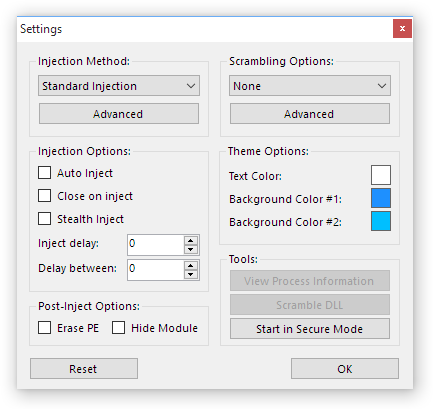
- Multi-DLL injection (with options to enable/disable DLLs to inject)
- Auto-Inject
- Stealth Inject
- Close on inject
- DLL Scrambling (scrambles DLLs on injection to make hacks harder to detect and make detected hacks work again)
- 'Un-inject' DLLs
- Mutiple injection methods (Standard, LdrLoadDll Stub, LdrpLoadDll Stub, Thread Hijacking and Manual Map)
- Drag and drop support
- 64-bit injection support
- Automatic Visual C++ depedency installer
- Execute exported functions after injection
How to use:
- Download and extract the attachment
- Run Extreme Injector v3.exe
- (optional) Click Settings and then Start in Secure Mode to avoid Anti-Cheat detection of the injector itself.
- Type in a process name into the box (including the extension). If you want to target a specific process or select by window name, use the Select button.
- (Note) If you are injecting into Combat Arms, make sure to type in Engine.exe
- Add the DLLs you want by clicking on the Add DLL button. You can also drag and drop them into the DLL list.
- You can disable/enable which DLLs to inject so you can keep your favourite DLLs without needing to find them each time.
- Go into Settings and customise the settings to your liking. Everything should be straight forward (do not mess around with Advanced settings unless you know what you are doing).
- (Note) If you are injecting into Combat Arms, make sure to tick Auto-Inject and start the game.
- Click Inject and enjoy! (or wait for the process to start and let it auto-inject if you ticked auto-inject)
Please explain the Injection Methods!
This version of the injector introduces 2 new injection techniques.
- Standard - This is the injection technique used in nearly every injector out there. It uses CreateRemoteThread and LoadLibrary and is the most reliable injection technique.
- LdrLoadDll Stub - This is similar to the Standard injection technique except it goes 1 level deeper into LoadLibrary.
- LdrpLoadDll Stub - This goes even another level deeper into LdrLoadDll. It may crash or cause errors on OSes newer than Windows 10 as it can change.
- Thread Hijacking - This is a pretty stable method of injection that takes over already executing code to inject your DLL and is not used by many injectors.
- Manual Map - This is the most secure injection technique. So secure that even Windows won't even know about the injected DLL. It may not work properly on OSes newer than Windows 10, you will be told what to do by the injector in that case.
Please explain the Scramble Options!
With the new version of Extreme Injector v3, there are way too many options to explain so I've created handy presets to make things easier:
None - As the name implies, this means that DLL scrambling is disabled completely.
Basic - This applies basic scrambling that should work with most DLLs.
Standard - This applies even more scrambling options that should work with most DLLs.
Extreme - Applies all scrambling options (the best/strongest preset) that could break some DLLs but should work with most.
Please explain the Post-Inject Options!
These post-inject techniques are often seen within hacks to try prevent detection from anti-cheats but this injector can do it externally if the hack doesn't do it already.
- Erase PE - This erases the PE headers at the start of the injected DLL, making it hard for anti-cheats to identify that a DLL exists at a specific location.
- Hide Module - This hides the DLL from the process' module list so if an anti-cheat were to search through a process' module list, it would not appear.
Warning: Most modern anti-cheats these days can still easily detect DLLs even with these options enabled. The most secure method would be using manual map.
Known bugs/limitations:
- Thread Hijacking is not supported at all on XP 64-bit.
- LdrpLoadDll has only been tested on XP, Vista, 7, 8, 8.1 and 10. It will probably not work on anything newer than that.
- "Create new entrypoint" under scrambling advanced options does not support 64-bit DLLs.
When using 'Start in Secure Mode'....
If your anti-virus detects a threat/virus when you click on it, please ignore it or temporarily disable your anti-virus, it's a false positive. I would never infect any users with anything. Note that you should NOT add an exclusion to the Temp folder as any REAL viruses that emerge there might get through.
Injection failed...?
Try another injection method and see what happens. Feel free to take a screenshot or copy and paste the error message here so I can look into it. Make sure to mention what OS you are running.
OMG, why is the injector connecting to the internet?
So people can stay up to date, I've added a simple update check which connects to my WP blog. It does not offer any direct links or download anything by itself, it only tells you to go to wherever you downloaded the injector or to visit my blog for more information.
What's the Visual C++/DirectX depedency installer?
What is the exported functions feature useful for?
Please refer to my blog for more information.
Requirements:
.NET Framework 4
What's new?
Credits:
DarthTon - Better manual map code (originally coded in C++, ported to C# by me, licensed under MIT).
Darawk - Thread hijacking code concept.
Virus Scans:
https://www.virustotal.com/en/file/2...is/1438350537/
https://virusscan.jotti.org/en-US/fi...job/4ogarh4wws
If your anti-virus detects this as a virus, ignore it or add an exclusion. It is not a virus, you can run it under a sandbox and log every single thing it does, it's harmless. Once the injector gets more popular, it will be labelled as "riskware". This means that using it can be risky because the DLLs you inject could be malicious. I am not responsible for the hacks you download.
If you get "System.Expection: The injection method used returned NULL", please right-click on the DLL you are injecting > Properties > Unblock > OK or use Manual Map injection.
Visit here for the latest version:
http://www.mpgh.net/forum/showthread.php?t=1022113
Sorry guys, bugs fixed now.
Thanks @klurosu for helping me spark a lightbulb moment.For those on v3.5 and getting an update notification, please note that I made an emergency update 10 hours after release.
A powerful and advanced injector in a simple GUI! If you're wondering, this was coded in C#. This is a rewrite of the widely known v2.1 which can be found here.
Features:
- Colourful and customizable GUI
- Process List
- Multi-DLL injection (with options to enable/disable DLLs to inject)
- Auto-Inject
- Stealth Inject
- Close on inject
- DLL Scrambling (scrambles DLLs on injection to make hacks harder to detect and make detected hacks work again)
- 'Un-inject' DLLs
- Mutiple injection methods (Standard, LdrLoadDll Stub, LdrpLoadDll Stub, Thread Hijacking and Manual Map)
- Drag and drop support
- 64-bit injection support
- Automatic Visual C++ depedency installer
- Execute exported functions after injection
How to use:
- Download and extract the attachment
- Run Extreme Injector v3.exe
- (optional) Click Settings and then Start in Secure Mode to avoid Anti-Cheat detection of the injector itself.
- Type in a process name into the box (including the extension). If you want to target a specific process or select by window name, use the Select button.
- (Note) If you are injecting into Combat Arms, make sure to type in Engine.exe
- Add the DLLs you want by clicking on the Add DLL button. You can also drag and drop them into the DLL list.
- You can disable/enable which DLLs to inject so you can keep your favourite DLLs without needing to find them each time.
- Go into Settings and customise the settings to your liking. Everything should be straight forward (do not mess around with Advanced settings unless you know what you are doing).
- (Note) If you are injecting into Combat Arms, make sure to tick Auto-Inject and start the game.
- Click Inject and enjoy! (or wait for the process to start and let it auto-inject if you ticked auto-inject)
Please explain the Injection Methods!
This version of the injector introduces 2 new injection techniques.
- Standard - This is the injection technique used in nearly every injector out there. It uses CreateRemoteThread and LoadLibrary and is the most reliable injection technique.
- LdrLoadDll Stub - This is similar to the Standard injection technique except it goes 1 level deeper into LoadLibrary.
- LdrpLoadDll Stub - This goes even another level deeper into LdrLoadDll. It may crash or cause errors on OSes newer than Windows 10 as it can change.
- Thread Hijacking - This is a pretty stable method of injection that takes over already executing code to inject your DLL and is not used by many injectors.
- Manual Map - This is the most secure injection technique. So secure that even Windows won't even know about the injected DLL. It may not work properly on OSes newer than Windows 10, you will be told what to do by the injector in that case.
Please explain the Scramble Options!
With the new version of Extreme Injector v3, there are way too many options to explain so I've created handy presets to make things easier:
None - As the name implies, this means that DLL scrambling is disabled completely.
Basic - This applies basic scrambling that should work with most DLLs.
Standard - This applies even more scrambling options that should work with most DLLs.
Extreme - Applies all scrambling options (the best/strongest preset) that could break some DLLs but should work with most.
Please explain the Post-Inject Options!
These post-inject techniques are often seen within hacks to try prevent detection from anti-cheats but this injector can do it externally if the hack doesn't do it already.
- Erase PE - This erases the PE headers at the start of the injected DLL, making it hard for anti-cheats to identify that a DLL exists at a specific location.
- Hide Module - This hides the DLL from the process' module list so if an anti-cheat were to search through a process' module list, it would not appear.
Warning: Most modern anti-cheats these days can still easily detect DLLs even with these options enabled. The most secure method would be using manual map.
Known bugs/limitations:
- Thread Hijacking is not supported at all on XP 64-bit.
- LdrpLoadDll has only been tested on XP, Vista, 7, 8, 8.1 and 10. It will probably not work on anything newer than that.
- "Create new entrypoint" under scrambling advanced options does not support 64-bit DLLs.
When using 'Start in Secure Mode'....
If your anti-virus detects a threat/virus when you click on it, please ignore it or temporarily disable your anti-virus, it's a false positive. I would never infect any users with anything. Note that you should NOT add an exclusion to the Temp folder as any REAL viruses that emerge there might get through.
Injection failed...?
Try another injection method and see what happens. Feel free to take a screenshot or copy and paste the error message here so I can look into it. Make sure to mention what OS you are running.
OMG, why is the injector connecting to the internet?
So people can stay up to date, I've added a simple update check which connects to my WP blog. It does not offer any direct links or download anything by itself, it only tells you to go to wherever you downloaded the injector or to visit my blog for more information.
What's the Visual C++/DirectX depedency installer?
What is the exported functions feature useful for?
Please refer to my blog for more information.
Requirements:
.NET Framework 4
What's new?
Code:
Changes since version 3.5/3.5.1/3.5.2 (31st July 2015):
- Fixed exception that occurs on DEP enabled processes on Windows 10.
- Fixed bug with GUI under Advanced Options for injection.
- The Disable SEH Validation option now actually does what it says.
- Fixed critical bug relating to code that resolves exports for Windows 10 modules.
- Fixed bug where exception would be thrown when no export function parameters were specified.
- Fixed manual map support for Windows 8.1 (broken in 3.4).

Changes since version 3.4 (29th July 2015):
- General stability fixes (crashes with 64-bit).
- Updated compatbility with Windows 8.1 and 10 (blame Microsoft and their compatibility "fixes").
- Secure Mode now closes previous instance.
- Fixed critical bug that would have prevented hacks using exception handlers (mainly packed/protected DLLs) from working in manual map mode.
- Added DirectX dependency detection.
- Added the ability to call exported functions after injection (use the ... button next to the listed DLL)
- Added a simple update notification.

Changes since version 3.3 (17th June 2014):
- Fixed bug where 1 CPU core was used because the injector was waiting for *itself* to close (no, it wasn't because of a RAT).
- Fixed bug where attempting to unload a module on a 64-bit process resulted in an exception.
- Fixed bug where the injector threw an exception from writing a scrambled DLL that was in use.
- Added support for LdrpLoadDll on Windows 8.1 Update 1 (64-bit).
- Added missing dependency required for ZIP extraction to work correctly (made the injector crash during Visual C++ Debug dependency installation).
- Added a threads list to the process information window.
- Added a new "Strip section characteristics" option to the Extreme preset of scrambling options.
- Added a new "Shift section memory" option to the Extreme preset of scrambling options, should *significantly* improve the ability for hacks to evade anti-cheat detection. This option is much more powerful on 32-bit DLLs, but is still somewhat effective on 64-bit DLLs.

Changes since version 3.2 (9th June 2014):
- Fixed bug where auto-inject did not seem to work
- Addressed possible crashing from messages failing to display during injection

Changes since version 3.1 (3rd June 2014):
- Fixed bug where a message box would appear randomly if a Visual C++ dependency was missing (leftover from testing code)
- Fixed bug where selecting "No" from the prompt under Advanced in Injection Method would untick the wrong box
- Injector now displays a message box saying that injection was successful

Changes since version 3.0 (31st May 2014):
- Complete rewrite from scratch (same and familiar look from previous versions)
- All injection techniques are now 100% compatible with 64-bit DLLs
- Drag-and-drop fixed when run as administrator on newer OSes
- Automatically elevates without asking if it knows you have administrator rights
- Better scaling on displays with a DPI higher than 96
- Added a Visual C++ Dependency Installer
- Manual map now supports DLLs that use SEH to work (better packer support, eg. Themida, Enigma, etc)
- New injection technique: LdrpLoadDll
- Better exception/error reporting
- New scrambling engine, more scrambling methods
- Removed "Append Random Data" as it just wasted disk space and is ineffective
- Improved detection of different OS versions
- Dynamic assembly code generation (powered by AsmJit)
- Seperate process, thread and window manager, does not rely on .NET Process class anymore
- "Start in Secure Mode" creates an even more "secure" instance of Extreme Injector
DarthTon - Better manual map code (originally coded in C++, ported to C# by me, licensed under MIT).
Darawk - Thread hijacking code concept.
Virus Scans:
https://www.virustotal.com/en/file/2...is/1438350537/
https://virusscan.jotti.org/en-US/fi...job/4ogarh4wws
If your anti-virus detects this as a virus, ignore it or add an exclusion. It is not a virus, you can run it under a sandbox and log every single thing it does, it's harmless. Once the injector gets more popular, it will be labelled as "riskware". This means that using it can be risky because the DLLs you inject could be malicious. I am not responsible for the hacks you download.
If you get "System.Expection: The injection method used returned NULL", please right-click on the DLL you are injecting > Properties > Unblock > OK or use Manual Map injection.
ty master <3
- - - Updated - - -
can you pm me a link so I don't have to wait for approval
- - - Updated - - -
can you pm me a link so I don't have to wait for approval
Wonderful, Wonderful, Thank you for this.. I almost made a mistake upgrading, Glad this is coming out.
Impressive job man! 
1000 thx you for your effort, we know you have a life and you're very busy for that "shit"
1000 thx you for your effort, we know you have a life and you're very busy for that "shit"
Approved by @arunforce. Thanks.
 Originally Posted by master131

 Arun never approves anything Originally Posted by Hero


I have this error since I went on windows 10 can you help me?
System.MissingMethodException: Unable to resolve the function 'InitOnceExecuteOnce' inside the module: KERNEL32.dll.
System.MissingMethodException: Unable to resolve the function 'InitOnceExecuteOnce' inside the module: KERNEL32.dll.
Originally Posted by karasinek
EDIT - Fixed. @maddoggy00 @Hero @Flengo @BACKD00R @arunforce @Liz
Can you guys approve it again and change the title to: Extreme Injector v3.5.1
Thanks.
Hopefully this is the last of the issues with Windows 10, gosh it's a bloody nightmare.
Thx  great work
great work Approved. By me, the way it should be.
Hmm.. How about:
An error occurred while injecting "dll" into "exe".
System.Exception: The injection method used returned NULL (injection failed).
Happened with 3.4 and 3.5 too, on Windows 10.
An error occurred while injecting "dll" into "exe".
System.Exception: The injection method used returned NULL (injection failed).
Happened with 3.4 and 3.5 too, on Windows 10.
Good job @master131. Your programming skills are indeed great and advanced. 
I get this error on windows 8.1, everything is working with 3.3 though. Only getting this error using 3.4/3.5 on windows 8.1.
System.AccessViolationException: Unable to read memory from the specified pointer.
I have tried running both as admin, but I can't seem to get it to work on windows 8.1
System.AccessViolationException: Unable to read memory from the specified pointer.
I have tried running both as admin, but I can't seem to get it to work on windows 8.1
Originally Posted by lukeps4
 Just stick to v3.3 for now. Originally Posted by doubleagent
Similar Threads
- 205Last post
- 344Last post
- 1Last post
- 1Last post
- 4Last post