[C++] Yami Framework (Object Oriented, Memory Management)
What is Yami Framework?
Yami framework is a object oriented library with Form system, UI system and lots of other Utils used for file management, crypting etc!

Features:
Crypter:
The crypter contains functions to Encrypt or Decrypt files with cryptography keys, you can Encrypt/Decrypt a file into memory, you can decrypt a encrypted file and save it as another file (e.g encrypted.enc, decrypt and save as decrypted.exe) And vice versa!
Example:
Code:
Shared<YCrypter> pCrypter = make_shared<YCrypter>();
cryptograpy_key key("MPGH"); // Cryptograpy key
pCrypter->EncryptFile("exe.exe", "encrypted.data", key); // Encrypt the file
// Decrypt encrypted data to be able to use the exe like normal again (or dll or whatever you stored)
pCrypter->DecryptFile("encrypted.data", "newexe.exe", key);
// Remember that the key must always be the same, you cannot encrypt a file with key 'MPGH' and then try to decrypt it with 'mpgh'
EventHandler:
The EventHandler is used to Dispatch events, All UI Systems and the Window class uses the Event system to dispath certain events for key presses, mouse moves or other general events. (Use += operator assign a events function)
To use the eventhandler with member functions use a lamda, to use member functions put 'this' in the capture-list, to use local definitions pass '&' to the capture-list:
Code:
// Member function
event += [this](arguments) { memberfunction(arguments); };

// Local function
.... definiton of 'object' ....
event += [&](arguments) { object->function(arguments); };
FileManagement:
The file management is used to check if files exists, get all files in a certain directory, there is also a config system avaiable that can get/set variables in a file.
Managed: (Big)
The managed section of the library contains alot of the memory & pointer managing.
Thread system is used to start threads, with this Thread system you can start threads for Member functions, now the syntax is a bit ugly because of how C++ Member Function Pointers work and some other retarded shit kek.
Example of Thread System:
Code:
TestClass class; // Object
Shared<YThread> thread = make_shared<YThread>(); // Shared pointer (You'll learn what Shared pointer is in a sec)
thread->Start(&class, &TestClass::FunctionYouWantToBeThread, argumentsused);
When creating a Shared pointer you must use make_shared, you cannot initalize a Shared pointer with an already created pointer, you must use make_shared to create the pointer, however you can copy a Shared pointer.
Example:
Code:
Shared<TestClass> object = make_shared<TestClass>(); // object is the original owner of this pointer now, only object can destroy it
Shared<TestClass> shared_ptr(object); // shared_ptr can also access the object now

std::cout << "object is " << (object.is_owner() ? "Owner" : "Brother") << std::endl; // Outputs Owner
std::cout << "shared_ptr is " << (shared_ptr.is_owner() ? "Owner" : "Brother") << std::endl; // Outputs Brother
// When object goes out of scope the managed pointer will be destroyed and all memory de-allocated!
There are 2 iterators avaiable, Prcocess iterators and Module iterators, these can be used to iterate through all processes or all modules inside a process.
Example:
Code:
YProcessIterator pIter;

while(++pIter) // ++ operator has been overloaded, every time you ++ the iterator it goes to the next process (it returns true if there is a next process)
{
   if (pIter->name == "csgo.exe") // Name is the name of the process
   {
       YModuleIterator mIter(pIter->pID); // Module iterator must be constructed with a process ID
       while(++mIter) // Same as proc iter
       {
           if (mIter->name == "client.dll") // If name etc etc
       }
   }
}
Example:
Code:
Shared<YMemory> pMemory = make_shared<YMemory>(); // Managed object

if (pMemory->Attach("csgo.exe"))
{
     YModule client;
     pMemory->Module("client.dll", &client);
     pMemory->Read<int>(someaddr);
}
UI:
The UI System can be used to create advanced User interfaces with tabs.
Example of what is currently existent:
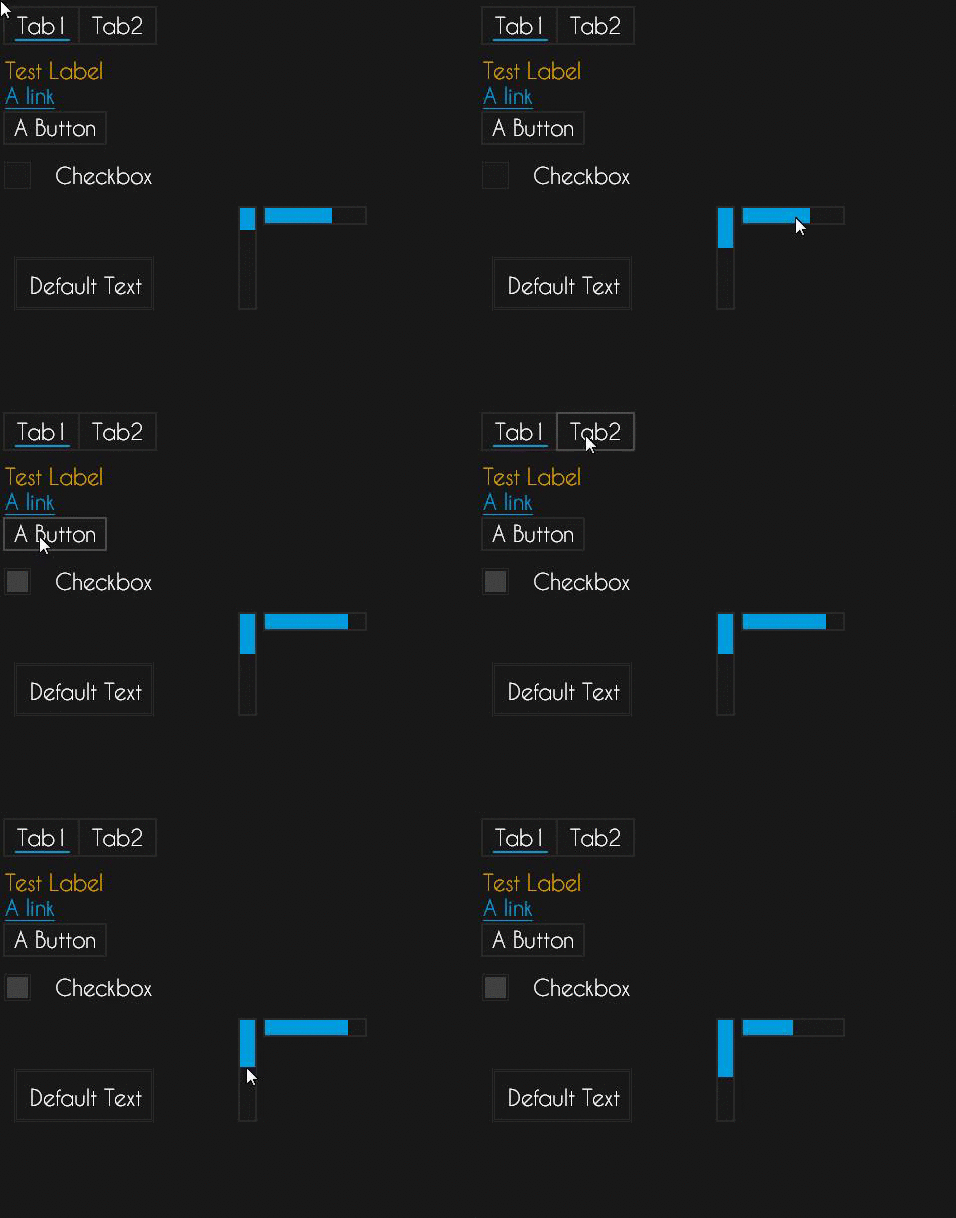
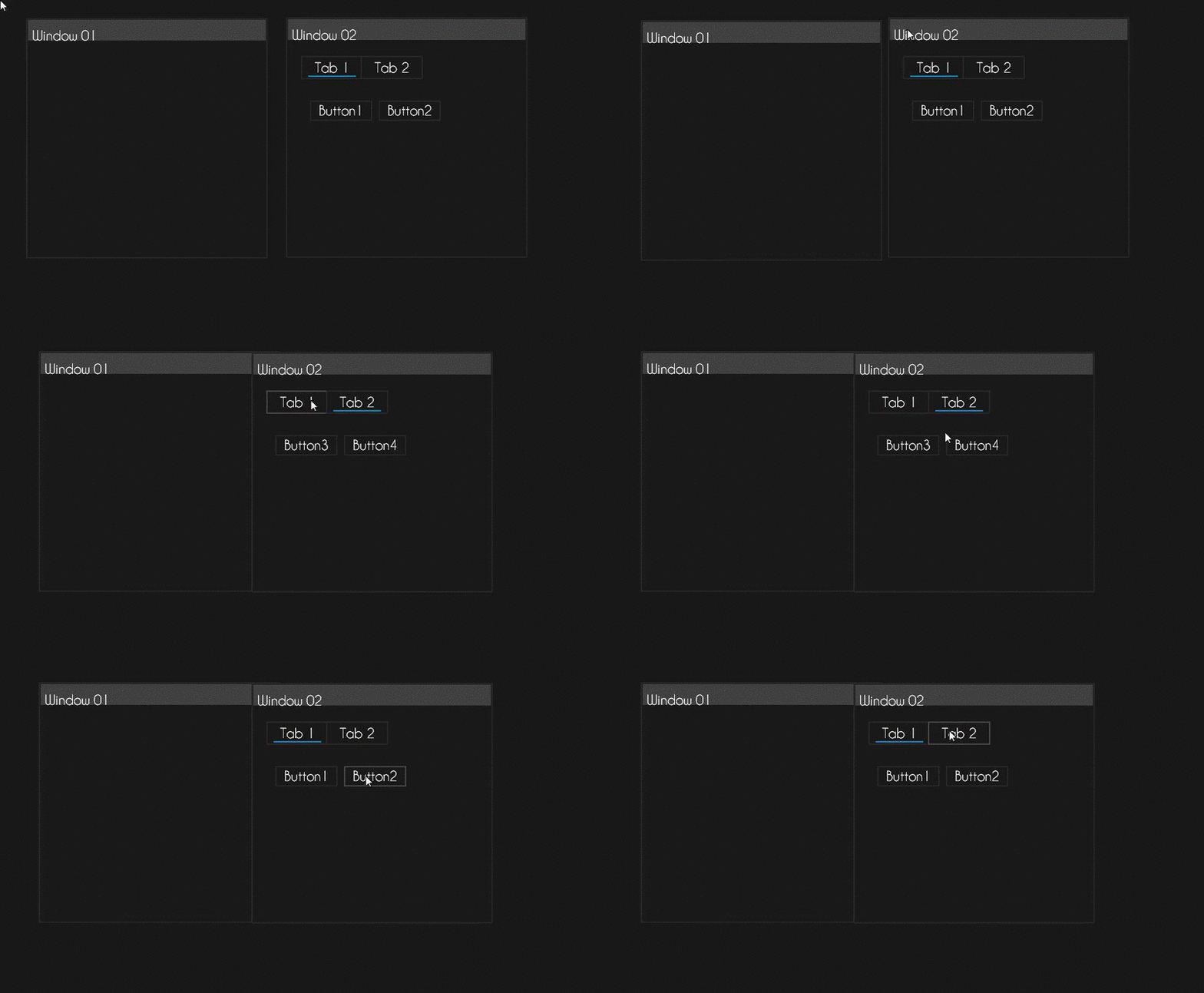
To show an example of UI code would be a bit to much to be able show, and that is why you should use "Project Generator.exe" to generate a sample project showcasing A form class with a few UI elements.
Window
This actually contains more than just the window, the name will be reconsidered at a later date.
The Renderer contains all the functions required to draw on the screen.
The window creates a WINAPI Window, to create a renderer you need a window to draw on.
The texture class creates texture from a file (In memory or saved)
Yami Application:
This is the main framework, here you have your Application, Form and Timer class.
The Application class is used to manage your application, but atm it is still missing alot, however you need it to run a form, to create the application class you need to run the Start function with correct parameters.
Example:
Code:
int main(int argC, char* argV[)
{
   Shared<YApplication> app = Start(argC, argV); // Start application

   return app->Exit(); // Exit application
}
Known Bugs
- Currently when the window is opened the params are wrong, you must resize the window a tiny bit and you'll be able to click everything perfectly! (Trying to figure this one out)
- Some classes have yet to be updated to match the managed part of the framework (e.g the UI Controls)
How to install:
- Extract the contents of the .rar
- Open "Project Generator.exe"
- Type: gen newProject
- There should now be a newProject folder where "Project Generator" was located, inisde this folder you should find a Visual studio project with a main.cpp setup!
- Next you need to setup the project includes & library includes.
- Change the includes in main.cpp to fit how you included the Includes file.
Video Tutorial: (topkek music m8s)
Virusscan
Changelog
v0.8
- Original Release
v0.8.5
- Fixed Project Generation with Project Generator (now generates correct main.cpp data!)
- Changed how Shared works, it now only deletes the pointer if the last instance goes out of scope/calls destroy.
- Fixed spelling misstake in the YWindow class. (From getHeight to getHeigth)
v0.9
- Changed all UI elements to match the rest of the framework (Shared pointers etc)
- Changed 'Event' class to be able to use lamdas for callbacks, this makes it much
easier to have events invoke member functions or similiar!
- Changed Form class a little, you should no longer need to initalize '_myWindow' & '_myRenderer' in InitalizeComponent function!
- Added constructor for taking in a pointer to an existing object for Shared, after
the Shared object has been constructed, Shared will control the pointer and safely release it when time is due.
- Added UICanvas, used for controlling UIWindows(new), this class is based around controllling windows
and sending events to the window, window sends it to its children and on it goes. Canvas also uses a
topmost system, the current focused window will be ontop of all other windows!
- Added UIWindow, used for adding UI items, a UIWindow controlls the placement of the UIItems added to it.
- Added 'CreateOverlayedWindow' function to class 'YWindow', this opens the possibily to create
an overlay window. (Used for creating ESPs or other visual aspects)
- Added 'verify' command to Project Generator, use this to check so your files are intact!
- Fixed some small 'Uncontrollable' code within the Pointer class, it will no longer randomly delete pointers
(Was a small bug)
- Fixed return type of operator* in the iterator classes, it no longer returns a pointer
to the current iterated object, it returns a reference. (Makes more sense)
v0.9.1
- Fixed crypter
v0.9.2
- Added YHandleManager class in Managed (Used for opening handles to objects, locking the handles etc)
- Added YDataAllocator class in Managed (Used for allocating/deallocating memory)
- Added "ShowDialog" function to form, using the application to start a form is no longer required (Note this will be ran in the current thread, meaning it will be deadlocked to the form as long as the form is open)
- Added 'OnItemKeyDown' event to UITextbox.
- Added new operator() to the Event, use it to call the eventhandlers function(s).
- Added UIProgressBar, displays a progress bar on the screen with (0-100) progress.
- Fixed a small bug in the Window handle code, still need to refactor it but now it should prevent wierd errors.
- Fixed UITextbox input handling! (If you wish to handle each keystroke yourself then assign the eventhandler 'OnItemKeyDown' and return true)
- Fixed the CallFunc function in EventHandler, it now returns the Signature return type of the targetted event function.
- Re-factored Textbox, you can now add a texture to it (it'll look like this: https://gyazo.com/96d6eb3870a908da32d000c953f6dd16)
- Re-factored Event, when using += operator you are now appending more functions to the current vector of Handlers. (Meaning you can have multiple callbacks per event)
Please report any bugs to MPGH.Yamiez on skype!
 Originally Posted by m4jyk


 It wasn't mee

