Skip to content
MPGHThe Dark Arts
/
RegisterLog in
Forum
Community
What's NewLatest posts across the boardTrendingHottest threads right nowSubscribedThreads you follow
Discussion
GeneralIntroductionsEntertainmentDebate FortFlaming & Rage
Board
News & AnnouncementsMPGH TimesSuggestions & HelpGiveaways
More Sections
Art & Graphic DesignProgrammingHackingCryptocurrency
Hacks & Cheats
Games
ValorantCS2 / CS:GOCall of Duty / WarzoneFortniteApex LegendsEscape From Tarkov
+14 moreLeague of LegendsGTA VMinecraftRustROTMGBattlefieldTroveBattleOnCombat ArmsCrossFireBlackshotRuneScapeDayZDead by Daylight
Resources
Game Hacking TutorialsReverse EngineeringGeneral Game HackingAnti-CheatConsole Game Hacking
Tools
Game Hacking ToolsTrainers & CheatsHack/Release NewsNew
Submit a release →Share your cheat, tool, or config with the community.
AINEW
AI Tools
General & DiscussionPrompt EngineeringLLM JailbreaksHotAI Agents & AutomationLocal / Open Models
AI × Gaming
AI Aimbots & VisionML Anti-CheatGame Bots & Automation
Create
AI Coding / Vibe CodingAI Art & MediaAI Voice & TTS
The AI frontier →Where game hacking meets modern machine learning. Jump in.
Marketplace
Buy & Sell
SellingBuyingTradingUser Services
Trust & Safety
Middleman LoungeMarketplace TalkVouch Copy Profiles
Money
Cryptocurrency TalkCurrency ExchangeWork & Job Offers
Start selling →List accounts, services, and goods. Use the middleman to trade safe.
MPGH The Dark Arts

A community for offensive security research, reverse engineering, and AI.

Community

ForumMarketplaceSearch

Account

RegisterLog in

Legal

Privacy PolicyForum RulesHelp & FAQ
© 2026 MPGH · All rights reserved.Built by the community, for the community. For educational purposes onlyContent is shared for security research and education — we don't condone illegal use. You're responsible for complying with applicable laws. Use at your own risk.
Home › Forum › Programming › C++/C Programming › ReadProcessMemory from a .DLL with offset

ReadProcessMemory from a .DLL with offset

Posts 1–8 of 8 · Page 1 of 1
LE
LEZIK
ReadProcessMemory from a .DLL with offset
Hello,

i am kinda stuck with my function.
i want to read out a string from the game SAMP.
Found it in CE and looks exactly like this:
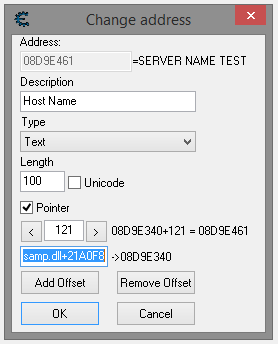

It is pretty easy to read out the memory from only a window, but reading with a pointer from a .DLL is a bit too unknow for me.

So far i got the GetModuleBaseAddress function:
Code:
DWORD GetModuleBaseAddress(LPCWSTR szProcessName, LPCWSTR szModuleName)
{
	HANDLE hSnap = CreateToolhelp32Snapshot(TH32CS_SNAPPROCESS, 0);
	PROCESSENTRY32 pe32;

	if (hSnap == INVALID_HANDLE_VALUE)
	{
		return 0;
	}
	pe32.dwSize = sizeof(PROCESSENTRY32);
	if (Process32First(hSnap, &pe32) == 0)
	{
		CloseHandle(hSnap);
		return 0;
	}

	do
	{
		if (lstrcmp(pe32.szExeFile, szProcessName) == 0)
		{
			int PID;
			PID = pe32.th32ProcessID;

			HANDLE hSnap = CreateToolhelp32Snapshot(TH32CS_SNAPMODULE, PID);
			MODULEENTRY32 xModule;

			if (hSnap == INVALID_HANDLE_VALUE)
			{
				return 0;
			}
			xModule.dwSize = sizeof(MODULEENTRY32);
			if (Module32First(hSnap, &xModule) == 0)
			{
				CloseHandle(hSnap);
				return 0;
			}

			do
			{
				if (lstrcmp(xModule.szModule, szModuleName) == 0)
				{
					CloseHandle(hSnap);
					return (DWORD)xModule.modBaseAddr;
				}
			} while (Module32Next(hSnap, &xModule));
			CloseHandle(hSnap);
			return 0;
		}
	} while (Process32Next(hSnap, &pe32));
	CloseHandle(hSnap);
	return 0;
}
and this is in my main function:
Code:
	pHandle = OpenProcess(PROCESS_ALL_ACCESS | PROCESS_VM_OPERATION, TRUE, pId);
	DWORD ADDR;
	DWORD SAMPDLLBASE = GetModuleBaseAddress(L"GTA:SA:MP", L"samp.dll");
	const char* ServerString;

	ReadProcessMemory(pHandle, (LPVOID)(SAMPDLLBASE + 0x21A0F8), (LPVOID)&ADDR, sizeof(ADDR), NULL);
	ADDR += 121;
	ReadProcessMemory(pHandle, (LPVOID)(ADDR), (LPVOID)&ServerString, sizeof(ServerString), NULL);
	cout << ServerString;
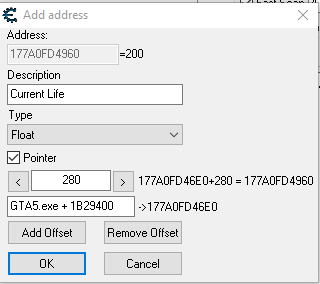
hopefully some nice guy can post me an example or something where i can look up, how this works.
#1 · 10y ago
MI
MikeRohsoft

Code:
#include "stdafx.h"
#include <windows.h>
#include <iostream>
#include <stdio.h>
#include <TlHelp32.h>


__int64 GetModuleBaseAddress(LPCWSTR szProcessName, LPCWSTR szModuleName)
{
	HANDLE hSnap = CreateToolhelp32Snapshot(TH32CS_SNAPPROCESS, 0);
	PROCESSENTRY32 pe32;

	if (hSnap == INVALID_HANDLE_VALUE)
	{
		return 0;
	}
	pe32.dwSize = sizeof(PROCESSENTRY32);
	if (Process32First(hSnap, &pe32) == 0)
	{
		CloseHandle(hSnap);
		return 0;
	}

	do
	{
		if (lstrcmp(pe32.szExeFile, szProcessName) == 0)
		{
			int PID;
			PID = pe32.th32ProcessID;

			HANDLE hSnap = CreateToolhelp32Snapshot(TH32CS_SNAPMODULE, PID);
			MODULEENTRY32 xModule;

			if (hSnap == INVALID_HANDLE_VALUE)
			{
				return 0;
			}
			xModule.dwSize = sizeof(MODULEENTRY32);
			if (Module32First(hSnap, &xModule) == 0)
			{
				CloseHandle(hSnap);
				return 0;
			}

			do
			{
				if (lstrcmp(xModule.szModule, szModuleName) == 0)
				{
					CloseHandle(hSnap);
					return (__int64)xModule.modBaseAddr;
				}
			} while (Module32Next(hSnap, &xModule));
			CloseHandle(hSnap);
			return 0;
		}
	} while (Process32Next(hSnap, &pe32));
	CloseHandle(hSnap);
	return 0;
}

int main()
{
	wchar_t* wCharWindowName = L"Grand Theft Auto V";
	wchar_t* GameTitle = L"GTA5.exe";
	
	HWND WindowHandle = FindWindow(NULL, wCharWindowName);
	
	__int64 baseaddr = GetModuleBaseAddress(GameTitle, GameTitle);
	DWORD PlayerInfo = 0x1B29400;
	DWORD PlayerOffset = 0x280;
	float value = 0; 
	
	DWORD pid; 
	GetWindowThreadProcessId(WindowHandle, &pid); 
	HANDLE phandle = OpenProcess(PROCESS_ALL_ACCESS, 0, pid); 
	while (1)  
	{
		float Life = 0;
		__int64  pLifeAddress = 0;
			
		ReadProcessMemory(phandle, (void*)(baseaddr + PlayerInfo), &pLifeAddress, sizeof(pLifeAddress), 0);
		ReadProcessMemory(phandle, (void*)(pLifeAddress + PlayerOffset), &Life, sizeof(Life), 0);
		std::cout << "Life: "<< Life << "\n";
		Sleep(1000);
	}
	return 0;
}
Life: 200
Life: 200
Life: 200
...
#2 · 10y ago
LE
LEZIK
Quote Originally Posted by MikeRohsoft View Post

Code:
#include "stdafx.h"
#include <windows.h>
#include <iostream>
#include <stdio.h>
#include <TlHelp32.h>


__int64 GetModuleBaseAddress(LPCWSTR szProcessName, LPCWSTR szModuleName)
{
	HANDLE hSnap = CreateToolhelp32Snapshot(TH32CS_SNAPPROCESS, 0);
	PROCESSENTRY32 pe32;

	if (hSnap == INVALID_HANDLE_VALUE)
	{
		return 0;
	}
	pe32.dwSize = sizeof(PROCESSENTRY32);
	if (Process32First(hSnap, &pe32) == 0)
	{
		CloseHandle(hSnap);
		return 0;
	}

	do
	{
		if (lstrcmp(pe32.szExeFile, szProcessName) == 0)
		{
			int PID;
			PID = pe32.th32ProcessID;

			HANDLE hSnap = CreateToolhelp32Snapshot(TH32CS_SNAPMODULE, PID);
			MODULEENTRY32 xModule;

			if (hSnap == INVALID_HANDLE_VALUE)
			{
				return 0;
			}
			xModule.dwSize = sizeof(MODULEENTRY32);
			if (Module32First(hSnap, &xModule) == 0)
			{
				CloseHandle(hSnap);
				return 0;
			}

			do
			{
				if (lstrcmp(xModule.szModule, szModuleName) == 0)
				{
					CloseHandle(hSnap);
					return (__int64)xModule.modBaseAddr;
				}
			} while (Module32Next(hSnap, &xModule));
			CloseHandle(hSnap);
			return 0;
		}
	} while (Process32Next(hSnap, &pe32));
	CloseHandle(hSnap);
	return 0;
}

int main()
{
	wchar_t* wCharWindowName = L"Grand Theft Auto V";
	wchar_t* GameTitle = L"GTA5.exe";
	
	HWND WindowHandle = FindWindow(NULL, wCharWindowName);
	
	__int64 baseaddr = GetModuleBaseAddress(GameTitle, GameTitle);
	DWORD PlayerInfo = 0x1B29400;
	DWORD PlayerOffset = 0x280;
	float value = 0; 
	
	DWORD pid; 
	GetWindowThreadProcessId(WindowHandle, &pid); 
	HANDLE phandle = OpenProcess(PROCESS_ALL_ACCESS, 0, pid); 
	while (1)  
	{
		float Life = 0;
		__int64  pLifeAddress = 0;
			
		ReadProcessMemory(phandle, (void*)(baseaddr + PlayerInfo), &pLifeAddress, sizeof(pLifeAddress), 0);
		ReadProcessMemory(phandle, (void*)(pLifeAddress + PlayerOffset), &Life, sizeof(Life), 0);
		std::cout << "Life: "<< Life << "\n";
		Sleep(1000);
	}
	return 0;
}
Life: 200
Life: 200
Life: 200
...
that would prob. fix my problem with the offset but not with .dll.
or should i just replace GTA5.exe with my dll?
#3 · 10y ago
MI
MikeRohsoft
Quote Originally Posted by LEZIK View Post


that would prob. fix my problem with the offset but not with .dll.
or should i just replace GTA5.exe with my dll?
I don't know.
Create a new Pointer in CE, insert "samp.dll" in this and writedown the Integer
If your variable SAMPDLLBASE output of cout is the same, you got it
Code:
DWORD SAMPDLLBASE = GetModuleBaseAddress(L"GTA:SA:MP", L"samp.dll");
std::cout << SAMPDLLBASE << "\n";

Read String:
Code:
char* buffer = new char[1];
ReadProcessMemory(phandle, (void*)(baseaddr + 0x23713DE), &buffer[0], 10, 0);
std::cout << "PlayerName: " << buffer;
#4 · 10y ago
LE
LEZIK
Found my mistake already some time ago, just want to clear things out and post my solution.
The function GetModuleBaseAddress() was right but it gave me no value back.
Thats when i realized, that i don't need to put in the window name rather the name of the .exe.
So in my case it was gta_sa.exe.
Code:
DWORD SAMPDLLBASE = GetModuleBaseAddress(L"gta_sa.exe", L"samp.dll");
/close
#5 · 10y ago
bario2009
bario2009
Where I Need Put The Value?
#6 · 10y ago
RA
RazorHacker
Your Is Float how about 4bytes
#7 · 10y ago
UB
UberCamper2012
What is in your dll?
Did you make it?
Is it re-used code?
What is your knowledge of pointers? Is it small?
#8 · 10y ago
Posts 1–8 of 8 · Page 1 of 1

Post a Reply

Similar Threads

  • Help with hooking from a dllBy Anddos in C++/C Programming
    5Last post 16y ago
  • [Help] Dealing with pointers from a dllBy ctpsolo in C++/C Programming
    11Last post 16y ago
  • only sat chams hack .dll with hotkeyBy mutemulti in Combat Arms Help
    5Last post 16y ago
  • New Update from WH.dll pls the LINK!!By SacredGold in CrossFire Hacks & Cheats
    19Last post 16y ago
  • need help with offset problemBy qplazm in General Game Hacking
    1Last post 17y ago

Tags for this Thread

#c++#dll#external#gtasamp#offset#readprocessmemory#samp