Unhappy"The name 'ReadInteger' does not exist in the current context"

Posts 16 of 6 · Page 1 of 1
"The name 'ReadInteger' does not exist in the current context"
Hey people,

I am fairly new to C# and yeah I am making my own tool for MW3 atm.
So I didn't work on it for a few weeks now, since I am busy at school at the moment and just enjoying life.

I know for a fact that it used to work properly in the past (Built it and gave it to my friends, but a previous version).

Now I don't really remember where I left but all those functions just don't work anymore.

  • The name 'WriteInteger' does not exist in the current context
  • The name 'ReadInteger' does not exist in the current context
  • The name 'ProcessHandle' does not exist in the current context
  • The name 'WriteBytes does not exist in the current context


I really have no idea to fix it.
Could any of you help m with that?
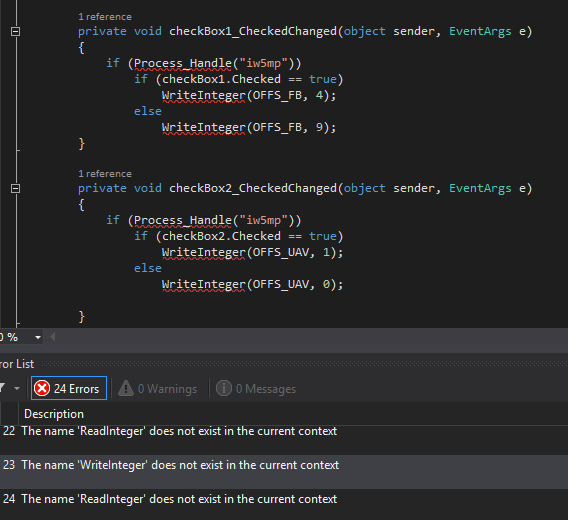
Looks like your project file is messed up or you've lost some source files
How though? It makes no sense since I didn't change anything at all.
Quote Originally Posted by Biesi View Post
Looks like your project file is messed up or you've lost some source files
Quote Originally Posted by Clxrk View Post
How though? It makes no sense since I didn't change anything at all.
I don't think we can answer how you lost files.

Maybe you need to add a library? You should check if there's a livrary that uses those specific functions.
If you can send me the Visual Studio project in a ZIP or RAR, I'll fix it for you.

In the class that you showed us, does WriteInteger, ReadInteger, ProcessHandle and WriteBytes all live in the same class? If it is in a different class or file, you'll need to reference that class/file. It's always a good idea to separate your "working code" from your user interface code. The GUI runs on one thread and if your "working code" happens to run on the same thread, the GUI will become unresponsive and the user will think it's crashed. You can remedy this using a BackgroundWorker, Threading, etc. The way that I use the functions in another class is by instantiating it in my GUI code such as:
Code:
using System.Threading.Tasks;
using System.Windows.Forms;

namespace YourNamespace 
{
	public partial class UserInterface : Form1
	{
		// Instantiates the HackFunctions class where all your functions live. Now you can use it in your code.
                HackFunctions hacks = new HackFunctions();
		
		public UserInterface() 
		{
			private void checkBox1_CheckedChanged(object sender, EventArgs e)
			{
                                // If the selected process is correct and the checkbox is checked, continue.
				if (hacks.Process_Handle("iw5mp") && checkBox1.Checked == true)
					hacks.WriteInteger(OFFS_FB, 4);
				else
					WriteInteger(OFFS_FB, 9);
			}
		}
	}
}
Tips: Back when I started programming I learned from the same mistake you're making. Always document your code. One time, I got up and went to get some lunch and came back and had NO idea what I wrote. This is an example of something I wrote recently, I comment on everything.

Code:
// This method performs the actual installation of the mods to the target directory. It is essentially just copying the mods the user selects to the target directory.
        private static void CopyAllDirectories(DirectoryInfo source, DirectoryInfo target)
        {
            // Checks if directory exists.
            Directory.CreateDirectory(target.FullName);

            // Copy each file into the new directory.
            foreach (FileInfo file in source.GetFiles())
            {
                file.CopyTo(Path.Combine(target.FullName, file.Name), true);
                Console.WriteLine(@"Copying {0}\{1}", target.FullName, file.Name);    // For debugging purposes.
            }

            // Copy each subdirectory using recursion.
            foreach (DirectoryInfo diSourceSubDir in source.GetDirectories())
            {
                DirectoryInfo nextTargetSubDir =
                    target.CreateSubdirectory(diSourceSubDir.Name);
                CopyAllDirectories(diSourceSubDir, nextTargetSubDir);
            }
}
Looks like you're missing a class wich includes those methods.
Posts 16 of 6 · Page 1 of 1

Post a Reply

Similar Threads

Tags for this Thread

Need help?