[TuT]TaskBar Manipulation
Taskbar Manipulation
As always , Open VB.net and create a new project, follow along.
First, Add 7 Buttons and 1 Texbox to your form
Change button text to something like
* Hide Start
* Show Start
* Hide Clock
* Show Clock
* Disable Taskbar
* Disable Taskbar
* Change Start Menu Text
You should now have something that looks like this
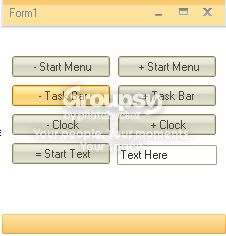
Now for the code part
First thing you need is this code
To hide the Start Menu, You need this code
To Show the Start Menu, You need this code
To hide the Clock, You need this code
To Show the Clock, You need this code
To Disable the Taskb, You need this code
To Enable the Taskb, You need this code
Finally,
To Change the Start Button Text, You need this code
Hope this helps
As always , Open VB.net and create a new project, follow along.
First, Add 7 Buttons and 1 Texbox to your form
Change button text to something like
* Hide Start
* Show Start
* Hide Clock
* Show Clock
* Disable Taskbar
* Disable Taskbar
* Change Start Menu Text
You should now have something that looks like this
Now for the code part
First thing you need is this code
Code:
    Private Declare Function FindWindow Lib "user32" Alias "FindWindowA" (ByVal lpClassName As String, ByVal lpWindowName As String) As IntPtr
    Private Declare Function FindWindowEx Lib "user32" Alias "FindWindowExA" (ByVal hWnd1 As IntPtr, ByVal hWnd2 As IntPtr, ByVal lpsz1 As String, ByVal lpsz2 As String) As IntPtr
    Private Declare Function ShowWindow Lib "user32" (ByVal hwnd As IntPtr, ByVal nCmdShow As Integer) As IntPtr
    Private Declare Function SetWindowText Lib "user32" Alias "SetWindowTextA" (ByVal hWnd As IntPtr, ByVal lpString As String) As Boolean
    Private Declare Function EnableWindow Lib "user32" (ByVal hWnd As IntPtr, ByVal bEnable As Boolean) As Integer
    Private Declare Function GetWindowText Lib "user32" Alias "GetWindowTextA" (ByVal hWnd As IntPtr, ByVal lpString As String, ByVal nMaxCount As Integer) As Integer
    Private Declare Function SendMessage Lib "user32" Alias "SendMessageA" (ByVal hWnd As IntPtr, ByVal wMsg As Integer, ByVal wParam As Integer, ByVal lParam As Integer) As Integer
    Private Const WM_LBUTTONDOWN As Integer = &H201
    Private Const WM_LBUTTONUP As Integer = &H202
    Private Const SW_HIDE As Integer = 0
    Private Const SW_SHOW As Integer = 5
    Private Const SW_MINIMIZE As Integer = 6
    Private Const SW_MAXIMIZE As Integer = 3
    Private Const SW_RESTORE As Integer = 9

    Public Shared Sub PopupStartMenu()
        Dim Taskb As IntPtr = FindWindow("Shell_TrayWnd", Nothing)
        Dim StartMenu As IntPtr = FindWindowEx(Taskb, IntPtr.Zero, "Button", Nothing)
        SendMessage(StartMenu, WM_LBUTTONDOWN, 0, 0)
        SendMessage(StartMenu, WM_LBUTTONUP, 0, 0)
    End Sub

    Public Shared Sub CloseStartMenu()
    End Sub

    Public Shared Sub ShowStartButton()
        Dim Taskb As IntPtr = FindWindow("Shell_TrayWnd", Nothing)
        Dim StartMenu As IntPtr = FindWindowEx(Taskb, IntPtr.Zero, "Button", Nothing)
        ShowWindow(StartMenu, SW_SHOW)
    End Sub

    Public Shared Sub HideStartButton()
        Dim Taskb As IntPtr = FindWindow("Shell_TrayWnd", Nothing)
        Dim StartMenu As IntPtr = FindWindowEx(Taskb, IntPtr.Zero, "Button", Nothing)
        ShowWindow(StartMenu, SW_HIDE)
    End Sub

    Public Shared Sub ShowClock()
        Dim Taskb As IntPtr = FindWindow("Shell_TrayWnd", Nothing)
        Dim Systray As IntPtr = FindWindowEx(Taskb, IntPtr.Zero, "TrayNotifyWnd", Nothing)
        Dim Clock As IntPtr = FindWindowEx(Systray, IntPtr.Zero, "TrayClockWClass", Nothing)
        ShowWindow(Clock, SW_SHOW)
    End Sub

    Public Shared Sub HideClock()
        Dim Taskb As IntPtr = FindWindow("Shell_TrayWnd", vbNullString)
        Dim Systray As IntPtr = FindWindowEx(Taskb, IntPtr.Zero, "TrayNotifyWnd", Nothing)
        Dim Clock As IntPtr = FindWindowEx(Systray, IntPtr.Zero, "TrayClockWClass", vbNullString)
        ShowWindow(Clock, SW_HIDE)
    End Sub

    Public Shared Property StartMenuText() As String
        Get
            Dim Taskb As IntPtr = FindWindow("Shell_TrayWnd", Nothing)
            Dim StartMenu As IntPtr = FindWindowEx(Taskb, IntPtr.Zero, "Button", Nothing)
            Dim WindowText As String = Space(256)
            GetWindowText(StartMenu, WindowText, Len(WindowText))
            WindowText = WindowText.Trim
            WindowText = WindowText.Substring(0, WindowText.Length - 1)
            Return WindowText
        End Get
        Set(ByVal Value As String)
            Dim Taskb As IntPtr = FindWindow("Shell_TrayWnd", Nothing)
            Dim StartMenu As IntPtr = FindWindowEx(Taskb, IntPtr.Zero, "Button", Nothing)
            SetWindowText(StartMenu, Value)
            EnableWindow(StartMenu, False)
            EnableWindow(StartMenu, True)
        End Set
    End Property

    Public Shared Sub DisableTaskbar()
        Dim Taskb As IntPtr
        Taskb = FindWindow("Shell_TrayWnd", Nothing)
        Call EnableWindow(Taskb, False)
    End Sub

    Public Shared Sub EnableTaskbar()
        Dim Taskb As IntPtr
        Taskb = FindWindow("Shell_TrayWnd", Nothing)
        Call EnableWindow(Taskb, True)
    End Sub
Code:
HideStartButton()
Code:
ShowStartButton()
To hide the Clock, You need this code
Code:
HideClock()
To Show the Clock, You need this code
Code:
ShowClock()
To Disable the Taskb, You need this code
Code:
DisableTaskbar()
To Enable the Taskb, You need this code
Code:
DisableTaskbar()
Finally,
To Change the Start Button Text, You need this code
Code:
StartButtonText = TextBox1.Text


 , PM why06 next time
 Originally Posted by NextGen1


