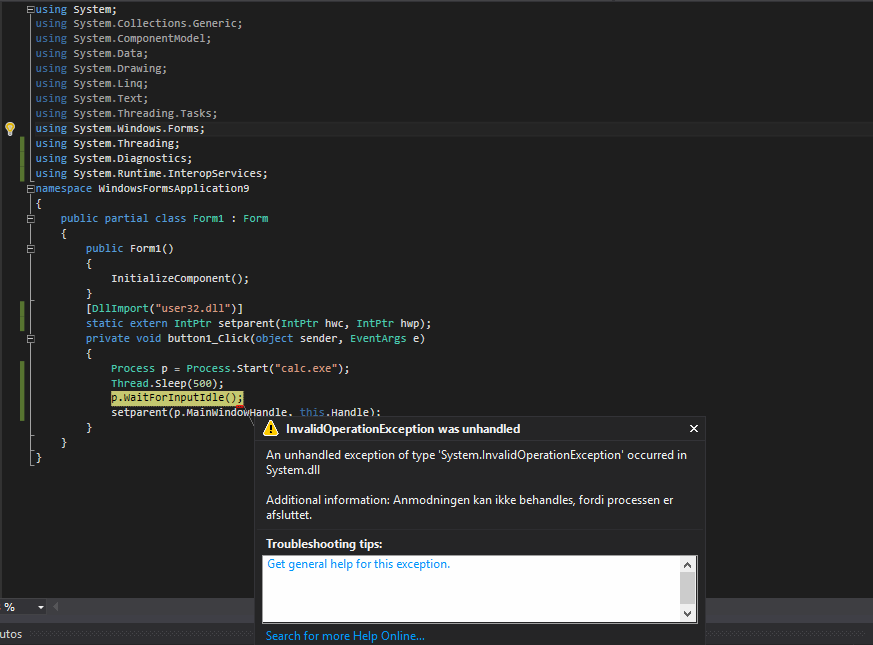
You should be able to figure out how to make it fixed on that box
Doesnt seem to work, could it be because i am using windows 10?
These are all the "using"s you will need:
Code:
using System;
using System.ComponentModel;
using System.Diagnostics;
using System.Runtime.InteropServices;
using System.Threading;
using System.Windows.Forms;
You have a few mistakes on your code that make me believe you're a beginner in coding in general. First things first, function names are case sensitive. Rename setparent to SetParent. Delete every using you have and copy the ones I the code above. You shouldn't dive into coding without learning the basics first. I suggest you read before you start practicing. Also, using the console is better when you're still learning.
Edit: You'll have to figure the rest out for yourself as I honestly don't know how to make the window stay fixed. I have very little experience with Windows Forms
Originally Posted by FatAssHacker123
These are all the "using"s you will need:
Code:
using System;
using System.ComponentModel;
using System.Diagnostics;
using System.Runtime.InteropServices;
using System.Threading;
using System.Windows.Forms;
You have a few mistakes on your code that make me believe you're a beginner in coding in general. First things first, function names are case sensitive. Rename setparent to SetParent. Delete every using you have and copy the ones I the code above. You shouldn't dive into coding without learning the basics first. I suggest you read before you start practicing. Also, using the console is better when you're still learning.
Edit: You'll have to figure the rest out for yourself as I honestly don't know how to make the window stay fixed. I have very little experience with Windows Forms
Still didnt work for me, thanks anyways.
Originally Posted by MikeRaarupBirk
Still didnt work for me, thanks anyways. /close
I'll post my code when I get home. I hope it'll do the trick so you can study it and tweak it as you like.