Skip to content
MPGHThe Dark Arts
/
RegisterLog in
Forum
Community
What's NewLatest posts across the boardTrendingHottest threads right nowSubscribedThreads you follow
Discussion
GeneralIntroductionsEntertainmentDebate FortFlaming & Rage
Board
News & AnnouncementsMPGH TimesSuggestions & HelpGiveaways
More Sections
Art & Graphic DesignProgrammingHackingCryptocurrency
Hacks & Cheats
Games
ValorantCS2 / CS:GOCall of Duty / WarzoneFortniteApex LegendsEscape From Tarkov
+14 moreLeague of LegendsGTA VMinecraftRustROTMGBattlefieldTroveBattleOnCombat ArmsCrossFireBlackshotRuneScapeDayZDead by Daylight
Resources
Game Hacking TutorialsReverse EngineeringGeneral Game HackingAnti-CheatConsole Game Hacking
Tools
Game Hacking ToolsTrainers & CheatsHack/Release NewsNew
Submit a release →Share your cheat, tool, or config with the community.
AINEW
AI Tools
General & DiscussionPrompt EngineeringLLM JailbreaksHotAI Agents & AutomationLocal / Open Models
AI × Gaming
AI Aimbots & VisionML Anti-CheatGame Bots & Automation
Create
AI Coding / Vibe CodingAI Art & MediaAI Voice & TTS
The AI frontier →Where game hacking meets modern machine learning. Jump in.
Marketplace
Buy & Sell
SellingBuyingTradingUser Services
Trust & Safety
Middleman LoungeMarketplace TalkVouch Copy Profiles
Money
Cryptocurrency TalkCurrency ExchangeWork & Job Offers
Start selling →List accounts, services, and goods. Use the middleman to trade safe.
MPGH The Dark Arts

A community for offensive security research, reverse engineering, and AI.

Community

ForumMarketplaceSearch

Account

RegisterLog in

Legal

Privacy PolicyForum RulesHelp & FAQ
© 2026 MPGH · All rights reserved.Built by the community, for the community. For educational purposes onlyContent is shared for security research and education — we don't condone illegal use. You're responsible for complying with applicable laws. Use at your own risk.
Home › Forum › MultiPlayer Game Hacks & Cheats › Other Semi-Popular First Person Shooter Hacks › Alliance of Valiant Arms (AVA) Hacks & Cheats › [Tutorial] How to Create a .BIK video

[Tutorial] How to Create a .BIK video

Posts 1–15 of 18 · Page 1 of 2
flameswor10
flameswor10
[Tutorial] How to Create a .BIK video
Hey guys, You all are probably wondering how to make .bik videos. Well, This is going to teach you in Step by Step.

First of all, You need these tools:
Computer
Any type of video [.mp4 .avi .wmv] etc
Rad Video Tools (which is in my Attachments)

Instructions:

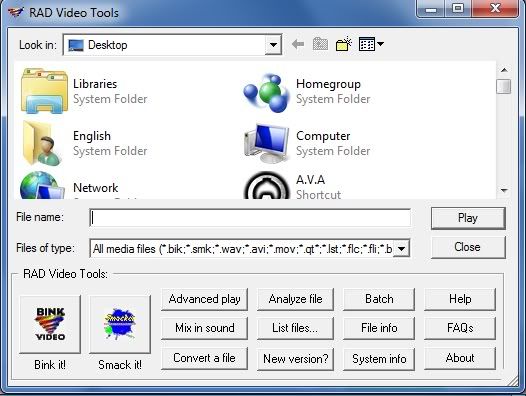
Step 1: Download my .zip and Exctract the .exe and install it.. Once it finishes installing, Open it and a menu like this one should pop up.
[IMG]http://i992.photobucke*****m/albums/af44/flameswor10/RAD%20Tools%20Tutoritual%20Screenshots/RADtoolsStep1.jpg[/IMG]

Step 2: Search for that video That you want to turn into a .bik double click on it. Your Video Should Start Playing

[IMG]http://i992.photobucke*****m/albums/af44/flameswor10/RAD%20Tools%20Tutoritual%20Screenshots/RADtoolsStep2.jpg[/IMG]

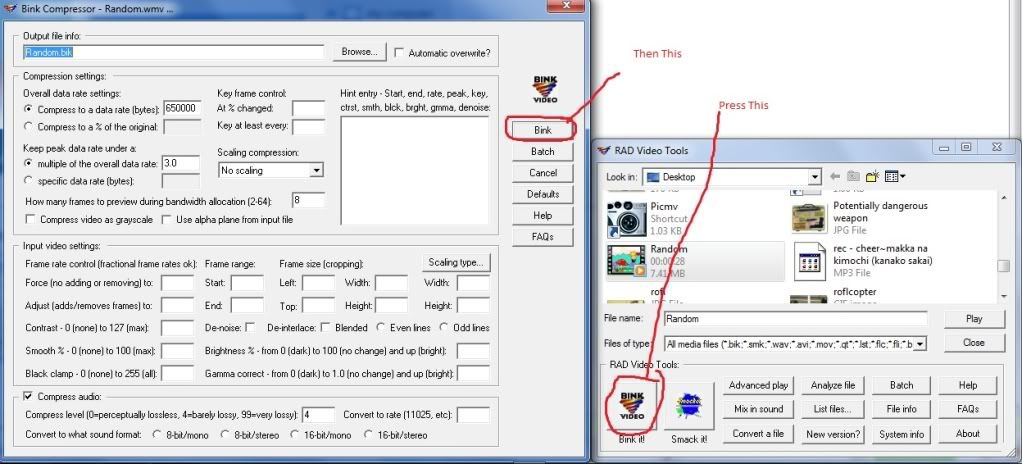
Step 3: Press the button that says "Bink It" And a menu should pop up.. Don't worry about the video stuff and just click on the button that says "Bink".
[IMG]http://i992.photobucke*****m/albums/af44/flameswor10/RAD%20Tools%20Tutoritual%20Screenshots/RADtoolsStep3.jpg[/IMG]

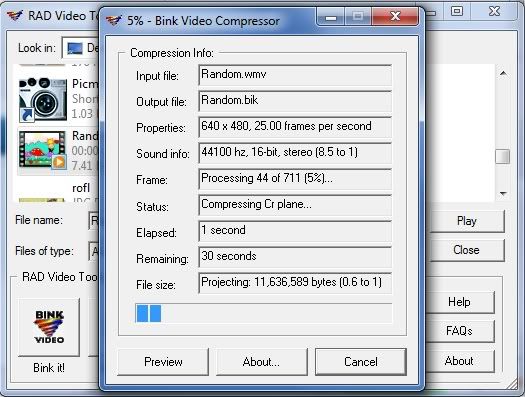
Step 4: A box should pop up and should have information about how your video is going (Conversion wise)
[IMG]http://i992.photobucke*****m/albums/af44/flameswor10/RAD%20Tools%20Tutoritual%20Screenshots/RADToolsStep4.jpg[/IMG]

Step 5: You've finished making the Video after pressing the button "Done" Now all you have to do is to find that video and rename it either what ever the video name is your replacing is in the folder "\AVA\avagame\Video" and you've finished..

VirusScans
VirusTotal
VirusScan

Thank you for the time you spent reading this tutorial. Please press the Thank you button (Just under my Post directly on the right) if this has helped you in any way.. Please just don't Read and do nothing.. Comment and tell me if the TUT needs more improving or needs more pictures.
#1 · 16y ago
KA
KazestemeANI
Shouldn't Step 5 be
/AVA/avagame/video/(whatever version you're using)
Meh. Still the same anyways. I tried it. I did it. I finally have the rant of Hitler about the I-Pad on the opening now. Yay.
#2 · 16y ago
flameswor10
flameswor10
If this has helped you in any way, Please press thanks.. It shows that I helped you guys
#3 · 16y ago
/B
/b/oss
huh i got better tools for that but anyway u made it nice and i think u helped lot of ppls...
#4 · 16y ago
flameswor10
flameswor10
Quote Originally Posted by flameswor10 View Post
Hey guys, You all are probably wondering how to make .bik videos. Well, This is going to teach you in Step by Step.

First of all, You need these tools:
Computer
Any type of video [.mp4 .avi .wmv] etc
Rad Video Tools (which is in my Attachments)

Instructions:

Step 1: Download my .zip and Exctract the .exe and install it.. Once it finishes installing, Open it and a menu like this one should pop up.

[IMG]http://i992.photobucke*****m/albums/af44/flameswor10/RAD%20Tools%20Tutoritual%20Screenshots/RADtoolsStep1.jpg[/IMG]

Step 2: Search for that video That you want to turn into a .bik double click on it. Your Video Should Start Playing

[IMG]http://i992.photobucke*****m/albums/af44/flameswor10/RAD%20Tools%20Tutoritual%20Screenshots/RADtoolsStep2.jpg[/IMG]

Step 3: Press the button that says "Bink It" And a menu should pop up.. Don't worry about the video stuff and just click on the button that says "Bink".

[IMG]http://i992.photobucke*****m/albums/af44/flameswor10/RAD%20Tools%20Tutoritual%20Screenshots/RADtoolsStep3.jpg[/IMG]

Step 4: A box should pop up and should have information about how your video is going (Conversion wise)

[IMG]http://i992.photobucke*****m/albums/af44/flameswor10/RAD%20Tools%20Tutoritual%20Screenshots/RADToolsStep4.jpg[/IMG]

Step 5: You've finished making the Video after pressing the button "Done" Now all you have to do is to find that video and rename it either what ever the video name is your replacing is in the folder "\AVA\avagame\Video" and you've finished..

VirusScans
VirusTotal
VirusScan

Thank you for the time you spent reading this tutorial. Please press the Thank you button (Just under my Post directly on the right) if this has helped you in any way.. Please just don't Read and do nothing.. Comment and tell me if the TUT needs more improving or needs more pictures.
I meant please press thanks on that post..
#5 · 16y ago
RE
Ren103
Wrong section?
#6 · 16y ago
flameswor10
flameswor10
How is this IS the wrong section?
#7 · 16y ago
pimpinallovertheworld666
This is a TUT on how to make a (Useless) video... =)
#8 · 16y ago
flameswor10
flameswor10
No.. This is a TUT on how to make an intro video for GAMES
#9 · 16y ago
Marchiano
Marchiano
Wow thats really fucking awesome.
#10 · edited 16y ago · 16y ago
flameswor10
flameswor10
LOL.. Thank you very much
#11 · 16y ago
RE
Ren103
Probably, people will use this .bk video creator to put random sheat or A.V.A. trailers on it. Which sucks big time. 'Cause a game with a simple intro, is cool enough.
#12 · 16y ago
kile978
kile978
Quote Originally Posted by flameswor10 View Post
How is this IS the wrong section?
This is the AVA HACKS section. thats why
#13 · 16y ago
RE
Ren103
Quote Originally Posted by kile978 View Post


This is the AVA HACKS section. thats why
What he said.
>_>
#14 · 16y ago
HEXLADEN
HEXLADEN
Do You wanna this animated bitch on start-up:

and some skinned weapons:

???
#15 · 16y ago
Posts 1–15 of 18 · Page 1 of 2

Post a Reply

Similar Threads

  • [Tutorial] How to Create a .BIK videoBy flameswor10 in Combat Arms Mods & Rez Modding
    59Last post 16y ago
  • [Tutorial] How to create a keygenBy maxkranen1 in Visual Basic Programming
    12Last post 16y ago
  • [Tutorial] How to record 1080p HD videosBy No-WaY-ouT in CrossFire Tutorials
    10Last post 16y ago
  • Tutorial|HOW TO USE OGC AIMBOT!+VideoBy almog6666 in Combat Arms Europe Hacks
    11Last post 17y ago
  • [Tutorial] How to create a Runnable - Ultra Easy VersionBy emisand in Gunz General
    13Last post 20y ago

Tags for this Thread

None