Thumbs upDouble Click Rapid Fire

Posts 1–9 of 9 · Page 1 of 1
Double Click Rapid Fire
Description:

Most rapid fire scripts have some sort of toggle with On/Off states. This way you have to press the toggle button every time you take pistol, because rapid fire breaks almost all rifles, things like reporting/commending, selecting text, browsing in overlay etc.

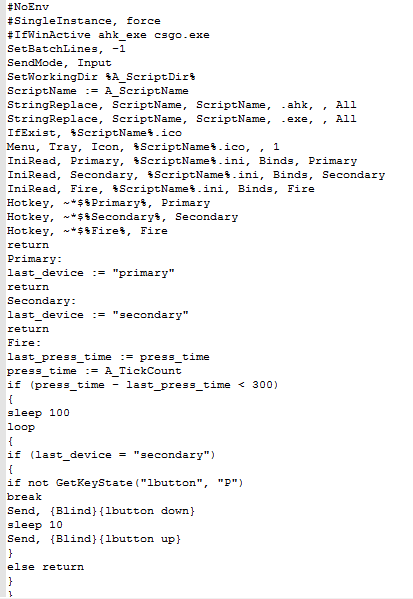
This script gets round this problem in an elegant way: rapid fire is triggered by double click + hold. It also tracks if your current weapon is pistol, therefore you should use separate binds for primary/secondary weapons. Finally, this script is only active while csgo.exe is in focus, so no intervention in other apps' work.

Note: VAC status of Double Click Rapid Fire is undetected and it should never change, because it doesn't read/write game memory, inject dll etc.


Usage:

- Adjust DCRF.ini to correspond to your current ingame binds or change ingame binds accordingly to the included autoexec.cfg
- Run either DCRF.exe or DCRF.ahk
- In CSGO take pistol, press fire button 2+ times quickly and continue holding it


VirusScans:

VirusTotal, Jotti


Download and Thanks:


Bugfix: using script's hotkeys while crouching now won't make you uncrouch.
DCRF_mpgh.net.rar541 KB · 135 downloads 2/53 malicious
Seems to be good, can you explain better "Adjust DCRF.ini to correspond to your current ingame binds or change ingame binds accordingly to the included autoexec.cfg" ?
I'm new on CS:GO.
Waiting for the attachment btw
RyuHewlett,
Here're the files mentioned in your quote:

DCRF.ini:
Code:
[Binds]
Primary=wheelup 
Secondary=wheeldown
Fire=lbutton

; - refer to this document for key listing: http://www.autohotkey.com/docs/KeyList.htm
autoexec.cfg:
Code:
// EXAMPLE

bind "MOUSE1"         "+attack";
bind "MWHEELUP"       "slot1";
bind "MWHEELDOWN"     "slot2";

host_writeconfig
As you can see, if your ingame bind for +attack is MOUSE1 then in DCRF.ini you should set Fire to lbutton. Same for other 2 variables.
Approved.
Use at your OWN risk.
Quote Originally Posted by Smoke View Post
Approved.
Use at your OWN risk.
Has passed c+p test with flying colors. This script is fine and not C+P'ed @Smoke Update The exe is also fine too since its just the special details taken away
Quote Originally Posted by Ally View Post


Has passed c+p test with flying colors. This script is fine and not C+P'ed @Smoke Update The exe is also fine too since its just the special details taken away
Was that really necessary?
Quote Originally Posted by 63OR63 View Post
Was that really necessary?
yes it was, i check every single script just in-case
Good joob... Keeep it up!
New version approved. Use at your own risk.
Posts 1–9 of 9 · Page 1 of 1

Post a Reply

Similar Threads

Tags for this Thread

Need help?