I was trying to make a new private server, and I followed all of the steps in order to make one. But when I started Apache and MySQL and typed 127.0.0.1 i my browser, it said the site cant be reached.
don't search up 127.0.0.1, just run Apache and MySql and press Admin where MySql is, then add the database
Originally Posted by KiD_CuDi_
I was trying to make a new private server, and I followed all of the steps in order to make one. But when I started Apache and MySQL and typed 127.0.0.1 i my browser, it said the site cant be reached.
It's 127.0.0.1/phpmyadmin
Even if I search up 127.0.0.1/phpmyadmin or just hit admin, it gives me the same error.
Also tried to stop Apache, didn't work.
Still need help
Try with your static ipv4 address
Originally Posted by Zolmex
Try with your static ipv4 address
Rip, doesnt work
Hate to ask such a blatant question, but is wServer running?
Run this in a new command prompt to see what's using port 80: netstat -anp | find "80"
Originally Posted by 059
Hate to ask such a blatant question, but is wServer running?
Run this in a new command prompt to see what's using port 80: netstat -anp | find "80"
Lol yes its running.
When I put that into Command Prompt it showed me nothing.
You use localhost, and the port.
localhost:808/phpmyadmin
Post a picture of your XAMPP control panel.
Originally Posted by Invader_Zim
You use localhost, and the port.
localhost:808/phpmyadmin
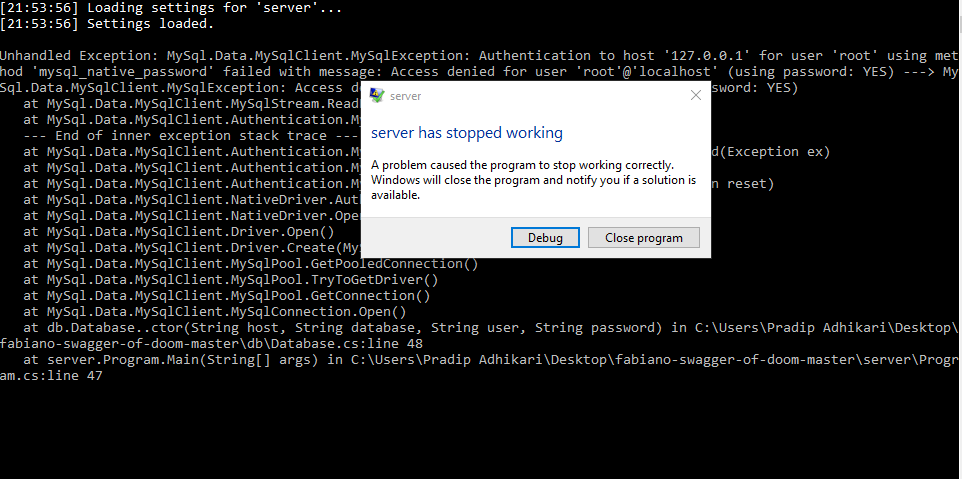
Thanks, that worked, but I am now getting this error on server.exe