Overclocking PC

Posts 113 of 13 · Page 1 of 1
Overclocking PC
so can some 1 help me how to Overclocking my PC well ??
Quote Originally Posted by ikki View Post
so can some 1 help me how to Overclocking my PC well ??
tell me EVERYTHING ABOUT UR PC

processor, ram, motherboard, cooling, EVERYTHING!
if u want to overclock processor then when your computer starts press del or i duno what to enter bios.then find a "CPU frequency and voltage" button (at least on my pc is that and its in Advanced Tab ) or if u cant find it just search every tab and other stuff till u find FSB modifier.and increase it by 10 to see if it works good.then try more and more till u find whats best for your cimputer.And bout graphic cards there are programs somewhere that help u with that.For ATI its called AtiTool just google it its free and i dunno bout nvidia.Hope his helps
Quote Originally Posted by thechewu View Post
i dunno bout nvidia.Hope his helps
Nvidia has their own manager that overclocks for you :O its better if you dont know what you're doing, since it does it all safely
Quote Originally Posted by thechewu View Post
if u want to overclock processor then when your computer starts press del or i duno what to enter bios.then find a "CPU frequency and voltage" button (at least on my pc is that and its in Advanced Tab ) or if u cant find it just search every tab and other stuff till u find FSB modifier.and increase it by 10 to see if it works good.then try more and more till u find whats best for your cimputer.And bout graphic cards there are programs somewhere that help u with that.For ATI its called AtiTool just google it its free and i dunno bout nvidia.Hope his helps
that is the express way for blowing up ur pc.
I don't have the balls to do anything like that...yet. I'm sure you can google it and come up with results...but then again, getting posts for asking a google question is far easier.
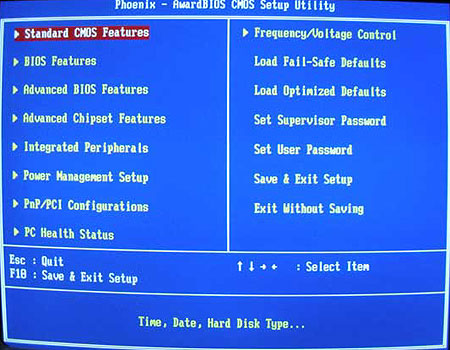
my bios screen is spose to look like this

but i dont see like half of that shit soo.. i am confused
ohh yea i got AMD Athlon 64 Processor
if u see a freq/voltage control, then u can prolly oc
and thats the one i dont see
Quote Originally Posted by ikki View Post
and thats the one i dont see
then no OC for u.
search every button and tab u see for FSB
Quote Originally Posted by thechewu View Post
search every button and tab u see for FSB
he wont ever see it.
you should NOT overclock a factory made computer. it may have the crappiest cooling the world. best thing is to do is to make your own. if you have a low budget and want better performance than buy a new graphics card and lots of fans and replace your CPU stock HS/FAN. have your case open and download a 3rd party OC program for your CPU. once done, your computer should have lowered about 10C which is good to OC a bit.
Posts 113 of 13 · Page 1 of 1

Post a Reply

Similar Threads

Tags for this Thread

None

Need help?