PostWorking relax hack [Undetectable] [Up-to-date]

Posts 1630 of 37 · Page 2 of 3
Quote Originally Posted by steam395 View Post
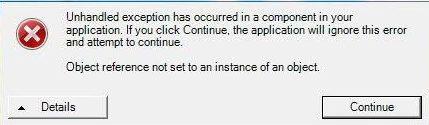
When i pick map, i have this error. Please help, how to fix it?
You need to have .NET framework 4.7 at least for this to work, if you do have windows 7 and above, and you do have .NET framework 4.7 and above, just delete the hack, and reinstall it. Make sure to not open it until you open OSU. and make sure you're running OSU stable. Not any other version, Also I'd prefer running the relax hack as a administrator.

- - - Updated - - -

And this relax is for OSU! standard ONLY. not any other mode.
Hey dude, I left a message for you on your profile, please read it and reply to me in PMs, trying so hard to reach you lol
Quote Originally Posted by call911plz View Post
You need to have .NET framework 4.7 at least for this to work, if you do have windows 7 and above, and you do have .NET framework 4.7 and above, just delete the hack, and reinstall it. Make sure to not open it until you open OSU. and make sure you're running OSU stable. Not any other version, Also I'd prefer running the relax hack as a administrator.

- - - Updated - - -

And this relax is for OSU! standard ONLY. not any other mode.
Yes. I do have the windows above. I do have .Net framework 4.7. I do have stable version. Running as an admin. OSU STANDART ONLY!

- - - Updated - - -

C:\Windows\Microsoft.NET\Framework64
Tell me your version in this folder please.
Quote Originally Posted by steam395 View Post
Windows 10 home prem.
Already have those.
mb you can give me link to another version?
Ah sorry, I encountered that kind of problem before. It's most likely osu error. It's either run osu and the hack by admin, If it doesn't work repair your osu by opening the repair osu executable at it's directory and again if it doesn't work show me the details of that error..
Quote Originally Posted by Vipboomz View Post
Ah sorry, I encountered that kind of problem before. It's most likely osu error. It's either run osu and the hack by admin, If it doesn't work repair your osu by opening the repair osu executable at it's directory and again if it doesn't work show me the details of that error..
Downloaded new version of osu. same problem.
I was learning about it whole day. When i go C: /Windows/Microsoft.NET/Framework/ There is 4.0 version, i installed 4.7.2 version but it is not exist, so i cant update it any more.
 
EROR

Detailed information on the use of
(JIT) debugging instead of this dialog
window at the end of this message.

************** Textures **************
System.FormatException: The input string was not in the correct format.
in System.Number.ParseSingle (String, NumberStyles, NumberFormatInfo numfmt parameters)
in System.Convert.ToSingle (string value)
in osu__Tool.OsuBeatmap.ParseDifficulty (string of strings, logical and found, boolean, boolean hr)
in osu__Tool.OsuBeatmap..ctor (String path, Boolean ez, Boolean hr)
in osu__Tool.Form. <SongsTreeView_NodeMouseDoubleClick> b__12_0 ()
in System.Threading.Tasks.Task.InnerInvoke ()
in System.Threading.Tasks.Task.Execute ()
--- End tracing the stack from the previous location where the exception occurred ---
in System.Runtime.CompilerServices.TaskAwaiter.ThrowF orNonSuccess (task task)
in System.Runtime.CompilerServices.TaskAwaiter.Handle NonSuccessAndDebuggerNotification (Task Task)
in osu__Tool.Form. <SongsTreeView_NodeMouseDoubleClick> d__12.MoveNext ()
--- End tracing the stack from the previous location where the exception occurred ---
in System.Runtime.CompilerServices.AsyncMethodBuilder Core. <> c. <ThrowAsync> b__6_0 (state of the object)

************** Uploaded Builds **************
mscorlib
Build version: 4.0.0.0
Version Win32: 4.7.3062.0 built: NET472REL1
CodeBase: file: /// C: /Windows/Microsoft.NET/Framework/v4.0.30319/mscorlib.dll
----------------------------------------
osu! Tool
Build version: 1.0.0.0
Win32 Version: 1.0.0.0
CodeBase: file: /// C: / Users / Admin / Desktop / Osu relax / osu!% 20relax_mpgh.net / osu!% 20relax / osu!% 20relax.exe
----------------------------------------
System.Windows.Forms
Build version: 4.0.0.0
Version Win32: 4.7.3062.0 built: NET472REL1
CodeBase: file: /// C: / Windows / Microsoft Windows / Microsoft Windows 7
----------------------------------------
system
Build version: 4.0.0.0
Version Win32: 4.7.3062.0 built: NET472REL1
CodeBase: file: /// C: /Windows/Microsoft.Net/assembly/GAC_MSIL/System/v4.0_4.0.0.0__b77a5c561934e089/System.dll
----------------------------------------
System.Drawing
Build version: 4.0.0.0
Version Win32: 4.7.3062.0 built: NET472REL1
CodeBase: file: /// C: /Windows/Microsoft.Net/assembly/GAC_MSIL/System.Drawing/v4.0_4.0.0.0b03f5f7f11d50a3a/System.Drawing.dll
----------------------------------------
system configuration
Build version: 4.0.0.0
Version Win32: 4.7.3062.0 built: NET472REL1
CodeBase: file: /// C: /Windows/Microsoft.Net/assembly/GAC_MSIL/System.Configuration/v4.0_4.0.0.0__b03f5f7f11d50a3a/System.Configuration.dll
----------------------------------------
System.Core
Build version: 4.0.0.0
Version Win32: 4.7.3062.0 built: NET472REL1
CodeBase: file: /// C: /Windows/Microsoft.Net/assembly/GAC_MSIL/System.Core/v4.0_4.0.0.0__b77a5c561934e089/System.Core.dll
----------------------------------------
System.Xml
Build version: 4.0.0.0
Version Win32: 4.7.3062.0 built: NET472REL1
CodeBase: file: /// C: /Windows/Microsoft.Net/assembly/GAC_MSIL/System.Xml/v4.0_4.0.0.0bbaa5c561934e089/System.Xml.dll
----------------------------------------
InputSimulator
Build version: 0.1.0.0
Win32 Version: 0.1.0.0
CodeBase: file: /// C: / Users / Admin / Desktop / Osu relax / osu!% 20relax_mpgh.net / osu!% 20relax / InputSimulator.DLL
----------------------------------------
mscorlib.resources
Build version: 4.0.0.0
Win32 version: 4.7.2046.0 built: NET47REL1
CodeBase: file: /// C: /Windows/Microsoft.Net/assembly/GAC_MSIL/mscorlib.resources/v4.0_4.0.0.0_en_b77a5c561934e089/mscorlib.resources.dll
----------------------------------------
System.Windows.Forms.resources
Build version: 4.0.0.0
Win32 version: 4.7.2046.0 built: NET47REL1
CodeBase: file: /// C: / Windows / Microsoft Windows/Microsoft/.
----------------------------------------

************** Operational debugging (JIT) **************
To connect the operational (JIT) debugging of the .config file
application or computer (machine.config) must have
value jitDebugging, installed in the section system.windows.forms.
The application must also be compiled with the included
debugging.

For example:

<Configuration>
<system.windows.forms jitDebugging = "true" />
</ Configuration>

The JIT debugging is any unhandled exception
is sent to the JIT debugger that is registered on this computer,
Instead of processing the data with a dialog box.
Quote Originally Posted by steam395 View Post
Downloaded new version of osu. same problem.
I was learning about it whole day. When i go C: /Windows/Microsoft.NET/Framework/ There is 4.0 version, i installed 4.7.2 version but it is not exist, so i cant update it any more.
 
EROR

Detailed information on the use of
(JIT) debugging instead of this dialog
window at the end of this message.

************** Textures **************
System.FormatException: The input string was not in the correct format.
in System.Number.ParseSingle (String, NumberStyles, NumberFormatInfo numfmt parameters)
in System.Convert.ToSingle (string value)
in osu__Tool.OsuBeatmap.ParseDifficulty (string of strings, logical and found, boolean, boolean hr)
in osu__Tool.OsuBeatmap..ctor (String path, Boolean ez, Boolean hr)
in osu__Tool.Form. <SongsTreeView_NodeMouseDoubleClick> b__12_0 ()
in System.Threading.Tasks.Task.InnerInvoke ()
in System.Threading.Tasks.Task.Execute ()
--- End tracing the stack from the previous location where the exception occurred ---
in System.Runtime.CompilerServices.TaskAwaiter.ThrowF orNonSuccess (task task)
in System.Runtime.CompilerServices.TaskAwaiter.Handle NonSuccessAndDebuggerNotification (Task Task)
in osu__Tool.Form. <SongsTreeView_NodeMouseDoubleClick> d__12.MoveNext ()
--- End tracing the stack from the previous location where the exception occurred ---
in System.Runtime.CompilerServices.AsyncMethodBuilder Core. <> c. <ThrowAsync> b__6_0 (state of the object)

************** Uploaded Builds **************
mscorlib
Build version: 4.0.0.0
Version Win32: 4.7.3062.0 built: NET472REL1
CodeBase: file: /// C: /Windows/Microsoft.NET/Framework/v4.0.30319/mscorlib.dll
----------------------------------------
osu! Tool
Build version: 1.0.0.0
Win32 Version: 1.0.0.0
CodeBase: file: /// C: / Users / Admin / Desktop / Osu relax / osu!% 20relax_mpgh.net / osu!% 20relax / osu!% 20relax.exe
----------------------------------------
System.Windows.Forms
Build version: 4.0.0.0
Version Win32: 4.7.3062.0 built: NET472REL1
CodeBase: file: /// C: / Windows / Microsoft Windows / Microsoft Windows 7
----------------------------------------
system
Build version: 4.0.0.0
Version Win32: 4.7.3062.0 built: NET472REL1
CodeBase: file: /// C: /Windows/Microsoft.Net/assembly/GAC_MSIL/System/v4.0_4.0.0.0__b77a5c561934e089/System.dll
----------------------------------------
System.Drawing
Build version: 4.0.0.0
Version Win32: 4.7.3062.0 built: NET472REL1
CodeBase: file: /// C: /Windows/Microsoft.Net/assembly/GAC_MSIL/System.Drawing/v4.0_4.0.0.0b03f5f7f11d50a3a/System.Drawing.dll
----------------------------------------
system configuration
Build version: 4.0.0.0
Version Win32: 4.7.3062.0 built: NET472REL1
CodeBase: file: /// C: /Windows/Microsoft.Net/assembly/GAC_MSIL/System.Configuration/v4.0_4.0.0.0__b03f5f7f11d50a3a/System.Configuration.dll
----------------------------------------
System.Core
Build version: 4.0.0.0
Version Win32: 4.7.3062.0 built: NET472REL1
CodeBase: file: /// C: /Windows/Microsoft.Net/assembly/GAC_MSIL/System.Core/v4.0_4.0.0.0__b77a5c561934e089/System.Core.dll
----------------------------------------
System.Xml
Build version: 4.0.0.0
Version Win32: 4.7.3062.0 built: NET472REL1
CodeBase: file: /// C: /Windows/Microsoft.Net/assembly/GAC_MSIL/System.Xml/v4.0_4.0.0.0bbaa5c561934e089/System.Xml.dll
----------------------------------------
InputSimulator
Build version: 0.1.0.0
Win32 Version: 0.1.0.0
CodeBase: file: /// C: / Users / Admin / Desktop / Osu relax / osu!% 20relax_mpgh.net / osu!% 20relax / InputSimulator.DLL
----------------------------------------
mscorlib.resources
Build version: 4.0.0.0
Win32 version: 4.7.2046.0 built: NET47REL1
CodeBase: file: /// C: /Windows/Microsoft.Net/assembly/GAC_MSIL/mscorlib.resources/v4.0_4.0.0.0_en_b77a5c561934e089/mscorlib.resources.dll
----------------------------------------
System.Windows.Forms.resources
Build version: 4.0.0.0
Win32 version: 4.7.2046.0 built: NET47REL1
CodeBase: file: /// C: / Windows / Microsoft Windows/Microsoft/.
----------------------------------------

************** Operational debugging (JIT) **************
To connect the operational (JIT) debugging of the .config file
application or computer (machine.config) must have
value jitDebugging, installed in the section system.windows.forms.
The application must also be compiled with the included
debugging.

For example:

<Configuration>
<system.windows.forms jitDebugging = "true" />
</ Configuration>

The JIT debugging is any unhandled exception
is sent to the JIT debugger that is registered on this computer,
Instead of processing the data with a dialog box.
Your error is "The input string was not in the correct format." It's there you should see it.
Since you've turned to "High-performance" Changing most of the boxes to windows xp-ish can you turn that back to normal? and try.
Quote Originally Posted by Vipboomz View Post
Your error is "The input string was not in the correct format." It's there you should see it.
Since you've turned to "High-performance" Changing most of the boxes to windows xp-ish can you turn that back to normal? and try.
I have windows 10 standart boxes.

Tell me your version in this folder please.
C:\Windows\Microsoft.NET\Framework64
Quote Originally Posted by steam395 View Post
I have windows 10 standart boxes.

Tell me your version in this folder please.
C:\Windows\Microsoft.NET\Framework64
v4.0.30319
The hack works for me. Got me wondering why it doesn't for you guys.
I tried it out on 3 other computers and they seem to work.
Quote Originally Posted by Vipboomz View Post
v4.0.30319
The hack works for me. Got me wondering why it doesn't for you guys.
I tried it out on 3 other computers and they seem to work.
I tried and it doesn’t work for me either
I have the same issue that steam395 have.

mscorlib
Wersja zestawu: 4.0.0.0
Wersja Win32: 4.7.2650.0 built by: NET471REL1LAST_B
CodeBase: file:///C:/Windows/Microsoft.NET/Framework/v4.0.30319/mscorlib.dll
----------------------------------------
osu! Tool
Wersja zestawu: 1.0.0.0
Wersja Win32: 1.0.0.0
CodeBase: file:///C:/Users/user/Desktop/osu!%20relax/osu!%20relax.exe
----------------------------------------
System.Windows.Forms
Wersja zestawu: 4.0.0.0
Wersja Win32: 4.7.2556.0 built by: NET471REL1
CodeBase: file:///C:/WINDOWS/Microsoft.Net/assembly/GAC_MSIL/System.Windows.Forms/v4.0_4.0.0.0__b77a5c561934e089/System.Windows.Forms.dll
----------------------------------------
System
Wersja zestawu: 4.0.0.0
Wersja Win32: 4.7.2556.0 built by: NET471REL1
CodeBase: file:///C:/WINDOWS/Microsoft.Net/assembly/GAC_MSIL/System/v4.0_4.0.0.0__b77a5c561934e089/System.dll
----------------------------------------
System.Drawing
Wersja zestawu: 4.0.0.0
Wersja Win32: 4.7.2556.0 built by: NET471REL1
CodeBase: file:///C:/WINDOWS/Microsoft.Net/assembly/GAC_MSIL/System.Drawing/v4.0_4.0.0.0__b03f5f7f11d50a3a/System.Drawing.dll
----------------------------------------
System.Configuration
Wersja zestawu: 4.0.0.0
Wersja Win32: 4.7.2556.0 built by: NET471REL1
CodeBase: file:///C:/WINDOWS/Microsoft.Net/assembly/GAC_MSIL/System.Configuration/v4.0_4.0.0.0__b03f5f7f11d50a3a/System.Configuration.dll
----------------------------------------
System.Core
Wersja zestawu: 4.0.0.0
Wersja Win32: 4.7.2633.0 built by: NET471REL1LAST_C
CodeBase: file:///C:/WINDOWS/Microsoft.Net/assembly/GAC_MSIL/System.Core/v4.0_4.0.0.0__b77a5c561934e089/System.Core.dll
----------------------------------------
System.Xml
Wersja zestawu: 4.0.0.0
Wersja Win32: 4.7.2612.0 built by: NET471REL1LAST_B
CodeBase: file:///C:/WINDOWS/Microsoft.Net/assembly/GAC_MSIL/System.Xml/v4.0_4.0.0.0__b77a5c561934e089/System.Xml.dll
----------------------------------------
InputSimulator
Wersja zestawu: 0.1.0.0
Wersja Win32: 0.1.0.0
CodeBase: file:///C:/Users/user/Desktop/osu!%20relax/InputSimulator.DLL
----------------------------------------
mscorlib.resources
Wersja zestawu: 4.0.0.0
Wersja Win32: 4.7.2556.0 built by: NET471REL1
CodeBase: file:///C:/WINDOWS/Microsoft.Net/assembly/GAC_MSIL/mscorlib.resources/v4.0_4.0.0.0_pl_b77a5c561934e089/mscorlib.resources.dll
----------------------------------------
System.Windows.Forms.resources
Wersja zestawu: 4.0.0.0
Wersja Win32: 4.7.2556.0 built by: NET471REL1
CodeBase: file:///C:/WINDOWS/Microsoft.Net/assembly/GAC_MSIL/System.Windows.Forms.resources/v4.0_4.0.0.0_pl_b77a5c561934e089/System.Windows.Forms.resources.dll
----------------------------------------
It doesn't work for me. :v Windows 10 ^^" same problem.

- - - Updated - - -

o-o try to disable full screen mode and letterboxing
it work in win 10 just run as admin...
and yeah the slider pretty suck
I have the same problem(Windows 10). But I found the sources of a very similar hack. Something has been updated, compiled and everything works perfectly.
 
Screens
https://imgur.com/bO4EREb and https://imgur.com/qUmlX3b
Randomize key timings don't work.

Quote Originally Posted by Dead55 View Post
I have the same problem(Windows 10). But I found the sources of a very similar hack. Something has been updated, compiled and everything works perfectly.
Mind telling me where you got that?
Posts 1630 of 37 · Page 2 of 3
This thread is closed for replies.

Similar Threads

Tags for this Thread

None

Need help?