DOUBLE PUMP MACRO SEASON 7
This macro allows you to hold a key down and it keeps switching between your 2 pump.
Step 1:
- Navigate to your macros tab in Logitech GHUB or similar> Create and name your macro
Step 2:
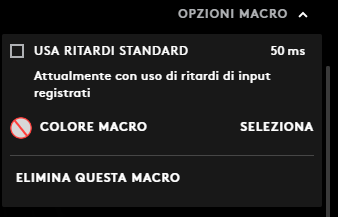
Open the options and disable "Use standard delay"
Step 3:
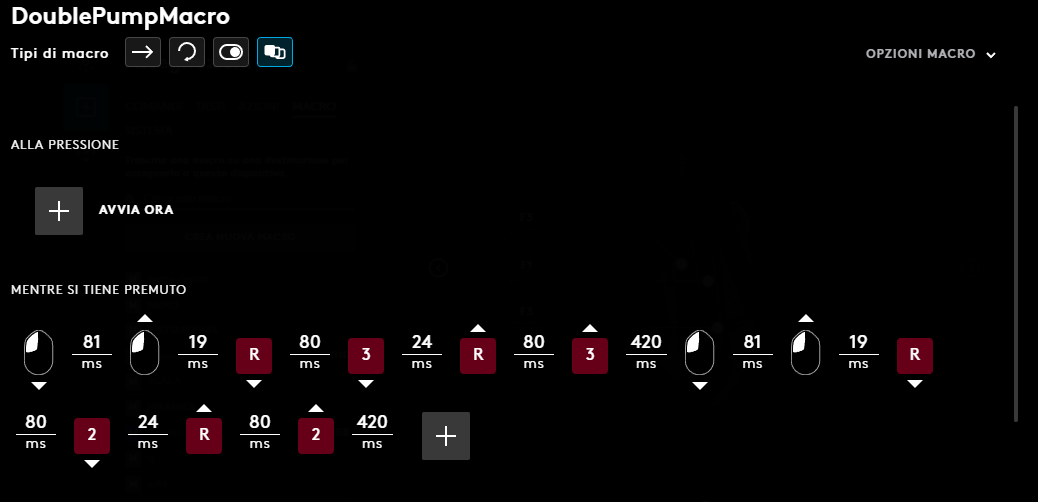
Copy this (key 2 is for slot one, 3 for slot two)
Step 4:
- Go to your mouse and bind the macro to any key of your choosing (not mouse 1 or 2)
This is the macro in action:
Step 1:
- Navigate to your macros tab in Logitech GHUB or similar> Create and name your macro
Step 2:
Open the options and disable "Use standard delay"
Step 3:
Copy this (key 2 is for slot one, 3 for slot two)
Step 4:
- Go to your mouse and bind the macro to any key of your choosing (not mouse 1 or 2)
This is the macro in action:
 Originally Posted by manofmanytalents

