NEWStar Trek Fleet Command FREE MOD PACK FOR WINDOWS PC - STFC FREE MOD PACK FOR WINDOWS
Star Trek Fleet Command FREE MOD PACK FOR WINDOWS PC - STFC FREE MOD PACK FOR WINDOWS
STAR TREK FLEET COMMAND
FREE BepInEx MOD PACK FOR WINDOWS PC
Two plugins | No license or activation | In-game configuration | English and Russian
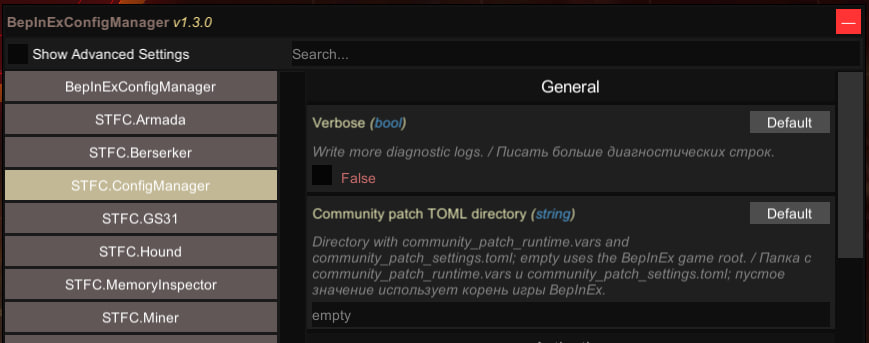
PRESS F8 IN THE GAME TO OPEN THE MOD SETTINGS MENU
----------------------------------------
ABOUT THIS RELEASE
This is a free quality-of-life modification pack for the Windows PC version of Star Trek Fleet Command.
The pack runs through BepInEx and contains six plugins for configuration management, mining, repairs, memory cleanup and interface improvements.
It is intended to reduce repetitive actions and make everyday gameplay more comfortable. It does not provide free Latinum, unlimited resources, instant event rewards or server-side account changes.
No registration, email address, license key or activation is required. The configuration interface supports English and Russian.
----------------------------------------
INCLUDED PLUGINS
STFC.ConfigManager
The central in-game configuration menu for the included plugins.
- Open or close the menu with F8
- English and Russian interface
- Enable, disable and configure supported functions
- Apply supported settings directly inside the game
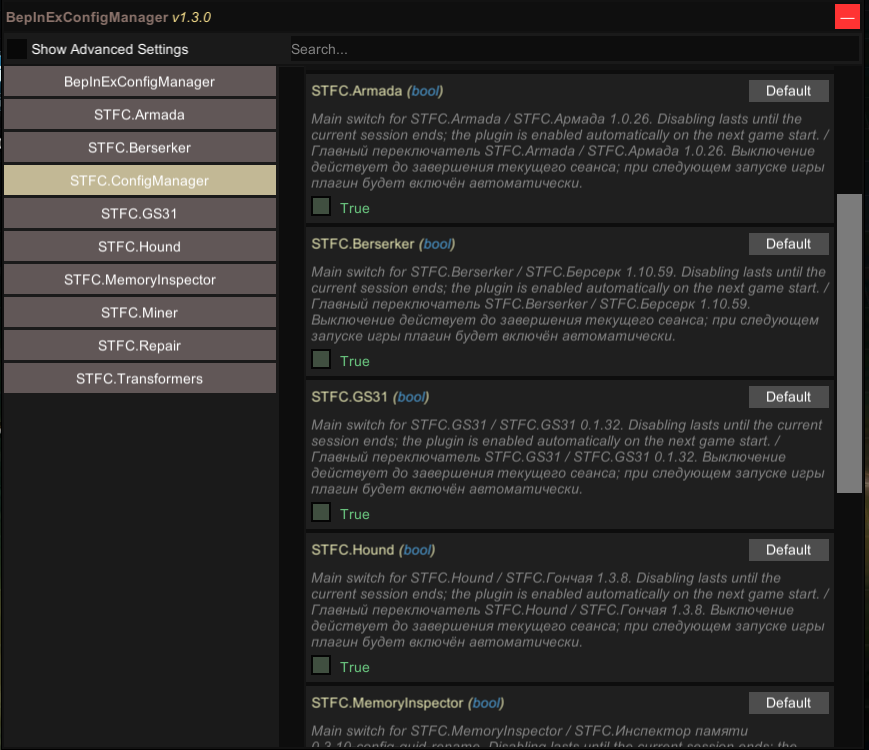
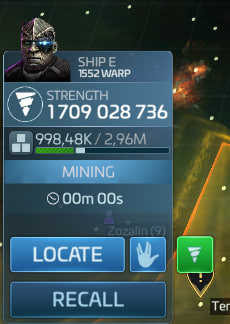
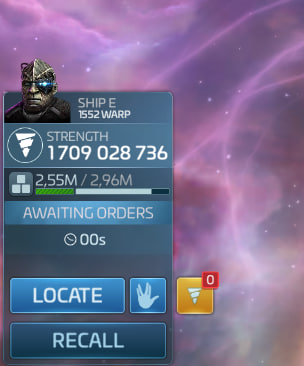
STFC.Miner
Automates repetitive mining operations for a selected ship.
- Adds a mining control button to supported ships
- Searches for a suitable available mining node
- Continues mining after a node is depleted
- Monitors protected and full cargo limits
- Can recall the ship when the selected cargo limit is reached
- Can return the ship to its mining system
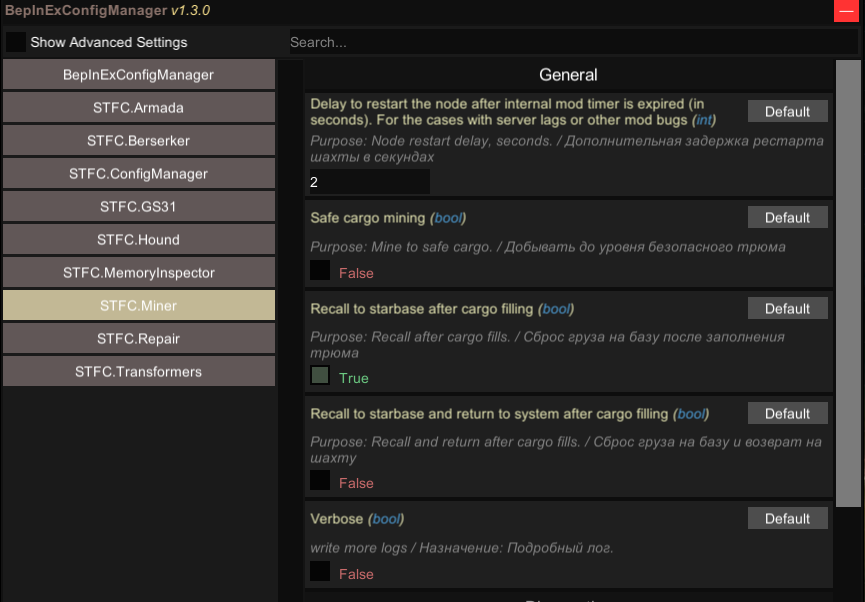
STFC.Repair
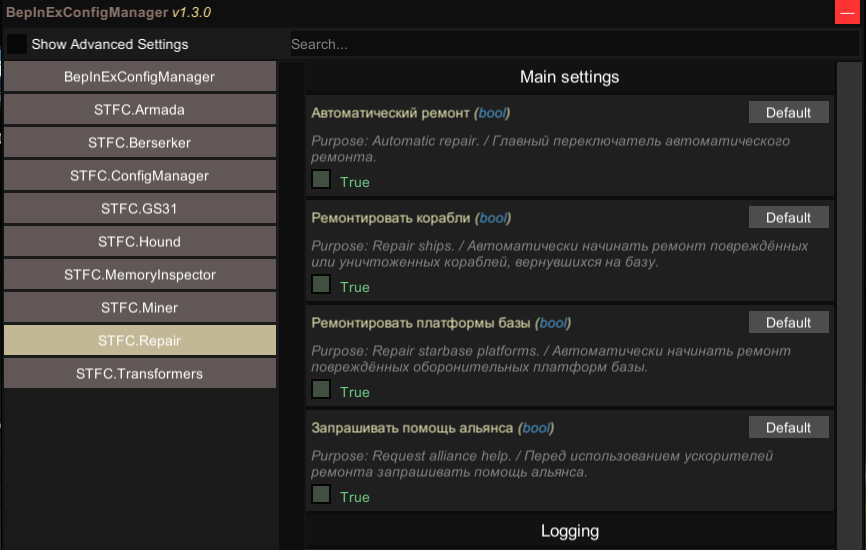
Automates supported ship and station defense repairs.
- Detects damaged ships and defense platforms
- Starts supported repairs automatically
- Requests alliance help
- Can use available repair speedups and repair tokens
- Does not spend Latinum
STFC.MemoryInspector
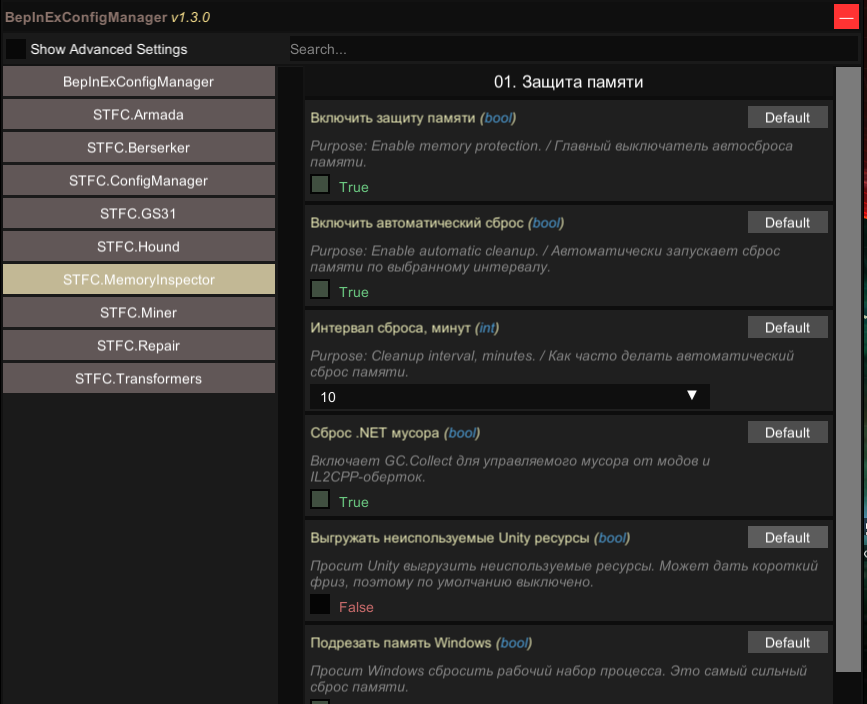
A lightweight memory-cleanup plugin for long game sessions.
- Performs periodic memory cleanup
- Supports configurable intervals from 5 to 30 minutes
- Provides a manual cleanup hotkey
- Helps reduce memory accumulation during long sessions
STFC.Transformers
Improves several parts of the game interface.
- Larger supported windows and panels
- Improved combat reports and ship statistics
- Extended object viewer
- Optional display of additional ship, player and alliance information
STFC.CommunityPatch
Provides a selected collection of interface improvements.
- Interface scaling
- Extended camera zoom
- Shop cooldown preview
----------------------------------------
NO LICENSE OR ACTIVATION
This release is completely free.
- No registration
- No email address required
- No license key
- No activation check
- No advertisements
The custom plugin DLLs are not encrypted or obfuscated and can be inspected as normal .NET assemblies.
Mining and repair functions operate through the running game and its game services. The release does not contact a separate licensing, activation or update service.
----------------------------------------
INSTALLATION
- Close Star Trek Fleet Command and its launcher completely.
- Download the archive using the official MPGH download button attached to this thread.
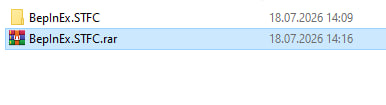
- Extract the archive using Windows, WinRAR or 7-Zip.
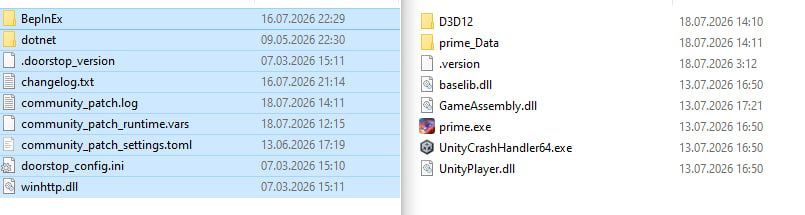
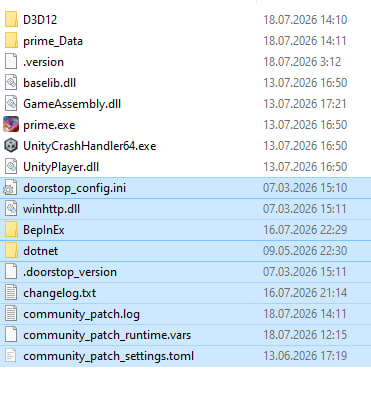
- Copy the supplied files into the Star Trek Fleet Command game directory.
- Allow Windows to merge the folders when requested.
- Launch the game.
- The first launch may take longer while BepInEx initializes.
- Log into the game and press F8 to open the configuration menu.
- Enable and configure the required plugins.
If BepInEx or other plugins are already installed, back up the existing BepInEx folder before installation.
Archive password: None
----------------------------------------
IMPORTANT INFORMATION AND DISCLAIMER
Star Trek Fleet Command is an online game. Third-party modifications may be unsupported or prohibited by the game publisher.
INSTALL AND USE THIS SOFTWARE ENTIRELY AT YOUR OWN RISK.
The release author is not responsible for account warnings or restrictions, game crashes, interrupted actions, incorrect installation, lost settings or conflicts with other third-party plugins.
----------------------------------------
GAME UPDATES
Not every Star Trek Fleet Command update requires new plugin versions. In many cases, the game and plugins continue working normally. Sometimes an update affects only one plugin or one specific function.
This release does not contain an automatic updater.
When an updated package is required, it will be uploaded manually through the MPGH upload system. No outside download links are used.
After a game update, report the exact game version, affected plugin and observed problem in this thread.
----------------------------------------
RELEASE INFORMATION
Platform: Windows PC
Game: Star Trek Fleet Command
Framework: BepInEx
Package build: 1.000.50907
STFC.Miner version: 1.1.26
STFC.Repair version: 1.0.77
STFC.CommunityPatch version: 0.1.0.11
Release date: July 23, 2026
Price: Free
License or activation required: No
Archive password: None
Automatic updater: No
Encrypted or obfuscated custom DLLs: No
----------------------------------------
CREDITS
- BepInEx developers and contributors
- HarmonyLib developers and contributors
- sinai-dev and contributors for BepInEx Configuration Manager and UniverseLib components
- netniV and contributors for the original STFC Community Mod work adapted for this pack
- Newtonsoft.Json, protobuf-net, Tomlyn and .NET developers and contributors
- Everyone who tested the plugins and reported problems
----------------------------------------
DOWNLOAD
Use the official MPGH download button attached to this thread.
There are no outside download links and no external VirusTotal links. MPGH automatically scans the uploaded archive and displays the result on the download button.
IMPORTANT DOWNLOAD INFORMATION
The complete archive is divided into five parts because the full file could not be uploaded as a single MPGH attachment.
Download all five parts and place them in the same folder. Open part01.rar with WinRAR or 7-Zip and start the extraction. All parts will be combined automatically and the complete package will be extracted into one folder.
----------------------------------------
SUPPORT AND BUG REPORTS
Please reply to this thread or contact me through an MPGH private message.
When reporting a problem, include:
- Current Star Trek Fleet Command version
- Affected plugin name and version
- A clear description of the problem
- What you expected to happen
- A screenshot, if possible
- Relevant BepInEx log lines
Do not publish passwords, account credentials or other private information.
Enjoy a more comfortable Star Trek Fleet Command experience!
FREE BepInEx MOD PACK FOR WINDOWS PC
Two plugins | No license or activation | In-game configuration | English and Russian
PRESS F8 IN THE GAME TO OPEN THE MOD SETTINGS MENU
----------------------------------------
ABOUT THIS RELEASE
This is a free quality-of-life modification pack for the Windows PC version of Star Trek Fleet Command.
The pack runs through BepInEx and contains six plugins for configuration management, mining, repairs, memory cleanup and interface improvements.
It is intended to reduce repetitive actions and make everyday gameplay more comfortable. It does not provide free Latinum, unlimited resources, instant event rewards or server-side account changes.
No registration, email address, license key or activation is required. The configuration interface supports English and Russian.
----------------------------------------
INCLUDED PLUGINS
STFC.ConfigManager
The central in-game configuration menu for the included plugins.
- Open or close the menu with F8
- English and Russian interface
- Enable, disable and configure supported functions
- Apply supported settings directly inside the game
STFC.Miner
Automates repetitive mining operations for a selected ship.
- Adds a mining control button to supported ships
- Searches for a suitable available mining node
- Continues mining after a node is depleted
- Monitors protected and full cargo limits
- Can recall the ship when the selected cargo limit is reached
- Can return the ship to its mining system
STFC.Repair
Automates supported ship and station defense repairs.
- Detects damaged ships and defense platforms
- Starts supported repairs automatically
- Requests alliance help
- Can use available repair speedups and repair tokens
- Does not spend Latinum
STFC.MemoryInspector
A lightweight memory-cleanup plugin for long game sessions.
- Performs periodic memory cleanup
- Supports configurable intervals from 5 to 30 minutes
- Provides a manual cleanup hotkey
- Helps reduce memory accumulation during long sessions
STFC.Transformers
Improves several parts of the game interface.
- Larger supported windows and panels
- Improved combat reports and ship statistics
- Extended object viewer
- Optional display of additional ship, player and alliance information
STFC.CommunityPatch
Provides a selected collection of interface improvements.
- Interface scaling
- Extended camera zoom
- Shop cooldown preview
----------------------------------------
NO LICENSE OR ACTIVATION
This release is completely free.
- No registration
- No email address required
- No license key
- No activation check
- No advertisements
The custom plugin DLLs are not encrypted or obfuscated and can be inspected as normal .NET assemblies.
Mining and repair functions operate through the running game and its game services. The release does not contact a separate licensing, activation or update service.
----------------------------------------
INSTALLATION
- Close Star Trek Fleet Command and its launcher completely.
- Download the archive using the official MPGH download button attached to this thread.
- Extract the archive using Windows, WinRAR or 7-Zip.
- Copy the supplied files into the Star Trek Fleet Command game directory.
- Allow Windows to merge the folders when requested.
- Launch the game.
- The first launch may take longer while BepInEx initializes.
- Log into the game and press F8 to open the configuration menu.
- Enable and configure the required plugins.
If BepInEx or other plugins are already installed, back up the existing BepInEx folder before installation.
Archive password: None
----------------------------------------
IMPORTANT INFORMATION AND DISCLAIMER
Star Trek Fleet Command is an online game. Third-party modifications may be unsupported or prohibited by the game publisher.
INSTALL AND USE THIS SOFTWARE ENTIRELY AT YOUR OWN RISK.
The release author is not responsible for account warnings or restrictions, game crashes, interrupted actions, incorrect installation, lost settings or conflicts with other third-party plugins.
----------------------------------------
GAME UPDATES
Not every Star Trek Fleet Command update requires new plugin versions. In many cases, the game and plugins continue working normally. Sometimes an update affects only one plugin or one specific function.
This release does not contain an automatic updater.
When an updated package is required, it will be uploaded manually through the MPGH upload system. No outside download links are used.
After a game update, report the exact game version, affected plugin and observed problem in this thread.
----------------------------------------
RELEASE INFORMATION
Platform: Windows PC
Game: Star Trek Fleet Command
Framework: BepInEx
Package build: 1.000.50907
STFC.Miner version: 1.1.26
STFC.Repair version: 1.0.77
STFC.CommunityPatch version: 0.1.0.11
Release date: July 23, 2026
Price: Free
License or activation required: No
Archive password: None
Automatic updater: No
Encrypted or obfuscated custom DLLs: No
----------------------------------------
CREDITS
- BepInEx developers and contributors
- HarmonyLib developers and contributors
- sinai-dev and contributors for BepInEx Configuration Manager and UniverseLib components
- netniV and contributors for the original STFC Community Mod work adapted for this pack
- Newtonsoft.Json, protobuf-net, Tomlyn and .NET developers and contributors
- Everyone who tested the plugins and reported problems
----------------------------------------
DOWNLOAD
Use the official MPGH download button attached to this thread.
There are no outside download links and no external VirusTotal links. MPGH automatically scans the uploaded archive and displays the result on the download button.
IMPORTANT DOWNLOAD INFORMATION
The complete archive is divided into five parts because the full file could not be uploaded as a single MPGH attachment.
Download all five parts and place them in the same folder. Open part01.rar with WinRAR or 7-Zip and start the extraction. All parts will be combined automatically and the complete package will be extracted into one folder.
----------------------------------------
SUPPORT AND BUG REPORTS
Please reply to this thread or contact me through an MPGH private message.
When reporting a problem, include:
- Current Star Trek Fleet Command version
- Affected plugin name and version
- A clear description of the problem
- What you expected to happen
- A screenshot, if possible
- Relevant BepInEx log lines
Do not publish passwords, account credentials or other private information.
Enjoy a more comfortable Star Trek Fleet Command experience!
UPDATED DOWNLOAD
Due to a false-positive antivirus detection on one of the previous archive parts, the files had to be repacked.
Download all five newly attached parts and place them in the same folder.
Open part01.rar with WinRAR or 7-Zip and start the extraction. The remaining parts will be combined automatically.
- - - Updated - - -
MISSING ARCHIVE PART
Part05 was not displayed with the previous attachments, so I am attaching it separately in this post.
This post contains part05 only. Download parts 01 through 05, place all five files in the same folder, and open part01.rar with WinRAR or 7-Zip. The complete archive will be extracted automatically.
Due to a false-positive antivirus detection on one of the previous archive parts, the files had to be repacked.
Download all five newly attached parts and place them in the same folder.
Open part01.rar with WinRAR or 7-Zip and start the extraction. The remaining parts will be combined automatically.
- - - Updated - - -
MISSING ARCHIVE PART
Part05 was not displayed with the previous attachments, so I am attaching it separately in this post.
This post contains part05 only. Download parts 01 through 05, place all five files in the same folder, and open part01.rar with WinRAR or 7-Zip. The complete archive will be extracted automatically.
Update:
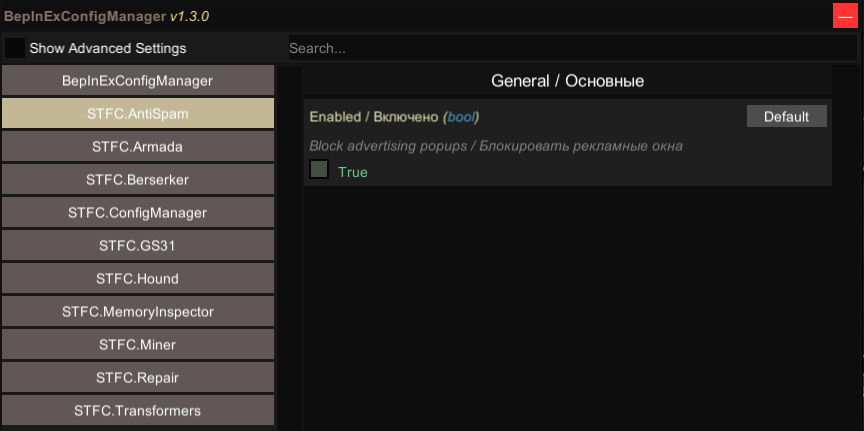
1. Added the plugin
STFC.AntiSpam
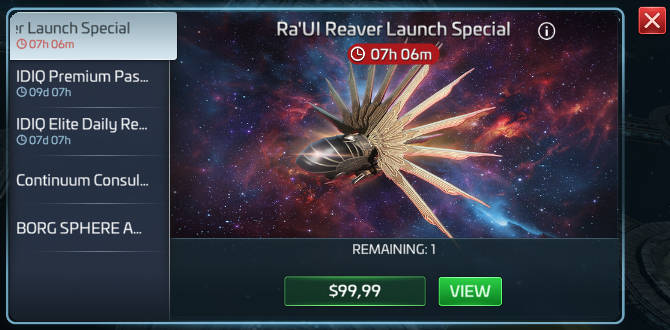
It automatically blocks advertising pop-ups without affecting the shop, rewards, confirmations, or other in-game windows. It can be enabled or disabled at any time.
2. Minor bugs have been fixed:
STFC.ConfigManager; STFC.Repair; STFC.Miner
3. BepInEx.STFC_ v 1.000.51211.rar
1. Added the plugin
STFC.AntiSpam
It automatically blocks advertising pop-ups without affecting the shop, rewards, confirmations, or other in-game windows. It can be enabled or disabled at any time.
2. Minor bugs have been fixed:
STFC.ConfigManager; STFC.Repair; STFC.Miner
3. BepInEx.STFC_ v 1.000.51211.rar
Update:
BepInEx.STFC_ v 1.000.51336.rar
BepInEx.STFC_ v 1.000.51336.rar
Updated DOWNLOAD:
BepInEx.STFC_ v 1.000.51385.rar
INCLUDED PLUGINS
STFC.Miner
Finds available mining nodes, continues after depletion, monitors cargo and can recall or return the ship.
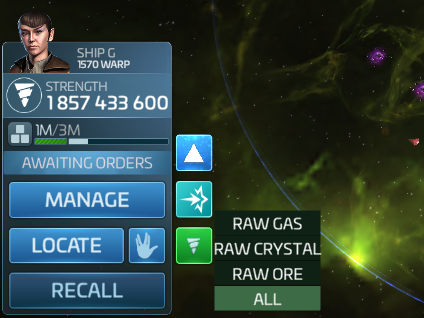
Added a resource selection menu to the Miner button.
Available modes: RAW GAS, RAW CRYSTAL, RAW ORE, and ALL.
Resource filters support all raw-resource grades.
Each ship can use its own independent mining filter.
ALL preserves the original Miner behavior without filtering.
STFC.Hound
It marks ships carrying over-protected cargo (OPC).
STFC.Home
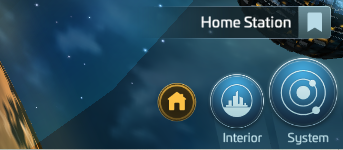
Adds a Home button next to the Interior button. Clicking it recalls all deployed fleets to the player’s base. Fleets already home or returning are skipped.
STFC.Repair
STFC.AntiSpam
STFC.MemoryInspector
STFC.Transformers
STFC.CommunityPatch
STFC.ConfigManager

BepInEx.STFC_ v 1.000.51385.rar
INCLUDED PLUGINS
STFC.Miner
Finds available mining nodes, continues after depletion, monitors cargo and can recall or return the ship.
Added a resource selection menu to the Miner button.
Available modes: RAW GAS, RAW CRYSTAL, RAW ORE, and ALL.
Resource filters support all raw-resource grades.
Each ship can use its own independent mining filter.
ALL preserves the original Miner behavior without filtering.
STFC.Hound
It marks ships carrying over-protected cargo (OPC).
STFC.Home
Adds a Home button next to the Interior button. Clicking it recalls all deployed fleets to the player’s base. Fleets already home or returning are skipped.
STFC.Repair
STFC.AntiSpam
STFC.MemoryInspector
STFC.Transformers
STFC.CommunityPatch
STFC.ConfigManager