Someone please Sticky this, this will solve a lot of peoples problems, and remember. Thank me if I helped you.
Search .:Settings:. for how you need your graphics
.:Scripts:. for how to add scripts and
.:RSBot:. for how to get Rsbot all together
How to Setup RSBot in 3 Simple Steps
Table of Contents
- i - Revision history
- 1.0 - Introduction
- 2.0 - Step 1: Getting JRE and JDK
- 3.0 - Step 2a: Setting the Environmental Variables (Windows XP)
- 4.0 - Step 2b: Setting the Environmental Variables (Windows 7)
- 5.0 - Step 3: Getting TortoiseSVN and RSBot
- 6.0 - Frequently Asked Questions
- 7.0 - How to add Scripts
- 8.0 - How to Have your Graphic settings
- 9.0 - Credits
____________________________________________________________________________________________________
i - Revision history
» 10/4/10: Wrote the guide
____________________________________________________________________________________________________
1.0 - Introduction
» This is a guide on how to setup RSBot and how to setup everything else.
____________________________________________________________________________________________________
2.0 - Step 1: Getting JRE and JDK
» Go here to get the latest version of JRE.
» Go here to get the latest version of JDK.
____________________________________________________________________________________________________
3.0 - Step 2a: Setting the Environmental Variables (Windows XP)
» Go to Start, right click on My Computer and click on Properties.
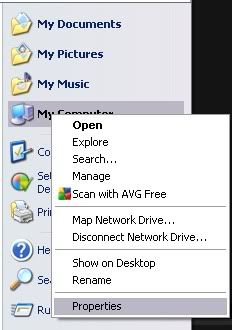 »
» Click the Advanced tab then click Environmental Varialbes.
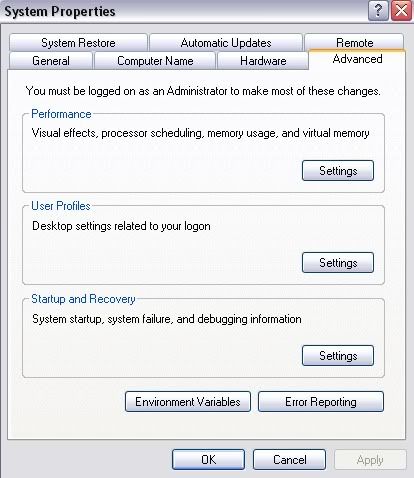 »
» Under the first box click new.
» Type PATH for the variable name and C:\Program Files\Java\jdk1.6.0_19\bin for the variable value.
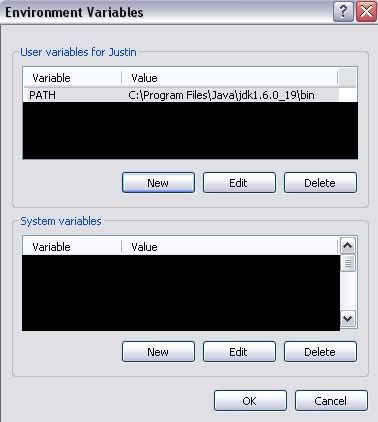 »
» Restart your computer.
____________________________________________________________________________________________________
4.0 - Step 2b: Setting the Environmental Variables (Windows 7)
» Go to start, right click on Computer and click Properties.
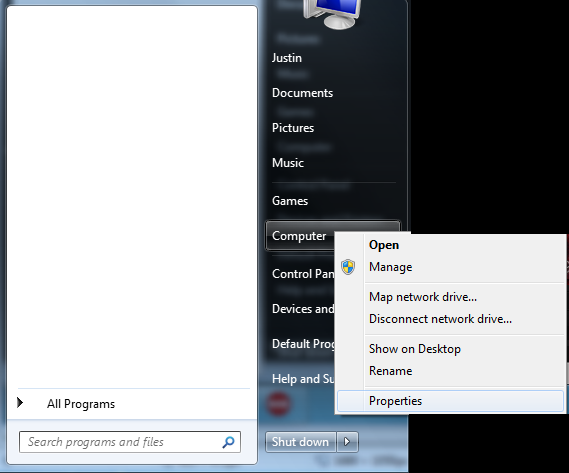 »
» Click Advanced System Settings.
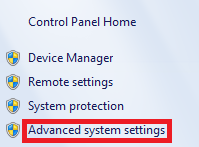 »
» Click Environmental Variables
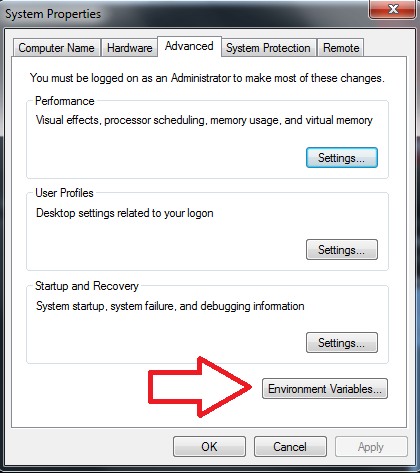 »
» Under the first box click new.
» Type PATH for the variable name and C:\Program Files\Java\jdk1.6.0_19\bin for the variable value.
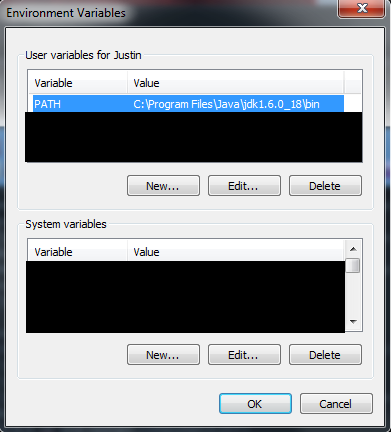 »
» Restart your computer.
____________________________________________________________________________________________________
5.0 - Step 3: Getting TortoiseSVN and .:RSBot:.
» Go here to get TortoiseSVN
» Restart computer, if necessary.
» Right click on your desktop and click on SVN checkout.
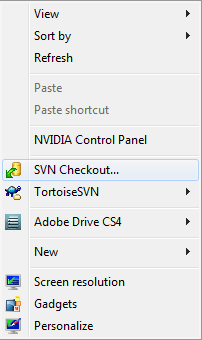 »
» Copy and paste svn://dev.*************/rsbot/trunk into the URL of repository blank
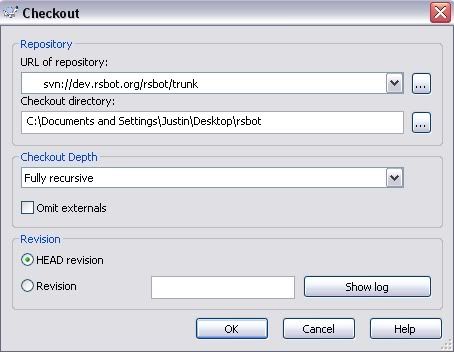 »
» Click OK and your RSBot folder should be created.
____________________________________________________________________________________________________
6.0 - Frequently Asked Questions
Q: How do I fix the "Attempt to show world" error?
» A: Log into your account on
RuneScape - MMORPG - The No.1 Free Online Multiplayer Game on any world. After you successfully log in, exit and run the bot again.
Q: When I start the bot, all it does is show a white screen. How do I fix this?
» A: Go to the graphics settings and switch it to safe mode then put all the settings to the lowest.
____________________________________________________________________________________________________
7.0 - How to add .:Scripts:.
1) Make sure you have downloaded and installed the latest JDK SE from
Java SE Downloads - Sun Developer Network (SDN) (JDK 6 Update 20). If you are running a relatively new computer, it might be running 64-bit windows rather than the typical 32-bit version. In this case you must select "Windows x64" rather than "Windows" when downloading the JDK. If you are not sure which version of Windows you have, you can easily find out using the following guide:
How to determine whether a computer is running a 32-bit version or 64-bit version of the Windows operating system.
2) Open up RSBot (the .jar file that you have downloaded from *************) if you have not done so before. If you have opened it before, then you do not have to open it up again (although you can if you want to), simply make sure that you have opened it AT LEAST ONCE since you downloaded it.
3) RSBot will have created some folders for you in your Documents folder. Open up "Documents" ("My Documents" on Windows XP) and open up the folder "RSBot". Within here you will see a folder called "Scripts".
4) Download the script you want and as save it into the scripts folder. Here is how to do so:
Some scripters will give you a link to the script, which you can click on to download it. In this case, as long as you download the ".java" file, you simply have to move it into the "Scripts" folder in your "RSBot" folder. Otherwise, if the code itself is posted on the forums, you need to copy it all and paste it into a new Notepad document (Start > All Programs > Accessories > Notepad). Near the top of all that code (below all the lines that start with 'import') you will see the words 'public class xxxxx extends Script'. The xxxxx will be the name of the script. Save the file as
xxxxx.java (this is case sensitive!).
5) Go back to your "RSBot" folder and click "Compile-Scripts". This will convert all your scripts into .class files (which RSBot will be able to load in). If you pasted the script correctly, you will now see that the script has been added when you go to File > Run Script. There is no need to restart RSBot, as the scripts will be loaded in every time you do File > Run Script.
If you paste a script in incorrectly, then RSBot will not load in some of your other scripts. If this happens delete the .java file and try again or contact the author of the script.
You should be good to go now, and able to add any script you want. However, if you are having problems, perhaps the following section of answers to frequently asked questions will help you out.
FAQs:
1) When I compile I get the following:
Code:
Note: scripts\GlobalChopAndDrop.java uses or overides a deprecated API.
Note: Recompile with -Xlint:deprecation for details
Answer: You can ignore any lines with 'Note:' at the beginning. This is just a note to scripters. This file has compiled fine. Some scripts will give these notes, most will not.
2) When I compile I get the following:
Code:
Scripts\GlobalChopAndDrop.java:284: reached end of file while parsing
}
^
1 error
Answer: You have not copied the script correctly. Make sure you copy everything. You have probably missed out a '}' at the end of the script.
3) When I compile I get the following:
Code:
Path file does not exist. Please run RSBot and try again.
Answer: Open up RSBot (the .jar) and compile again.

 Originally Posted by kiraush


 667 Art & Graphic DesignPhotoshop Tutorials