Home › Forum › MultiPlayer Game Hacks & Cheats › CrossFire Hacks & Cheats › CrossFire Philippines Hacks › CrossFire PH Spammers, Injectors and Multi Tools › [Release] *TOOL* ResChanger
 [Release] *TOOL* ResChanger
[Release] *TOOL* ResChanger
[Info]
App Name: ResChanger
Description: It routinely checks your resolution within a time frame. You can turn it off or on to stop/start the routine.
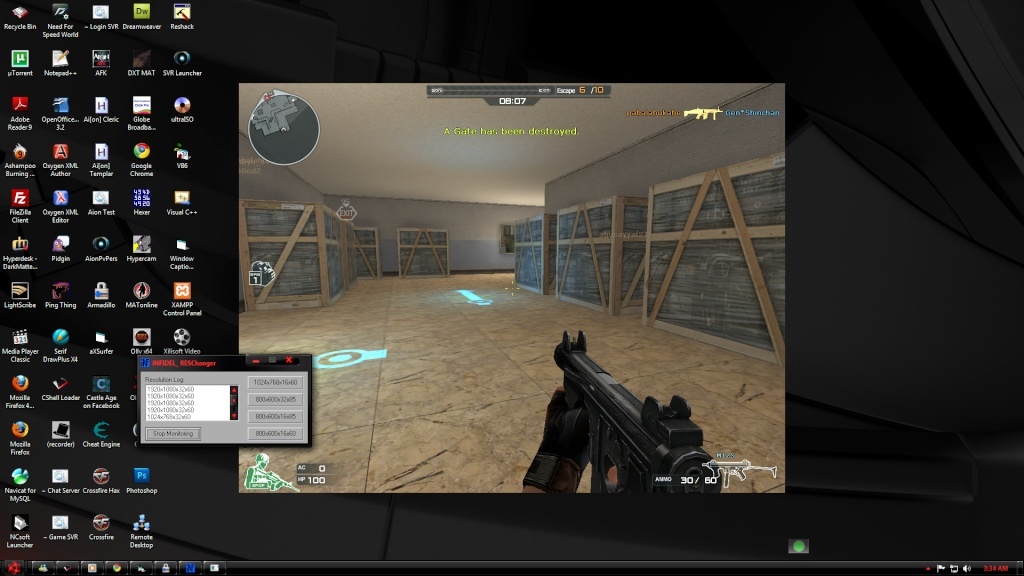
Why: You can use this tool to 'change' your resolution while playing Crossfire. With the resolution changed, your crossfire game window will be on 'window mode' (refer screenshot).
Is this a hack? NO
[Screenshot]
Virus Scans
Virus Total Scan Results
Jotti Malware Scanner Scan Results
NoVirusThanks.org Scanner
[Instructions]
[Additional Info]
- Run ResChangeR.exe every time you join a game (actual game not lobby)
- I have included a check that will close ResChangeR.exe if Crossfire.exe is not running/visible. (Hope this works lol)
- Tested under Win 7 x64
- Make sure that the crossfire's video resolution is smaller than your desktop resolution.
- by Default, when you start ResChangeR.exe it sets the resolution to 1920x1080.
- It will Restore to your ORIGINAL RESOLUTION when you exit the application (ResChangeR)
This is on test beta phase.
May or May not work properly. May or may not work with other OS as well.
Enjoy and good luck!
App Name: ResChanger
Description: It routinely checks your resolution within a time frame. You can turn it off or on to stop/start the routine.
Why: You can use this tool to 'change' your resolution while playing Crossfire. With the resolution changed, your crossfire game window will be on 'window mode' (refer screenshot).
Is this a hack? NO
[Screenshot]
Virus Scans
Virus Total Scan Results
Jotti Malware Scanner Scan Results
NoVirusThanks.org Scanner
[Instructions]
- Start ResChangeR.exe (there are 3 files, select which one is nearest to your current resolution or your resolution itself)
- Click on "start monitoring".
- Run Crossfire normally (with or without hacks)
- Login to Crossfire, find a game then Play the game.
- Wait for the 'monitoring' to reset your resolution.
[Additional Info]
- Run ResChangeR.exe every time you join a game (actual game not lobby)
- I have included a check that will close ResChangeR.exe if Crossfire.exe is not running/visible. (Hope this works lol)
- Tested under Win 7 x64
- Make sure that the crossfire's video resolution is smaller than your desktop resolution.
- by Default, when you start ResChangeR.exe it sets the resolution to 1920x1080.
- It will Restore to your ORIGINAL RESOLUTION when you exit the application (ResChangeR)
This is on test beta phase.
May or May not work properly. May or may not work with other OS as well.
Enjoy and good luck!

 Originally Posted by infidel_


