Making yourself administrator

Posts 115 of 41 · Page 1 of 3
Making yourself administrator
Hey guys last week i broke my computer and my dad fixed by reformating the drive and installing the OS (my dad works on computers for a job). Then he made himself admin and me a standard user. My question is that is there any way i can make myself admin without beggin my dad or hacking his account. (i bought the computer too) My OS is Windows 7 Pro. And i have 32 bit. THANKS IN ADVANCE!
Reformatting it again? Lol I think you have to be on the highest powered user to make a different/edit a user.
I thought this would make someone admin on MPGH

OT : Ask him, since you paid for it too.
BEG LIKE YOU'VE NEVER BEGGED BEFORE.
You can through the Command Prompt! I think it something like this:

Net User Group Administrators /add (Enter PC Name here)

Not Sure but it's something like that

OR

You could unlock the secret Hidden Admin account and Dominate Him!

Reinstall Windows.
And save the back ups and make your dads account and put his stuff in there.
Quote Originally Posted by Justin View Post
You can through the Command Prompt! I think it something like this:

Net User Group Administrators /add (Enter PC Name here)

Not Sure but it's something like that

OR

You could unlock the secret Hidden Admin account and Dominate Him!

i tried it said access denied (new security on windows 7) and u need to be admin to enable hidden account
Quote Originally Posted by vinvin148 View Post
i tried it said access denied (new security on windows 7)
Nah it was always like that.
Just reinstall windows.
Find a crack or something or if you have a Cd.
Quote Originally Posted by Justin View Post
You can through the Command Prompt! I think it something like this:

Net User Group Administrators /add (Enter PC Name here)

Not Sure but it's something like that

OR

You could unlock the secret Hidden Admin account and Dominate Him!

yeah, you can do that too, imma go see if i can find a vid.
Quote Originally Posted by deadskulz View Post
yeah, you can do that too, imma go see if i can find a vid.
if u find a vid dont post it i cant watch the vids cause i need administrator permision to install flash
Quote Originally Posted by vinvin148 View Post
if u find a vid dont post it i cant watch the vids cause i need administrator permision to install flash

oh, wdf?
tell your dad that you need to get adobe, flash, ect...
Quote Originally Posted by Stevenom View Post
Ummmm I think the cmd only works if you're admin?
I'm not sure.
you tryin to be a smart ass or what.
cmd works on all types of accts cept if the admin diabled it.
Enable Built-in Administrator Account

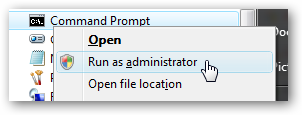
First you’ll need to open a command prompt in administrator mode by right-clicking and choosing “Run as administrator” (or use the Ctrl+Shift+Enter shortcut from the search box)


Now type the following command:

Code:
net user administrator /active:yes


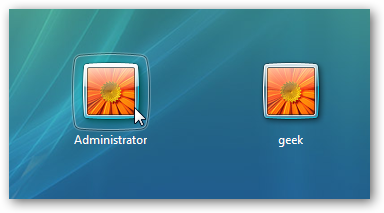
You should see a message that the command completed successfully. Log out, and you’ll now see the Administrator account as a choice. (Note that the screenshots are from Vista, but this works on Windows 7)


You’ll note that there’s no password for this account, so if you want to leave it enabled you

Disable Built-in Administrator Account

Make sure you are logged on as your regular user account, and then open an administrator mode command prompt as above. Type the following command:

Code:
net user administrator /active:no


Posts 115 of 41 · Page 1 of 3

Post a Reply

Tags for this Thread

None

Need help?