UnhappyCrossFire error ! XTrap !

Posts 112 of 12 · Page 1 of 1
CrossFire error ! XTrap !
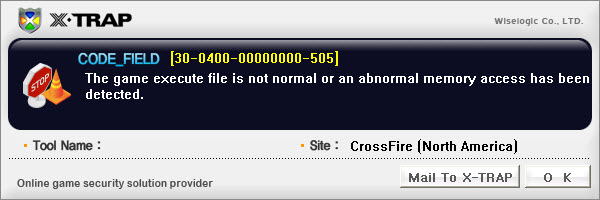
help me pls ! when I start crossfire I get this error:
CODE_FILED 30-0400-00000000-506
The game execute file is not normal or an abnormal memory access has benn detected !
I don't use hack and when I start Crossfire, turn off Avast ! I've re-installed the game 9-10 time !
plz help me ! MPGH BEST !
Close all programs F2P or similar (Cheat Engine etc) Some programms are detected as ilegal by Xtrap.
stop using hacks
mmm... i close all process and after start CF ! but not work...
Quote Originally Posted by Wiz'Khalifa. View Post
Try Reinstalling CF.
read pls !
I've re-installed the game 9-10 time !
Close all your unwanted programs,and check if your running with X fire.
I haven't XFire (chat programm !!)
Quote Originally Posted by antony21 View Post
I haven't XFire (chat programm !!)
Okay,then try to restarting your PC.It should work after closing all the unwanted processes and restarting your pc.
When you restart your PC close the unwanted processes again.

Simply re-try the injection again It may take a few times but this is in no way a detection message!

If you are receiving any additional errors, Please go to the help section for further support;
Evelyn said
1st delete any hacks you own
2nd scan ur computer from viruses
3rd reinstall cf client
4th go play

Adding onto what has been said here;

1. You need to add Crossfire to your Anti-Virus Program... And Firewall's Exception's list, Scroll to the second post of this thread to see a Mini-tutorial on doing this correctly;

[SOLVED] Common Solutions to Cross Fire Errors - Page 2 - Z8Games

2. I heard you saying you are using AVAST, this is the program that has the most conflict with Crossfire, I highly suggest you completely uninstall Avast and get yourself a new program, Something like AVG or McAffe.

3. When closing any unneeded programs manually, you might miss a few, Please use a program such as SmartClose to disable any unneeded programs;

SmartClose download and reviews from SnapFiles

Programs that cause disturbances include;

Xfire, MSN, Skype, FRAPs, And Many more.

4. If you have used a Hack or Xtrap Bypass in the Past, Or have any Injectors open, I highly suggest you uninstall them or refrain from using them to help “Cure” This error.

5. It is unlikely but still true that you may be having a Virus or other malicious files that are attacking your computer and hence your Crossfire Game as well. Please run a thorough Virus Scan on your computer and be sure to restart immediately afterward.

AVG

AVG Free | Download Free Antivirus Software | USA

MBAM

Malwarebytes' Anti-Malware: Malwarebytes

6. You may need to clean your computer down with a program such as CCleaner, and in addition perform a clean and complete reinstallation of Crossfire;

CCleaner

Download CCleaner 3.04.1389 - FileHippo.com

Full Reinstallation

[GAME ERRORS] GUIDE - Performing A Clean Installation Due To Errors - Z8Games

I hope this helps!
Posts 112 of 12 · Page 1 of 1

Post a Reply

Tags for this Thread

None

Need help?