 INVedit
INVedit
INVedit
Please take your time and read through this post - especially the "common problems" section - and/or the tutorial below before downloading INVedit or replying to this topic. Otherwise I'll have to help you with problems which are already explained here.
INVedit is the (more like "some kind of") successor of NBTedit. With it you can create your own porta- wait, wrong game. You can use it to edit your inventory both Singleplayer and Multiplayer, if you're the server host.
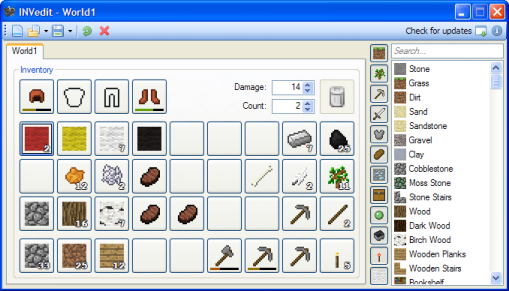
Screenshot:

Virus Scans
Virus Total
Virusscan Jotti
Features
Common Problems:
Please take your time and read through this post - especially the "common problems" section - and/or the tutorial below before downloading INVedit or replying to this topic. Otherwise I'll have to help you with problems which are already explained here.
INVedit is the (more like "some kind of") successor of NBTedit. With it you can create your own porta- wait, wrong game. You can use it to edit your inventory both Singleplayer and Multiplayer, if you're the server host.
Screenshot:
Virus Scans
Virus Total
Virusscan Jotti
Features
- • Loads blocks from the enclosed files (items.txt and the .pngs).
• Groups for faster access of individual blocks. • Search box lets you filter items.
• If possible, displays item damage as bar.
• Stacks items almost like in the game itself.
• Tabs for editing multiple inventories simultaneously.
• Moving items from one tab to another is possible.
• Quick load and save.
• Automatic updating.
Common Problems:
Code:
AVG says this is Adware/Spyware
It's called a false positive. It seems like only AVG has this problem, any other antivirus programs are fine with INVedit. However, this is your decision. There are alternatives for editing inventories, so go check them out.

Error messages "The application has failed to initialize properly (0xc0000135)"
and "Unable to find a version of the runtime to run this application"
and "Could not load file or assembly 'System.Core [...]' or one of its dependecies.":
Make sure you have .NET 3.5 installed and working correctly. .NET 4.0 doesn't do the job. If you're not sure, try to reinstall or repair it. If that doesn't fix it, please send me a PM.

Error message "Couldn't find NBT.dll":
Some people seem to have problems extracting the program correctly. Here is what to do:
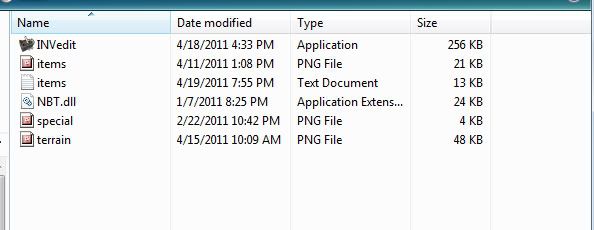
If you open the .zip file there should one folder inside called "INVedit". You have to extract the full folder and not just start the .exe within it. If you do that, only the .exe gets extracted temporarily and it won't be able to find the other needed files. Just drag the folder onto your desktop or personal folder, then you can proceed as usual.

Error message "Failed to parse column ITEMS at line 235 in file items.txt":
Automatic updating was broken. Old versions are having problems updating the .exe. If you try to do it anyway, the next time you start a message box will pop displaying the above error and the first group will be missing. To fix this, just redownload it.

Error message "System.IO.InvalidDataException: The magic number in GZip header is not correct. [...]":
Make sure your world file isn't corrupted, and that you are actually opening a valid Minecraft file.

Error message "Can't find Inventory tag":
This shows up if you're trying to edit a level.dat of a multiplayer world, as the inventories get stored in seperate player files (you can open these with INVedit). It rarely happens on new worlds, where no inventory has been saved yet. Pick up a random item ingame and quit.

Again, before asking any questions, also read the tutorial post below.
It usually will help you with your first steps and shows you some more features and how everything works.


You can find the .NET Framework 3.5 here (Windows). May also work with Mono or Wine (Linux + Mac). If you're an unexperienced Mac or Ubuntu user, this is probably not the right tool for you. There are a few unofficial tutorials on how to do it, but I really suggest using a different tool or mod.
INVedit.zip
 Originally Posted by Heartview

 I guess :|
