 [VB] Multiple forms
[VB] Multiple forms
Okay this is a simple tutorial how to use & add multiple forms in Visual Basic.
For this one you need :
1 Button.
Lets get started :
1. Start a project & add the button.
2. You can name it what ever you like.
3. Now go left up and press "Project-> Add windows form>"
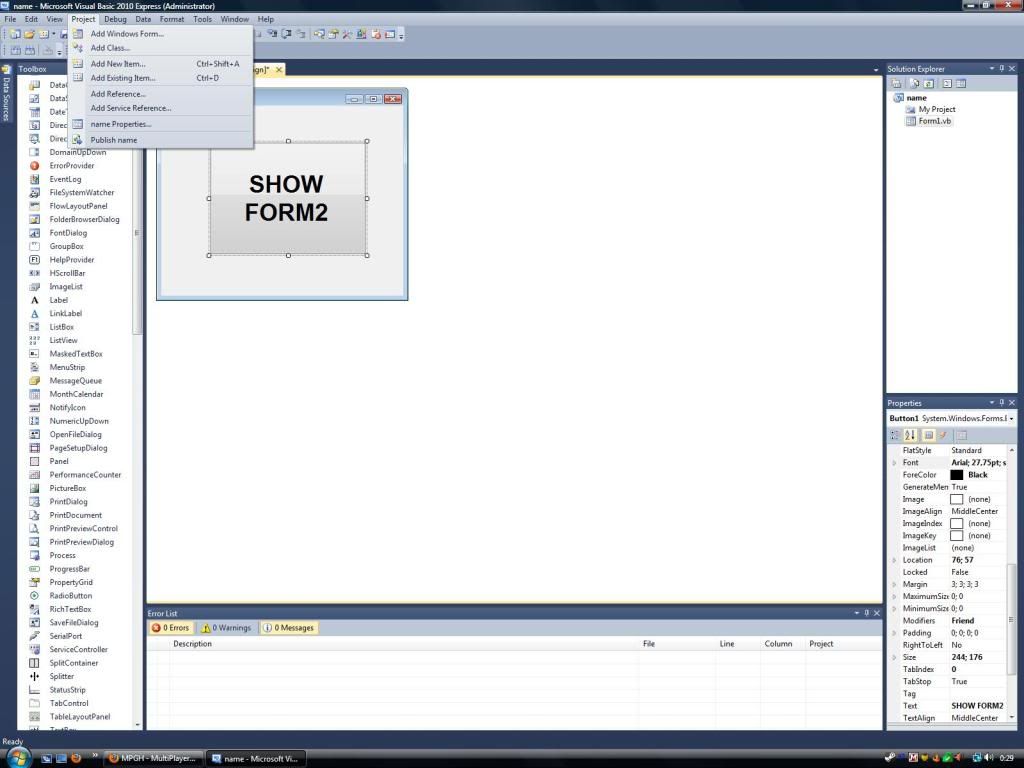
4. After you have added the form, double click the button and write the code :
It should look like this
Note: Form2 is the default name.
5. Now debug and click the button to open Form2
TIP: To hide the Form1 write
under the Form2.Show() code.
For this one you need :
1 Button.
Lets get started :
1. Start a project & add the button.
2. You can name it what ever you like.
3. Now go left up and press "Project-> Add windows form>"
4. After you have added the form, double click the button and write the code :
Form2.Show()
Private Sub Button1_Click(ByVal sender As System.Object, ByVal e As System.EventArgs) Handles Button1.Click
Form2.Show()
Form2.Show()
5. Now debug and click the button to open Form2
TIP: To hide the Form1 write
Me.Hide()
