 Allocating More Ram Towards Java! [WINDOWS]
Allocating More Ram Towards Java! [WINDOWS]
okay i had a look around in the tutorial section, didn't see what i am about to post, so i found this on 'minecraftforums' and thought I'd share it with you guys here!
Allocating More Ram Towards Java!: "texture packs with high resolutions, wasn't designed to sustain such high uses of memory" quoted from a member 'Scuttles'
Step 1; Open up 'Control Panel'
IMG:
Step 2; Type 'Java' inside the 'Search Control Panel' box. (Just encase you miss it from all those bulgy icons!)
IMG:
Step 3; Click on the java 'icon/shortcut'
IMG:
Step 4; click on the 'Java' tab which should be the 2nd one across the top. (going from left>right)
IMG:
Step 5; then click on the 'View' tab just below
IMG: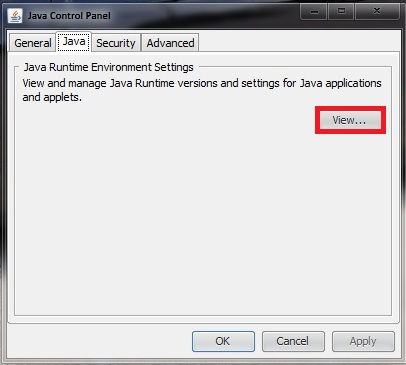
Step 6; "Assure there is only ONE line in here, any more lines could cause issues.
If you have multiple lines uninstall all versions of Java from your system and download latest version of 'JAVA JDK'. Make sure to get the x64 version if you have a 64-bit OS.(Download Link > http://jdk7.java.net/download.html)
IMG:
Step 7; Change Runtime Parameters:
-Xincgc -Xmx8192M
^ (NOW PAY CLOSE ATTENTION TO '8192M" THAT IS HOW MUCH SYSTEM RAM I HAVE, IF YOU HAVE MORE OR LESS), use this website > B bytes KB kilobytes MB ********s GB gigabytes TB terabytes converter calculator to calculate your total mb of 'SYSTEM RAM' installed.
Step 8; Click 'OK' & 'OK or Apply' after the 2nd popup has closed.
IMG:
Step 9; (optional), if you want you can do a quick 'restart' of your PC, just to make sure its all good!,
Step 10: Go try it out!
Optional Video Link instead,
Enjoy!
Allocating More Ram Towards Java!: "texture packs with high resolutions, wasn't designed to sustain such high uses of memory" quoted from a member 'Scuttles'
Step 1; Open up 'Control Panel'
IMG:
Step 2; Type 'Java' inside the 'Search Control Panel' box. (Just encase you miss it from all those bulgy icons!)
IMG:
Step 3; Click on the java 'icon/shortcut'
IMG:
Step 4; click on the 'Java' tab which should be the 2nd one across the top. (going from left>right)
IMG:
Step 5; then click on the 'View' tab just below
IMG:
Step 6; "Assure there is only ONE line in here, any more lines could cause issues.
If you have multiple lines uninstall all versions of Java from your system and download latest version of 'JAVA JDK'. Make sure to get the x64 version if you have a 64-bit OS.(Download Link > http://jdk7.java.net/download.html)
IMG:
Step 7; Change Runtime Parameters:
-Xincgc -Xmx8192M
^ (NOW PAY CLOSE ATTENTION TO '8192M" THAT IS HOW MUCH SYSTEM RAM I HAVE, IF YOU HAVE MORE OR LESS), use this website > B bytes KB kilobytes MB ********s GB gigabytes TB terabytes converter calculator to calculate your total mb of 'SYSTEM RAM' installed.
Step 8; Click 'OK' & 'OK or Apply' after the 2nd popup has closed.
IMG:
Step 9; (optional), if you want you can do a quick 'restart' of your PC, just to make sure its all good!,
Step 10: Go try it out!
Optional Video Link instead,
Enjoy!

 Originally Posted by .Wulf


![Silk[H4x]](/forum/customavatars/thumbs/avatar107208_2.gif)