 3 Simple Ways to raise your FPS in Crossfire
3 Simple Ways to raise your FPS in Crossfire
Hello And good Morning,Today I will be teaching you how to Raise your FPS In 5 Simple Ways 
This Is A Tutorial For People Who have Fps like 20-40
1.)Defrag Your Computer
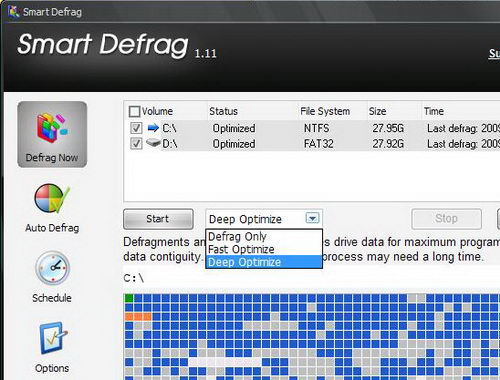
Your Computer Has Lots of Unnecessary things Such As Chache,Cookies,History etc.They can also be the cause of lag on your game to Fix that.You must run a Disk defrag.I do not recommend you use Windows disk Defrag because it does not do its job Properly.I recommend you use IObit Smart Defrag because it is a FREE tool that provides extremely fast and efficient defragmentation to your hard drives intelligently for faster file loading and high disk performance. With "install it and forget it" feature.
This Can give you a good fps boost
2.)Game Speed up Program
A Game Speed up program is a must for your game because It can give you atleast 5+ FPS.I recommend You Use IObit Gamebooster.Yes,Some of you might say Gamebooster never works for me.Technically Some of you are right even when I had bad FPS I Used Gamebooster It Also didn't Work for me either,Few Months later I ask some of my friends on how to speed up your Game .They Recommended me to Use GameBooster.I laughed I said That doesnt work,They told me to try GameBooster 2.0.I tried it out and It Worked Because in Gamebooster 2.0 It Closes Some Unnecessary programs automatically and Also some that can not be closed.In 2.0 There is this new feature That it defrags Games And speeds them up.And The One Thing I Love most About this program that it has a gaming Mode that speeds the game up like a Beauty!
3.)Change Your Crossfire Fonts
Crossfire Fonts Can also Be A Pain to your Game.For Some of you who havent noticed Crossfire Font Are 13mb.You Should Change them to 13kb
Use Cosmic Sans MS They kind of give a 2+ fps Boost.Here is how to Change them
1.) Open My Computer
2.)Click at local disk :C
3.) Click at Program Files
4.)Click At Z8Games/Crossfire/Rez/Fonts(And There You will find a file called
Default Which is a big File)
5.) Then Go to C:/Program Files/Windows/Fonts(Select Your Desired Fonts and rename it to default and then replace it to Z8Games/Crossfire/Rez/Fonts)
That Should Speed It Up!
Well I have Reached The END of my tutorial Please APPROVE MINIONS
This Is A Tutorial For People Who have Fps like 20-40
1.)Defrag Your Computer
Your Computer Has Lots of Unnecessary things Such As Chache,Cookies,History etc.They can also be the cause of lag on your game to Fix that.You must run a Disk defrag.I do not recommend you use Windows disk Defrag because it does not do its job Properly.I recommend you use IObit Smart Defrag because it is a FREE tool that provides extremely fast and efficient defragmentation to your hard drives intelligently for faster file loading and high disk performance. With "install it and forget it" feature.
This Can give you a good fps boost
2.)Game Speed up Program
A Game Speed up program is a must for your game because It can give you atleast 5+ FPS.I recommend You Use IObit Gamebooster.Yes,Some of you might say Gamebooster never works for me.Technically Some of you are right even when I had bad FPS I Used Gamebooster It Also didn't Work for me either,Few Months later I ask some of my friends on how to speed up your Game .They Recommended me to Use GameBooster.I laughed I said That doesnt work,They told me to try GameBooster 2.0.I tried it out and It Worked Because in Gamebooster 2.0 It Closes Some Unnecessary programs automatically and Also some that can not be closed.In 2.0 There is this new feature That it defrags Games And speeds them up.And The One Thing I Love most About this program that it has a gaming Mode that speeds the game up like a Beauty!
3.)Change Your Crossfire Fonts
Crossfire Fonts Can also Be A Pain to your Game.For Some of you who havent noticed Crossfire Font Are 13mb.You Should Change them to 13kb
Use Cosmic Sans MS They kind of give a 2+ fps Boost.Here is how to Change them
1.) Open My Computer
2.)Click at local disk :C
3.) Click at Program Files
4.)Click At Z8Games/Crossfire/Rez/Fonts(And There You will find a file called
Default Which is a big File)
5.) Then Go to C:/Program Files/Windows/Fonts(Select Your Desired Fonts and rename it to default and then replace it to Z8Games/Crossfire/Rez/Fonts)
That Should Speed It Up!
Well I have Reached The END of my tutorial Please APPROVE MINIONS
 Originally Posted by i[Smart]


