Realmware Battlefield 3 Borderless tool
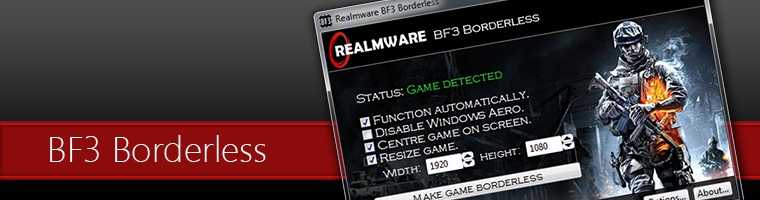
Realmware BF3 Borderless is a simple program which gives you control over the window that Battlefield 3 runs in. The main purpose of this is to run Battlefield 3 in a fullscreen window. This has the advantages of both worlds: you get full use of your screen, and the convenience of easily switching to other programs. You may be familiar with this from games such as Left 4 Dead, which natively supports running in a fullscreen window. This page lists each and every feature of the program.
Easy to use
=Automatically detects when the game is running and applies your settings.
=You will be automatically notified about any new updates for BF3 Borderless.
=If you wish, you can leave BF3 Borderless running in the Windows system tray. It will then apply your window settings to Battlefield 3 whenever you run the game.
Customisable
=Resize the game window to any exact size that you want.
=Automatically centre the game on your screen, if you want.
=Apply your settings either automatically or manually.
=Minimise BF3 Borderless to either the taskbar or the system tray.
Improve performance
=Disable Windows Aero to increase performance and reduce stuttering.
=Avoid lag and glitches which occur in standard fullscreen mode.
=Play with AMD Eyefinity or NVIDIA Surround without glitches.
=BF3 Borderless consumes very little system resources.
FAQ
Will this get me kicked or banned by PunkBuster?
No. BF3 Borderless is entirely safe — you will not get into any trouble with PunkBuster. BF3 Borderless only modifies the window border of the running game; it does not inject any code or modify the game memory. It doesn't behave anything like a game hack. Additionally, PunkBuster generally only searches for known cheat program signatures; it will therefore never detect BF3 Borderless as a problem. There are many players using this tool, and none of them have reported any issues with PunkBuster.
Why do I get an error, "The application was unable to start correctly"?
This is a known issue which affects a small minority of our users. It is possibly related to security software, such as ZoneAlarm. We are investigating this and will try to resolve it from our end if at all possible. Check back later for an update, or contact us to request a modified version of BF3 Borderless which includes a workaround for this.
Why isn't BF3 Borderless able to detect the game?
If you are running either Battlefield 3 or Origin with administrator rights, then BF3 Borderless will also need administrator rights in order to detect the game. To do this, simply right-click on your BF3 Borderless shortcut, and choose "Run as administrator"; BF3 Borderless should then detect the game with no problems.
Why do I get low performance or stuttering in windowed mode?
Games are usually able to perform just as well in windowed mode as they can in fullscreen mode. The first thing you should do to try and resolve this is disable Windows Aero while playing the game; this can give you a surprising boost in performance.
To do this, simply tick the "Disable Windows Aero" checkbox in BF3 Borderless (available since version 1.2). With this change, Windows Aero will automatically disable itself when you launch the game, and it will re-enable when you close the game.
Another thing that can cause issues with windowed mode is multi-GPU setups. If you are running multiple graphics cards in NVIDIA SLI or AMD CrossFireX, or you own a single multi-GPU graphics card such as the GTX 590 or AMD 6990, then are using a multi-GPU setup. Unfortunately, it seems multi-GPU setups are known for numerous issues, and low performance in windowed mode seems to be one of them. In fact, you might only be using one GPU while playing in windowed mode! There is currently no known solution for this.
VirusTotal Scan
SHA256: 36e9380b5d00f077e91024bc5cebdb6bded9061f1049a6e8e0 b25fea8faa71d6
File name: BF3Borderless-1.2.rar
Detection ratio: 0 / 42
Analysis date: 2012-03-27 09:58:49 UTC ( 0 minutes ago )
Antivirus Result Update
AhnLab-V3 - 20120326
AntiVir - 20120327
Antiy-AVL - 20120327
Avast - 20120327
AVG - 20120327
BitDefender - 20120327
ByteHero - 20120327
CAT-QuickHeal - 20120327
ClamAV - 20120327
Commtouch - 20120327
Comodo - 20120327
DrWeb - 20120327
Emsisoft - 20120327
eSafe - 20120326
eTrust-Vet - 20120327
F-Prot - 20120327
F-Secure - 20120327
Fortinet - 20120327
GData - 20120327
Ikarus - 20120327
Jiangmin - 20120326
K7AntiVirus - 20120326
Kaspersky - 20120327
McAfee - 20120327
McAfee-GW-Edition - 20120326
Microsoft - 20120327
NOD32 - 20120327
Norman - 20120327
nProtect - 20120327
Panda - 20120326
PCTools - 20120326
Rising - 20120327
Sophos - 20120327
SUPERAntiSpyware - 20120323
Symantec - 20120327
TheHacker - 20120326
TrendMicro - 20120327
TrendMicro-HouseCall - 20120327
VBA32 - 20120327
VIPRE - 20120327
ViRobot - 20120327
VirusBuster - 20120323
Jotti's Malware Scan: http://virusscan.jotti.org/en/scanre...55ac600d0e8efc