How to Compile Wallhack
If any of this needs to be updated tell me i may have missed something while typing.
Follow these instructions:
1. Download and Install Visual C++
http://www.microsoft.com/visualstudi...press-productsⓘ
2. Download Direct SDKDownload details: DirectX SDK - (Summer 2004).
In the downloads
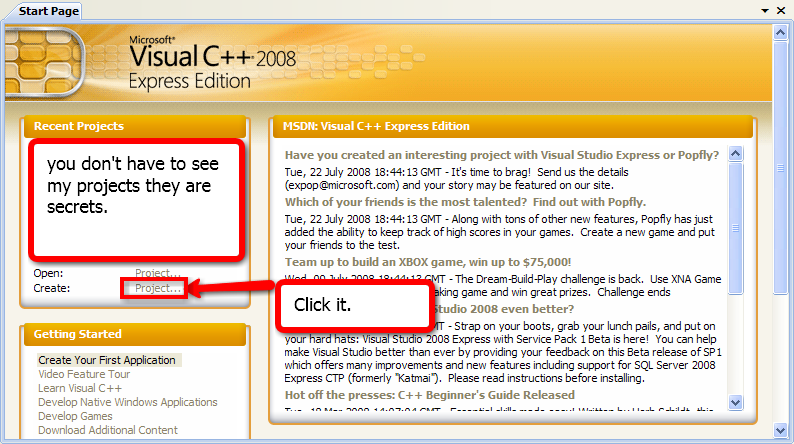
3. Open Visual C++ 2008 Express Edition and Click Create Projects
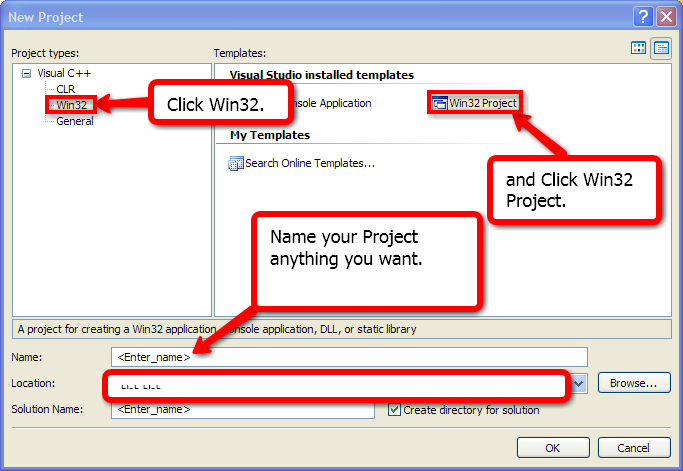
4. In Project types Click on Win32 then on the Right side click Win32 Project then Name Your Project and Click Ok.
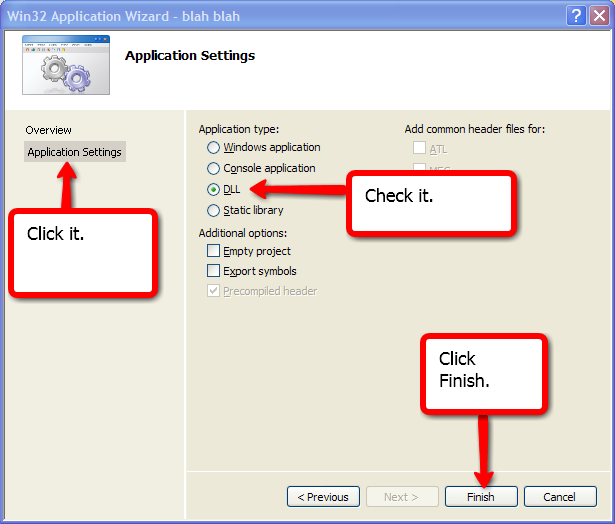
5. Click Application Settings , Click on dll option and Click Finish.
6. Copy the source and Paste it on your Blank page of your project name (.cpp)
name.cpp
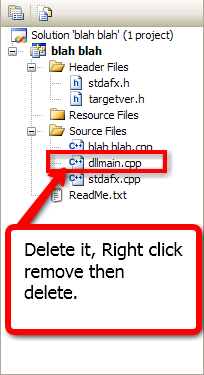
7.Delete dllmain.cpp You don't Need it.
8. Include stdafx.h should be on top of Other Includes.
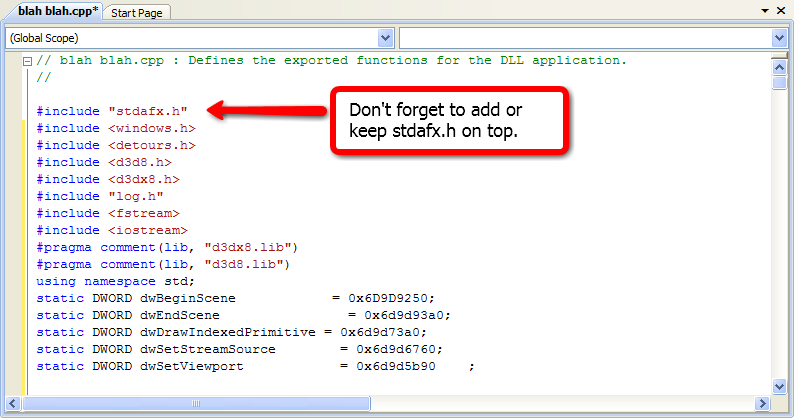
9. Click on Projects on top, Click Add New Item.
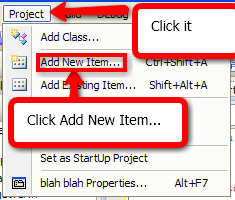
10.Click on Header file (.h), Name it log and Click Add.
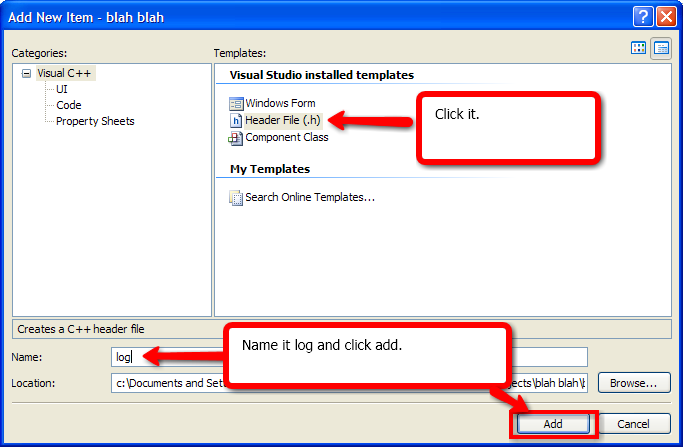
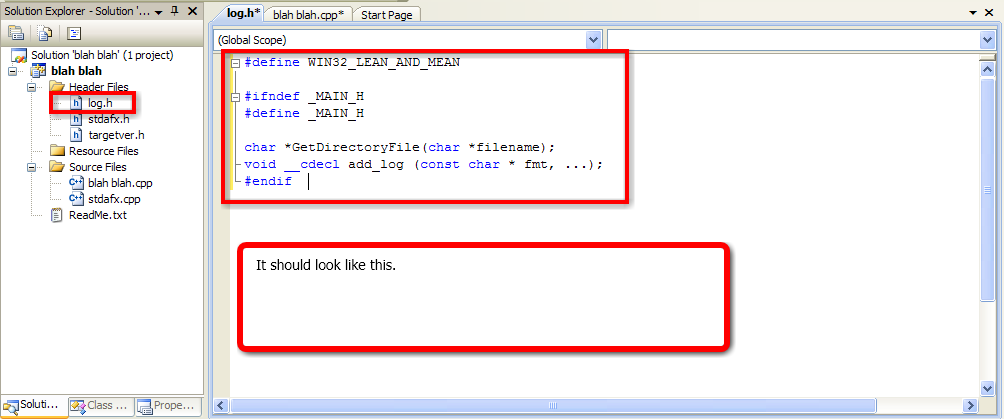
11. Copy and Paste the source on the Header file you Created.
log.h (a header file)
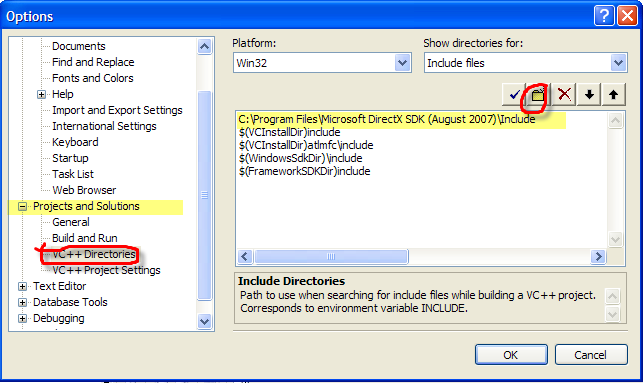
12.go to tools>>option-projects and solution-VC++directories and add direct sdk Summer 2004 includes and library .
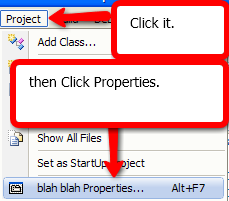
13. Click on Project And then Click Properties.
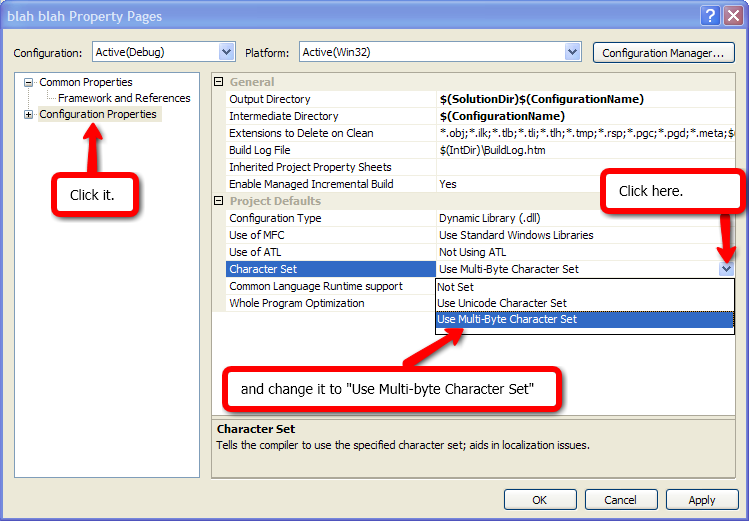
14.Click on Configuration Properties , On the Right side on Character set, Change "Use Unicode Character set" to "Use Multi-Byte Character set" and Click Ok.
15. Download the files i attached in this thread and place the detours.h in your Include folder C:\Program Files\Microsoft Visual Studio 9.0\VC\include and Detours.lib in your Library folder C:\Program Files\Microsoft Visual Studio 9.0\VC\lib.
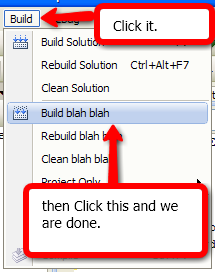
16. Click Build and Build your Project.
17. You will find your DLL file in C:\Documents and Settings\TheIFear\My Documents\Visual Studio 2008\Projects\(name of your dll)\Debug, and you will find your dll.
Approve @Flengo @Genesis @Liz @Hero @Approved
Follow these instructions:
1. Download and Install Visual C++
http://www.microsoft.com/visualstudi...press-productsⓘ
2. Download Direct SDKDownload details: DirectX SDK - (Summer 2004).
In the downloads
3. Open Visual C++ 2008 Express Edition and Click Create Projects
4. In Project types Click on Win32 then on the Right side click Win32 Project then Name Your Project and Click Ok.
5. Click Application Settings , Click on dll option and Click Finish.
6. Copy the source and Paste it on your Blank page of your project name (.cpp)
name.cpp
Code:
pSetViewport=(oSetViewport)DetourFunction((PBYTE)dwSetViewport,(PBYTE)mySetViewport);
}
return pBeginScene(pDevice);
}
BOOL WINAPI DllMain ( HMODULE hModule, DWORD dwReason, LPVOID lpReserved )
{
DisableThreadLibraryCalls(hModule);
if ( dwReason == DLL_PROCESS_ATTACH )
{
//=========Log==========================//
GetModuleFileName(hModule, dlldir, 512);
for(int i = strlen(dlldir); i > 0; i--) { if(dlldir[i] == '\\') { dlldir[i+1] = 0; break; } }
ofile.open(GetDirectoryFile("log.txt"), ios::app);
//=========Log=========================//
pBeginScene = (oBeginScene)DetourFunction((PBYTE)dwBeginScene, (PBYTE)myBeginScene);
pEndScene = (oEndScene)DetourFunction((PBYTE)dwEndScene, (PBYTE)myEndScene);
pDrawIndexedPrimitive = (oDrawIndexedPrimitive)DetourFunction((PBYTE)dwDrawIndexedPrimitive, (PBYTE)myDrawIndexedPrimitive);
pSetStreamSource = (oSetStreamSource)DetourFunction((PBYTE)dwSetStreamSource, (PBYTE)mySetStreamSource);
pSetViewport=(oSetViewport)DetourFunction((PBYTE)dwSetViewport,(PBYTE)mySetViewport);
}
return TRUE;
}
8. Include stdafx.h should be on top of Other Includes.
9. Click on Projects on top, Click Add New Item.
10.Click on Header file (.h), Name it log and Click Add.
11. Copy and Paste the source on the Header file you Created.
log.h (a header file)
Code:
#define WIN32_LEAN_AND_MEAN #ifndef _MAIN_H#define _MAIN_H char *GetDirectoryFile(char *filename); void __cdecl add_log (const char * fmt, ...); #endif
12.go to tools>>option-projects and solution-VC++directories and add direct sdk Summer 2004 includes and library .
13. Click on Project And then Click Properties.
14.Click on Configuration Properties , On the Right side on Character set, Change "Use Unicode Character set" to "Use Multi-Byte Character set" and Click Ok.
15. Download the files i attached in this thread and place the detours.h in your Include folder C:\Program Files\Microsoft Visual Studio 9.0\VC\include and Detours.lib in your Library folder C:\Program Files\Microsoft Visual Studio 9.0\VC\lib.
16. Click Build and Build your Project.
17. You will find your DLL file in C:\Documents and Settings\TheIFear\My Documents\Visual Studio 2008\Projects\(name of your dll)\Debug, and you will find your dll.
Approve @Flengo @Genesis @Liz @Hero @Approved
 It was originally posted in 2009 I believe.
 Originally Posted by CoBraX


