How to use a PS4 Controller on PC
1) Install the latest xbox-360-controller-for-windows drivers from here:
https://www.microsoft.com/hardware/e...er-for-windows
2) Download the latest version of the DS4 to XInput Wrapper from here:
http://www.mpgh.net/forum/attachment...2&d=1395760079
3) Unzip the files to a folder on your hard drive and
Run ScpDriver.exe from the Virtual Bus Driver folder and click install.
4) Connect the DualShock 4 through bluetooth or USB (Hold the PS logo and share button until the light bar flashes rapidly to allow the controller to sync.
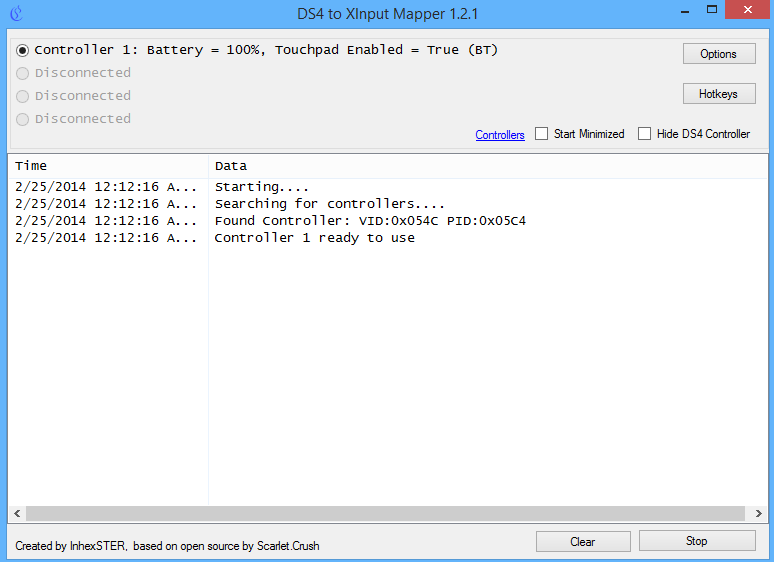
5) Start ScpServer.exe and click Start.
6) The controller will appear on top of list (up-to four controllers can be connected).
7) Using the options you are able to adjust the color of the light bar using RGB, turn on/off rumble and adjust the sensitivity of the touchpad.
Troubleshoot Guide for DS4 to XInput Wrapper:
Make sure you have:
1. Microsoft .NET 4.0
2. Visual C 2010/2012 Runtime.
3. Latest DirectX Runtime.
4. Latest Official Microsoft Xbox 360 Controller Drivers available.
5. Minimum of Bluetooth 2.1 + EDR Dongle (if using Bluetooth).
6. Administrator rights on your PC.
7. Make sure you quit all other apps/games that can use the controller
(Steam/Uplay/TeamSpeak, etc) if you are using Hide DS4 controller option
8. Having MotionJoy drivers installed seem to cause issues for some people
9. This tool can't run at the same time as DS3 SCP server gui or service at this moment
10. Bluetooth Drivers from Microsoft or other driver that use Microsoft Bluetooth Stack
Exclusive Mode (Hide DS4 Controller Checked)
This mode attempts to grab fully exclusive read/write rights to DS4 (Wireless Controller). So no other app will be able to read from it. This makes it disappear from the list of controllers. Known to cause freezes with some applications like Uplay, Teamspeak, etc on Windows versions prior to 8.1
Shared Mode (Hide DS4 Controller Unchecked)
This is more compatible mode it does not require any special access rights to DS4 controller, it will remain in the system. The problem with it is that some game like FIFA 14 and some other receive input from Wireless Controller (DS4) and X360 Controller at the same time (Dual Input). It also prevents freezes with some applications, like UPlay for example.
Checkbox will switch the mode and restarts the X360 Controller.
Usage cases:
So if you had problems with UPlay, start the tool make sure it does not hide controller, then star Uplay and AC3, AC4 or other uplay games
Assasin's Creed 3,4 allow you to choose which controller is being used in options.
If you want to go back to exclusive mode to play games that have dual input issues:
Make sure Upay, Teamspeak and some other application that might use DS4 Wireless Controller are not running
Switch on Hide DS4 Controller and there will be no more dual input
Virus Scans:
VirusTotal
VirScan
Approval: @Flengo @Hero
 Originally Posted by Unknown


