Helpscreen freeze

Posts 1–5 of 5 · Page 1 of 1
screen freeze
hey anyone else is getting this problem=?

cause today my screen freeze alot
Tips
Quote Originally Posted by kiohearts View Post
hey anyone else is getting this problem=?
cause today my screen freeze alot
Causes:

- Drivers video card, update.
- Services and process run on start Windows, not required to play.
- Antivirus, please turn off
- Scan your pc for virus or others craps.

I recommended CClean for fast solution.
To try use resolution 800x600 low quality.
Good luck !
Quote Originally Posted by punisher54 View Post
Causes:

- Drivers video card, update.
- Services and process run on start Windows, not required to play.
- Antivirus, please turn off
- Scan your pc for virus or others craps.

I recommended CClean for fast solution.
To try use resolution 800x600 low quality.
Good luck !
Yup, CCleaner is always a good thing to use when having any problem.
Quote Originally Posted by punisher54 View Post
Causes:

- Drivers video card, update.
- Services and process run on start Windows, not required to play.
- Antivirus, please turn off
- Scan your pc for virus or others craps.

I recommended CClean for fast solution.
To try use resolution 800x600 low quality.
Good luck !
after post i did everything that u say buy still my screen freeze
Diagnose and Benchmark your graphic card
I think is your video card with problems, maybe maintenance. I recommended this software:


Go to bit(.)ly/furmark and download FurMark 1.14.1

FurMark is a very intensive OpenGL benchmark that uses fur rendering algorithms to measure the performance of the graphics card. Fur rendering is especially adapted to overheat the GPU and that's why FurMark is also a perfect stability and stress test tool (also called GPU burner) for the graphics card.
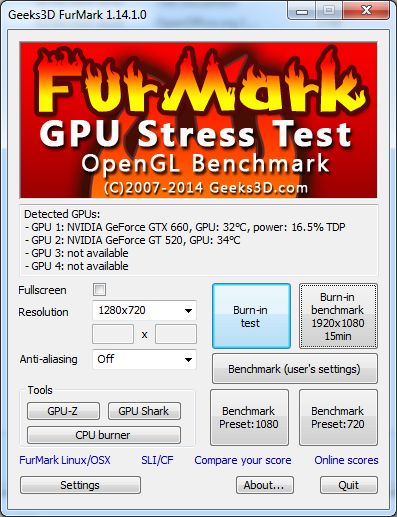


Use the GPU-Z button to check temperature and others. All Benchmark are very easy to use.
This software is freewar.
Good luck !

Posts 1–5 of 5 · Page 1 of 1

Post a Reply

Similar Threads

Tags for this Thread

None

Talk with us